
소개
Thank you for choosing the Neareal Wireless Stainless Steel Cat Water Fountain. This automatic pet drinking fountain is designed to provide fresh, filtered water for your pets, promoting hydration and health. Featuring a cordless design, a 3.2 L (108 oz) capacity, and a 4000 mAh rechargeable battery, it offers convenience and flexibility for placement anywhere in your home without the need for a power outlet. This manual provides detailed instructions for assembly, operation, maintenance, and troubleshooting to ensure optimal performance and longevity of your fountain.

Image: The Neareal Wireless Stainless Steel Cat Water Fountain in operation, showcasing its sleek design and flowing water.
무엇이 포함됩니까?
패키지에 모든 구성품이 들어 있는지 확인하세요.
- Wireless Pet Water Fountain (Stainless Steel Water Tank and Top Cover)
- 무선 펌프
- Metal Spout
- 배터리 유닛
- 필터 박스
- Filters (quantity as per package variant)
- 필터 스폰지
- 청소용 브러시
- 충전 케이블
- 사용자 설명서

이미지: 폭발된 view showing all included components: stainless steel tank, top cover, manual, battery, metal spout, sponge, filter box, filter, charging cable, and water pump.
명세서
| 특징 | 세부 사항 |
|---|---|
| 상표 | 니어리얼 |
| 모델명 | Oval Premium |
| 재료 | 304 스테인리스 스틸 |
| 색상 | 스테인리스 스틸 |
| 용량 | 3.2리터(108온스) |
| 배터리 | 4000 mAh Rechargeable (up to 50 days operation in Sensor Mode) |
| 제품 크기(L x W x H) | 7.56인치 x 7.5인치 x 9.17인치 |
| 품목 무게 | 2.01파운드 |
| 소음 수준 | Ultra-silent (approx. 28dB) |
| 여과 시스템 | Quadruple Filtration (Activated Carbon, Cotton Layer, Filter Sponge) |
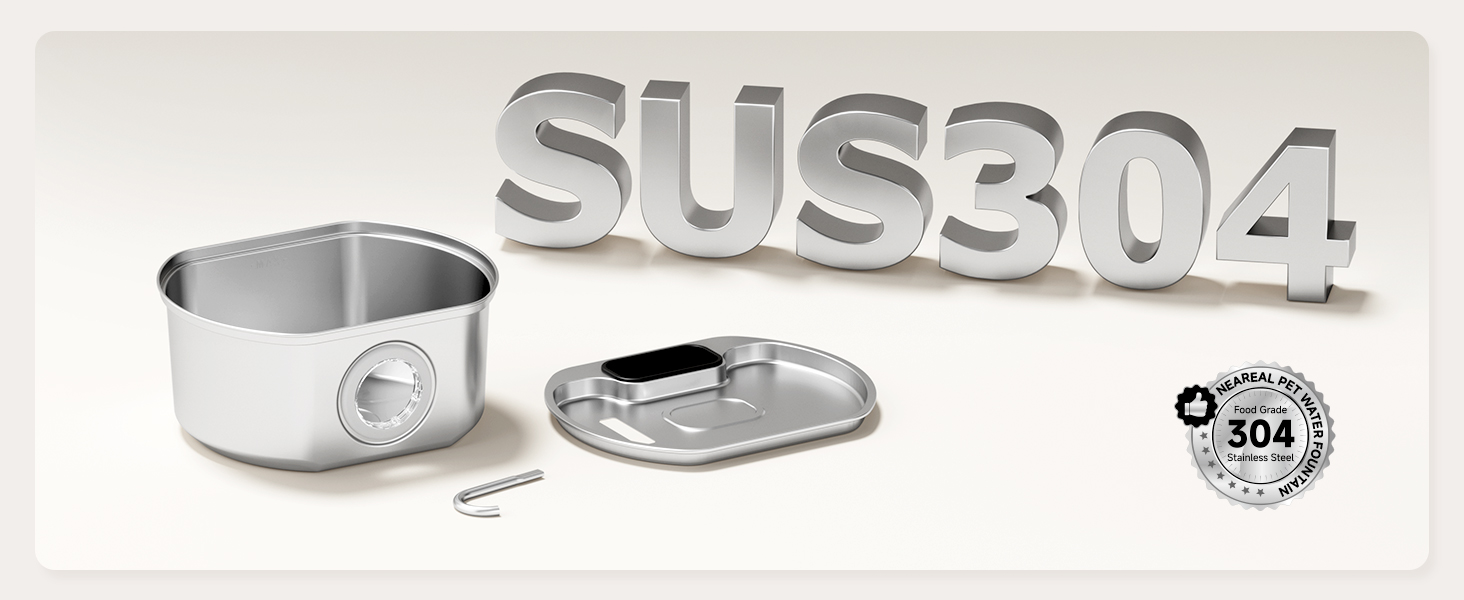
Image: Visual confirmation of SUS304 food-grade stainless steel construction.
설치 지침
Follow these steps to assemble your Neareal Cat Water Fountain:
- 필터 준비: Soak the filter in clean water for 5 minutes, then rinse it thoroughly for 30 seconds.
- Install Water Release Strip and Battery: Install the water release strip and the induction battery unit separately onto the tray.
- 내부 구성 요소 조립: Install the remaining internal parts into the main unit, following the directional arrows for proper alignment.
- 탱크를 채우세요: Fill the stainless steel tank with clean water. Ensure the water level is between the MIN and MAX indicators.
- Attach Spout and Top Cover: Insert the metal spout firmly into the center of the battery unit. Then, carefully place the top cover onto the water tank, ensuring it is securely seated.
- 전원 켜기: Long press the on/off button on the battery unit to start the fountain in induction mode.
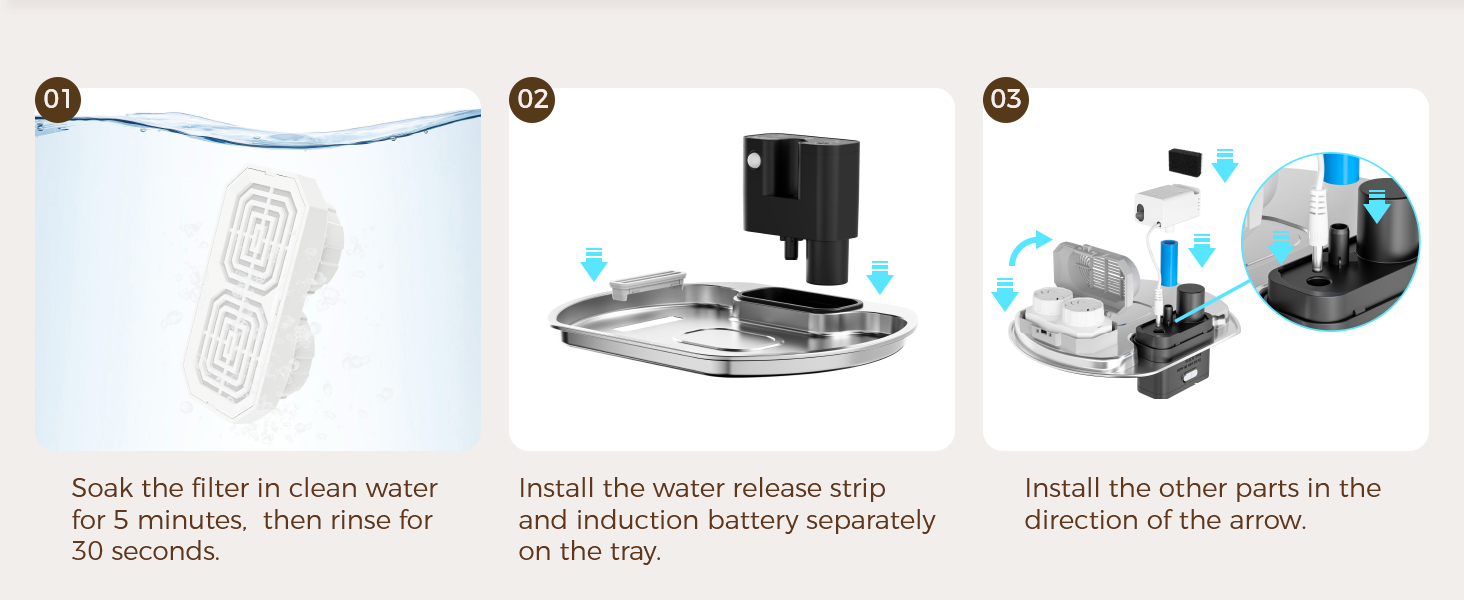
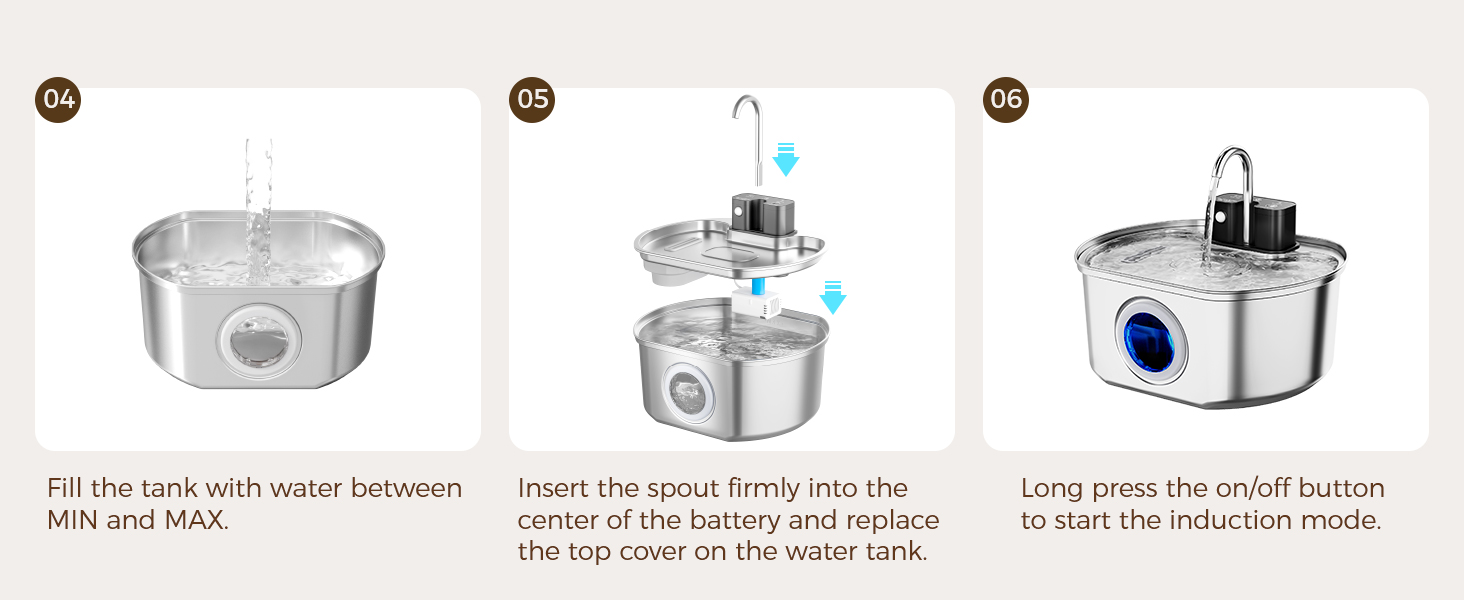
Images: Visual guides for the six-step assembly process, from filter preparation to initial power-on.
작동 지침
Your Neareal Cat Water Fountain offers three operating modes and intelligent light indicators:
작동 모드
Use the ergonomic button to switch between modes:
- 센서 모드: Dispenses water for 15 seconds whenever a pet is detected within approximately 5 feet. This mode conserves battery life.
- 타이머 모드: Releases water for 15 seconds every 15 minutes, providing regular hydration.
- 연속 모드: Keeps water flowing continuously when the fountain is plugged into a power source. This mode is ideal for constant water availability.

Image: A visual representation of the three operating modes: Sensor, Timer, and Continuous, with descriptions.
Intelligent Light Indicators
The smart indicator lights on the battery unit provide status updates:
- 숨쉬는 빛: Indicates the fountain is operating in Sensor Mode.
- 깜박이는 빨간불: Alerts you to a low battery level, requiring a recharge.
- 깜박이는 백색광: 현재 장치가 충전 중임을 나타냅니다.
- 솔리드 화이트 라이트: 배터리가 완전히 충전되었음을 나타냅니다.
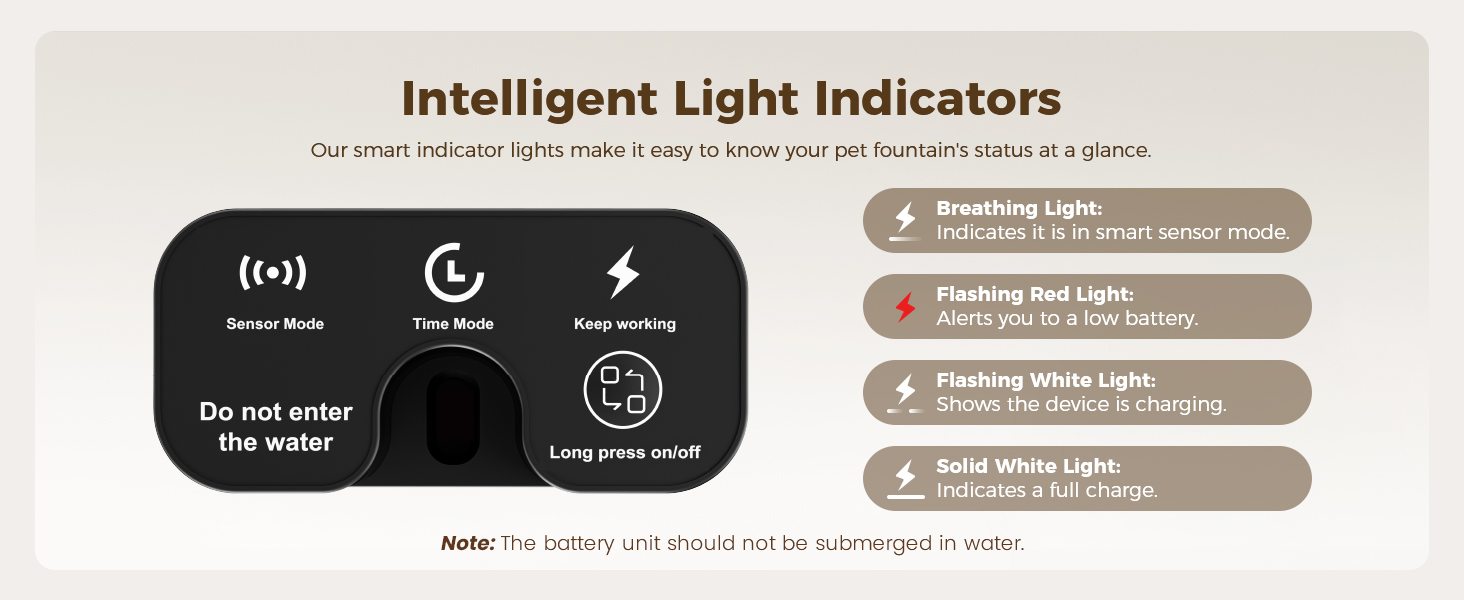
Image: A detailed guide to the intelligent light indicators, explaining what each light pattern signifies.
유지
Regular cleaning and filter replacement are crucial for your pet's health and the fountain's longevity.
분수 청소
- The stainless steel tank and modular parts are designed for quick assembly and disassembly, making cleanup simple.
- The stainless steel components are dishwasher safe.
- 중요한: Always remove the battery compartment before rinsing, soaking, or dish-washing to prevent short circuits. Do not immerse the battery unit in water. Do not place plastic parts in the dishwasher.
- We recommend cleaning the entire fountain weekly.

Image: The stainless steel parts of the fountain placed in a dishwasher, illustrating the ease of cleaning.
펌프 청소
To prolong your water pump's life, we recommend weekly cleaning:
- 펌프 덮개를 제거합니다.
- 임펠러를 제거합니다.
- Clean the pump chamber and impeller with the provided cleaning brush.
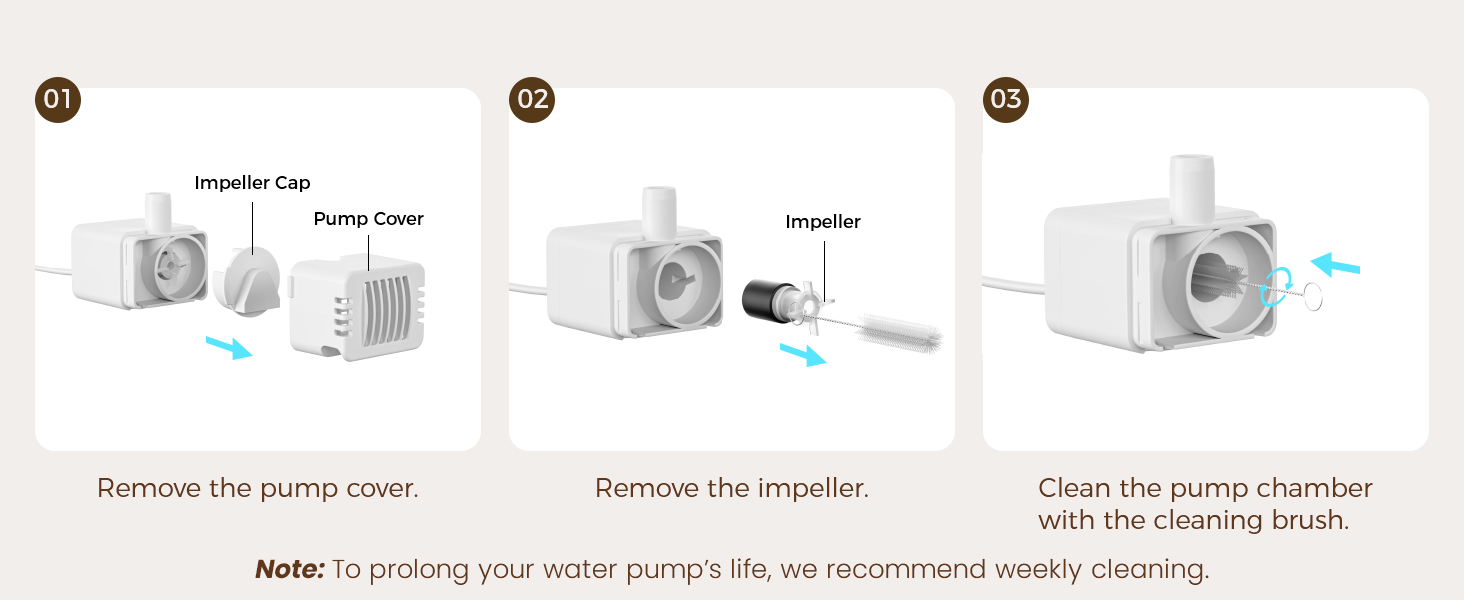
Image: A step-by-step visual guide demonstrating how to disassemble and clean the water pump's impeller and chamber.
필터 교체
The fountain features a quadruple filtration system:
- Water Release Strip: Blocks large debris.
- Filter Shell: Traps pet hair and food particles.
- 활성탄: Removes odor and improves taste.
- 이온교환수지: Softens water and removes heavy metals.
- 필터 스폰지: Traps sticky scale and keeps water clean.
For your pet's health, replace the filter every 1-2 weeks. Genuine replacement filters can be purchased online by searching for B0FCFQJH5Y.

Image: An exploded diagram illustrating the multi-layer filtration system, including the filter shell, activated carbon, ion exchange resin, and filter sponge.
문제 해결 (자주 묻는 질문)
Q: What if the fountain dispenses little or no water?
A:
- Check the battery level and charge the fountain if it is low.
- Check the water level and add water up to the maximum line.
- Disassemble the pump and scrub the impeller and well with a small brush.
- Check all tunnels for blockages, including the spout and pipe.
- If the issue persists, record a video and contact Customer Service.
Q: How often should I replace the filter, and where to buy replacements?
A: For your pet's health, replace the filter every 1-2 weeks. Genuine replacement filters can be purchased online by searching for B0FCFQJH5Y.
Q: How do I use this wireless pet fountain?
A: Using the fountain is easy once you know the basic functions.
- Press and hold the button to turn it on or off.
- Press the button once to switch between modes.
- The continuous flow mode requires the fountain to be plugged in.
Q: How often should I clean the cat drinking fountain and pump?
A: We recommend cleaning the water fountain and pump weekly. If the water fountain is noisy, check if the water level meets the minimum and if the impeller is scaled.
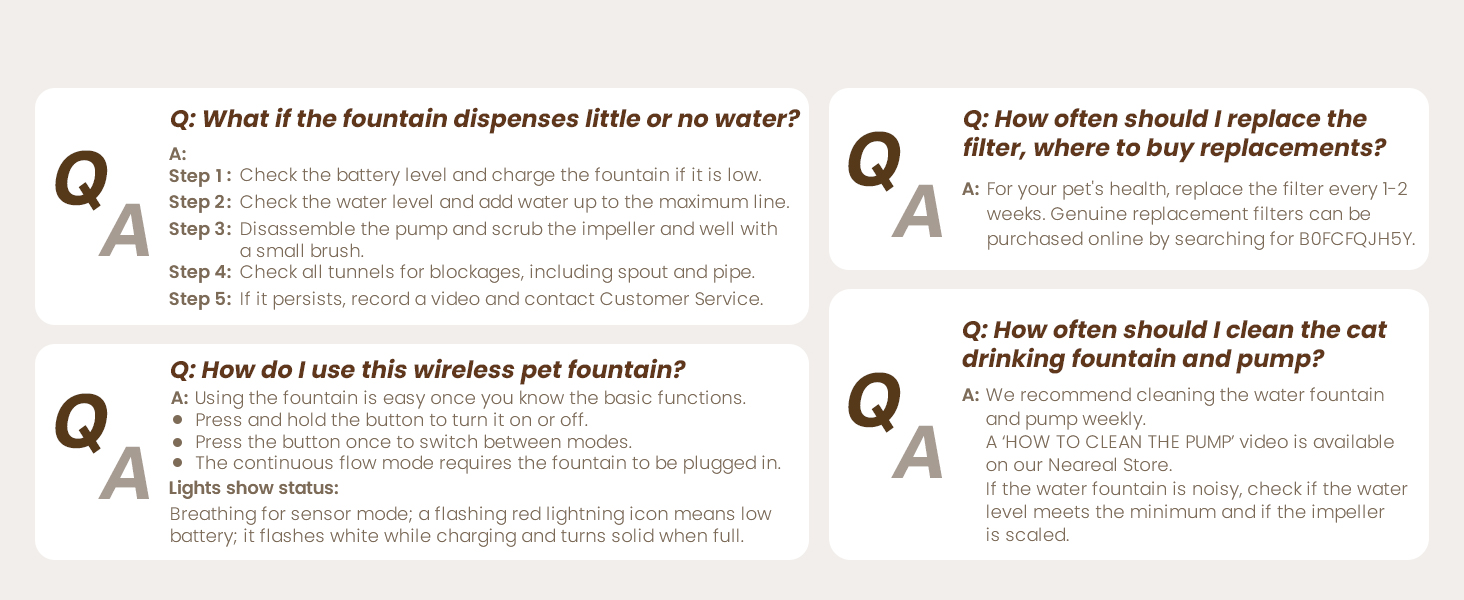
Image: A visual summary of common questions and their answers regarding the fountain's operation and maintenance.
안전 정보
- 이 제품은 가정용으로만 사용하도록 설계되었습니다.
- Do not allow children to play with the fountain.
- 분수대를 청소하거나 유지 보수하기 전에는 항상 전원을 차단하십시오.
- Ensure the battery compartment is completely dry before reinserting the battery unit.
- 배터리 유닛을 물에 담그지 마십시오.
- 제공된 정품 충전 케이블만 사용하십시오.
- Do not use the fountain with any liquids other than water.
- Keep the fountain on a level surface to prevent spills.
보증 및 지원
Your Neareal Cat Water Fountain comes with an 18개월 보증. This warranty covers manufacturing defects and ensures free replacement for eligible issues.
For any questions, technical assistance, or warranty claims, please contact Neareal Customer Service:
- Web대지: www.neareal.shop
- 이메일: support@neareal.shop
Neareal offers 24/7 professional help and VIP exclusive care to ensure your satisfaction.

Image: Information on Neareal's customer support, including 24/7 help, 18-month replacement, and contact details.