
LONELY BINARY ESP32-S3 IPEX (16MB + Antenna)
LONELY BINARY ESP32-S3 Development Board Gold Edition User Manual
Model: ESP32-S3 IPEX (16MB + Antenna)
1. 제품 오버view
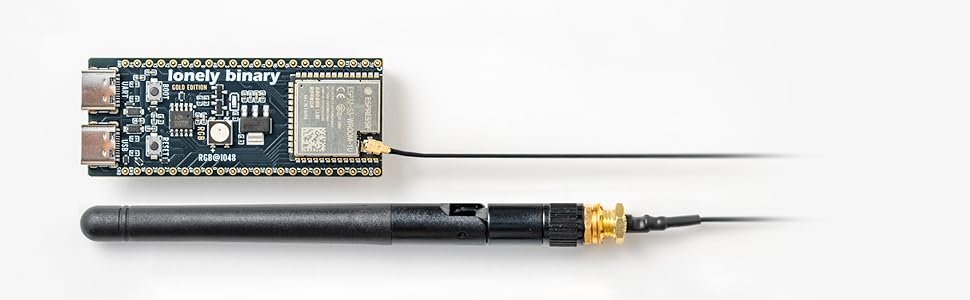
The LONELY BINARY ESP32-S3 Development Board Gold Edition is a high-performance microcontroller board designed for advanced IoT, AI, and machine learning projects. It features a dual-core processor, 16MB Flash memory, and 8MB PSRAM, providing robust capabilities for complex applications. The board includes dual USB Type-C ports for power and data, and an external IPEX antenna for enhanced Wi-Fi and Bluetooth connectivity.

Image 1.1: The Lonely Binary ESP32-S3 Development Board Gold Edition with external antenna.
2. 주요 특징
- Premium ESP32-S3 Performance: Dual-core processor with 16MB Flash and 8MB PSRAM for advanced IoT, AI, and machine learning projects.
- Superior WiFi and Bluetooth Range: External IPEX antenna provides extended signal strength and reliability, outperforming built-in antennas for remote applications.
- 프리미엄 빌드 품질: Features a Black Gold PCB with Lead-Free Finish and crisp silkscreen for enhanced durability and aesthetics.
- Dual USB Type-C Ports: Separate ports for power and data, ensuring compatibility with macOS, Windows, and Linux operating systems.
- Flexible Prototyping Pins: Includes 2x40-pin headers, compatible with breadboards and various sensors.
- AI Acceleration Support: Optimized for machine learning and real-time applications.
- Open Platform Compatibility: Works with MicroPython, ESP-IDF, and Arduino IDE, ideal for sensors, displays, and secure boot projects.
이미지 2.1: 이상view of the ESP32-S3 IPEX N16R8 Gold Edition's key features.
3. 설정 및 설치
3.1. 언박싱 및 초기 검사
Carefully remove the ESP32-S3 development board and its components from the packaging. Inspect all items for any visible damage. Ensure all listed components are present.
Video 3.1: An unboxing video of the Lonely Binary ESP32-S3 IPEX, demonstrating the contents and initial handling.
3.2. Attaching the External Antenna
The external IPEX antenna significantly improves Wi-Fi and Bluetooth range. Connect the antenna cable to the IPEX connector on the ESP32-S3 board. Gently screw the antenna onto the connector until secure, but do not overtighten.

이미지 3.2: 클로즈업 view of the IPEX external antenna being connected to the ESP32-S3 development board.
3.3. 컴퓨터에 연결하기
Use a USB Type-C cable to connect the development board to your computer. The board features dual USB-C ports; either can be used for power and data. Ensure the necessary drivers are installed for your operating system (macOS, Windows, Linux). Refer to the official Espressif documentation or Lonely Binary's online tutorials for specific driver installation instructions.

Image 3.3: The dual USB Type-C ports on the ESP32-S3 development board, used for power and data communication.
4. 사용 설명서
4.1. Development Environments
The ESP32-S3 board is compatible with several popular development environments:
- 아두이노 IDE: A user-friendly environment for beginners and experienced users. Install the ESP32 board package through the Boards Manager.
- 마이크로파이썬: A Python 3 implementation optimized for microcontrollers. Flash the MicroPython firmware to the board and use a serial terminal for interaction.
- ESP-IDF(Espressif IoT 개발 프레임워크): The official development framework from Espressif, offering comprehensive tools and libraries for advanced applications.
Detailed setup guides for each environment can be found on the 외로운 바이너리 web대지 or Espressif's official documentation.

Image 4.1: Screenshot indicating the availability of online tutorials and resources for the ESP32-S3.
4.2. 핀아웃 다이어그램
Understanding the pinout is crucial for connecting sensors, actuators, and other peripherals. The board provides 2x40-pin headers for flexible prototyping.

Image 4.2: Detailed pinout diagram of the Lonely Binary ESP32-S3 Development Board, showing GPIO assignments and power pins.
5. 유지관리 및 관리
- Keep the board in a dry, static-free environment.
- 기판을 극한의 온도나 습도에 노출시키지 마십시오.
- 부품 손상이나 정전기 방전을 방지하려면 기판의 가장자리를 잡고 다루십시오.
- Ensure proper power supply (5V via USB-C) to prevent damage.
- The board features a lead-free finish, making it safer for handling and educational purposes.

Image 5.1: Illustration highlighting the lead-free PCB finish of the development board.
6. 문제 해결
- 컴퓨터에서 보드를 인식하지 못합니다. Ensure USB-C cable is functional and drivers are correctly installed. Try a different USB port or cable.
- Wi-Fi/블루투스 연결 문제: Verify the external IPEX antenna is securely connected. Check your code for correct Wi-Fi/Bluetooth configuration. Ensure the antenna is not obstructed.
- RGB LED pin discrepancy: Some documentation might incorrectly state the RGB LED is on GPIO38. The correct pin for the RGB LED is GPIO48. Adjust your code accordingly if experiencing issues with the onboard RGB LED.
- 펌웨어 업로드 실패: Ensure the board is in bootloader mode (usually by holding the BOOT button while pressing and releasing 재설정 후 해제asing BOOT). Check serial port selection in your IDE.
7. 사양
| 특징 | 세부 사항 |
|---|---|
| 상표 | LONELY BINARY |
| 모델명 | ESP32-S3 IPEX (16MB +Antenna )- GOLD EDITION |
| 프로세서 | ESP32-S3 Dual-Core E-300 |
| 프로세서 속도 | 240MHz |
| 플래시 메모리 | 16메가바이트 |
| PSRAM | 8메가바이트 |
| 연결성 | Wi-Fi 802.11 b/g/n (2.4GHz), Bluetooth Classic & BLE, Dual USB Type-C |
| 안테나 | 1x IPEX External Antenna |
| 운영 체제 호환성 | Arduino IDE, MicroPython, Espressif IDF |
| 치수(길이 x 너비 x 높이) | 2.04인치 길이 x 1.3인치 너비 x 5.1인치 높이 |
| 무게 | 0.04 킬로그램 |
| 제조 부품 번호 | LB-ESP32S3-GOLD-N16R8 |
8. 상자 안에 무엇이 들어있나요?
- 1x Lonely Binary ESP32-S3 Development Board (16MB Flash, 8MB PSRAM)
- 1x IPEX External Antenna
- 2x40 Pin Headers
- 1x IPEX Lead (15cm)
- 1x Storage Container

Image 8.1: The complete package contents, including the ESP32-S3 board, external antenna, pin headers, IPEX lead, and storage container.
9. 보증 및 지원
9.1. 보증 정보
이 제품에는 다음이 포함되어 있습니다. 1년 보증 from the manufacturer, Lonely Binary. Please retain your proof of purchase for warranty claims.
9.2. 기술 지원
For technical assistance, additional resources, or to report issues, please visit the official 외로운 바이너리 web대지. Online tutorials and community forums may also provide valuable support.
Ask a question about this manual
Ask about setup, troubleshooting, compatibility, parts, safety, or missing instructions. Manuals+ will review the question and use this page’s manual context to help answer it.