
1. 이상view
The TOWODE 2K Light Bulb Security Camera offers advanced surveillance features for your home. Designed for easy installation into standard E27 light sockets, this camera provides high-definition video, motion detection, two-way audio, and comprehensive area coverage. It is compatible with 2.4GHz Wi-Fi networks for wireless connectivity.
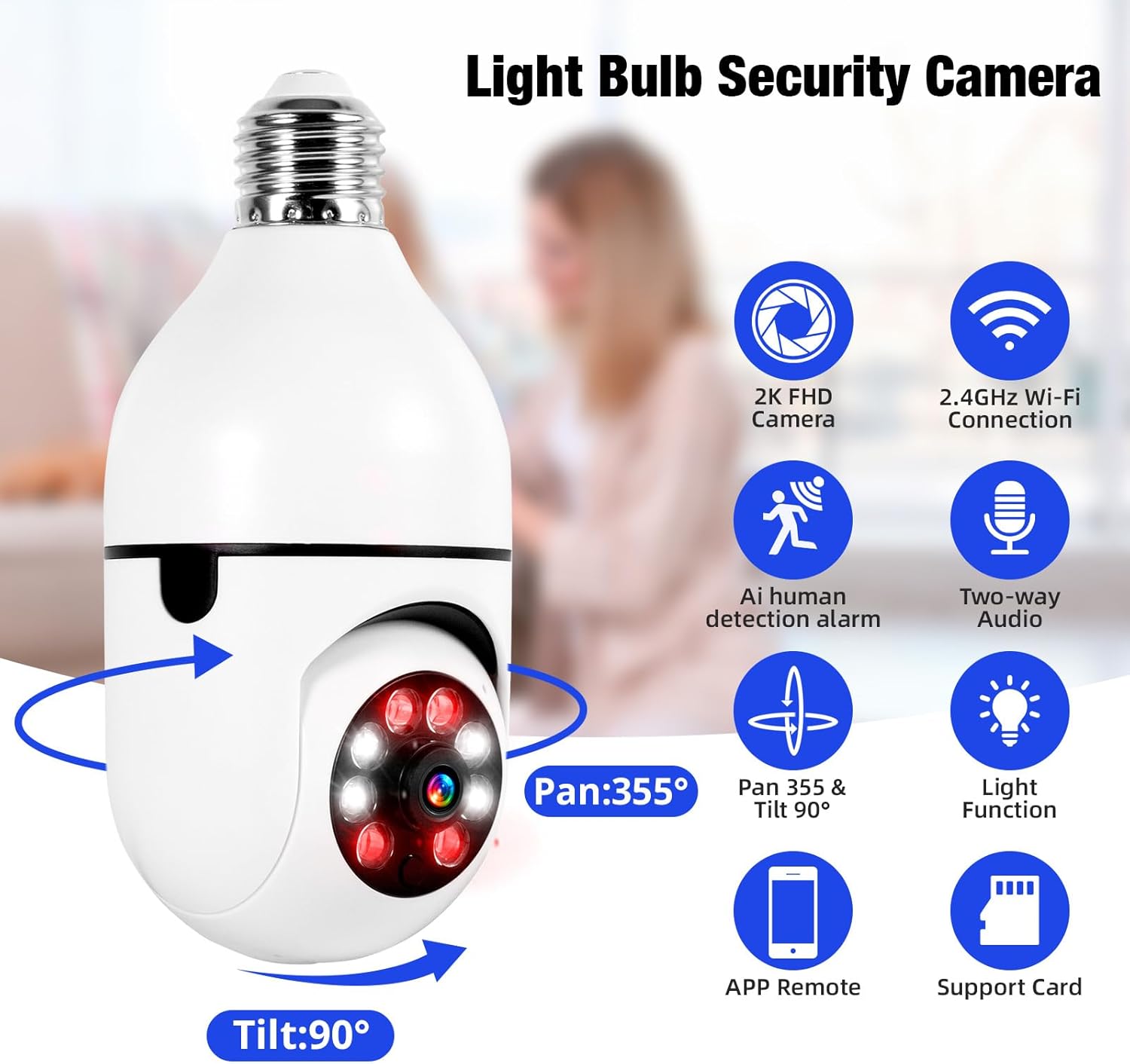
Image 1.1: The TOWODE 2K Light Bulb Security Camera, highlighting its 2K FHD camera, 2.4GHz Wi-Fi connection, AI human detection alarm, two-way audio, Pan 355° & Tilt 90° rotation, light function, APP remote control, and support for SD card storage.
2. 패키지 내용
패키지에 모든 품목이 들어 있는지 확인하세요.
- TOWODE 2K Light Bulb Security Camera (2 units)
- E27 Light Sockets (2 units)
- 사용 설명서
3. 제품 특징
- High-Definition Image Quality: Features ultra-clear 2K resolution, four built-in infrared lights, and four white lights. Infrared automatically switches to full-color mode at night, capturing clear details in dark environments.
- 간편한 설치: Fits standard E27 light sockets (compatible with 110V-240V). Plug-and-play screw-in installation requires no drilling or wiring. An adapter is included for direct power source connection.
- AI Human Detection & Real-Time Alarm: Supports two-way voice chat for communication. Effectively filters out environmental disturbances like rustling leaves. Customizable voice alarms and real-time alerts are sent to your phone upon anomaly detection.
- 360 ° 파노라마 View: Supports remote control with 355° horizontal rotation and 90° vertical pan. Provides nearly 360° panoramic monitoring without blind spots, handling wide-angle detection and precise tracking.
- 다양한 저장 옵션: Supports cloud storage, local Micro SD cards (up to 128GB), and cell phone memory for continuous 24/7 recording.
4. 설정 및 설치
The camera is designed for simple installation, similar to replacing a light bulb.
- 위치를 선택하십시오 : Select a location with a standard E27 light socket (110V-240V compatible) or a power source where the included adapter can be used. Ensure the location provides adequate Wi-Fi signal strength.
- 카메라에 나사를 박으세요: Carefully screw the camera into the E27 light socket. If using the adapter, plug the adapter into a power source and then screw the camera into the adapter.
- 전원 켜기: Ensure the light socket or power source is switched on. The camera will power up and initiate its startup sequence.

Image 4.1: A person demonstrating the easy installation of the light bulb camera by screwing it into a standard E27 socket.
5. 앱 연결
To operate your camera, download the companion mobile application and connect it to your Wi-Fi network.
- 앱 다운로드 : 검색 the 'AJCloud' app in your smartphone's app store (iOS or Android) and install it.
- 등록/로그인: 앱을 열고 화면의 지시에 따라 새 계정을 만들거나 이미 계정이 있는 경우 로그인하세요.
- 장치 추가: Tap the '+' icon or 'Add Device' option within the app. Select 'Light Bulb Camera' or a similar option.
- Wi-Fi에 연결: Follow the app's prompts to connect the camera to your 2.4GHz Wi-Fi network. You may need to scan a QR code on the camera or enter your Wi-Fi password.
- 설정 완료: Once connected, name your camera and complete any remaining setup steps. The camera feed should now be visible in the app.
Video 5.1: An official product video demonstrating the features and setup of the Light Bulb Camera, including app integration and functionality.
6. 사용 설명서
6.1. 동작 감지 및 추적
The camera features advanced AI human detection and motion tracking capabilities.
- 실시간 알림: When motion or a human figure is detected, the camera sends instant alerts to your connected smartphone.
- 동작 추적 : 카메라는 해당 필드 내에서 움직이는 물체를 자동으로 추적할 수 있습니다. view지속적인 감시를 보장합니다.
- 맞춤형 알람: Set up personalized voice alarms through the app to deter intruders.
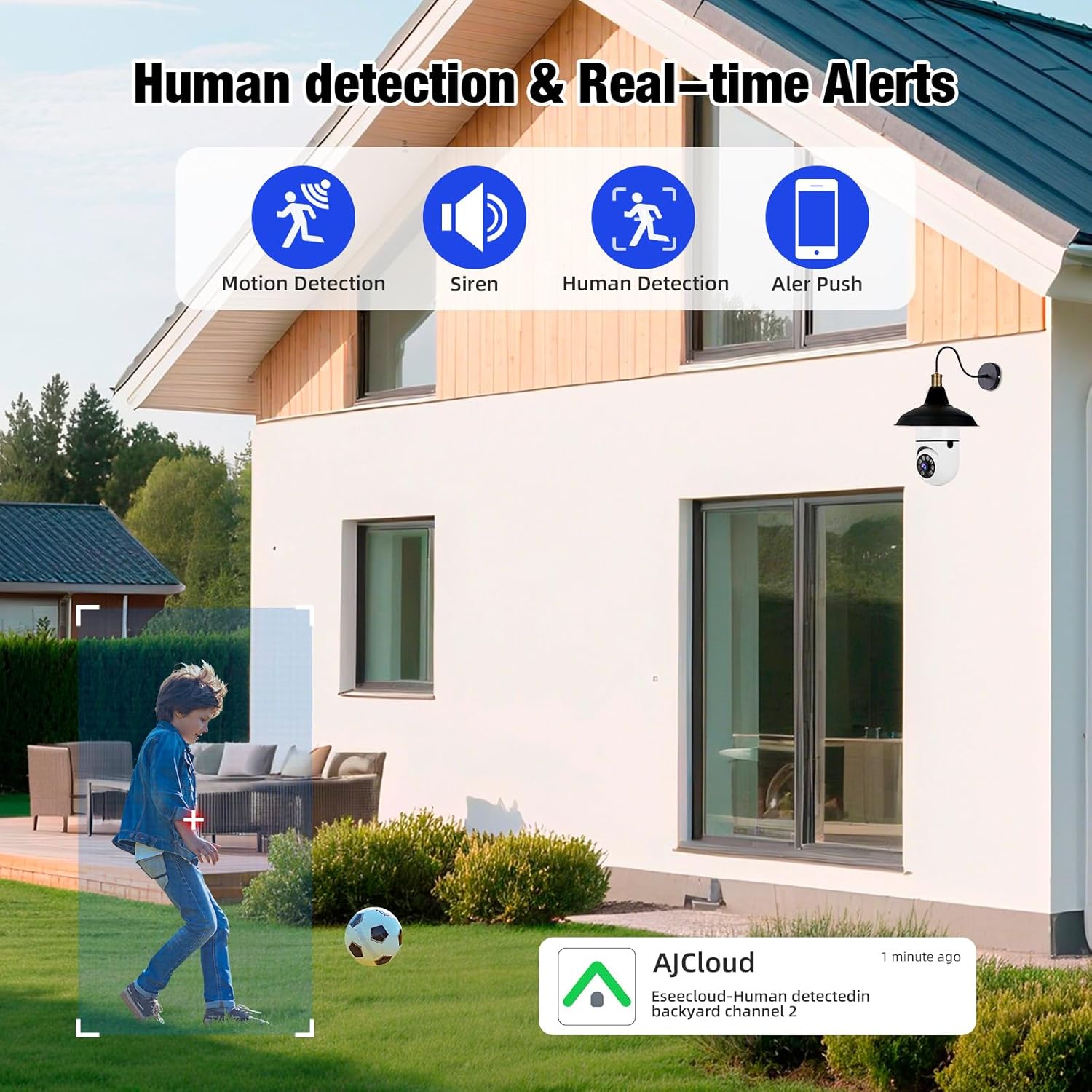
Image 6.1: The camera's human detection feature in action, showing an alert notification on a smartphone as a child is detected in the backyard.

Image 6.2: An illustration of the camera's real-time alarm and human detection at night, with a warning light activated and a notification on a smartphone.
6.2. 야간 투시경
The camera provides clear visibility even in low-light conditions.
- 컬러 나이트 비전: Utilizing its white lights, the camera can switch to full-color mode at night, providing detailed and vibrant images.
- 적외선 나이트 비전: For discreet monitoring, the infrared lights provide clear black and white video in complete darkness.
6.3. 양방향 오디오
양방향 오디오 기능을 사용하여 카메라를 통해 직접 통신하세요.
- Speak and Listen: Use the app to speak to visitors or deter unwanted guests, and listen to audio from the camera's location.

Image 6.3: The two-way audio function, illustrating communication between a user via smartphone and a delivery person at the door through the camera.

Image 6.4: A visual representation of the two-way audio feature, showing a person interacting with a delivery driver at their doorstep via the camera.
6.4. 비디오 재생 및 저장
기록된 foo에 액세스tage and manage storage options.
- 로컬 스토리지: Insert a Micro SD card (up to 128GB, not included) into the camera's slot for continuous local recording.
- 클라우드 스토리지: Subscribe to cloud storage services through the app for secure, remote video backup.
- Mobile Storage: Save important video clips directly to your smartphone's memory.
- 재생: View 기록된 footage directly from the app, with options to download or share.

Image 6.5: The camera highlighting its support for both Micro SD card (up to 128GB) and cloud storage solutions for video recording.
7. 유지관리
정기적인 유지관리를 통해 보안 카메라의 최적의 성능과 수명을 보장할 수 있습니다.
- 청소: Gently wipe the camera lens and body with a soft, dry cloth to remove dust and debris. Avoid abrasive cleaners.
- 펌웨어 업데이트: Periodically check the app for available firmware updates to ensure your camera has the latest features and security enhancements.
- Wi-Fi 연결: Ensure a stable 2.4GHz Wi-Fi connection for uninterrupted operation.
- 스토리지 관리: 정기적으로 다시view 그리고 녹음된 음식을 관리하세요tage, especially if using local SD card storage, to prevent it from becoming full.
8. 문제 해결
If you encounter issues with your TOWODE 2K Light Bulb Security Camera, refer to the following common solutions:
| 문제 | 해결책 |
|---|---|
| 카메라가 Wi-Fi에 연결되지 않음 | Ensure your Wi-Fi is 2.4GHz. Check Wi-Fi signal strength at the camera's location. Restart your router and the camera. Re-attempt the connection process in the app. |
| 화질이 나쁘다 | Verify the camera lens is clean. Ensure adequate lighting for optimal performance. Check your internet speed; a slow connection can affect streaming quality. |
| 움직임 알림 없음 | Check app notification settings and ensure they are enabled. Verify motion detection sensitivity settings in the app. Ensure the camera has a clear view 감시할 지역의. |
| 양방향 오디오가 작동하지 않음 | Check microphone and speaker settings in the app. Ensure your phone's volume is up. Verify the camera's microphone and speaker are not obstructed. |
| SD 카드가 녹화되지 않습니다 | Ensure the SD card is inserted correctly. Format the SD card through the app. Check if the SD card is full or corrupted. Replace the SD card if necessary. |
9. 사양
| 특징 | 세부 사항 |
|---|---|
| 모델명 | DPDZ02 |
| 비디오 캡처 해상도 | 2K (implied from product title, specifications list states 1080p, but product title is 2K, so 2K is used as primary) |
| 연결 기술 | 무선(Wi-Fi 2.4GHz) |
| 실내/실외 사용 | Outdoor (as per product title, specifications list states Indoor, but product title is Outdoor, so Outdoor is used as primary) |
| 전원 | 코드식 전기 |
| 팬/틸트 범위 | 355° 수평, 90° 수직 |
| 나이트 비전 | 컬러 야간 투시경, 적외선 야간 투시경 |
| 저장 옵션 | Cloud Storage, Micro SD Card (up to 128GB), Cell Phone Memory |
| 특징 | HD Resolution, AI Human Detection, Two-Way Audio |
| 치수(길이 x 너비 x 높이) | 1.18 x 1.18 x 2.76 인치 |
| 품목 무게 | 15.8 온스 |
10. 보증 및 지원
For warranty information or technical support, please refer to the contact details provided on the product packaging or visit the official TOWODE web대지. 보증 청구를 위해 구매 영수증을 보관하십시오.