
1. 서론
The Thunderobot L1 Computer Monitor Lamp is designed to provide optimal lighting for your workspace, focusing on eye comfort and visual clarity. It features an asymmetric light source, high color rendering (Ra≥95), flicker-free illumination, low blue light protection, and adjustable color temperature and brightness levels.
2. 안전 정보
- l을 확인하세요amp is securely placed on the monitor to prevent accidental falls.
- l을 노출시키지 마십시오amp 물이나 과도한 습기.
- Avoid disassembling the product. Contact support for repairs.
- 전원 공급에는 제공된 USB 케이블만 사용하십시오.
- 어린이의 손이 닿지 않는 곳에 보관하세요.
3. 패키지 내용
패키지에 모든 품목이 들어 있는지 확인하세요.
- Thunderobot L1 Computer Monitor Lamp
- USB 전원 케이블
- 사용자 설명서
4. 설정 지침
- L 위치 지정amp: Gently place the Thunderobot L1 Monitor Lamp on top of your computer monitor. The gravity-activated clamping mechanism and silicone anti-slip stabilizers will help secure it in place. Adjust the lamp's angle using the dual-pivot adjustment system to direct light onto your workspace without screen glare.
- 전원 연결: Connect the provided USB cable to the USB-C port on the lamp and plug the other end into an available USB port on your computer or a USB power adapter (not included). The lamp will power on.

Image: The Thunderobot L1 lamp features a gravity-activated clamp, silicone stabilizers, and a dual-pivot adjustment system for secure and flexible positioning.
Video: This video demonstrates the assembly and installation of the Thunderobot L1 Computer Monitor Lamp, showing how to attach it to a monitor and connect the power cable.
5. 사용 설명서
The Thunderobot L1 Monitor Lamp features intuitive touch controls located on the top surface of the lamp.
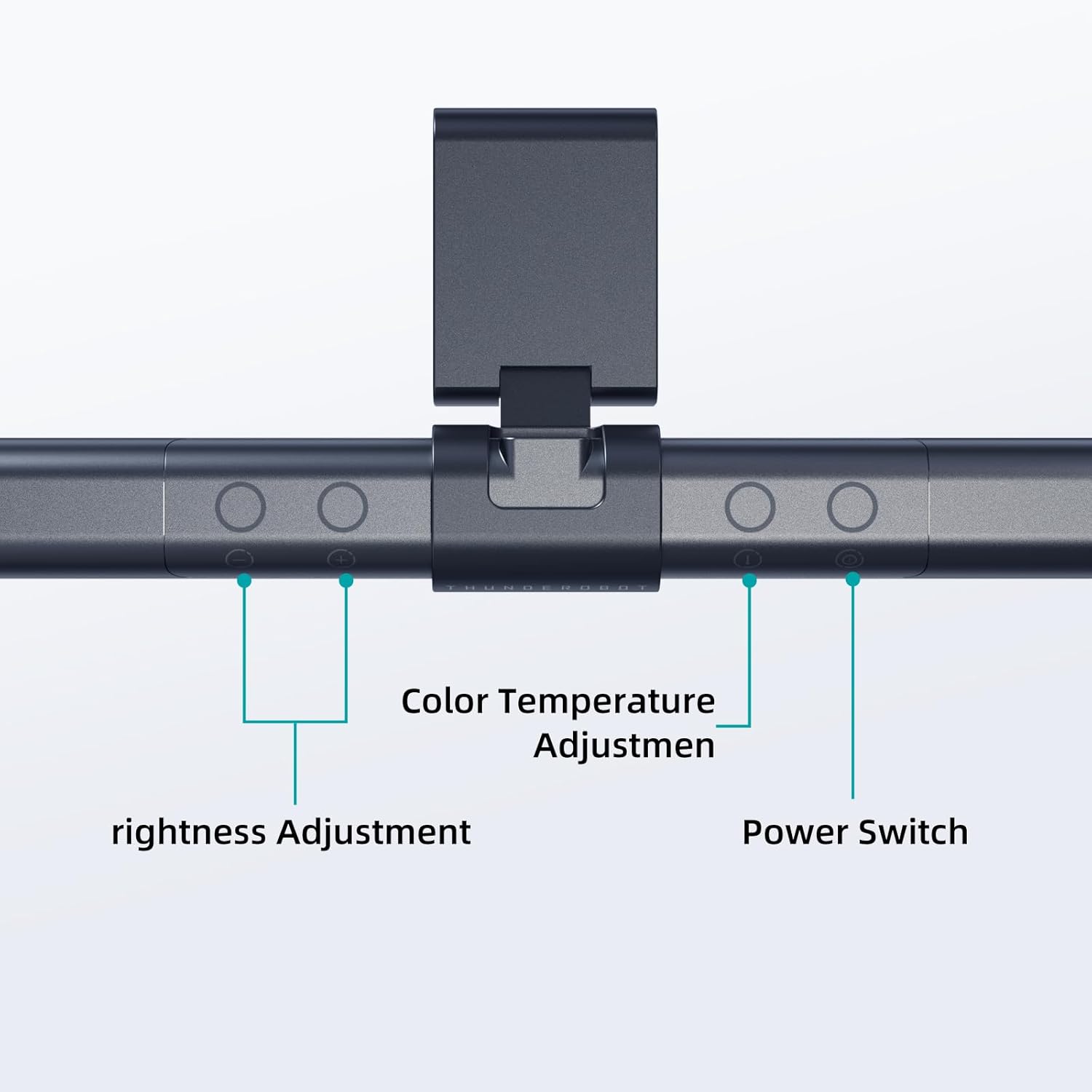
Image: The touch controls include buttons for brightness adjustment, color temperature adjustment, and power.
- 전원 켜기/끄기: 전원 버튼 (O) l을 돌리려면amp 켜기 또는 끄기.
- 밝기 조정: 밝기 조절 버튼을 사용하세요.+ 그리고 -) to cycle through ten levels of brightness.
- 색온도 조정: Press the color temperature button (i) to switch between six different color temperature settings.

이미지: lamp offers six adjustable color temperatures, ranging from 3000K (Warm Light) to 6000K (Cool White Light), suitable for various activities like movie viewing, reading, studying, and working.
6. 주요 특징
- 비대칭 광원: The advanced asymmetric light design ensures uniform light distribution across the workspace, eliminating screen glare and shadows. This optimizes the light path for comfortable, prolonged use.
- Ra≥95 High Color Rendering: With a color rendering index of Ra≥95, the lamp accurately reproduces colors, providing a vivid and true-to-life visual experience for various tasks.
- 플리커 프리 조명: Equipped with flicker-free technology, this lamp provides constant, stable illumination, reducing eye strain and headaches associated with traditional lighting.
- Low Blue Light Protection: Advanced low blue light technology reduces harmful blue wavelengths, alleviating eye strain, dryness, and fatigue, especially during extended screen time.
- Six Color Temperatures: Offers a versatile range of six color temperature options, from warm white to cool white, allowing users to customize the lighting atmosphere for different scenarios and preferences.
- Ten-Level Dimming: Provides ten adjustable brightness levels for precise control over illumination intensity.

Image: The Ra≥95 High CRI ensures colors are displayed accurately and vibrantly, as demonstrated by the fruit comparison.

이미지: lamp provides low blue light protection, reducing harmful blue light exposure for eye comfort.
7. 사양
| 특징 | 세부 사항 |
|---|---|
| 제품 치수 | 3.5인치 깊이 x 17.7인치 너비 x 3.85인치 높이 |
| 품목 무게 | 16 온스 |
| Lamp 유형 | 데스크 엘amp |
| 음영 색상 | 검은색 |
| 그늘 소재 | 폴리에스터 |
| 스위치 유형 | 푸시 버튼 |
| 연결 기술 | USB(전원용) |
| 권tage | 12 볼트 |
| 색상 | 검은색 |
| 모양 | 평평한 |
| 재료 유형 | 폴리카보네이트 |
| 모델 번호 | TH-L1-B2 |
8. 유지관리
- 청소: 청소하기 전에 전원을 분리하세요. 부드럽고 마른 천으로 l을 닦으세요.amp. 연마성 세척제나 용제를 사용하지 마십시오.
- 저장: 장기간 사용하지 않을 경우 l을 보관하십시오.amp 시원하고 건조한 곳에 보관하세요.
9. 문제 해결
- Lamp 켜지지 않습니다:
- USB 케이블이 두 장치 모두에 단단히 연결되어 있는지 확인하십시오.amp 그리고 전원.
- Verify that the power source (USB port or adapter) is functional.
- 불빛이 깜빡거립니다:
- 전원 연결을 확인하세요.
- 깜빡임 현상이 계속되면 고객 지원팀에 문의하십시오.
- 조작이 작동하지 않습니다.
- 전원 케이블을 분리했다가 다시 연결하여 장치를 재설정하십시오.amp.
- 터치 컨트롤을 사용할 때는 손가락이 깨끗하고 건조한지 확인하세요.
10. 보증 및 지원
Thunderobot provides 1-year product quality support for the L1 Computer Monitor Lamp. For warranty claims or technical assistance, please contact Thunderobot customer service.