
1. 서론
The NGTeco NG-MB1 4-in-1 APP-Based Time Clock is a versatile attendance management system designed for small businesses. It offers multiple verification methods including facial recognition, fingerprint scanning, RFID card, and PIN entry to accurately track employee work hours. This manual provides detailed instructions for setting up, operating, maintaining, and troubleshooting your device.
2. 안전 정보
- Ensure the device is installed indoors and away from direct sunlight, heat sources, and moisture.
- 손상을 방지하려면 제공된 전원 어댑터만 사용하세요.
- 기기를 직접 분해하거나 수리하려고 하지 마세요. 도움이 필요하면 고객 지원에 문의하세요.
- 장치를 깨끗하고 먼지나 이물질이 없는 상태로 유지하십시오.
3. 패키지 내용
패키지에 모든 품목이 들어 있는지 확인하세요.
- NGTeco NG-MB1 Time Clock Unit
- 전원 어댑터
- 벽 장착 브래킷
- 장착 하드웨어(나사, 앵커)
- RFID Cards (multiple)
- USB Drive (for data transfer)
- 빠른 시작 가이드
- Contact Information Card
4. 제품 오버view
The NGTeco NG-MB1 Time Clock features a compact design with multiple input options for employee verification.
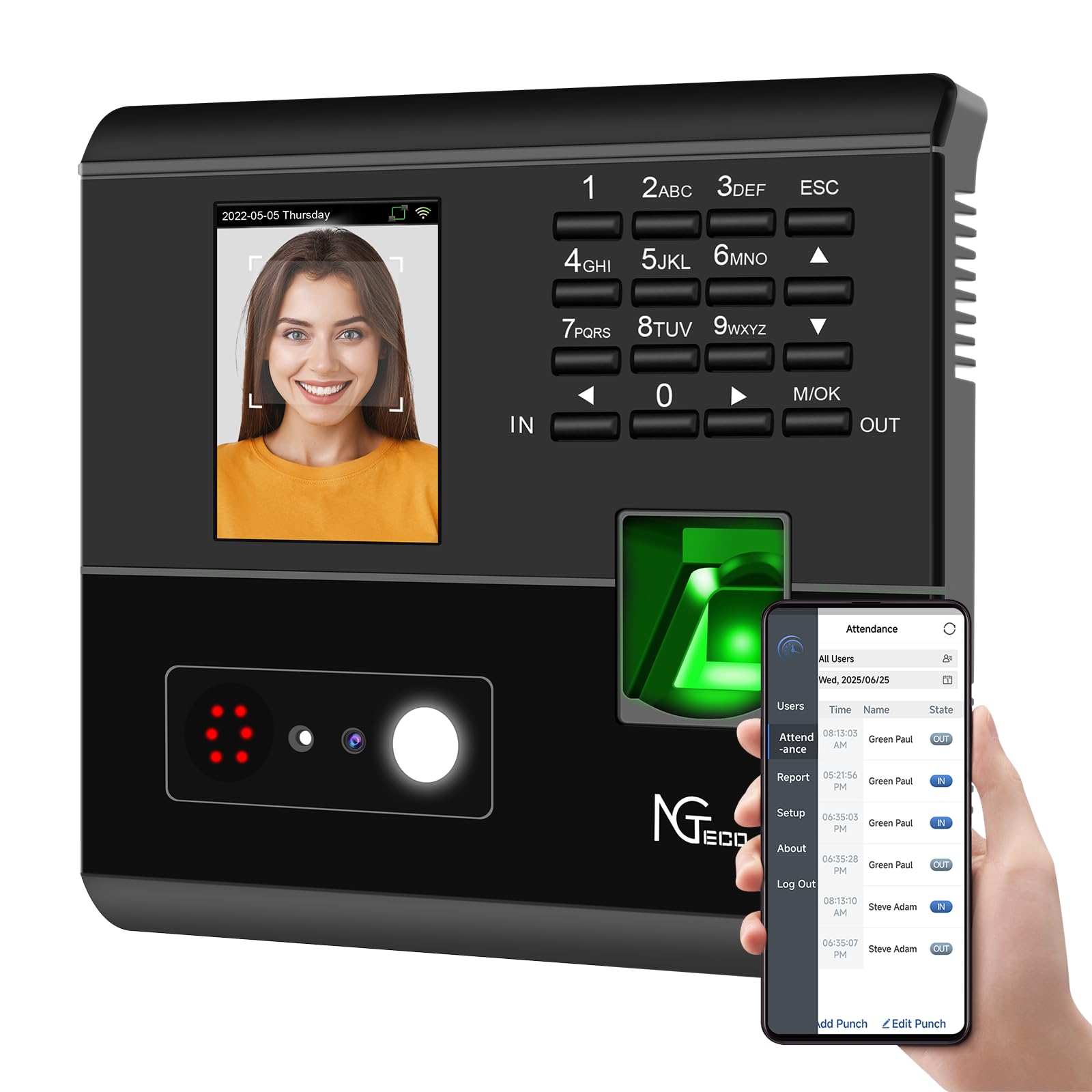
그림 1: 앞쪽 view of the NGTeco NG-MB1 Time Clock highlighting its four verification methods: Face Scan, Fingerprint, RFID Card, and Password.
전면 패널 기능:
- 디스플레이 화면: Shows time, date, user information, and menu options.
- 키패드 : Numeric keys for PIN entry and navigation.
- 지문 인식기: For biometric fingerprint verification.
- Face Recognition Camera: For facial recognition verification.
- RFID/Card Reading Area: For scanning RFID cards.
Side and Back Panel Features:

그림 2: 뒤쪽 view of the NGTeco NG-MB1 Time Clock, illustrating the power input, Ethernet port, and USB port for connectivity and data transfer.
- USB 포트: For direct data transfer using a USB drive.
- 전원 포트: 제공된 전원 어댑터에 연결합니다.
- 이더넷 포트 : 유선 네트워크 연결용.
5. 설정
5.1 장치 설치
- Choose a suitable indoor location for mounting the time clock, ensuring it is at an appropriate height for all users.
- 제공된 장착용 템플릿을 사용하여 벽에 드릴 구멍 위치를 표시하십시오.
- Secure the wall mounting bracket using the supplied screws and anchors.
- Connect the power adapter and, if desired, an Ethernet cable to the device.
- Attach the time clock unit to the mounted bracket.
5.2 앱 다운로드
다운로드 NGTeco Time App from your mobile device's app store (Apple App Store for iOS or Google Play Store for Android). This app is essential for managing users, attendance records, and generating reports.
동영상 1 : This video demonstrates the two methods for registering employee information on the NGTeco Time Clock, including using the device directly and through the NGTeco Time App.
5.3 Wi-Fi 연결
기기를 Wi-Fi 네트워크에 연결하려면:
- On the device, navigate to the [커뮤니케이션] 메뉴.
- 선택하다 [무선 네트워크].
- 목록에서 원하는 Wi-Fi 네트워크를 선택하세요.
- Enter the Wi-Fi password using the keypad and confirm.
- The device will attempt to connect to the network. A successful connection will be indicated on the screen.
동영상 2 : This video provides a step-by-step guide on how to configure the Wi-Fi settings on your NGTeco Time Clock device.
6. 사용 설명서
6.1 사용자 추가
Employees can be added directly on the device or through the NGTeco Time App.
Adding Users via Device:
- 를 누르고 계세요 M/OK 버튼을 눌러 메인 메뉴에 액세스합니다.
- 로 이동 [사용자] 그리고 선택하세요 [사용자 추가].
- 입력하세요 사용자 ID, 이름, 성, 설정 사용자 역할 (e.g., Employee, Admin).
- 선택하세요 검증 모드 (Password, Fingerprint, Card, or Face).
- Follow the on-screen prompts to enroll the chosen verification method(s).
Adding Users via NGTeco Time App:
- Open the NGTeco Time App on your smartphone.
- 로 이동합니다 사용자 section and tap 사용자 추가.
- Enter the employee's details including 이름, 성, 핀, 그리고 허가 수준.
- Save and sync the data with the device.
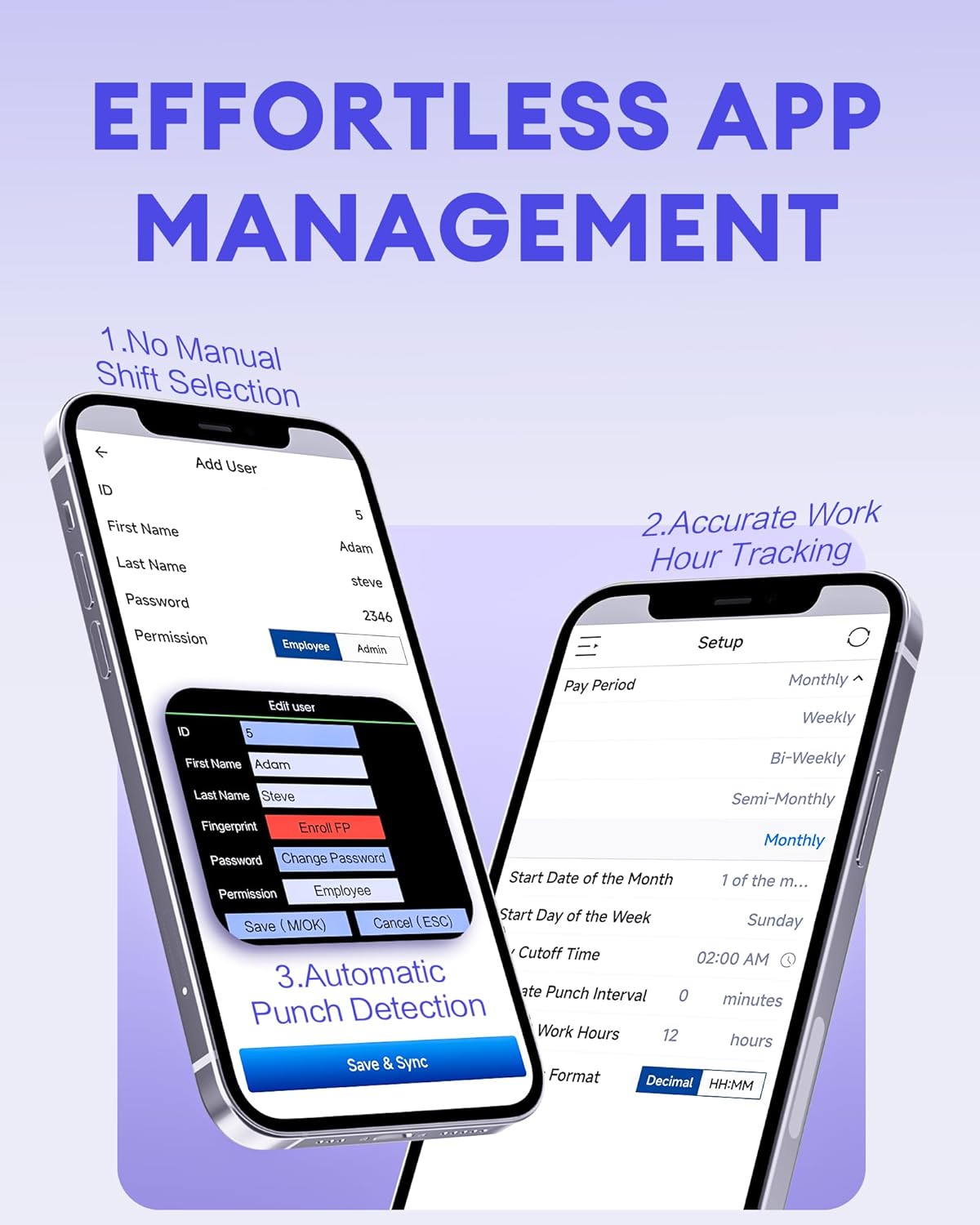
그림 3: The NGTeco Time App interface for effortless management, including adding users, setting up work hour tracking, and automatic punch detection.
6.2 Enrolling Biometrics and Cards
지문 등록:
For optimal fingerprint recognition:
- Always use clean fingers and avoid angled or tilted finger positions during enrollment.
- Place your finger belly completely in the middle of the reader.
- Do not slide the finger while enrolling. Apply some pressure for 1 second until the result is shown.
- If a finger is dry, gently breathe on it to moisten it before scanning.

그림 4: Visual representation of the high-precision fingerprint module, emphasizing reliable, fast, and secure access.
등록 절차:
Follow the on-screen instructions to position your face correctly in front of the camera for enrollment.
RFID Card Enrollment:
When prompted, hold the RFID card near the designated reading area on the device until it is successfully registered.
6.3 Clocking In and Out
The NGTeco NG-MB1 supports automatic detection for clocking in and out, eliminating the need to press specific 'IN' or 'OUT' keys. Simply present your chosen verification method (face, fingerprint, RFID card, or enter your PIN) to the device.
동영상 3 : This video demonstrates the four recognition methods (Face, Fingerprint, RFID, PIN) for clocking in on the NGTeco Time Clock.
6.4 Managing Attendance Records
Attendance records can be modified directly on the device or through the NGTeco Time App.
Adding/Editing Missing Punches:
- 기기를 통해: Access the menu, navigate to [Time Data], 그 다음에 [Add Missing Punch]. Select the user, date, time, and punch state (Check In/Check Out).
- 앱을 통해: In the NGTeco Time App, go to the 출석 section. You can add a new punch or edit an existing one by selecting the user, date, time, and punch state.

그림 5: The NGTeco Time App's punch record correction feature, allowing easy fixes for errors or missing punches.
동영상 4 : This video illustrates how to modify attendance records directly on the NGTeco Time Clock device and through the mobile application.
6.5 보고서 생성
The NGTeco Time Clock supports various payroll cycles and offers multiple ways to download attendance reports.

그림 6: The NGTeco Time Clock supports various payroll cycles, including Monthly, Semi-Monthly, Bi-Weekly, and Weekly, for flexible attendance management.
Report Download Options:
- App Email Download: Use the NGTeco Time App to email detailed reports directly to your inbox.
- USB Drive Download: Insert the provided USB drive into the device's USB port to download attendance data.

그림 7: Illustration of the two convenient methods for downloading attendance reports: directly to a USB drive or via email through the NGTeco Time App.
7. 유지관리
- 청소: Regularly wipe the device's screen, keypad, and fingerprint sensor with a soft, dry cloth. Avoid using abrasive cleaners or liquids.
- 소프트웨어 업데이트: Check the NGTeco Time App or web최적의 성능과 보안을 보장하기 위해 사용 가능한 펌웨어 또는 소프트웨어 업데이트를 확인하려면 해당 사이트를 방문하십시오.
- 데이터 백업: Periodically back up your attendance data using the USB drive or through the app to prevent data loss.
8. 문제 해결
- 장치 전원이 켜지지 않음: 전원 어댑터가 장치와 작동하는 전원 콘센트에 모두 단단히 연결되어 있는지 확인하세요.
- Wi-Fi 연결 문제: Verify your Wi-Fi password and ensure the device is within range of your router. Restarting the device or router may help.
- Fingerprint/Face Recognition Failure: Ensure the sensor/camera is clean. For fingerprints, ensure fingers are clean and placed correctly with adequate pressure. Re-enrollment may be necessary if issues persist.
- 앱 동기화 문제: Check your device's internet connection and ensure the time clock is connected to the same Wi-Fi network as your phone.
- Missing Punches: Refer to Section 6.4 for instructions on adding or editing missing punches.
For further assistance, consult the Quick Start Guide or contact NGTeco customer support.
9. 사양
| 특징 | 세부 사항 |
|---|---|
| 상표 | NG테코 |
| 모델 번호 | NG-MB1 |
| 색상 | 검은색 |
| 디스플레이 유형 | 디지털 |
| 특징 | Face/Fingerprint/Card/PIN |
| 제품 치수 | 폭 5인치 x 높이 4인치 |
| 전원 | 코드식 전기 |
| 연결 기술 | 와이파이 |
| 품목 무게 | 0.79 킬로그램 |
| 재료 유형 | 프리미엄 ABS 플라스틱 |
10. 보증 및 지원
- 보증: The NGTeco NG-MB1 comes with a 1-year manufacturer's warranty.
- 기술 지원: Enjoy free lifetime technical support from NGTeco's U.S.-based service team. Support is available Monday to Friday, 6 AM to 6 PM EST.
- For support, refer to the contact information provided in your Quick Start Guide or visit the official NGTeco web대지.