
1. 서론
This manual provides detailed instructions for the installation, operation, and maintenance of your Girafit GRF-T350SW 3K 5MP Indoor/Outdoor Pan/Tilt/Zoom Wi-Fi Security Camera. Please read this manual thoroughly before using the product to ensure proper functionality and safety. Keep this manual for future reference.
2. 제품 오버view
주요 특징
- 3K 5MP Resolution with 4X Digital Zoom: 선명하고 자세한 비디오 제공tage.
- 360° Pan and 180° Tilt: Offers comprehensive coverage of your monitoring area.
- AI Person/Pet/Vehicle Detection: Advanced artificial intelligence for accurate identification of subjects, reducing false alerts.
- 자동 동작 추적: Automatically follows detected subjects within the camera's field of view.
- 별빛 컬러 야간 투시경: Enhanced low-light performance for vivid color images at night.
- 양방향 오디오 : 실시간 통신을 위한 마이크와 스피커가 내장되어 있습니다.
- Auto Alert Siren: 소리로 경보를 울려 침입자를 막습니다.
- IP65 방수 등급: 다양한 기상 조건에서 야외 사용에 적합합니다.
- 유연한 스토리지 옵션: Supports encrypted US cloud storage and local Micro SD card storage (up to 256GB).
- 2.4GHz/5GHz Wi-Fi Connectivity: Dual-band Wi-Fi support for stable connection.
상자 안에 무엇이 들어있나요?
- Girafit GRF-T350SW Camera Body
- 전원 어댑터
- 장착 나사 및 앵커
- 장착 템플릿
- 사용자 설명서

Figure 2.1: Girafit GRF-T350SW camera showing its pan and tilt capabilities.

Figure 2.2: The Girafit GRF-T350SW camera operating reliably in both rainy and sunny conditions, highlighting its IP65 weatherproof design.
3. 설정
3.1 물리적 설치
- 위치를 선택하세요: Select a suitable outdoor or indoor location that provides the desired viewing angle and is within range of your Wi-Fi network. Ensure the power outlet is accessible.
- 카메라 장착: Use the provided mounting template to mark drill holes. Secure the mounting bracket to the wall or ceiling using the screws and anchors. Attach the camera to the bracket.
- 전원 연결: Plug the power adapter into the camera and then into a power outlet. The camera will power on and initiate its startup sequence.
3.2 앱 설치 및 계정 생성
- Download the Girafit App: 검색 'Girafit' in your smartphone's app store (iOS or Android) and download the official application.
- 계정 생성: 앱을 열고 화면의 지시에 따라 새 계정을 등록하세요.
3.3 네트워크 연결
- 장치 추가: In the Girafit app, tap the '+' icon to add a new device. Select your camera model.
- 앱 내 지침을 따르세요: The app will guide you through connecting the camera to your 2.4GHz or 5GHz Wi-Fi network. This typically involves scanning a QR code displayed on your phone with the camera lens.
- 완성: 연결되면 카메라의 상태 표시등이 바뀌고 앱에서 라이브 영상을 볼 수 있습니다.
4. 운영
4.1 팬, 틸트 및 줌 제어
라이브에서 view in the Girafit app, use the on-screen controls to remotely adjust the camera's viewing angle. The camera supports 360° horizontal pan and 180° vertical tilt. You can also digitally zoom in up to 4X to view 세부.

Figure 4.1: Visual comparison demonstrating the clarity of 3K 5MP resolution with 4X zoom compared to standard 3MP resolution.
4.2 동작 감지 및 자동 추적
The camera features advanced AI detection capabilities to identify humans, pets, and vehicles. When motion is detected, the camera can automatically track the subject, zoom in, record the event, and send push notifications to your smartphone.
- 감지 활성화: Navigate to the camera settings in the app to enable AI Person/Pet/Vehicle Detection.
- 감지 영역 설정: 카메라 내의 특정 영역을 정의합니다. view 동작 감지 기능을 활성화할 위치를 지정하세요.
- Activate Auto Tracking: Enable auto tracking in the settings to allow the camera to follow detected subjects.
- Auto Alert Siren: Configure the camera to trigger an audible siren upon detection to deter unwanted visitors.

Figure 4.2: Illustration of the camera's automatic tracking feature, showing a person being followed with a 4X zoom.

Figure 4.3: The camera's AI accurately detecting a human, a pet, and a vehicle in a home environment.

Figure 4.4: The camera detecting activity in a defined hexagonal area and issuing an auto voice alert.
4.3 야간 투시경
The GRF-T350SW offers multiple night vision modes for clear surveillance in low-light conditions.
- 별빛 컬러 야간 투시경: Utilizes a Starlight Sensor and f/1.6 aperture to capture more light, providing full-color video even in very dim environments.
- 적외선 모드 : 적외선 LED를 사용한 표준 흑백 야간 투시경입니다.
- 스포트라이트 모드: Activates built-in spotlights to illuminate the area and capture color video when motion is detected at night.
앱 설정에서 이러한 모드 간에 전환하거나 자동으로 설정할 수 있습니다.

Figure 4.5: Visual representation of the camera's Starlight Color Night Vision, Infrared Mode, and Spotlight Mode capabilities.
4.4 양방향 오디오
The integrated microphone and speaker allow for two-way communication. You can speak through the camera to visitors or deter intruders directly from your smartphone via the Girafit app.
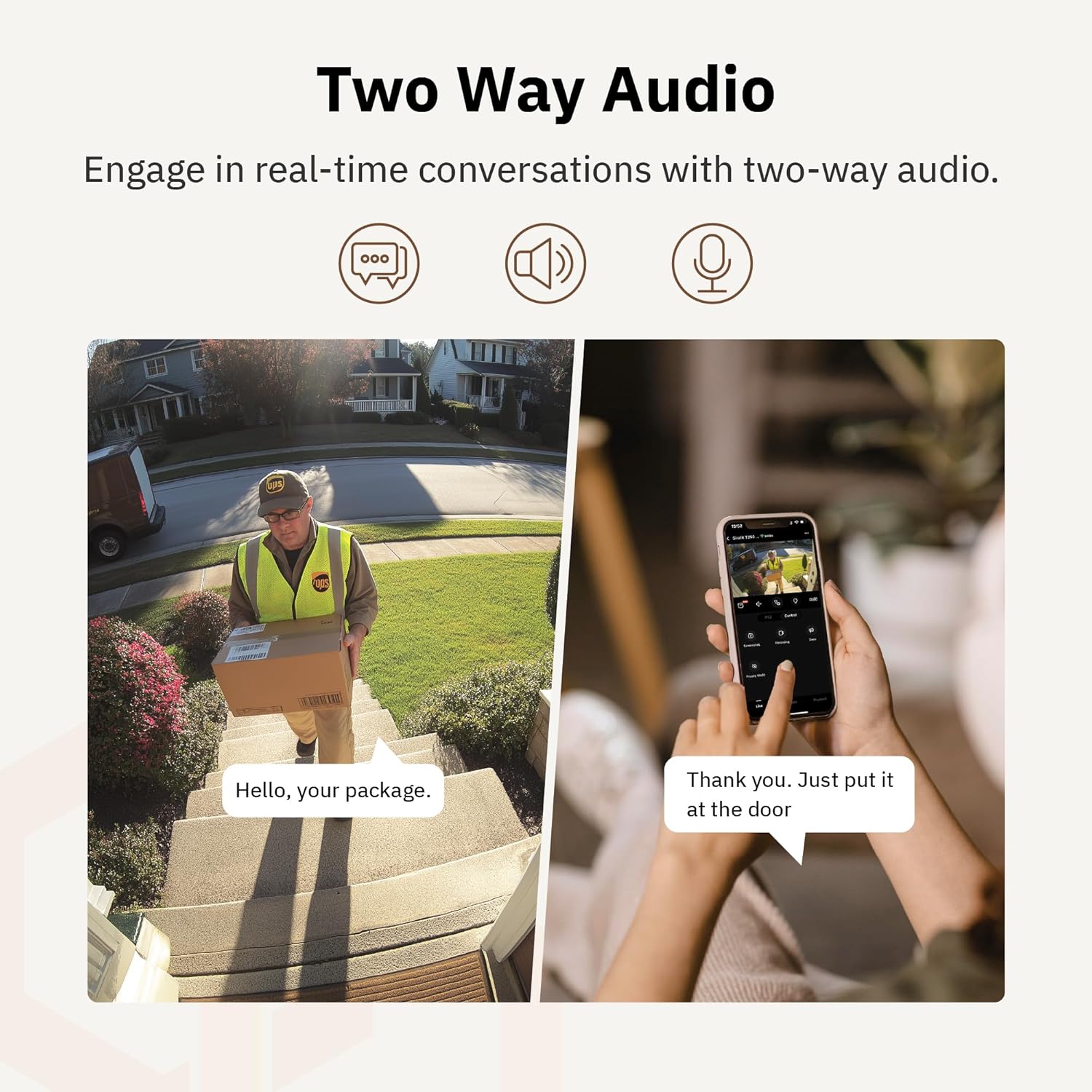
그림 4.6: example of using two-way audio to communicate with a delivery person at the door.
4.5 개인 정보 보호 모드
For enhanced privacy, the camera features a privacy mode. When activated, the camera lens physically tilts down by 180°, ensuring no live feed is captured or transmitted. This provides 100% privacy protection when needed.

Figure 4.7: The camera in privacy mode, with the lens tilted downwards to ensure no recording or live view.
4.6 비디오 저장
카메라는 비디오 저장을 위한 두 가지 기본 방법을 지원합니다.
- 마이크로 SD 카드 : 녹화된 영상을 로컬로 저장하려면 카메라의 지정된 슬롯에 Micro SD 카드(최대 256GB, 별도 구매)를 삽입하세요.
- 클라우드 스토리지: Girafit offers encrypted cloud storage services in the US. Refer to the app for subscription options and details.
5. 유지관리
5.1 청소
To maintain optimal performance, periodically clean the camera lens and housing. Use a soft, damp 먼지와 이물질을 닦아낼 때는 천을 사용하십시오. 렌즈나 마감을 손상시킬 수 있는 강한 화학 물질이나 연마재는 사용하지 마십시오.
5.2 펌웨어 업데이트
Girafit regularly releases firmware updates to improve camera performance, add new features, and enhance security. Check the Girafit app periodically for available updates and follow the in-app instructions to install them. Ensure the camera has a stable power supply during updates.
6. 문제 해결
- 카메라가 Wi-Fi에 연결되지 않음:
- Ensure your Wi-Fi network is 2.4GHz or 5GHz and the password is correct.
- 카메라를 Wi-Fi 라우터에 더 가까이 옮기세요.
- 라우터와 카메라를 다시 시작하세요.
- 낮은 비디오 품질:
- 인터넷 연결 속도를 확인하세요.
- 카메라 렌즈를 청소하세요.
- 카메라에 충분한 전원이 공급되고 있는지 확인하십시오.
- 동작 감지가 작동하지 않음:
- 앱 설정에서 동작 감지 기능이 활성화되어 있는지 확인하십시오.
- 감지 감도와 감지 구역을 조정합니다.
- 카메라를 가리는 장애물이 없는지 확인하십시오. view.
- 양방향 오디오 문제:
- Check microphone and speaker permissions for the Girafit app on your phone.
- 카메라의 마이크와 스피커가 가려지지 않았는지 확인하세요.
For further assistance, please contact Girafit customer support.
7. 사양
| 특징 | 설명 |
|---|---|
| 모델명 | GRF-T350SW |
| 비디오 캡처 해상도 | 3K(5만 화소) |
| 실내/실외 사용 | 집 밖의 |
| 연결 기술 | Wi-Fi (2.4GHz/5GHz), Wired |
| 전원 | 코드식 전기 |
| 장착 유형 | 벽걸이형 |
| 특징 | 2-Way Audio, AI Detection (Human/Pet/Vehicle), Auto Tracking, Color Night Vision, IP65 Weatherproof |
| 호환 장치 | Desktop, Laptop, Smartphone (Android/iOS) |
| 품목 치수(L x W x H) | 2.63 x 2.63 x 4.76 인치 |
| 품목 무게 | 14.7 온스 |
| 저장 옵션 | 마이크로 SD 카드(최대 256GB), 클라우드 스토리지 |
| 한국어: | 764742517881 |
8. 보증 및 지원
Girafit products are designed for reliability and performance. For warranty information, please refer to the warranty card included with your product or visit the official Girafit website. For technical support, troubleshooting assistance, or any inquiries regarding your Girafit GRF-T350SW camera, please contact Girafit customer service through the contact information provided on the official website or within the Girafit app.