
1. 서론
This manual provides detailed instructions for the assembly, operation, and maintenance of your WorkPro Momentum Ergonomic High-Back Active Chair. Please read this manual thoroughly before assembly and use to ensure proper function and safety.
The WorkPro Momentum chair is designed to provide an exceptional seating experience, integrating precision and comfort. Key features include a premium seat cushion with 3D printed lattice mesh, an active high-back for dynamic support, multiple reclining positions, built-in lumbar support, pneumatic 1-touch height adjustment, and 3D adjustable armrests.

Image 1.1: The WorkPro Momentum Ergonomic High-Back Active Chair in a modern office environment, showcasing its design and presence.
2. 안전 정보
경고: 이러한 안전 지침을 따르지 않을 경우 부상이나 제품 손상이 발생할 수 있습니다.
- 공압식 높이 조절: The pneumatic height adjustment mechanism may cause injury if not used carefully. Always follow manufacturer's instructions for safe use. Avoid sudden movements when adjusting height.
- 집회: 사용 전에 모든 부품이 단단히 고정되었는지 확인하십시오. 모든 나사와 볼트가 꽉 조여져 있는지 주기적으로 점검하십시오.
- 중량 용량: This chair supports up to 275 lbs (124.7 kg). Do not exceed this weight limit.
- 용도: This chair is designed for indoor office and home office use. Do not use for purposes other than its intended design.
- 어린이들: 조립 중에는 어린이가 의자에 접근하지 못하도록 하세요. 어린이가 의자 위나 의자를 가지고 놀지 않도록 하세요.
- 안정: Do not stand on the chair. Avoid leaning excessively to one side or backward, which could cause the chair to tip.
3. 패키지 내용
조립을 시작하기 전에 모든 부품이 있는지, 손상되지 않았는지 확인하십시오. 부품이 누락되었거나 손상된 경우 조립을 진행하지 마십시오. 즉시 고객 지원 센터에 문의하십시오.
- 등받이
- 시트 쿠션 어셈블리
- 팔걸이(좌우)
- 의자 받침대 (별 모양 받침대)
- 캐스터(5개)
- 가스 리프트 실린더
- 하드웨어 세트 (나사, 와셔, 육각 렌치)
4. 설치 및 조립
Assembly is required for this product. Please follow these steps carefully. It is recommended to assemble the chair on a soft, clean surface to prevent scratching.
- 바닥에 캐스터 부착: 의자 받침대 다리 끝에 있는 구멍에 바퀴 다섯 개를 각각 끼워 넣으세요. 딸깍 소리가 나면서 제자리에 고정될 때까지 세게 밀어 넣으세요.
- 가스 리프트 삽입: Place the gas lift cylinder into the center hole of the assembled chair base. Ensure it sits securely.
- 좌석에 팔걸이 부착: Align the armrests with the pre-drilled holes on the underside of the seat cushion assembly. Secure them using the provided screws and Allen wrench. Do not overtighten initially.
- 등받이를 좌석에 부착하세요: Connect the backrest to the seat cushion assembly using the designated mounting points and hardware. Ensure proper alignment before tightening all screws.
- 시트 어셈블리를 가스 리프트에 연결하십시오: Carefully place the assembled seat and backrest onto the gas lift cylinder, ensuring the center mechanism hole aligns with the top of the gas lift. Press down firmly to secure.
- 최종 확인: Once assembled, sit on the chair to ensure all components are properly seated and stable. Test all adjustment functions.
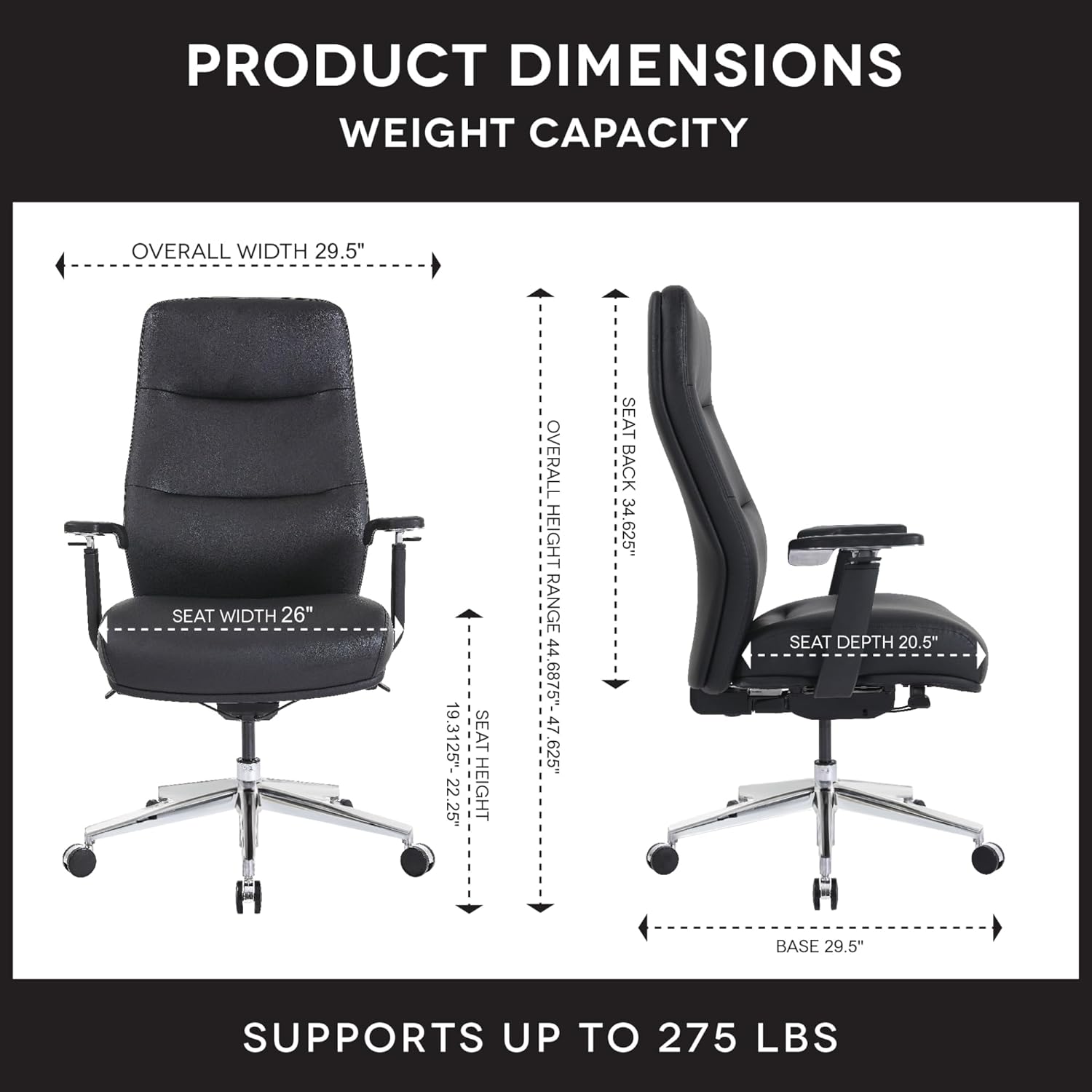
Image 4.1: Detailed product dimensions and weight capacity (275 lbs) of the WorkPro Momentum Ergonomic High-Back Active Chair.
5. 사용 설명서
Your WorkPro Momentum chair offers several adjustment features to customize your seating experience for optimal comfort and ergonomic support.
5.1. 좌석 높이 조절
To adjust the seat height, locate the pneumatic 1-touch lever typically found on the right side beneath the seat. While seated, pull the lever up to lower the seat. To raise the seat, stand up slightly and pull the lever up. Release the lever at your desired height.
5.2. Reclining Positions
The chair features multiple reclining positions. Use the recline tension knob (usually located under the front of the seat) to adjust the resistance of the recline. A separate lever (often on the left side) may be used to lock the backrest in a specific reclined position or allow for free-flowing tilt.

Image 5.1: The WorkPro Momentum chair illustrating its capability for multiple reclining positions, allowing users to find their optimal comfort angle.
5.3. Active High-Back Support
The active high-back is designed to move harmoniously with your body, providing continuous support and promoting healthy posture throughout the day. This dynamic movement helps reduce static pressure and encourages micro-movements.

이미지 5.2: 후면 view of the WorkPro Momentum chair demonstrating the active movement of its high-back, adapting to the user's posture.
5.4. 허리 지지대
The chair features built-in lumbar support that cradles your lower back, ensuring proper spinal alignment and reducing strain. This support is integrated into the backrest design.
5.5. 3D 팔걸이 조절
The 3D armrests offer customizable support with three adjustment capabilities:
- 높이 조정: Press the button on the side of the armrest and move it up or down to your desired height.
- 피벗: Rotate the armrest pads inward or outward to support your arms during various tasks.
- 전진 및 후진 이동: Slide the armrest pads forward or backward to find the optimal position for your forearms.
5.6. Premium Seat Cushion
The premium seat cushion design incorporates a 3D printed lattice mesh structure combined with foam layers. This construction ensures long-lasting comfort and maintains its shape and performance over time.

이미지 5.3: 폭발된 view illustrating the multi-layered construction of the WorkPro Momentum chair's premium seat cushion, including the 3D printed lattice mesh.
6. 유지관리
Regular maintenance will help prolong the life and appearance of your WorkPro Momentum chair.
- Cleaning Vegan Leather: For general cleaning, wipe the vegan leather upholstery with a soft, damp 천을 사용하세요. 심한 얼룩은 순한 비눗물에 적셔 즉시 닦아 말리세요. 독한 화학 약품이나 연마성 세척제 사용은 피하세요.
- 하드웨어 검사: Periodically inspect all screws, bolts, and connections to ensure they are tight. Retighten as necessary to maintain stability and safety.
- 캐스터 유지 관리: Keep casters free of hair, dust, and debris to ensure smooth movement. You may occasionally clean the caster wheels with a damp 옷감.
- 가스 리프트: The gas lift is a sealed unit and requires no user maintenance. If it fails to function, contact customer support.
7. 문제 해결
의자에 문제가 발생하면 다음의 일반적인 문제 및 해결 방법을 참조하십시오.
| 문제 | 가능한 원인 | 해결책 |
|---|---|---|
| 의자는 높이 조절이 되지 않습니다. | 가스 리프트 오작동 또는 레버가 작동하지 않음 | Ensure the lever is fully pulled. If still unresponsive, the gas lift may need replacement. Contact support. |
| 의자가 흔들리거나 불안정합니다 | 느슨한 하드웨어 | Check and tighten all screws and bolts, especially those connecting the seat, backrest, and armrests to the mechanism. |
| 삐걱거리는 소리 | Loose connections or friction between parts | Tighten all hardware. Apply a small amount of silicone lubricant to moving parts if necessary, avoiding contact with upholstery. |
| 캐스터가 원활하게 굴러가지 않음 | 바퀴의 잔해 | 캐스터 휠에서 머리카락, 먼지 또는 이물질을 제거하십시오. |
8. 사양
| 특징 | 세부 사항 |
|---|---|
| 상표 | 워크프로 |
| 모델 번호 | 735854699437 |
| 색상 | 검은색 |
| 재료 | Vegan Leather (Faux Leather), Foam, Wood Frame |
| 품목 무게 | 64파운드(29kg) |
| 중량 용량 | 최대 275kg(124.7파운드) |
| 전체 치수(길이 x 너비 x 높이) | 16.54 x 36.22 x 25.98 인치(대략) |
| 좌석 높이 범위 | 19.13" - 22.23" (approximate) |
| 백 스타일 | High Back, Active Movement |
| 팔 스타일 | 3D Adjustable (Height, Pivot, Forward/Backward) |
| 리클라이닝 포지션 | 다수의 |
| 조립이 필요합니다 | 예 |
| 규정 준수 | ANSI/BIFMA Compliant, FSC Certified Wood/Paper |
9. 보증 및 지원
For warranty information, please refer to the documentation provided at the time of purchase or contact your retailer. Warranty terms and conditions may vary.
If you require further assistance, have questions about assembly, operation, or need to report a missing/damaged part, please contact the manufacturer or your point of purchase. The manufacturer of this product is OFFICE DEPOT.
You can often find support resources, FAQs, and contact information on the official WorkPro website or through the retailer where you purchased the chair.
WorkPro Store: Visit the WorkPro Store on Amazon