소개
This manual provides detailed instructions for the safe and effective use of your Generic ZQ01337 7-in-1 Stage Light System. This versatile lighting unit is designed for various events, including parties, DJ sets, clubs, and stage performances. Please read this manual thoroughly before operation and retain it for future reference.
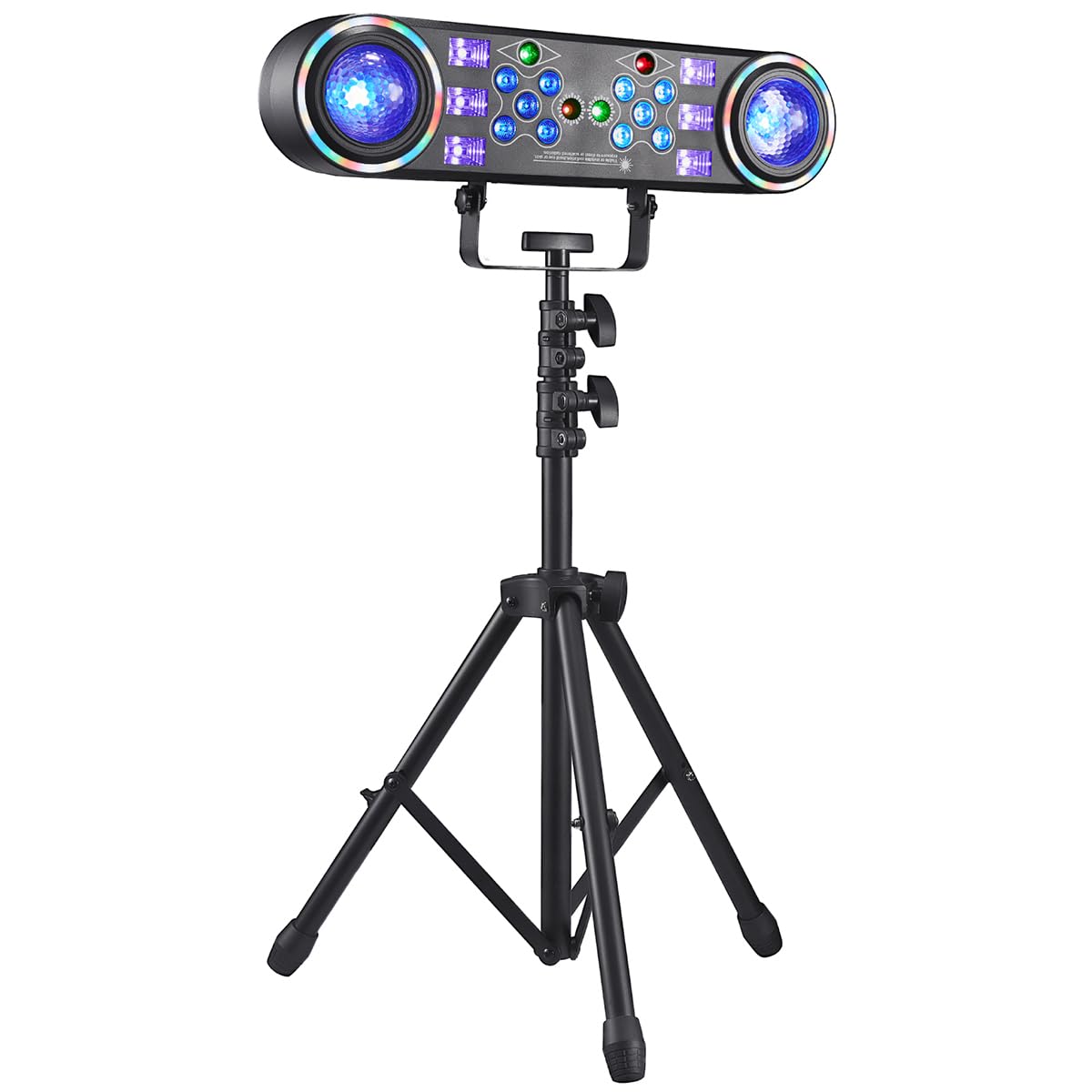
그림 1: 이상view of the Generic ZQ01337 7-in-1 Stage Light System.
패키지 내용
아래 나열된 모든 품목이 패키지에 포함되어 있는지 확인하세요. 품목이 누락되었거나 손상된 경우 고객 지원팀에 문의하세요.
- 7-in-1 Stage Light System Unit
- 라이트 스탠드
- 전원 케이블
- 사용 설명서 (본 문서)
중요 안전 지침
감전, 화재 또는 부상의 위험을 줄이려면 항상 다음 기본 안전 예방 조치를 따르세요.
- 제품을 사용하기 전에 모든 지침을 읽으세요.
- 본 제품을 비나 습기에 노출시키지 마십시오.
- Do not open the housing. There are no user-serviceable parts inside. Refer all servicing to qualified service personnel.
- Ensure the unit is placed on a stable surface or securely mounted to the stand.
- 가연성 물질에서 멀리 두세요.
- 사용하지 않을 때나 청소하기 전에는 전원 콘센트에서 장치의 플러그를 뽑아 두세요.
- 제품 작동 중에는 광원을 직접 쳐다보지 마십시오.
- 과열을 방지하려면 장치 주변에 적절한 환기가 이루어지도록 하십시오.
설치 가이드
- 스탠드 조립: Carefully unpack the light stand components. Follow the stand's specific instructions to assemble it securely. Ensure all locking mechanisms are tightened.
- 조명 장치를 설치하세요: Attach the 7-in-1 Stage Light System to the top of the assembled stand using the provided mounting hardware. Ensure it is firmly secured and balanced.
- 위치: Place the assembled light system in the desired location, ensuring it is stable and has adequate clearance for ventilation.
- 전원 연결: Insert the power cable into the power input port on the light unit, then plug the other end into a standard electrical outlet (AC 100-240V, 50/60Hz).
- 초기 전원 켜기: Locate the power switch on the unit and turn it to the "ON" position. The lights should illuminate, indicating the unit is receiving power.
작동 지침
The ZQ01337 offers multiple lighting effects and control modes. Familiarize yourself with the control panel or remote control (if included) to navigate these options.
제어판 이상view
The control panel typically includes a display screen and several buttons (e.g., MODE, UP, DOWN, ENTER) to select and adjust settings.
조명 모드
- 자동 모드 : The light system cycles through various pre-programmed patterns and colors automatically.
- 사운드 활성화 모드: The lights respond to ambient sound or music. Adjust sensitivity if available.
- 스트로브 모드: Produces rapid flashes of light. Speed can often be adjusted.
- UV (Blacklight) Mode: Emits ultraviolet light, causing certain materials to glow.
- Disco Ball Effect: Projects rotating patterns, simulating a traditional disco ball.
- Colorful/RGB Mode: Allows selection of specific colors or color combinations (Red, Green, Blue, White, etc.).
- DMX 모드: For professional control using a DMX controller (requires DMX cables and a compatible controller, not included). Refer to the DMX channel chart in the specifications for details.
설정 조정
Use the UP/DOWN buttons to navigate through options and the ENTER button to confirm selections. The MODE button typically switches between main operating modes.
유지
정기적인 유지보수는 장비의 수명 연장과 최적의 성능을 보장합니다.tage light system.
- 청소: Disconnect power before cleaning. Use a soft, dry cloth to wipe the exterior of the unit. For lenses, use a soft, lint-free cloth and a mild glass cleaner if necessary. Do not use abrasive cleaners or solvents.
- 통풍: Ensure ventilation openings are clear of dust and debris. Periodically use compressed air to clear vents.
- 저장: When not in use for extended periods, store the unit in its original packaging or a protective case in a cool, dry place, away from direct sunlight and extreme temperatures.
- 케이블 검사: Regularly inspect the power cable and any other connected cables for signs of damage. Replace damaged cables immediately.
문제 해결
If you encounter issues with your stage light system, refer to the following common problems and solutions:
| 문제 | 가능한 원인 | 해결책 |
|---|---|---|
| Light unit does not power on. | No power supply; Power cable loose; Unit switch off. | Check power outlet; Ensure power cable is securely connected; Turn power switch to ON. |
| Sound activated mode not working. | Microphone sensitivity too low; No sound detected; Mode not selected. | Increase microphone sensitivity (if adjustable); Ensure music/sound is playing near the unit; Select Sound Activated Mode. |
| 조명이 어둡거나 깜빡입니다. | Low power supply; Overheating; Internal fault. | Ensure stable power supply; Check for proper ventilation; Contact customer support if problem persists. |
| 리모컨이 응답하지 않습니다. | 배터리 방전; 장애물; 방향이 잘못 설정됨. | Replace remote battery; Remove obstructions; Point remote directly at the unit's IR receiver. |
명세서
| 상표 | 일반적인 |
| 모델 번호 | ZQ01337 |
| 부품 번호 | ZQ01337X1US |
| 제품 크기(L x W x H) | 15.7 x 8.5 x 31.5인치(조립됨) |
| 재료 | 플라스틱 |
| 포함된 구성 요소 | Light kit included (main unit, stand, power cable) |
| 필요한 배터리 | 아니요 |
| 전원 입력 | AC 100-240V, 50/60Hz (typical for stage lights, inferred) |
보증 및 지원
본 제품은 제조사 표준 보증이 적용됩니다. 구체적인 보증 조건은 구매 시 제공된 설명서를 참조하거나 판매점에 문의하십시오.
For technical support, troubleshooting assistance, or to inquire about replacement parts, please contact Generic customer service through your purchase platform or the contact information provided by the seller.
Note: Protection plans may be available for purchase separately. These plans are offered by third parties and are not directly associated with the manufacturer's warranty.