
EnergyPort H29
EnergyPort Smart Bracelet H29 User Manual
모델: H29
1. 서론
This manual provides detailed instructions for the setup, operation, maintenance, and troubleshooting of your EnergyPort Smart Bracelet H29. This device is designed to assist you in monitoring various health and fitness metrics, including heart rate, blood oxygen, blood pressure, sleep patterns, and activity tracking.

Image 1.1: The EnergyPort Smart Bracelet H29 with both the blue silicone and blue nylon bands.
2. 상자 안에 무엇이 들어있나요?
패키지에 모든 품목이 들어 있는지 확인하세요.
- EnergyPort Smart Screenless Watch (1 unit)
- 사용설명서(1개)
- 자석 충전 케이블(1개)
- Replacement Straps (2 units)

Image 2.1: Package contents of the EnergyPort Smart Bracelet H29.
3. 설정 가이드
3.1 Initial Power On and Bluetooth Activation
For the first use, it is necessary to activate the device's Bluetooth functionality.
- 전원 켜기: Press and hold the side button for 3 seconds. The device will vibrate once, and a green light will flash, indicating successful power-on.
- 블루투스 활성화: While the device is powered on, press and hold the side button for 10 seconds. The device will vibrate twice in succession, and the green light will flash again, confirming Bluetooth activation.
3.2 앱 설치 및 페어링
To utilize all features of your Smart Bracelet, download and install the companion application.
- 앱 다운로드 : 제품 포장에 제공된 QR 코드를 스캔하거나 다음 웹사이트를 방문하세요. QWatch 프로 앱 to download the 'QWatch Pro' application on your Android or iOS device.
- 블루투스 활성화: 스마트폰에서 Bluetooth가 활성화되어 있는지 확인하세요.
- 페어링 장치: Open the 'QWatch Pro' app, navigate to the device pairing section, and select 'H29' from the list of available devices to connect.

Image 3.1: Steps for initial Bluetooth activation and connecting the bracelet to the QWatch Pro app.
4. 사용 설명서
4.1 피트니스 추적
The EnergyPort Smart Bracelet H29 offers over 170 professional sports modes and comprehensive activity tracking.
- 운동 모드: Select from over 170 sports modes, including running, hiking, yoga, and gym activities.
- GPS 추적 : For outdoor activities like city running or hiking, the device syncs GPS routes to your phone app, providing detailed route maps and distance data.
- 목표 설정: Set smart goals within the app to guide your fitness journey and track progress.

Image 4.1: The smart bracelet tracking outdoor running with GPS synchronization.

Image 4.2: Visual representation of the extensive range of sports modes supported by the device.
4.2 상태 모니터링
The device provides continuous monitoring of key health metrics.
- 심박수: Continuous heart rate monitoring with alerts for abnormal readings during activity or rest.
- 혈중 산소(SpO2): Automatic detection of blood oxygen saturation, useful for high-altitude activities or sleep monitoring.
- 혈압: Continuous blood pressure monitoring with trend analysis and alerts for abnormal values.
- 수면 추적: 모니터 수면 stages(깊은, 가벼운, 깨어 있는)를 통해 수면의 질에 대한 통찰력을 제공합니다.
- 스트레스 모니터링: Tracks stress levels and offers guided breathing exercises to help manage stress.
- 여성 건강: AI-powered period prediction and exercise adjustments based on menstrual cycle.
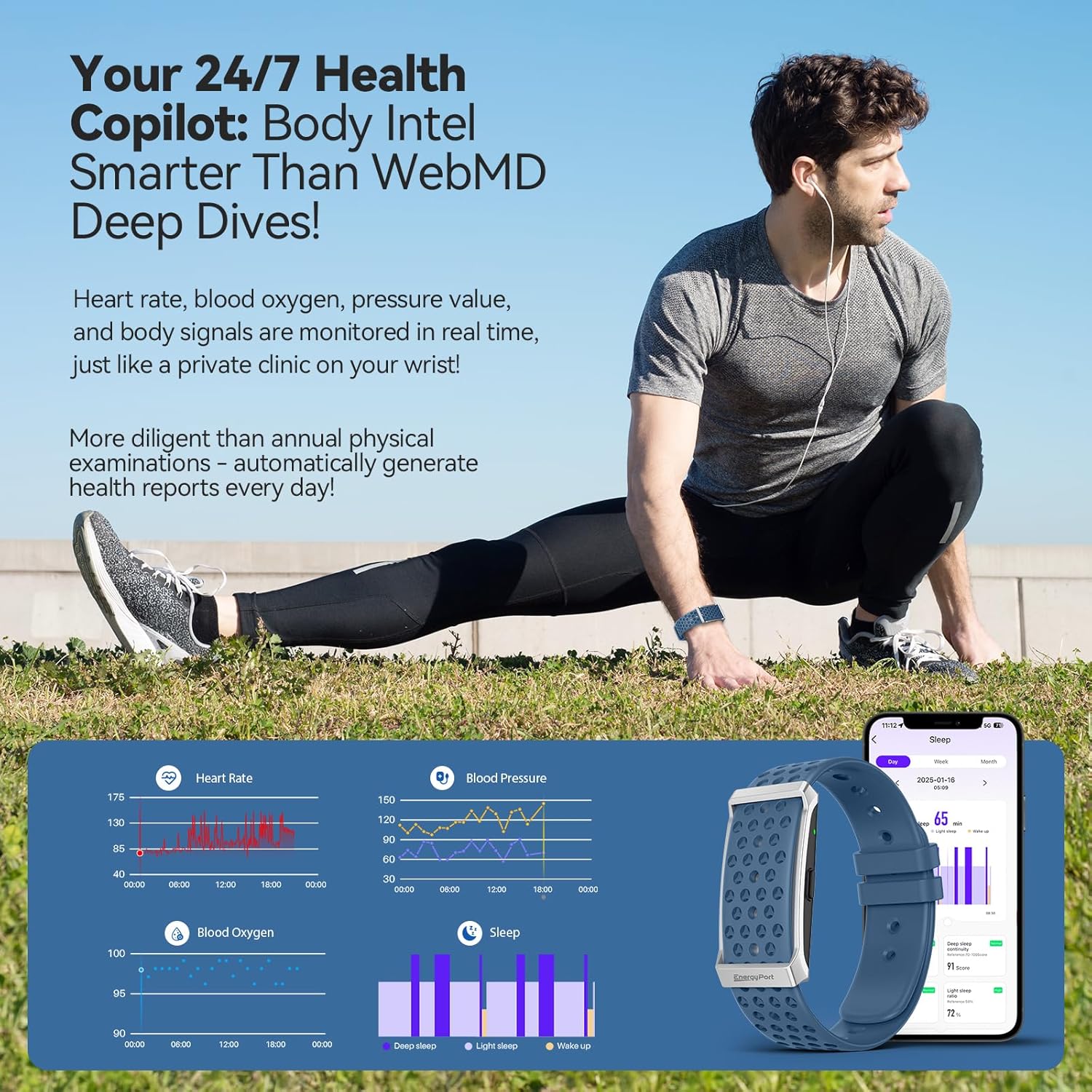
이미지 4.3: 이상view of health data tracked by the smart bracelet, including heart rate, blood pressure, blood oxygen, and sleep.

Image 4.4: Detailed sleep tracking and analysis provided by the device.
4.3 스마트 어시스턴트 기능
The bracelet integrates smart features to keep you connected and organized.
- 알림: Receive customizable vibration alerts for incoming calls, messages, and app notifications.
- 카메라 리모컨 : Use the bracelet as a remote shutter for your smartphone camera.
- 알림: Set gentle reminders for hydration, movement, or other custom alerts.
- 무음 경보: Set vibrating alarms that wake you discreetly without disturbing others.

Image 4.5: Notification display and smart alerts on the bracelet.
5. 유지관리
5.1 충전 중
The EnergyPort Smart Bracelet H29 features an extended battery life.
- 배터리 지속 시간: Expect 20-30 days of regular use and 45-60 days on standby from a single charge.
- 충전 프로세스: Use the provided magnetic charging cable. Align the magnetic pins with the charging contacts on the back of the device.

Image 5.1: Charging the EnergyPort Smart Bracelet H29.
5.2 방수성
The device is designed for daily water exposure.
- 평가: 1 ATM waterproof, suitable for depths up to 10 meters.
- 용법: Resistant to rain, sweat, and handwashing.
- 주의: Avoid immersion in hot water.

Image 5.2: The smart bracelet's 1 ATM water resistance for daily activities.
5.3 Cleaning and Strap Care
To maintain hygiene and comfort, regularly clean your bracelet and straps.
- 청소: Wipe the device and straps with a soft, damp 옷감. 가혹한 화학 물질을 피하십시오.
- Strap System: The device comes with a dual strap system (nylon and silicone) for various activities and comfort. Interchange straps as needed.

Image 5.3: The lightweight design and dual strap options for comfort.
6. 문제 해결
If you encounter issues with your EnergyPort Smart Bracelet H29, refer to the following common solutions:
- 장치 전원이 켜지지 않음: Ensure the device is fully charged. If it's the first use, follow the Bluetooth activation steps (Section 3.1) carefully.
- 앱과 페어링할 수 없습니다:
- Confirm Bluetooth is enabled on both the bracelet and your smartphone.
- Ensure the 'QWatch Pro' app is updated to the latest version.
- Restart both the bracelet and your smartphone, then attempt pairing again.
- Inaccurate Health Readings (HR, SpO2, BP):
- Ensure the bracelet is worn snugly on your wrist, not too tight or too loose.
- 기기 뒷면의 센서를 청소하세요.
- Remain still during measurements for best accuracy.
- Sleep Tracking Issues: Ensure the bracelet is worn consistently throughout the night. Verify that the app has the correct time zone settings.
- Workout Tracking Not Starting/Stopping: Ensure you initiate the workout mode correctly within the app or on the device. Wait for any countdowns to complete before starting your activity.
- Unexpected Vibrations: Check your notification settings within the 'QWatch Pro' app to ensure only desired alerts are enabled.
- App Glitches or Typos: Ensure your 'QWatch Pro' app is updated. If issues persist, try reinstalling the app.
7. 사양
| 특징 | 세부 사항 |
|---|---|
| 모델명 | H29 |
| 상표 | EnergyPort |
| 제품 치수 | 2.4 x 4.3 x 4.3 인치 |
| 품목 무게 | 5.9 온스 |
| 메모리 저장 용량 | 64메가바이트 |
| 운영 체제 | 안드로이드, iOS |
| 연결 기술 | 블루투스 |
| 무선 통신 표준 | 블루투스 |
| GPS | 스마트폰을 통한 GPS |
| 방수성 | 1 ATM (10m depth) |
| 배터리 수명 (일반 사용 시) | 20-30일 |
| 배터리 수명(대기) | 45-60일 |
| 특별 기능 | Day&Night Sleep Tracker, Call Reminder, Message Notification, Heart Rate Monitor, Blood Pressure Watch, Activity Tracker, Calorie Tracker, Pedometer, Camera Remote, Alarm, Sedentary Reminder, Water Drinking Reminder, GPS Running, 173 Exercise Modes |
8. 보증 및 지원
8.1 보증 정보
The EnergyPort Smart Bracelet H29 comes with a 3년 보증 covering all manufacturing defects. During this period, EnergyPort will cover repairs or replacements for eligible defects.
Image 8.1: EnergyPort's 3-year support commitment.
8.2 Lifetime Support and No Subscriptions
Enjoy free lifetime access to all core features of your EnergyPort Smart Bracelet H29. There are no subscription fees required to use the device's primary functionalities.
8.3 고객 지원
For further assistance, technical support, or warranty claims, please contact EnergyPort customer service through the official web사이트 또는 구매 플랫폼.
Ask a question about this manual
Ask about setup, troubleshooting, compatibility, parts, safety, or missing instructions. Manuals+ will review the question and use this page’s manual context to help answer it.