
1. 서론
Thank you for choosing the Mistral MTF1697DR 16-inch DC Table Fan. This manual provides essential information for the safe and efficient operation, maintenance, and troubleshooting of your new fan. Please read these instructions thoroughly before use and retain them for future reference.
2. 제품 오버view
The Mistral MTF1697DR is a 16-inch DC table fan designed for optimal air circulation. It features a durable construction and advanced functionalities for enhanced user comfort.
주요 특징:
- 9 Speed Settings with 3 Mode Selection
- Energy-efficient BLDC Motor
- Up to 9 Hours Timer Function
- 강력한 공기 공급
- Front & Rear Durable Plastic Fan Guard
- 원격 제어 작동
구성 요소:
Familiarize yourself with the main components of your fan:
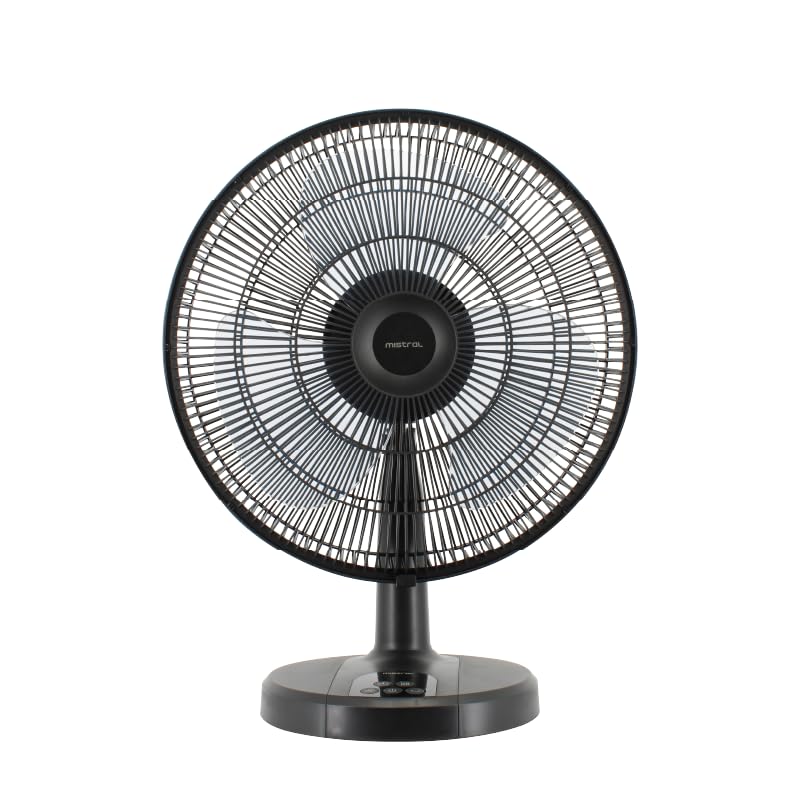
그림 1: 전면 view of the Mistral MTF1697DR fan, showing the fan head, guard, stand, and base with control panel.

그림 2: 측면 view of the Mistral MTF1697DR fan, illustrating the fan head's tilt mechanism and the fan's profile.
3. 설정
Follow these steps to set up your fan:
- 짐 풀기: 포장재를 조심스럽게 모두 제거하십시오. 모든 구성품이 있는지, 손상되지 않았는지 확인하십시오.
- 집회: The fan typically comes partially assembled. If the fan guard or base requires attachment, follow the diagrams provided in the separate assembly guide (if applicable) or ensure the fan head is securely fastened to the stand and the stand to the base. Ensure the front and rear fan guards are properly aligned and secured.
- 놓기: Place the fan on a stable, flat surface. Ensure there is adequate space around the fan for proper air circulation and to prevent obstruction of the air intake/outlet. Keep the fan away from curtains, drapes, or any objects that could be drawn into the fan blades.
- 전원 연결: Plug the power cord into a standard electrical outlet (220-240V ~ 50/60Hz).
4. 사용 설명서
Your Mistral MTF1697DR fan can be operated using the control panel on the base or the included remote control.
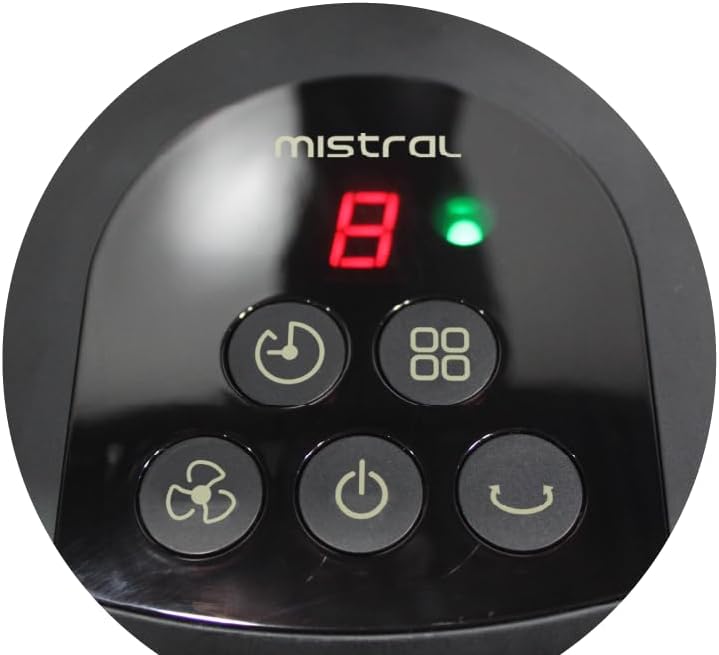
Figure 3: Close-up of the fan's control panel on the base, showing buttons for power, speed, mode, timer, and oscillation.
제어판 기능:
- 전원 버튼 (U): 팬을 켜거나 끄려면 누르세요.
- 속도 버튼(팬 아이콘): Press repeatedly to cycle through 9 speed settings. The current speed will be displayed on the LED screen.
- 모드 버튼(Squares Icon): Press to select from 3 operating modes (e.g., Normal, Natural, Sleep). Each press changes the mode.
- 타이머 버튼(시계 아이콘): Press to set the fan to turn off automatically after a set period, up to 9 hours. Each press increases the timer duration.
- 진동 버튼(Curved Arrow Icon): Press to start or stop the fan's oscillation function, which sweeps the airflow from side to side.
원격 제어:
The remote control duplicates all functions available on the fan's control panel, allowing for convenient operation from a distance. Ensure the remote control has working batteries and is pointed towards the fan's receiver.
5. 유지관리
Regular cleaning and proper care will ensure the longevity and optimal performance of your fan.
청소:
- 항상 팬의 플러그를 뽑아두세요 청소하기 전에 전원 콘센트에서 플러그를 뽑으세요.
- 외부: 팬의 외부 표면을 부드러운 천으로 닦으세요.amp 천으로 닦아주세요. 연마성 세제, 용제 또는 강한 화학 물질은 마감재를 손상시킬 수 있으므로 사용하지 마세요.
- Fan Guards and Blades: To clean the fan blades, you may need to carefully remove the front fan guard. Refer to the assembly instructions for guard removal. Use a soft cloth or a vacuum cleaner with a brush attachment to remove dust from the blades and guards. Ensure all parts are completely dry before reassembling and operating the fan.
- Do not immerse the fan in water or allow water to drip into the motor housing.
저장:
장기간 사용하지 않을 경우 선풍기를 시원하고 건조한 곳에 보관하세요. 원래 포장 상태로 보관하면 먼지와 손상으로부터 보호할 수 있습니다.
6. 문제 해결
팬에 문제가 발생하면 다음의 일반적인 문제와 해결 방법을 참조하세요.
- 팬이 켜지지 않음:
- 전원 코드가 작동하는 콘센트에 단단히 꽂혀 있는지 확인하세요.
- 전원 버튼이 눌렸는지 확인하세요.
- 가정용 회로 차단기가 작동했는지 확인하십시오.
- Weak or no airflow:
- Check for obstructions around the fan guards.
- Clean any dust or debris from the fan blades and guards (refer to Maintenance section).
- 팬 속도 설정을 높이세요.
- 원격 제어가 작동하지 않음:
- 리모컨과 선풍기 수신기 사이에 장애물이 없는지 확인하십시오.
- 리모컨의 배터리를 교체하세요.
- 리모컨의 유효 작동 범위 내에 있는지 확인하십시오.
이러한 해결 방법을 시도한 후에도 문제가 지속되면 고객 지원팀에 문의하세요.
7. 사양
| 사양 | 세부 사항 |
|---|---|
| 모델 | MTF1697DR |
| 권tage | 220-240V ~ 50/60Hz |
| 왓tage | 36와트 |
| 공기량 | 3600m³ / 시간 |
| 최대 공기 흐름 | 4.73m/초 |
| 제품 크기(L*W*H) | 455 * 280 * 600 mm (45.5D x 28W x 60H cm) |
| 순중량 | 2.6킬로그램 |
| 총 중량 | 3.8킬로그램 |
| 안전 마크 | 250177-11 |
| 색상 | 검은색 |
| 선풍기 디자인 | 테이블 선풍기 |
| 전원 | 코드식 전기 |
| 속도의 수 | 9 |
| 제어 방법 | 원격 |
| 모터 유형 | Brushless (BLDC) |
| 재료 | 플라스틱 |
| 포함된 구성 요소 | 원격 |
8. 보증 및 지원
보증 정보:
This Mistral MTF1697DR fan comes with a 2년 보증 on the product, and an extended 8년 보증 specifically for the motor. Please retain your proof of purchase for warranty claims.
고객 지원:
For technical assistance, warranty claims, or any questions not covered in this manual, please contact your retailer or the Mistral customer service department. Contact details can typically be found on the product packaging or the official Mistral web대지.