
1. 서론
This manual provides comprehensive instructions for the safe and effective use of the AMPBANK H128 Handheld Thermal Camera. The H128 is designed for precise temperature measurement and thermal imaging, suitable for various applications including electrical inspections, HVAC diagnostics, building energy audits, and automotive maintenance. Please read this manual thoroughly before operating the device and retain it for future reference.

그림 1.1: AMPBANK H128 Handheld Thermal Camera, showcasing its ergonomic design and integrated display.
2. 안전 정보
부상 및 기기 손상을 방지하기 위해 항상 다음 안전 수칙을 준수하십시오.
- Do not point the camera directly at extremely high-intensity energy sources, such as the sun or lasers, as this may damage the infrared detector.
- Avoid dropping the device or subjecting it to severe impact, despite its robust design.
- Do not immerse the device in water or other liquids. While it has an IP65 rating for dust and water jet protection, it is not designed for submersion.
- Use only the specified charging cable (USB-C) and power adapter to charge the device.
- 카메라를 분해하거나 개조하지 마십시오. 수리는 반드시 공인 서비스 담당자만 수행해야 합니다.
- Keep the lens clean and free from dust and debris. Use a soft, lint-free cloth for cleaning.
- Operate the device within the specified environmental conditions (temperature and humidity).
3. 제품 오버view
3.1. 구성 요소
그만큼 AMPBANK H128 thermal camera includes the following main components:
- 적외선 렌즈: 열복사를 포착합니다.
- 디스플레이 화면: Shows thermal images, temperature readings, and menu options.
- 제어 버튼: For navigation and selection (OK, Up, Down, Return/Power).
- 트리거 버튼: 이미지를 캡처하기 위해.
- USB-C 포트: 충전 및 데이터 전송용입니다.
- 삼각대 마운트: Standard 1/4-inch thread for stable positioning.
3.2. 주요 특징
The H128 thermal camera offers a range of advanced features for efficient and accurate thermal inspections:
- Enhanced Clarity with TISR Resolution: The camera utilizes TISR (Thermal Image Super Resolution) technology to achieve an effective display resolution of 240x240 pixels from a 128x128 infrared sensor, providing clearer thermal images.
- 24시간 연장된 배터리 수명: Equipped with a built-in 2900mAh rechargeable battery, the H128 provides up to 24 hours of continuous operation, minimizing downtime during extended inspections.
- Precise Temperature Measurement: The device offers high accuracy with a temperature resolution of 0.1°C and readings within ±3%, covering a wide temperature range from -4°F to 842°F (-20°C to 450°C). Users can adjust emissivity for various materials to improve accuracy.
- Temperature Alarm for Anomaly Detection: A built-in alarm system quickly identifies abnormal heat sources, automatically tracking and displaying maximum, minimum, and center temperatures on the screen.
- 내구성이 뛰어나고 견고한 디자인: The H128 is built to withstand demanding environments, featuring a 6.56-foot (2-meter) drop protection and an IP65 ingress protection rating against dust and water jets.
- 높은 프레임 속도: A 25Hz frame rate ensures smooth, real-time thermal imagery, crucial for dynamic inspections.
- Multiple Thermal Palettes: Choose from 5 different color palettes (Iron Red, Black Hot, Rainbow, White Hot, Red Hot) to best visualize temperature differences for specific applications.

Figure 3.1: Comparison of thermal image clarity with and without TISR technology, demonstrating the enhanced 240x240 resolution.

Figure 3.2: Illustration of the H128's long-lasting 24-hour battery life and Type-C charging port.

Figure 3.3: The H128 in use, demonstrating its capability for accurate temperature measurement in an electrical panel.

Figure 3.4: The H128 display highlighting hot, center, and cold spots with an integrated high/low temperature alarm.
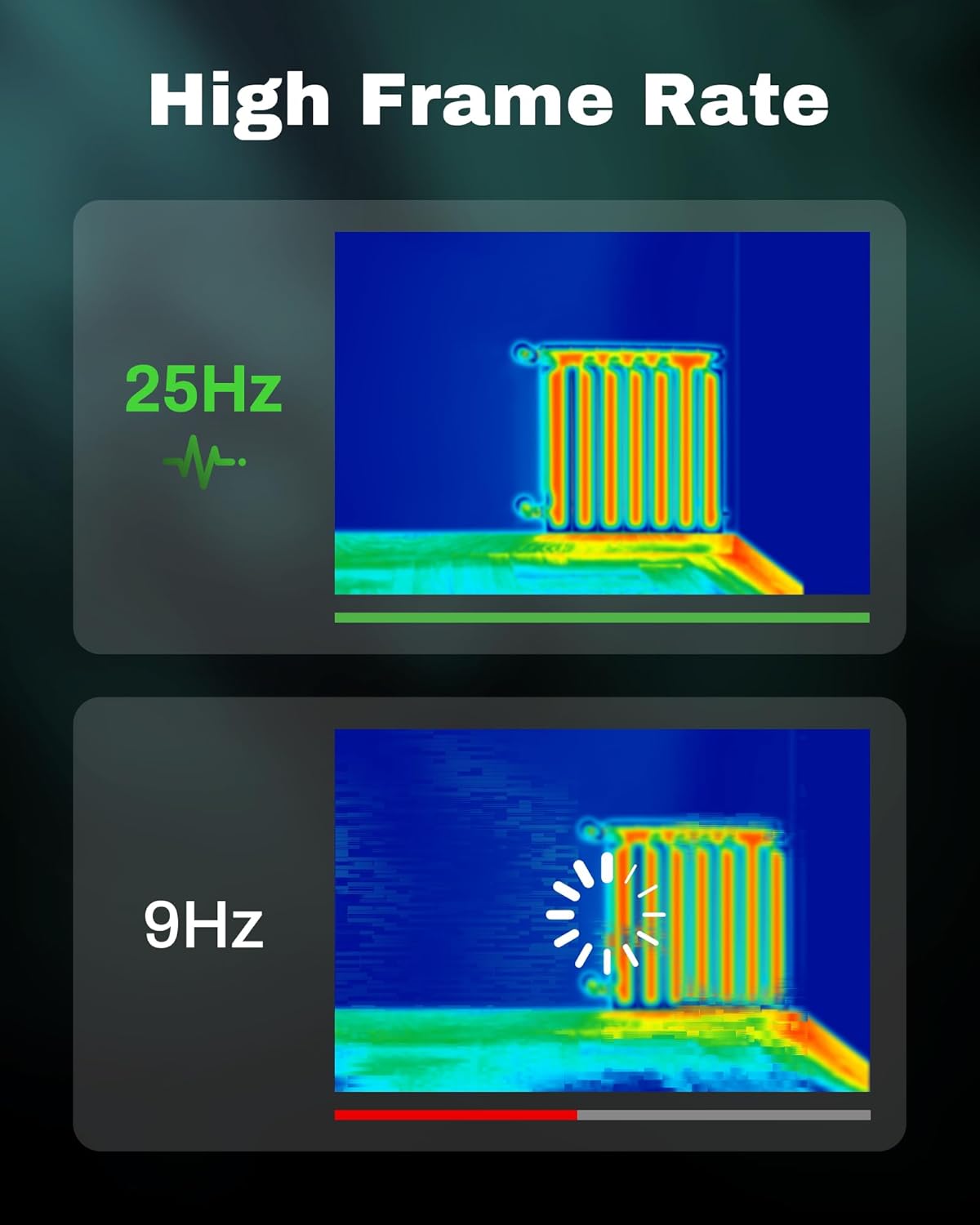
Figure 3.5: Visual comparison of thermal image fluidity at 25Hz versus 9Hz frame rates.

Figure 3.6: Display of the five available thermal color palettes for varied visualization of heat signatures.
4. 설정
4.1. 풀기
모든 품목을 포장에서 조심스럽게 꺼내세요. 상자에는 다음이 포함되어 있어야 합니다.
- AMPBANK H128 Thermal Imaging Camera
- USB-C 케이블
Inspect the camera for any signs of damage. If any components are missing or damaged, contact customer support immediately.
4.2. 배터리 충전
Before first use, fully charge the camera's built-in battery.
- Connect the supplied USB-C cable to the USB-C port on the top of the camera.
- USB-C 케이블의 다른 쪽 끝을 호환되는 USB 전원 어댑터(포함되지 않음) 또는 컴퓨터의 USB 포트에 연결합니다.
- 화면의 충전 표시등이 충전 상태를 보여줍니다. 완전 충전에는 일반적으로 몇 시간이 소요됩니다.
- 완전히 충전되면 케이블을 분리하세요.
4.3. 초기 전원 켜기 및 기본 설정
- 전원 켜기: Press and hold the power button (often integrated with the Return button) for approximately 8 seconds until the screen illuminates.
- 언어 선택: Upon first power-on, you may be prompted to select your preferred language. Use the Up/Down buttons to navigate and the OK button to confirm.
- 날짜 및 시간: 정확한 시간을 위해 올바른 날짜와 시간을 설정하세요amping of captured images. Navigate to the settings menu using the OK button, then find the Date/Time option.
5. 운영
5.1. 기본 동작
- 전원 켜기/끄기: Press and hold the power button for 8 seconds to turn on. Press and release the power button to turn off or enter sleep mode.
- 메뉴 탐색: 사용하세요 OK 메뉴에 들어가려면 버튼을 클릭하세요. Up 그리고 아래에 화살표 버튼을 눌러 옵션을 스크롤하세요. OK to select an option. Press the 반품 button to exit a menu or go back.
- 이미지 캡처: Aim the camera at the target. Press the trigger button (located on the handle) to capture a thermal image. Images are saved internally.
5.2. Measurement Modes and Settings
- Temperature Spot Measurement: The H128 automatically displays the maximum, minimum, and center temperatures on the screen.
- 방사율 조정: For accurate temperature readings, adjust the emissivity setting based on the material being inspected. Access this setting through the menu. Common emissivity values can be found in reference tables.
- 거리 설정: Inputting the approximate distance to the target can further refine temperature accuracy.
- 온도 팔레트: Change the color scheme of the thermal image to highlight temperature differences more effectively. Navigate to the palette settings in the menu and choose from Iron Red, Black Hot, Rainbow, White Hot, or Red Hot.
5.3. 데이터 관리
The H128 can store over 8000 images internally. To transfer images to a computer:
- Connect the camera to your computer using the supplied USB-C cable.
- 카메라는 이동식 저장 장치로 나타납니다.
- Browse to the image folder and copy the desired file컴퓨터에 연결하세요.

Figure 5.1: Connecting the H128 thermal camera to a laptop via USB-C for image transfer.
6. 유지관리
6.1. 청소
- 카메라 본체 : 카메라 본체를 부드러운 천으로 닦아주세요.amp 천. 연마성 세척제나 용매를 사용하지 마십시오.
- 적외선 렌즈: The infrared lens is a delicate optical component. Use a lens cleaning cloth or a soft, lint-free cloth specifically designed for optics. Gently wipe the lens to remove dust or smudges. Do not apply excessive pressure or use harsh chemicals.
6.2. 보관
When not in use, store the H128 in a cool, dry place, away from direct sunlight and extreme temperatures. Ensure the battery is partially charged (around 50%) before long-term storage to preserve battery health.
6.3. 배터리 관리
배터리 수명을 극대화하려면:
- 배터리를 자주 완전히 방전시키지 마세요.
- 장시간 배터리를 완충 상태로 두지 마십시오.
- 실온에서 배터리를 충전하십시오.
7. 문제 해결
| 문제 | 가능한 원인 | 해결책 |
|---|---|---|
| 카메라의 전원이 켜지지 않습니다. | 배터리가 소진되었습니다. | USB-C 케이블을 사용하여 배터리를 충전하세요. |
| 이미지가 흐릿하거나 불분명합니다. | Lens is dirty. / Incorrect focus (if applicable). | Clean the infrared lens with a soft, lint-free cloth. The H128 has fixed focus, ensure you are within the optimal measurement distance. |
| 온도 측정값이 부정확한 것 같습니다. | Incorrect emissivity setting. / Distance to target is too far. | Adjust the emissivity setting in the menu to match the material being measured. Ensure you are within the recommended measurement distance. |
| 이미지를 컴퓨터로 전송할 수 없습니다. | Loose USB-C connection. / Driver issue. | Ensure the USB-C cable is securely connected to both the camera and the computer. Try a different USB port or cable. Restart both devices. |
| 배터리 수명이 예상보다 짧습니다. | Frequent use of high-brightness settings. / Battery degradation over time. | Reduce screen brightness if possible. Ensure proper charging and storage practices. If battery life significantly degrades, contact support. |
If the problem persists after attempting these solutions, please contact AMPBANK customer support.
8. 사양
| 매개변수 | 값 |
|---|---|
| 모델 | H128 |
| 적외선 해상도 | 128x128 픽셀 |
| TISR Display Resolution | 240x240 픽셀 |
| 온도 범위 | -4°F ~ 842°F(-20°C ~ 450°C) |
| 정확성 | ±3% 또는 ±3°C (둘 중 더 큰 값) |
| 열 감도(NETD) | 40mk |
| 프레임 속도 | 25Hz |
| 배터리 유형 | Built-in Rechargeable Lithium Ion (2900mAh) |
| 배터리 수명 | 최대 24시간 연속 사용 가능 |
| 충전 포트 | USB-C |
| 낙하 보호 | 6.56피트(2미터) |
| IP 등급 | IP65 |
| 저장 용량 | 8000+ images |
| 치수 | 9.33 x 4.76 x 3.86 인치(대략) |
| 무게 | 1.06파운드(대략) |
9. 보증 및 지원
자세한 보증 정보는 제품에 동봉된 보증 카드를 참조하거나 공식 웹사이트를 방문하십시오. AMP은행 web사이트. 보증 약관은 지역 및 제품에 따라 다를 수 있습니다.
기술 지원이 필요하시거나 제품에 대한 질문이 있으시거나 보증 청구를 진행해야 하는 경우, 다음 연락처로 문의해 주십시오. AMPBANK customer support through their official channels:
- 제조업체: AMP은행
- 온라인 매장: 방문하세요 AMPBANK Store on Amazon
- 공식에 문의하세요 AMP은행 website or product packaging for the most current contact information (email, phone, service centers).