
소개
This manual provides detailed instructions for the installation, operation, and maintenance of your Meiqils 4 Channel 2K Dash Cam. Please read this manual thoroughly before using the device to ensure proper functionality and safety. Keep this manual for future reference.
상자 안에 무엇이 들어있나요?
패키지에 모든 품목이 들어 있는지 확인하세요.
- 1x 4 Channel Dash Cam (Front, Rear, Left, Right Cameras integrated)
- 1x Type-C 충전 케이블
- 1x 64GB SD 카드
- 1x GPS Module
- 1x 설치 도구

Image: Contents of the Meiqils 4 Channel 2K Dash Cam package.
제품 특징
The Meiqils 4 Channel 2K Dash Cam offers advanced features for comprehensive vehicle surveillance:
- 4채널 녹음: Simultaneously records from front (170° wide-angle), left, right (150° each), and a waterproof rear camera (150°).
- 고해상도: Captures 2K video from the front camera and 1080P from the rear, left, and right cameras in dual recording mode. The front camera can record up to 4K when used alone.
- 원활한 루프 녹음: 가장 오래된 영상을 자동으로 덮어씁니다. files when the included 64GB Micro-SD card (supports up to 256GB) is full, ensuring continuous recording.
- 야간 투시경: Equipped with sensors for clear recording in low-light conditions.
- Advanced 5GHz WiFi & App Control: Connects to a dedicated app for faster video downloads (up to 8MB/s) and convenient remote management.
- 내장형 G-센서: Detects sudden impacts or collisions and automatically locks the current video file 덮어쓰기를 방지하기 위해.
- 24시간 주차 감시: Activates time-lapse recording mode after the engine is turned off, providing continuous surveillance for up to 24 hours.
- GPS 모듈 : Records vehicle position and speed, providing valuable data for incident reconstruction.
- 3인치 IPS 화면: Provides instant footage verification and clear display.
- WDR (Wide Dynamic Range) : Enhances video quality in varying light conditions.
- 동작 감지: Records when motion is detected, conserving storage space.

Image: Illustration of the 4-channel recording capability.

이미지: 이상view of additional powerful functions.
제품 끝view
Familiarize yourself with the dash cam's components and dimensions:

Image: Product dimensions and screen size.
설정 및 설치
대시캠을 올바르게 설치하려면 다음 단계를 따르세요.
- 본체 장착: Attach the main dash cam unit to your vehicle's windshield using the provided suction cup mount. Ensure it is positioned to capture a clear view 운전을 방해하지 않고 앞길을 볼 수 있습니다. view.
- 후방 카메라 연결하기: Route the 20ft extension cable from the main unit to the rear of your vehicle. Mount the waterproof rear camera on the rear window or license plate area. The rear camera can be adjusted up to a full 360° angle.
- GPS 모듈 연결하기: Connect the GPS module to the designated port on the main unit. Position the GPS module in an area with a clear view 최적의 신호 수신을 위해 하늘을 살펴보세요.
- 전원 연결: Use the Type-C charging cable to connect the dash cam to your vehicle's power outlet (e.g., cigarette lighter). For 24/7 parking monitoring, a hardwire kit (included) is required for continuous power.
- SD 카드 삽입: Insert the 64GB Micro-SD card into the designated slot on the dash cam. Ensure it is inserted correctly.

Image: Easy installation guide.
작동 지침
기본 동작
- 전원 켜기/끄기: The dash cam will automatically power on and begin recording when your vehicle starts. It will power off when the engine is turned off (unless 24/7 parking mode is active).
- 녹음 모드: The dash cam supports various recording modes including continuous loop recording, emergency recording (G-Sensor activated), and parking monitoring.
- 화면 디스플레이: 3인치 IPS 화면은 실시간으로 화면을 표시합니다. view카메라에서 나오는 영상입니다. 카메라 간에 전환할 수 있습니다. view메뉴 버튼을 사용합니다.
루프 녹음
The dash cam records video in segments. When the memory card is full, the earliest recorded video will be automatically deleted to make space for new recordings. This ensures continuous operation without manual intervention.

이미지: 반복 녹음 기능.
G-센서(비상 녹화)
The built-in G-Sensor detects sudden acceleration, braking, or collisions. When triggered, it automatically locks the current video segment, protecting it from being overwritten by loop recording. This ensures critical footage is saved for evidence.

Image: G-Sensor for emergency recording.
24/7 Parking Monitor
With the optional hardwire kit (included), the dash cam can monitor your vehicle continuously even when parked. It automatically switches to time-lapse recording mode after the engine is turned off, providing surveillance against bumps or vandalism.

Image: 24-hour parking monitoring setup.
나이트 비전
The dash cam is equipped with advanced night vision technology to ensure clear video capture in low-light and nighttime conditions, enhancing safety and visibility.
WiFi & App Control
The dash cam features 5GHz WiFi connectivity for seamless integration with its dedicated mobile application. This allows for:
- 살다 View: 대시캠에서 스마트폰으로 실시간 비디오를 스트리밍하세요.
- 비디오 다운로드: Quickly download recorded footage to your phone at speeds up to 8MB/s.
- 설정 조정: Configure dash cam settings directly from the app.
- 공유: Easily share videos and photos.
연결하려면:
- Power on the device and check WiFi information on the dash cam screen.
- Download the 'Vidure' app from your smartphone's app store (Google Play or App Store).
- Connect your smartphone to the dash cam's WiFi network.
- Open the app and add the dash cam as a device.
- Once connected, you can access all app features.
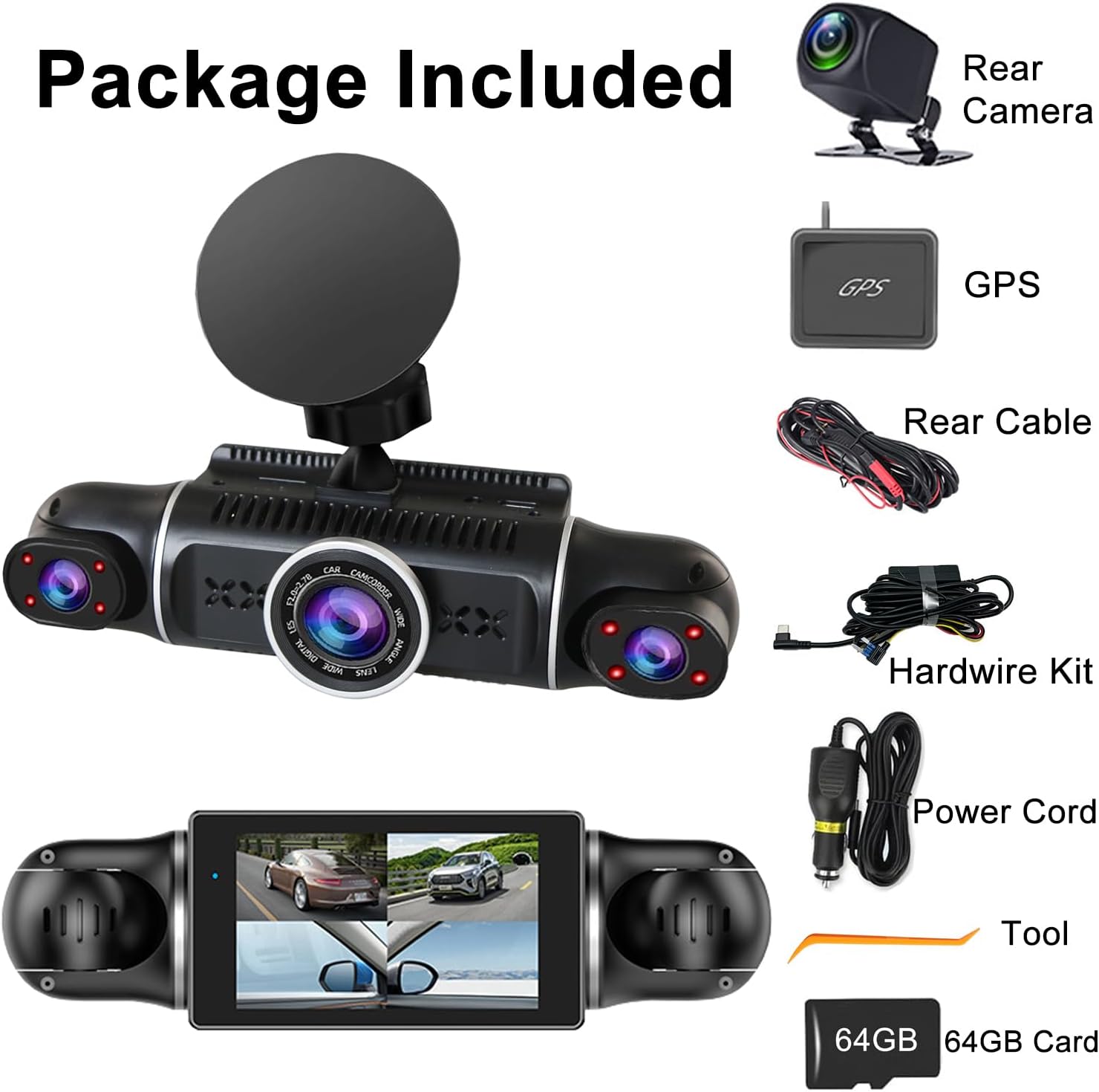
Image: WiFi and App Control setup.
GPS 기능
The included GPS module provides accurate location and speed data, which is embedded into your video recordings. This information can be crucial for insurance claims or legal disputes, offering verifiable evidence of your vehicle's journey.
문제 해결
블랙박스에 문제가 발생하면 다음의 일반적인 문제 및 해결 방법을 참조하십시오.
- 대시캠 전원이 켜지지 않음: 전원 케이블이 블랙박스와 차량 전원 콘센트에 제대로 연결되어 있는지 확인하십시오. 차량 전원 콘센트가 정상적으로 작동하는지 확인하십시오.
- 녹음이 예기치 않게 중단됨: Check if the SD card is full (loop recording should prevent this, but a faulty card might cause issues). Format the SD card regularly. Ensure the power supply is stable.
- 낮은 비디오 품질: Clean the camera lenses. Ensure the dash cam is securely mounted and not vibrating. Check video resolution settings.
- WiFi 연결 문제: Ensure the dash cam's WiFi is enabled. Restart both the dash cam and your smartphone. Make sure you are within range of the dash cam's WiFi signal.
- GPS가 작동하지 않음: Ensure the GPS module is connected correctly and has a clear view of the sky. It may take a few minutes to acquire a signal.
- Dash Cam Overheats: Ensure the dash cam is not exposed to direct sunlight for extended periods, especially in hot weather. Ensure proper ventilation around the device.
문제가 지속되면 고객 지원에 문의하여 추가 지원을 받으십시오.
명세서
| 특징 | 세부 사항 |
|---|---|
| 제품 치수 | 7.48 x 7.28 x 2.56 인치 |
| 품목 무게 | 1.52파운드 |
| 모델 번호 | 4채널 2K 블랙박스 |
| 배터리 | 1개의 리튬 폴리머 배터리(포함) |
| 연결성 | USB, Wireless (5GHz WiFi) |
| 비디오 캡처 해상도 | 1440p (2K) Front, 1080p Rear/Left/Right |
| 화면 크기 | 3인치(IPS) |
| 장착 유형 | 윈드 실드 마운트 |
| 특별 기능 | 4 Channel, G-Sensor, 360° View, Loop Recording, WDR, WiFi, 24/7 Parking Monitor, Night Vision, Motion Detection, 64GB SD Card, 170° Wide Angle, App Control |
| 색상 | 검은색 |
| 차량 서비스 유형 | 버스, 승용차, 미니밴, 트럭 |

Image: Feature comparison table.
보증 및 지원
For warranty information and customer support, please refer to the contact details provided on the product packaging or visit the official Meiqils web사이트. 구매 증빙 자료로 구매 영수증을 보관하세요.