
LFF TV-GKXMC-Q41-4MP/3W-1.8MM
LFF Hummingbird Feeder with Camera User Manual
Model: TV-GKXMC-Q41-4MP/3W-1.8MM
1. 제품 오버view
The LFF Hummingbird Feeder with Camera offers an innovative way to observe hummingbirds up close. Featuring a 2.5K HD camera with AI bird recognition, solar power, and a durable, weather-resistant design, it provides a unique birdwatching experience.
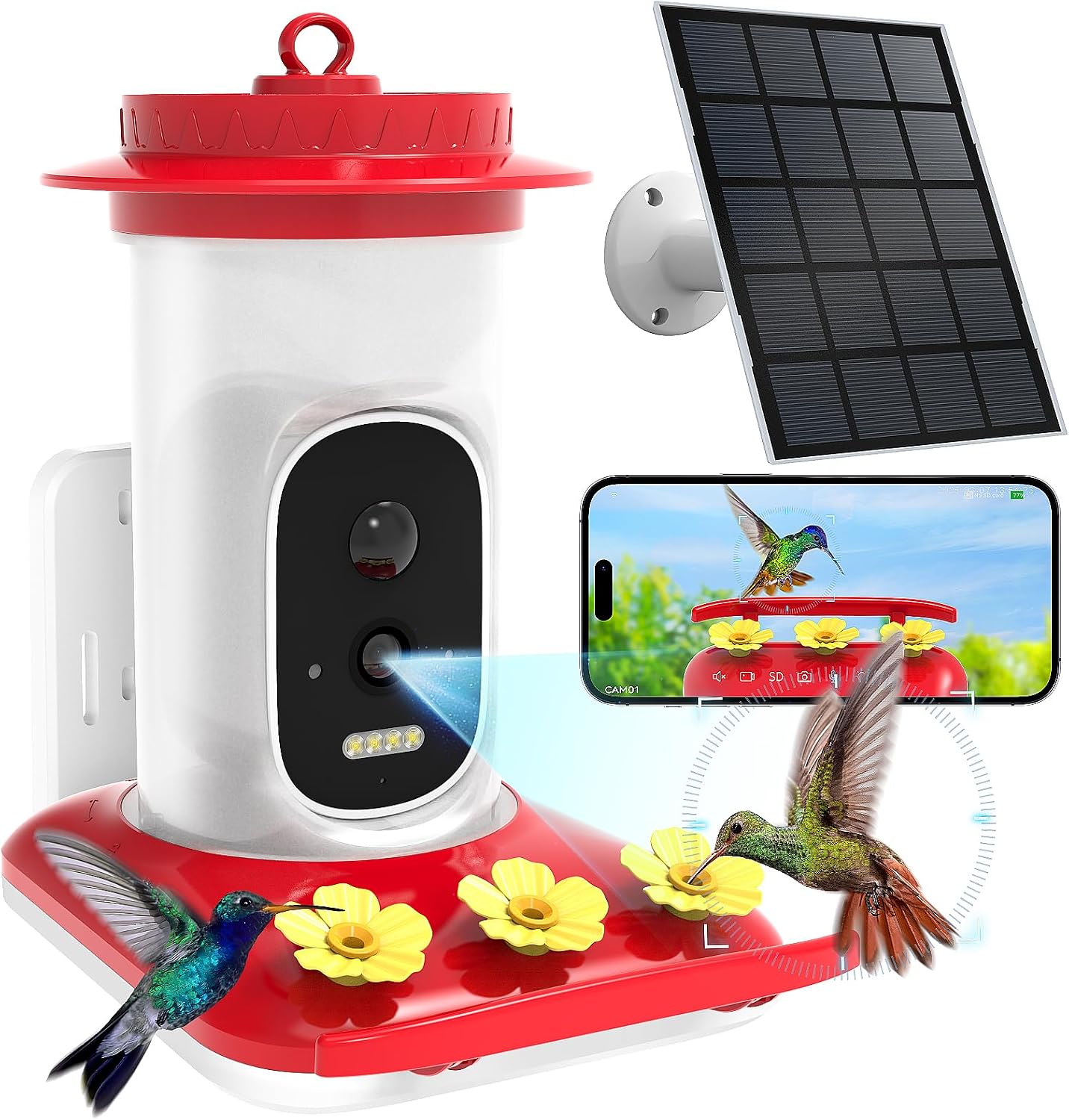
Figure 1: LFF Hummingbird Feeder with Camera, showing the main unit, solar panel, and smartphone app interface.
2. 포함 사항
Carefully unbox your LFF Hummingbird Feeder and ensure all components are present:
- Hummingbird Feeder Unit (Camera/Water Barrel and Waterfeeder Base)
- Solar Panel with Bracket
- 벽걸이 브라켓
- 외부 안테나
- Hummingbird Drinking Plugs (Yellow flowers)
- 섀시 나사
- 장착 나사 및 벽 앵커
- Binding Ties
- 사용 설명서 (본 문서)

Figure 2: All included parts of the Hummingbird Feeder system.
3. 설정 및 설치
Follow these steps to set up your hummingbird feeder:
3.1. Prepare the Feeder Base
- Remove the camera module from the hummingbird water feeder slot.
- Carefully insert the yellow hummingbird drinking plugs firmly into the spouts on the feeder base. Ensure they are securely seated to prevent leaks.

그림 3: 상세 view of the feeder base, highlighting the bee-proof design and anti-ant moat.
3.2. Fill the Nectar Reservoir
- 중요한: Do not open the top cover of the water barrel.
- Invert the water barrel and pour water or hummingbird nectar into the opening at the bottom. Fill to the recommended level as indicated on the barrel.
- Align the latch on the water barrel with the unlock mark on the waterfeeder base. Gently twist clockwise to assemble and fix it securely.

Figure 4: Instructions for filling the nectar reservoir. Note: If water leaks from the flower ports, reverse the pouring orientation during setup.
3.3. Camera Preparation and Installation
- Snap open the silicone cover on the back of the camera to access the power switch and charging port.
- Turn the power switch from "OFF" to "ON" to power on the camera. The indicator light will turn blue.
- Open the silicone cover on top of the camera to access the TF card slot and reset button.
- If needed, press and hold the reset button to reset the device. The camera will announce "Restore factory settings, please don't power off."
- Snap the camera back into the hummingbird feeder slot.
- Align the external antenna with the fixing hole and secure it to the camera.
Video 1: Step-by-step guide on assembling the LFF Hummingbird Feeder, including camera installation and initial power-up.
3.4. 장착 옵션
The feeder offers multiple mounting options to suit your outdoor space:
- 벽걸이 : Use the provided wall mount bracket and screws to attach the feeder to a wall.
- 교수형: Utilize the integrated hook to hang the feeder from a branch or shepherd's hook.
- 제본: Secure the feeder to a tree trunk or post using the binding ties.

Figure 5: Different ways to mount your hummingbird feeder.
배치 팁: It is advisable to avoid feeding hummingbirds alongside larger birds. Place the feeder at least 10 feet away from areas frequented by larger birds to ensure a safer environment for hummingbirds.

Figure 6: Recommended placement to avoid larger birds.
4. 사용 설명서
4.1. 앱 연결성 및 기능
Connect the smart hummingbird feeder to your smartphone or tablet via 2.4 GHz Wi-Fi (Not compatible with 5 GHz). Download the Tris Home APP to access the following features:
- 2.5K HD Camera & Night Vision: View optimal color images, even in darkness, with a 160° panoramic lens. The camera supports voice monitoring, two-way audio, photo capture, and video recording.
- AI Recognition & Instant Notification: The system uses sophisticated AI algorithms to accurately identify hummingbird species. Receive instant notifications when a hummingbird arrives. (A free one-month trial for AI Recognition service is included.)
- 양방향 오디오 : Use the 2-way audio feature to deter larger birds and ensure hummingbirds can feed safely.
- Auto-Capture: The feeder automatically captures moments when hummingbirds visit.
- 저장: Securely save photos and videos using either cloud storage or a TF card (not included).
- 공유: Share your smart hummingbird feeder with friends and family through the Tris Home APP and upload captured moments to social media.

Figure 7: Key features of the smart hummingbird feeder.

Figure 8: AI bird recognition feature identifying a hummingbird species.

Figure 9: Night vision capabilities, providing clear views even after dark.

Figure 10: Instant motion detection notifications to your smartphone.

Figure 11: Options for storing captured photos and videos.

Figure 12: Sharing captured hummingbird moments with friends and family.
4.2. 전원 관리
The feeder is equipped with a built-in 4000mAh rechargeable battery and an external 3W solar panel for continuous power supply. This dual charging mode ensures uninterrupted operation.

Figure 13: Solar panel and rechargeable battery for continuous power.
5. 유지관리
Regular maintenance ensures the longevity and optimal performance of your feeder:
- 청소: The feeder's wide-mouth design and tool-free assembly allow for easy disassembly and thorough cleaning. Regularly clean the feeder to prevent mold and bacteria growth, which can harm hummingbirds. Use warm water and a brush. Avoid harsh detergents.
- 리필: Refill the nectar reservoir as needed. The transparent design allows for easy monitoring of nectar levels.
- 날씨 보호: The IP66 waterproof rating ensures the feeder is protected against rain and harsh weather conditions. However, during extreme weather, consider bringing the feeder indoors if possible.

Figure 14: The feeder's IP66 waterproof design.
6. 문제 해결
| 문제 | 가능한 원인 | 해결책 |
|---|---|---|
| Water/Nectar leaks from flower ports. | Incorrect assembly of water barrel to base. | Ensure the water barrel is inverted correctly during filling and that the base is twisted firmly clockwise to lock. |
| 카메라 전원이 켜지지 않습니다. | Power switch is OFF or battery is drained. | Ensure the power switch is set to "ON". Charge the camera using the provided solar panel or a USB-C cable. |
| Wi-Fi에 연결할 수 없습니다. | 잘못된 Wi-Fi 대역(5GHz)을 선택했거나 신호가 약합니다. | Ensure you are connecting to a 2.4 GHz Wi-Fi network. Move the feeder closer to your Wi-Fi router or use a Wi-Fi extender. |
| AI Recognition not working. | Trial period expired or service not activated. | Check your Tris Home APP for AI Recognition service status. Activate or subscribe if the trial has ended. |
| 아무런 알림도 받지 못했습니다. | App notification settings are off or camera is offline. | Check notification settings in the Tris Home APP and on your smartphone. Ensure the camera is connected to Wi-Fi and online. |
7. 사양
- 상표: LFF 확장
- 모델 번호: TV-GKXMC-Q41-4MP/3W-1.8MM
- 표적 종: 벌새
- 특별 기능: Bee Resistant, Built-In Ant Moat, Built-In Camera, Leakproof, Portable
- 장착 유형: 행잉 마운트
- 제품 크기: 7.2인치 길이 x 5.2인치 너비 x 8.3인치 높이
- 전원: 태양열 전원
- 포함된 구성 요소: 매뉴얼, 마운팅 키트
- 색상: 빨간색
- 품목 무게: 2.3 파운드
- 제조업체: Shenzhen TRlS VISlON Technology Co.Ltd.
8. 보증 및 지원
For warranty information and technical support, please refer to the contact details provided with your product packaging or visit the official LFF web대지. 보증 청구를 위해 구매 영수증을 보관하십시오.
Ask a question about this manual
Ask about setup, troubleshooting, compatibility, parts, safety, or missing instructions. Manuals+ will review the question and use this page’s manual context to help answer it.