
Alienware Alienware Aurora R16 Desktop
Alienware Aurora R16 게임용 데스크탑 사용 설명서
Model: Alienware Aurora R16 Desktop
1. 서론
This manual provides essential information for setting up, operating, maintaining, and troubleshooting your Alienware Aurora R16 Gaming Desktop. Please read this manual thoroughly before using your system to ensure optimal performance and longevity.

Figure 1.1: Alienware Aurora R16 Gaming Desktop with included keyboard and mouse.
The Alienware Aurora R16 features the new Legend 3 design, focusing on minimalism and functionality while optimizing for any desktop gaming setup.

Figure 1.2: The Alienware Aurora R16's Legend 3 design emphasizes a minimalist and functional aesthetic.
2. 상자 안에 무엇이 들어있나요?
모든 구성품이 포장에 들어 있는지 확인하세요.
- Alienware Aurora R16 게임용 데스크탑
- 전원 케이블
- 건반
- 생쥐
- 문서(빠른 시작 가이드, 안전 정보)
If any items are missing or damaged, contact Alienware support immediately.
3. 초기 설정
Follow these steps to set up your Alienware Aurora R16 Desktop:
- 시스템 압축 해제: 데스크탑 본체를 포장에서 조심스럽게 꺼내세요.
- 주변기기 연결:
- Connect your monitor(s) to the appropriate display ports (DisplayPort, HDMI) on the graphics card.
- 키보드와 마우스를 사용 가능한 USB 포트에 연결하세요.
- 스피커, 헤드폰 또는 외장 드라이브와 같은 다른 주변 장치를 연결하십시오.

Figure 3.1: Rear I/O ports for connecting display, USB devices, and audio.

Figure 3.2: Front I/O ports including USB 3.2 Gen 1, USB 3.2 Gen 2 Type-C, and headphone/line out.
- 전원에 연결: Plug the power cable into the power supply unit on the back of the desktop, then plug the other end into a wall outlet or surge protector.
- 전원 켜기: Press the power button located on the front of the desktop. The system will boot up and guide you through the Windows 11 Pro initial setup.
4. 데스크톱 운영
4.1 첫 번째 부팅 및 Windows 설치
Upon first power-on, the system will guide you through the Windows 11 Pro setup process. Follow the on-screen instructions to configure your region, language, network settings, and user account.
4.2 에일리언웨어 커맨드 센터
The Alienware Command Center software allows you to customize your system's performance profiles, monitor thermals, and manage lighting effects. This software is pre-installed and can be accessed from the Windows Start Menu.

Figure 4.1: Alienware Command Center interface for system customization.
4.3 성능 및 게임
Your Alienware Aurora R16 is equipped with a 14th Gen Intel Core i9-14900KF processor and NVIDIA GeForce RTX 4080 SUPER graphics, designed for high-performance gaming and demanding applications. Ensure your graphics drivers are up to date for optimal performance.

Figure 4.2: The Alienware Aurora R16 is designed for immersive gaming experiences.

그림 4.3: example of a complete gaming setup featuring the Alienware Aurora R16.
5. 유지관리
5.1 청소
Regular cleaning helps maintain system performance and longevity:
- 부드럽고 보풀 없는 천으로 책상 표면의 바깥쪽을 닦아주세요.
- For dust accumulation in vents, use compressed air. Ensure the system is powered off and unplugged before cleaning.
- 액체 세척제를 부품에 직접 사용하지 마십시오.
5.2 공기 흐름 및 냉각
The Aurora R16 features an optimized airflow design and a 240mm liquid CPU cooler to ensure efficient thermal management. Ensure the desktop is placed in a well-ventilated area and that air vents are not obstructed.

Figure 5.1: Optimized internal design for efficient airflow and cable management.
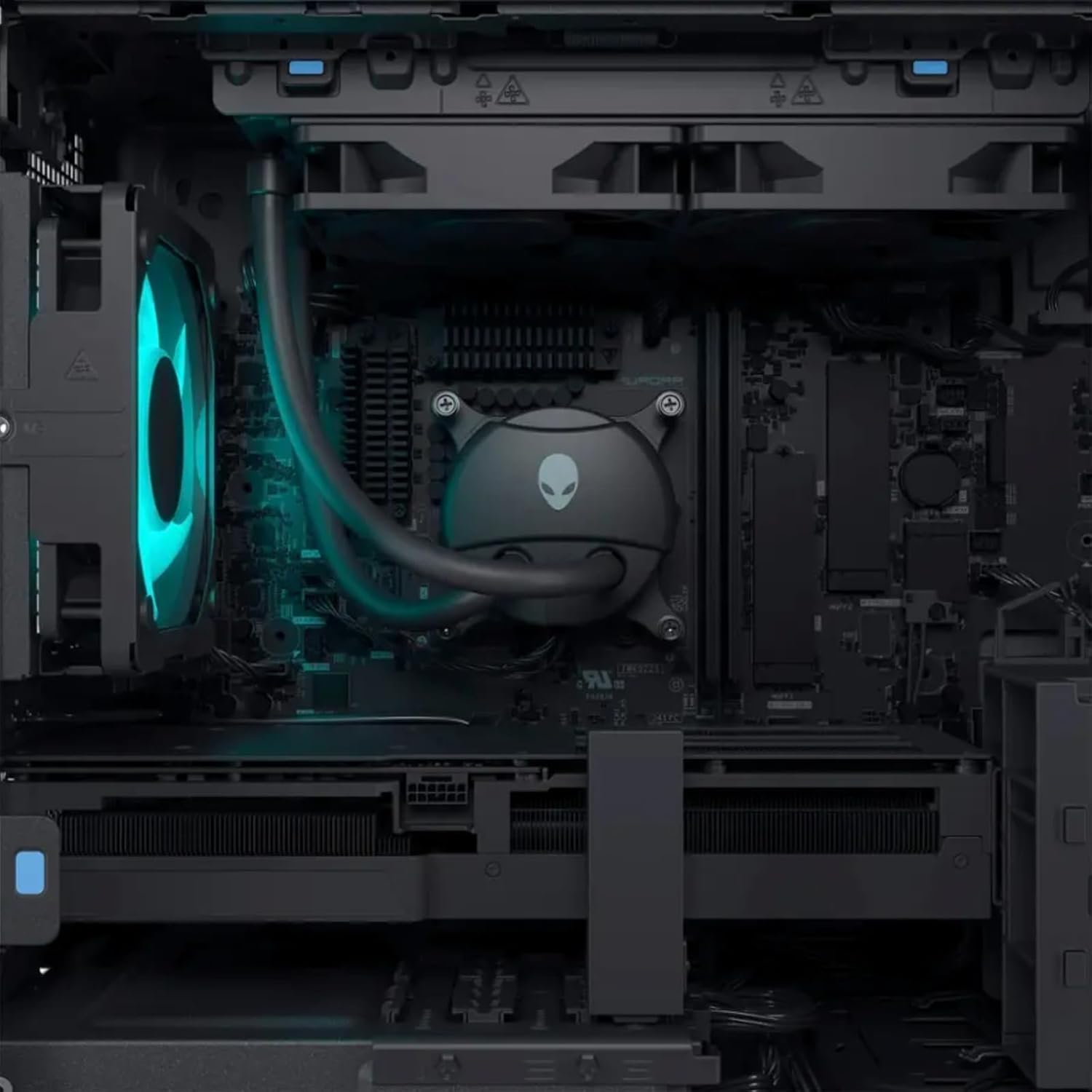
그림 5.2: 내부 view highlighting the liquid CPU cooling system and other components.

그림 5.3: 상향식 view of the internal layout, showing components and fan.

Figure 5.4: Angled internal view, providing a clearer look at the internal structure.
6. 문제 해결
This section provides solutions to common issues. For more complex problems, refer to the Alienware support web사이트 또는 기술 지원팀에 문의하세요.
| 문제 | 가능한 해결책 |
|---|---|
| 시스템 전원이 켜지지 않습니다. |
|
| 모니터에 표시되지 않습니다. |
|
| System is running slow or freezing. |
|
| Peripheral (keyboard/mouse) not responding. |
|
7. 사양
Detailed technical specifications for the Alienware Aurora R16 Gaming Desktop:
| 요소 | 사양 |
|---|---|
| 프로세서 | 14th Gen Intel Core i9-14900KF (24 Cores, 32 Threads, up to 6 GHz) |
| 그래픽 카드 | NVIDIA GeForce RTX 4080 SUPER 16GB GDDR6X |
| 숫양 | Up to 64GB DDR5 RAM (5600MHz) |
| 저장 | Up to 8TB SSD + 2TB HDD |
| 운영 체제 | 윈도우 11 프로 |
| 무선 연결 | Wi-Fi 6E(802.11ax), 블루투스 |
| CPU 냉각 시스템 | Liquid Cooling (240mm) |
| GPU Cooling System | 공기 냉각 |
| 디스플레이 포트 | 4 x DisplayPort 1.4, 1 x Mini DisplayPort (Total 5 DisplayPort Outputs) |
| USB 포트 | 3 x USB-C 3.2, 5 x USB-A 3.2, 4 x USB-A 2.0 (Total 12 USB Ports) |
| 치수(높이x너비x깊이) | 7.76 x 18.05 x 16.5 인치 |
| 무게 | 33.89파운드 |
8. 보증 및 지원
8.1 보증 정보
Your Alienware Aurora R16 Gaming Desktop comes with a standard manufacturer's warranty. For detailed terms and conditions, including warranty duration and coverage, please refer to the warranty documentation included with your product or visit the official Alienware support web대지.
8.2 기술 지원
기술 지원, 드라이버 다운로드 또는 추가 문제 해결을 위해서는 Alienware 공식 지원 페이지를 방문하십시오. web사이트를 방문하거나 고객 서비스에 문의하세요. 지원팀에 문의할 때는 제품 일련번호를 미리 준비해 두세요.
Alienware 지원 Web대지: support.dell.com/alienware
Ask a question about this manual
Ask about setup, troubleshooting, compatibility, parts, safety, or missing instructions. Manuals+ will review the question and use this page’s manual context to help answer it.