
GNCC GC3-2P
GNCC GC3-2P 1080P Indoor Security Camera Instruction Manual
Model: GC3-2P
소개
The GNCC GC3-2P Indoor Security Camera provides reliable home monitoring with 1080P Full HD video, motion detection, two-way audio, and night vision capabilities. Designed for easy installation and integration with smart home systems, this camera helps you keep an eye on your home, pets, or loved ones. It connects exclusively to 2.4GHz Wi-Fi networks and offers flexible storage options including local microSD card storage and optional cloud services.
상자 안에 무엇이 들어있나요?
Upon unboxing your GNCC GC3-2P Indoor Security Camera, you should find the following components:
- GNCC GC3 Indoor Camera Unit
- 전원 케이블(2m)
- 전원 어댑터
- Wall Mounting Kit (screws, anchors, adhesive)
- 사용자 설명서
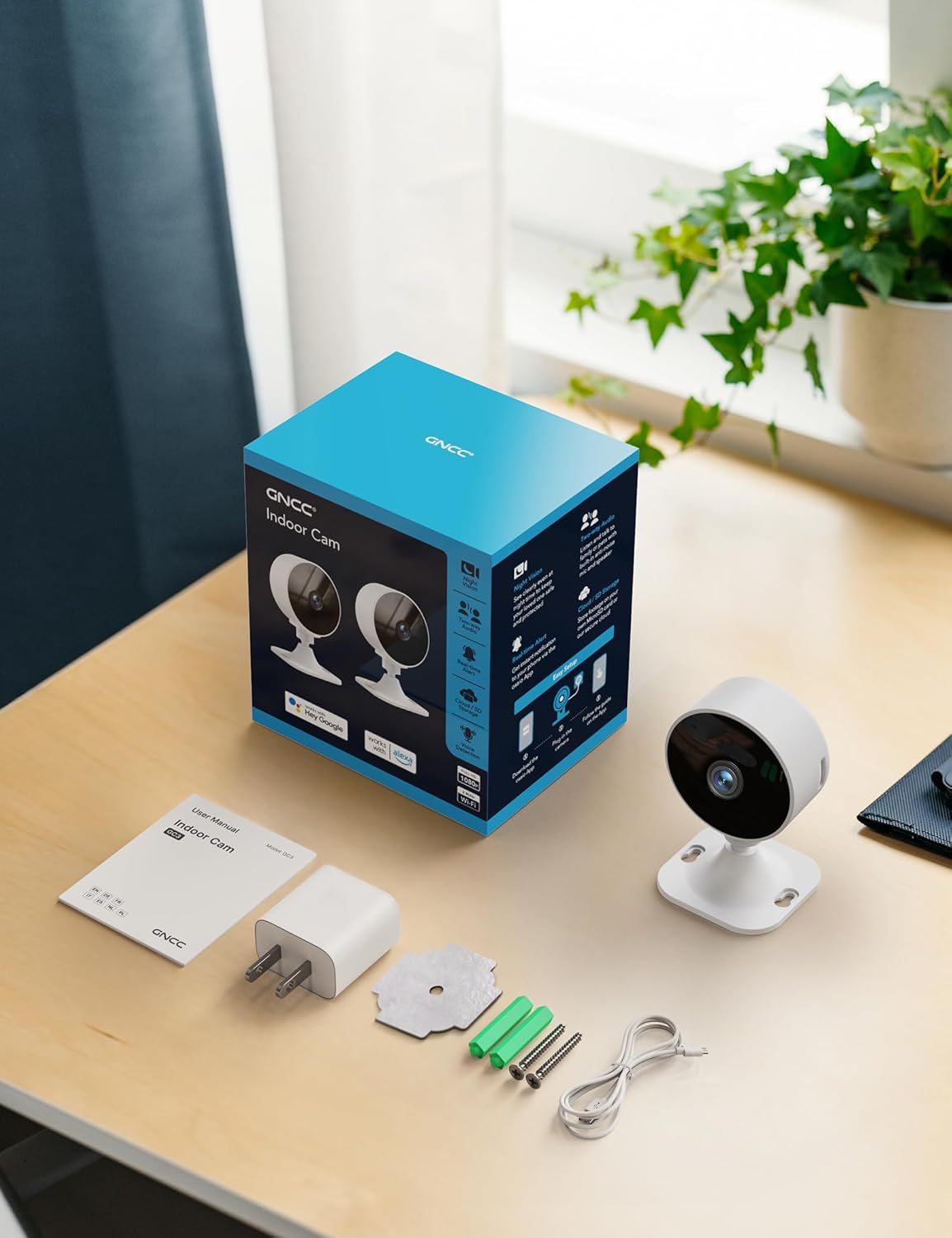
Image: All components included in the GNCC GC3-2P Indoor Security Camera package.
제품 끝view
The GNCC GC3-2P camera is a compact and versatile indoor security solution. It features a 1080P Full HD lens for clear video, infrared night vision for monitoring in low-light conditions, and a built-in microphone and speaker for two-way audio communication. The camera's base allows for flexible manual rotation to adjust the viewing angle. It supports both local microSD card storage (up to 128GB, not included) and cloud storage options.

이미지: 이상view of the GNCC Indoor Camera's main features.
주요 특징:
- 1080P Full HD 비디오: 선명하고 자세한 음식 사진을 촬영합니다.tage.
- 2.4GHz Wi-Fi 연결: Connects to your home network for remote access. (Note: 5GHz Wi-Fi is not supported.)
- 적외선 나이트 비전: Provides clear black-and-white images in darkness up to 15 meters.
- 동작 및 소리 감지: Sends real-time alerts to your smartphone.
- 양방향 오디오 : 카메라를 통해 듣고 말할 수 있습니다.
- 유연한 스토리지: microSD 카드(최대 128GB)를 지원하며, 클라우드 저장소 사용은 선택 사항입니다.
- 수동 회전: Easily adjust the camera angle by hand.
- 스마트 통합: Compatible with Alexa-enabled devices.

Image: Clear Night Vision for Peaceful Nights.

Image: Two-Way Audio Lets You Speak in Real Time.
설치 지침
Follow these steps to set up your GNCC GC3-2P Indoor Security Camera:
- 전원 켜기: Connect the provided 2m power cord to the camera's USB-C port and plug the power adapter into a wall outlet. The camera will power on and a red indicator light will flash, indicating it's ready for connection.
- 앱 다운로드: Download the "OsaiO" app from the Google Play Store or Apple App Store. You can scan the QR code provided on the product packaging for quick access.
- 생성/로그인: Open the OsaiO app and create a new account or log in if you already have one.
- 장치 추가: In the app, tap the '+' icon to add a new device. Follow the on-screen instructions to select your camera model.
- Wi-Fi에 연결: Ensure your smartphone is connected to a 2.4GHz Wi-Fi network. The camera only supports 2.4GHz Wi-Fi. If your router combines 2.4GHz and 5GHz, ensure your phone is on the 2.4GHz band during setup. Bring the camera close to the router for optimal initial connection. Enter your Wi-Fi password into the app.
- QR 코드 스캔: The app will generate a QR code. Hold your camera up to your phone screen to scan the QR code. You will hear a confirmation sound from the camera once it successfully scans.
- 완성: Once connected, the camera's indicator light will turn solid white. You can then name your device and begin monitoring.
- 장착(선택 사항): The camera can be placed on any flat surface. For wall or ceiling mounting, use the provided mounting kit (screws, anchors, or adhesive) to secure the base, then attach the camera. The camera head can be manually rotated to achieve the desired view잉 각도.

Image: App-guided setup process for the GNCC Indoor Camera.
작동 지침
살다 View and Monitoring:
Once your camera is set up and connected, open the OsaiO app to access the live feed. You can view real-time video from anywhere with an internet connection.

Image: Real-time monitoring remote live view 스마트폰에서.
동작 및 소리 감지:
The camera is equipped with AI-powered motion and sound detection. When activity is detected, you will receive instant notifications on your smartphone via the OsaiO app. You can customize alert sensitivity and schedules within the app settings.

Image: Motion & Sound Detection with AI-Powered Alerts.
양방향 오디오 :
Use the two-way audio feature to communicate with people or pets in the camera's vicinity. Tap the microphone icon in the live view to speak, and ensure your phone's volume is up to hear responses. Remember to remove any protective film from the camera's microphone and allow microphone access in the app.
Storage Options and Playback:
카메라는 두 가지 저장 방법을 지원합니다.
- MicroSD 카드: Insert a microSD card (up to 128GB, not included) into the designated slot on the camera for local storage of recordings.
- 클라우드 스토리지: An optional subscription service is available for cloud storage, providing convenient backup and access to your recordings.
에게 view 기록된 footage, navigate to the playback section in the OsaiO app. You can browse events by date and time.

Image: Playback Ready with SD Card or Cloud Backup options.
Smart Home Integration (Alexa):
The GNCC GC3-2P camera is compatible with Amazon Alexa. To integrate:
- Open the Alexa app and log in.
- Tap "More" in the lower right corner, then choose "Skills & Games."
- Tap the search icon and search for "OsaiO."
- Tap "OSAIo" and click "ENABLE TO USE."
- Sign in to your OsaiO account.
- Tap "Authorize" and then "Close."
- Tap "Cancel" and return to the home page.
You can now use voice commands like "Alexa, show the office camera" to view the live feed on compatible Alexa devices.
Video: Instructions on how to connect the GNCC camera to Alexa for voice control.
Privacy Mode and Sharing:
- 개인정보 보호 모드: Activate privacy mode in the app to turn off the camera with a single tap, ensuring no recordings or sharing occur.
- 가족 공유: Share camera access with up to 3 family members through the app, allowing multiple users to monitor the feed.

Image: Advanced operating features including privacy and sharing.
유지
- 청소: 부드럽고 마른 천으로 카메라 렌즈와 본체를 부드럽게 닦으세요. 강한 화학 물질이나 연마재는 사용하지 마세요.
- 펌웨어 업데이트: Regularly check the OsaiO app for available firmware updates to ensure your camera has the latest features and security enhancements.
- 놓기: 카메라를 직사광선, 열원 및 습기를 피해 안정적인 위치에 설치하십시오.
문제 해결
- 카메라가 Wi-Fi에 연결되지 않음:
- Wi-Fi 네트워크가 2.4GHz 대역인지 확인하십시오. 카메라는 5GHz 대역을 지원하지 않습니다.
- 앱에서 Wi-Fi 비밀번호를 정확하게 입력했는지 확인하세요.
- 설치 시 카메라를 Wi-Fi 공유기 가까이에 두십시오.
- Reset the camera using the reset button on the back and try the setup process again.
- 움직임/소리 알림 없음:
- Check the app's settings to ensure motion and sound detection are enabled.
- Adjust the sensitivity levels for detection in the app.
- 스마트폰에서 앱 알림이 활성화되어 있는지 확인하세요.
- Poor Two-Way Audio Quality:
- Remove any protective film from the camera's microphone.
- Ensure the OsaiO app has microphone access permissions on your phone.
- Increase your phone's volume.
- Check for any obstructions near the camera's microphone or speaker.
- 비디오 재생 문제:
- Ensure a microSD card is properly inserted and formatted, or that your cloud storage subscription is active.
- Check your internet connection stability for cloud playback.
명세서
| 특징 | 사양 |
|---|---|
| 모델명 | GC3-2P |
| 실내/실외 사용 | 실내 |
| 비디오 캡처 해상도 | 1080p |
| 연결 프로토콜 | 와이파이 (2.4GHz 대역만 사용) |
| 연결 기술 | 열광한 |
| 전원 | 코드식 전기 |
| 나이트 비전 범위 | 15 미터 |
| 저장 옵션 | MicroSD (up to 128GB), Cloud Storage (optional subscription) |
| 컨트롤러 유형 | 아마존 알렉사 |
| 장착 유형 | 탁상 마운트 |
| 품목 치수(L x W x H) | 2.56 x 2.76 x 3.54 인치 |
| 품목 무게 | 5.4 온스 |
| 색상 | 하얀색 |
보증 및 지원
The GNCC GC3-2P Indoor Security Camera comes with a 12개월 보증 from the manufacturer, Kalado. For technical support, troubleshooting assistance, or warranty claims, please refer to the contact information provided in your product packaging or visit the official GNCC web대지.
Manufacturer: Kalado
Ask a question about this manual
Ask about setup, troubleshooting, compatibility, parts, safety, or missing instructions. Manuals+ will review the question and use this page’s manual context to help answer it.