
소개
This manual provides detailed instructions for the installation, operation, and maintenance of your Ctronics 4K Hybrid Zoom 10x Outdoor WiFi Surveillance Camera, Model 930-4KD. This camera is designed for outdoor security, featuring dual lenses, 10x hybrid zoom, auto-tracking, human detection, color night vision, two-way audio, and an IP66 weatherproof rating.
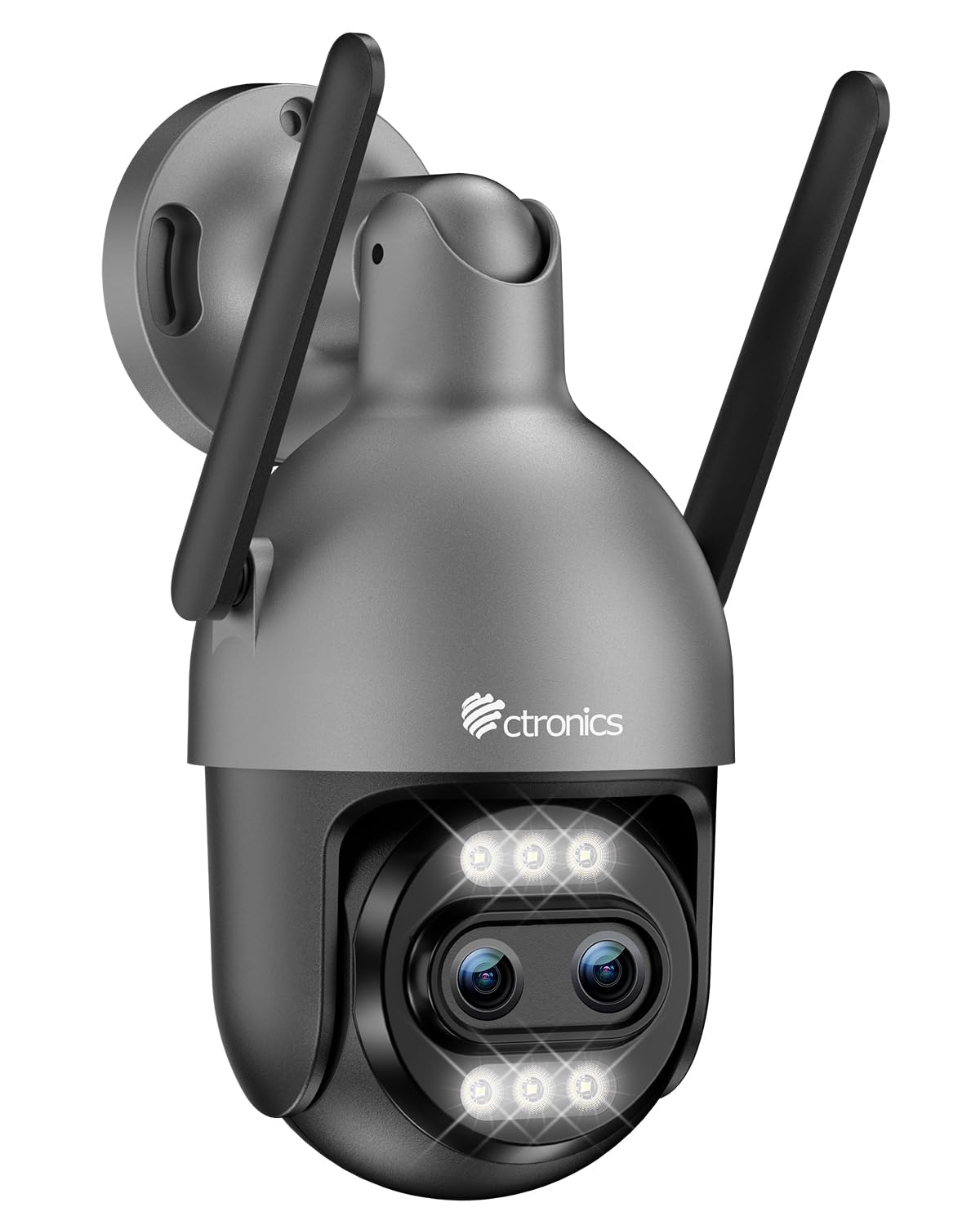
Image: Ctronics 4K Hybrid Zoom 10x Outdoor WiFi Surveillance Camera, Model 930-4KD.
1. 설정 및 설치
1.1 패키지 내용
패키지에 모든 구성 요소가 들어 있는지 확인하세요.
- Ctronics 4K Hybrid Zoom 10x Outdoor WiFi Surveillance Camera (Model 930-4KD)
- 전원 어댑터
- 장착 나사 및 앵커
- 네트워크 케이블용 방수 키트
- 사용 설명서 (본 문서)
1.2 물리적 설치
The camera is designed for outdoor use and ceiling mounting. Choose a location that provides optimal surveillance coverage and has a stable surface for mounting. Ensure the camera is within range of your Wi-Fi network or close to an Ethernet connection point.
- Mark the drilling positions on the wall or ceiling using the mounting template (if provided, otherwise use the camera base).
- 드릴로 구멍을 뚫고 벽 앵커를 삽입하세요.
- 제공된 나사를 사용하여 카메라 받침대를 표면에 고정하십시오.
- Adjust the camera angle as needed before final tightening.

이미지: 전ample of a Ctronics dual-lens PTZ camera, similar to Model 930-4KD, mounted for outdoor surveillance.
1.3 전원 및 네트워크 연결
Connect the camera to power using the provided power adapter. For network connectivity, you have two options:
- Wi-Fi 연결: Ensure your Wi-Fi network is 2.4GHz or 5GHz compatible. Follow the in-app instructions for Wi-Fi setup.
- 유선 연결: Connect an Ethernet cable from your router to the camera's network port. Use the waterproof kit to protect the connection if installed outdoors.
1.4 앱 설치 및 구성
Download the official Ctronics Pro app from your smartphone's app store (iOS or Android). Alternatively, use the HiP2P Client software for Windows or Mac OS.
- Install the Ctronics Pro app on your smartphone or HiP2P Client on your computer.
- 계정을 등록하고 로그인합니다.
- Follow the on-screen prompts to add your camera. This typically involves scanning a QR code on the camera or manually entering its ID.
- 시간대, 녹화 설정, 알림 방식 등 초기 설정을 구성하세요.

Image: The Ctronics multi-platform software interface, showing compatibility with desktop, laptop, tablet, and smartphone devices.
2. 사용 설명서
2.1 라이브 View 그리고 녹음
Once connected, access the live feed through the Ctronics Pro app or HiP2P Client. You can view real-time video, initiate manual recordings, and capture screenshots.
2.2 고급 기능
- 10배 하이브리드 줌: Utilize the digital controls in the app to zoom in and out, combining optical and digital zoom for detailed views.
- Auto Zoom Tracking: Enable this feature to allow the camera to automatically track detected human movement and zoom in for clearer identification.
- 인간 탐지: Configure motion detection zones and sensitivity. The camera will send alerts upon detecting human shapes, reducing false alarms.
- 컬러 나이트 비전: The camera employs Starlight vision technology and LED lights to provide full-color video even in low-light conditions, up to 30 meters.
- 양방향 오디오 : Use the built-in microphone and speaker to communicate with visitors or deter intruders remotely.
- PTZ 제어 : Pan, Tilt, and Zoom the camera remotely via the app to adjust the viewing angle and cover a 360-degree area.

Image: The Ctronics 10x Hybrid Zoom camera, highlighting its advanced optical capabilities.
2.3 저장 옵션
The camera supports local recording to a Micro SD card (up to 256GB). Ensure the card is inserted correctly and formatted through the app. Cloud storage options may also be available through the Ctronics service.
3. 유지관리
- 청소: 카메라 렌즈와 하우징을 부드러운 천으로 정기적으로 닦아주세요.amp 선명한 화질을 위해 천을 사용하십시오. 강한 화학 약품은 사용하지 마십시오.
- 펌웨어 업데이트: Check the Ctronics Pro app periodically for firmware updates. Keeping your camera's firmware updated ensures optimal performance and security.
- 전원 공급 장치: 전원 어댑터와 케이블이 손상되지 않았는지 확인하세요.
4. 문제 해결
| 문제 | 해결책 |
|---|---|
| 카메라가 Wi-Fi에 연결되지 않음 | Ensure the camera is within Wi-Fi range. Check Wi-Fi password. Try resetting the camera and re-adding it to the app. Verify your router supports 2.4GHz/5GHz. |
| 화면이 나오지 않거나 검은 화면만 표시됩니다. | Check power connection. Ensure network connection is stable. Restart the camera and the app. |
| 동작 감지 알림이 너무 자주/너무 드물게 발생합니다. | Adjust motion detection sensitivity and detection zones in the app settings. |
| 양방향 오디오가 작동하지 않음 | Check microphone and speaker permissions in the app. Ensure volume levels are adequate. |
| SD 카드가 녹화되지 않습니다 | Ensure the SD card is inserted correctly and formatted within the app. Check if the card is full or corrupted. Replace if necessary. |
5. 사양
| 특징 | 세부 사항 |
|---|---|
| 모델명 | 930-4KD |
| 상표 | 트로닉스 |
| 연결 기술 | Wired, WiFi |
| 특별 기능 | Two-Way Audio, Local Recording, UHD Resolution, PTZ Technology, Night Vision |
| 용법 | 집 밖의 |
| 호환 장치 | 컴퓨터, 노트북, 스마트폰, 태블릿 |
| 전원 | 전기 케이블 (12볼트) |
| 장착 유형 | 천장 마운트 |
| 색상 | Silver (argenté) |
| 폼 팩터 | 둥근 천장 |
| 재료 | 금속 |
| 경고 유형 | 오디오 및 모션 |
| 광원 유형 | 주도의 |
| Effective Capture Resolution | 8메가픽셀 |
| 국제 보호 등급 | IP66 |
| 제어 방법 | 애플리케이션 |
| 무선 기술 | Bluetooth (for initial setup/pairing, likely) |
| Screen Capture Resolution | 4K |
| 효과적인 비디오 해상도 | 3840.0 (likely 3840x2160 for 4K) |
| 나이트 비전 범위 | 30 미터 |
| 야간 투시경 유형 | 별빛 |
| 치수(길이 x 너비 x 높이) | 15 x 15 x 15cm |
| 비디오 캡처 형식 | MP4 |
| 광학 줌 | 6x |
| 초점 유형 | 자동 초점 |
| 줌 타입 | 6x Optical Zoom + 4x Digital Zoom (10x Hybrid) |
| 광센서 기술 | CMOS |
| 플래시 메모리 유형 | 마이크로SD |
| 지원되는 최대 플래시 메모리 용량 | 256GB (XNUMX기가바이트) |
6. 보증 및 지원
For warranty information, technical support, or further assistance, please refer to the official Ctronics website or contact their customer service directly. Details are typically provided on the product packaging or the official Ctronics support page.
You can also find additional resources and FAQs on the Ctronics official web대지: www.ctronics.com