
1. 서론
Thank you for choosing the Sunster TB10 8KW Portable Diesel Heater. This manual provides essential information for the safe and efficient operation of your device. Please read it thoroughly before use and retain it for future reference.
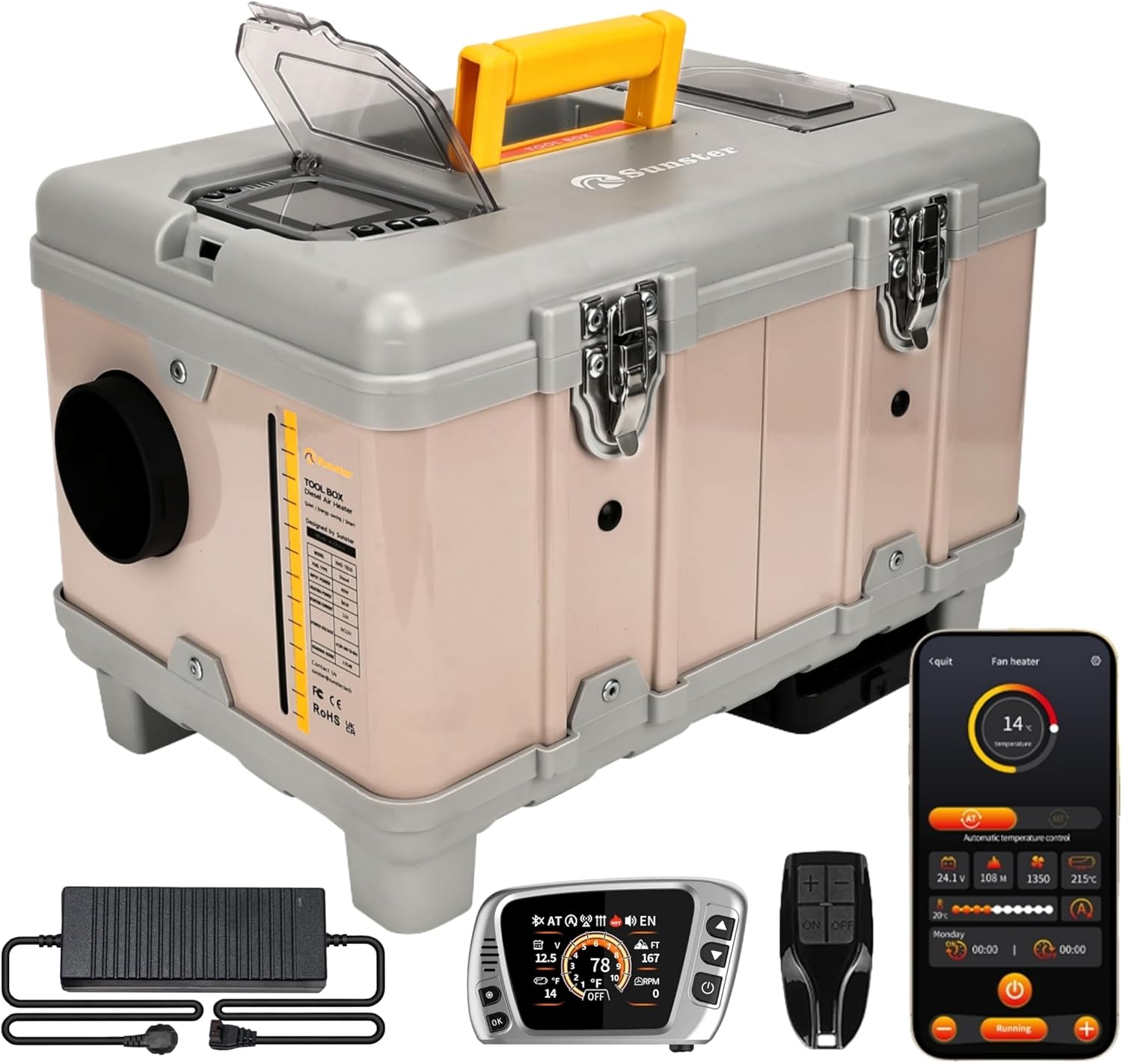
Figure 1: Sunster TB10 8KW Portable Diesel Heater and included accessories.
2. 안전 정보
Your safety is paramount. Always adhere to the following precautions:
- 일산화탄소 경고: Diesel heaters produce carbon monoxide. Always ensure adequate ventilation when operating the heater. Never use in enclosed spaces without proper exhaust routing and ventilation. Consider using a CO alarm.
- 연료 유형: Use only diesel fuel. Never use gasoline or other flammable liquids.
- 놓기: Place the heater on a stable, non-flammable surface. Ensure sufficient clearance from combustible materials.
- 배출: Ensure the exhaust pipe is properly installed and vented outdoors, away from any air intakes.
- 전원: Use only the specified DC 12V or AC 110-240V power sources. Ensure connections are secure.
- 어린이와 애완동물: 히터가 작동하는 동안에는 어린이와 애완동물이 히터에 접근하지 못하도록 하세요.
- 유지: Regularly inspect the heater for any damage or blockages. Do not operate if damaged.
3. 패키지 내용
포장을 풀 때 아래 나열된 모든 품목이 들어 있고 손상되지 않았는지 확인하세요.

Figure 2: Complete package contents of the TB10 Diesel Heater.
- TB10 Portable Diesel Heater Unit
- Warm Air Outlet Pipe (Black, flexible)
- Exhaust Pipe (Stainless steel, flexible)
- 머플러
- Heat Insulation Cloth for Exhaust Pipe
- Clamps (various sizes for pipes)
- AC-DC 전원 어댑터
- Battery Power Cord (for 12V DC connection)
- LCD Switch with 4m/13.1ft Extension Cable
- 원격 제어
- 사용자 설명서
- Fixture Accessories Set (screws, brackets)
4. 제품 오버view
The Sunster TB10 8KW Portable Diesel Heater is designed for versatile heating in various environments, including cars, trucks, RVs, garages, and outdoor camping. It features an integrated toolbox design for portability and ease of use.

Figure 3: Internal structure diagram of the TB10 Diesel Heater.
주요 특징:
- 스마트 APP 제어: Full control over temperature, timers, power levels, altitude mode, constant temperature, and ventilation mode.
- Upgraded S-DZ06LCD Switch: 블루투스 기능, 자동 시작 및 정지, 터보 열 모드, 환기 기능 및 청소 모드를 갖추고 있습니다.
- 통합 툴박스 디자인: Portable with a built-in 6-liter fuel tank and handle.
- 이중 전원 옵션: Supports 12V DC and 110-240V AC.
- 실내 온도 조절: Includes a 4-meter extension cable for the control panel.
- 환기 기능: Circulates air for cooling in warm weather.
- 적응형 고원 모드: 최대 4500미터 고도까지 연료 출력을 자동으로 조절합니다.
- Energy Saving & Silent: High heating efficiency with low fuel consumption (0.16-0.45L/h) and quiet operation (≤ 35 dB).
5. 설정 및 설치
올바른 설정 및 설치를 위해 다음 단계를 따르십시오.
5.1. Warm Air Duct Installation
- Open the warm air duct by extending it.
- CL을 배치amp 파이프 입구에서.
- Attach the duct to the air outlet on the heater unit.
- cl을 조여주세요amp 안전하게.
5.2. Exhaust Pipe and Muffler Installation
- 유연한 배기 파이프를 곧게 펴십시오.
- 배기 파이프에 단열 천을 감싸십시오.
- Secure the heat-insulating cloth with clamps at both ends of the pipe.
- Screw the assembled exhaust pipe into the side interface of the heater unit.
- cl을 조여주세요amp 인터페이스에서.
- Attach the muffler to the other end of the exhaust pipe using a clamp 그리고 조입니다.
5.3. 전원 연결
The heater supports both AC and DC power:
- AC 110-240V: Connect the provided AC-DC power adapter to a power strip or wall outlet. Insert the adapter's plug into the socket below the air outlet on the heater. Ensure the power adapter's indicator light is green.
- DC 12V : Use the provided battery power cord. Connect the positive (red) and negative (black) copper rings to the corresponding terminals of a 12V battery. Insert the plug into the socket below the air outlet on the heater.
중요한: 항상 볼륨을 확인하십시오tage used matches the product's specifications (12V DC or 110-240V AC).
Video 1: TB10 Installation Operation - This video demonstrates the step-by-step process of installing the air duct, exhaust pipe, and connecting power to the Sunster TB10 diesel heater.
6. 사용 설명서
Your TB10 heater can be controlled via the integrated LCD switch, remote control, or Bluetooth APP.

그림 4: 이상view of the LCD Monitor functions and settings.
6.1. 전원 켜기/끄기
- 전원을 켜려면: In shutdown state, press the power button to wake up the screen. Then, press and hold the power button until 'ON' appears on the screen.
- 전원을 끄려면: Long press the power button until 'OFF' appears on the screen.
6.2. 언어 전환
- Press the 'Settings' key to enter the basic settings menu.
- Select 'Language selection' (usually the first item).
- Use the Up/Down buttons to select the desired language flag.
- '확인'을 눌러 확인하세요.
6.3. 모드 전환
- Press the 'Settings' key to enter the menu.
- Select 'Mode selection' (usually the second item).
- Use the Up/Down buttons to navigate through options:
- MT (Manual Mode) / AT (Automatic Mode): Press 'OK' to switch between manual and automatic heating modes.
- Altitude (M/FT): Press 'OK' to switch between meters and feet for altitude display.
- Temperature Units (°C/°F): Press 'OK' to switch between Celsius and Fahrenheit.
- Automatic Start/Stop (ON/OFF): Press 'OK' to enable or disable automatic start/stop based on set temperature.
- Instant Heating Mode (ON/OFF): Press 'OK' to enable or disable instant heating.
- Press the 'Settings' key to save and exit.
6.4. Remote Control Matching
- Press the 'Settings' key to enter the menu.
- Select 'Remote control pairing' (usually the third item).
- Press 'OK' to enter the matching interface.
- Use Up/Down buttons to select the corresponding remote control icon.
- Press 'OK'. The remote control icon will flash.
- Press any key on your physical remote control. The heater will automatically return to the main interface upon successful pairing.
6.5. Manual Fuel Pump
This function is used to prime the fuel system or manually pump fuel.
- Press the 'Settings' key to enter the menu.
- Select 'Manual oil pump' (usually the fourth item).
- Press 'OK'.
- Press the Up button to start pumping fuel.
- Press the Down button to stop pumping fuel.
- Press the 'Settings' key to exit.
6.6. 타이밍 기능
Set automatic power on/off times for specific days.
- Press the 'Settings' key to enter the menu.
- Select 'Timing setting up' (usually the fifth item).
- Press 'OK' to enter the timing function.
- First, select the alarm clock icon on the right (for time calibration).
- Press 'OK' to enter time calibration. Adjust the time using the Up/Down buttons and press 'OK' to confirm. Set the time to your local region.
- Press the 'Settings' key to return.
- Select the first alarm clock icon (for setting daily timers).
- Adjust to the current day (e.g., SUN for Sunday) and press 'OK'.
- Set the automatic start time and automatic shutdown time using the Up/Down buttons and 'OK' to confirm.
- Select 'ON' to activate the timer for that day.
- Press the 'Settings' key to return.
6.7. 블루투스 연결
스마트폰 앱으로 히터를 제어하세요.
- Press the 'Settings' key to enter the menu.
- Navigate to the Bluetooth connection option (often represented by a QR code icon).
- Press 'OK'. A QR code will appear on the screen.
- Use your smartphone to scan the QR code. This will direct you to download the 'AirHeater' app.
- Open the app after downloading and turn on Bluetooth on your phone.
- Connect to the device within the app.
- At this time, the Bluetooth icon will be displayed on the heater's switch.
- Press 'OK' on the heater's switch to confirm the connection. You can now operate the heater via your mobile phone.
6.8. 청소 모드
The cleaning mode helps maintain the combustion chamber.
- In shutdown state, long press the Down button to turn on the cleaning mode.
- The heater will automatically shut down after cleaning the residual fuel from the combustion chamber.
Video 2: DZ06 Switch Operation - This video provides a detailed guide on operating the DZ06 Bluetooth LCD switch, including power, language, mode, remote pairing, manual pump, timing, Bluetooth, and cleaning functions.
Video 3: LCD Switch Operation - A comprehensive video demonstrating the various functions and settings of the LCD control switch.
7. 유지관리
정기적인 유지보수는 히터의 최적 성능과 수명 연장을 보장합니다.
- 청소: Regularly clean the exterior of the heater. Use the cleaning mode to clean the combustion chamber.
- 에어 필터: Check and clean the integrated air filter periodically to ensure proper airflow.
- 연료 탱크: Ensure the 6-liter fuel tank is free from contaminants.
- 사이: Periodically check all pipe and electrical connections for tightness and wear.
- 저장: When not in use for extended periods, drain the fuel tank and store the heater in a dry, safe place.
8. 문제 해결
문제가 발생하면 다음의 일반적인 문제와 해결 방법을 참조하세요.
- 히터가 작동하지 않음: Check power connections (AC or DC), ensure sufficient fuel, and verify the power button is pressed correctly.
- Error Code E5 (Overheating): This indicates overheating. Check for blocked air intake or exhaust, ensure proper ventilation, and allow the unit to cool down before restarting.
- White Smoke from Intake: If the power source is interrupted during operation, partially combusted diesel may vent from the combustion air intake. Ensure a stable power supply and proper exhaust routing.
- 열 출력 없음: Check fuel level, ensure the heater is in 'ON' mode, and verify temperature settings.
- 원격/앱 연결이 안 됨: Ensure Bluetooth is enabled on your device, the app is installed, and follow the remote pairing instructions.
For persistent issues, please contact Sunster customer support.
9. 사양
| 특징 | 사양 |
|---|---|
| 상표 | 선스터 |
| 모델 | TB10 8KW Portable Diesel Heater |
| 전원 | DC 12V / AC 110-240V |
| 가열 전력 | 8kw |
| 난방 효율 | ≥ 96% |
| 연료 소비량 | 0.16-0.45리터/시간 |
| 연료 탱크 용량 | 6L(1.58갤런) |
| 난방 범위 | 215피트² / 20m² |
| 작동 소음 | ≤ 35dB |
| 최소 온도 설정 | 화씨 46도(섭씨 8도) |
| 최대 온도 설정 | 화씨 95도(섭씨 35도) |
| 고도 적응 | 최대 4500미터 |
| 품목 무게 | 21.7파운드 |
| 패키지 크기 | 18.25 x 15 x 12.5 인치 |
10. 보증 및 지원
Your Sunster TB10 Portable Diesel Heater comes with a standard manufacturer's warranty. Please refer to the warranty card included in your package for specific terms and conditions.
For technical support, troubleshooting assistance, or warranty claims, please contact Sunster customer service through the official web사이트 또는 소매점.

