
소개
The URPIZY AI Voice Recorder is a sophisticated digital recording device designed for professional and personal use. It integrates advanced artificial intelligence capabilities for real-time transcription, intelligent summarization, and multilingual translation. Featuring a robust recording system and secure data handling, this device is an all-in-one solution for meetings, interviews, and general voice recording needs.
주요 특징은 다음과 같습니다.
- AI-powered Voice Hub for real-time transcription in 16 languages (offline/online) and text-to-speech recognition.
- AI summaries to extract important information from long texts.
- AI translation covering 130 languages with high accuracy.
- Bank-grade data protection with TLS/SSL encryption and private cloud storage.
- Professional recording system with 2 directional and 6 omnidirectional microphones for clear audio up to 15 meters.
- DSP+PCM noise cancellation to reduce environmental noise by up to 90%.
- Durable aircraft-grade aluminum body with a 5-inch touchscreen and 16 GB internal memory.
- 8 MP rear camera for synchronized photo tagging and photo translation.
- Compatibility with PC, smartphones, and tablets.
장치 오버view
The URPIZY AI Voice Recorder is equipped with multiple microphones for superior audio capture and a clear display for easy interaction.
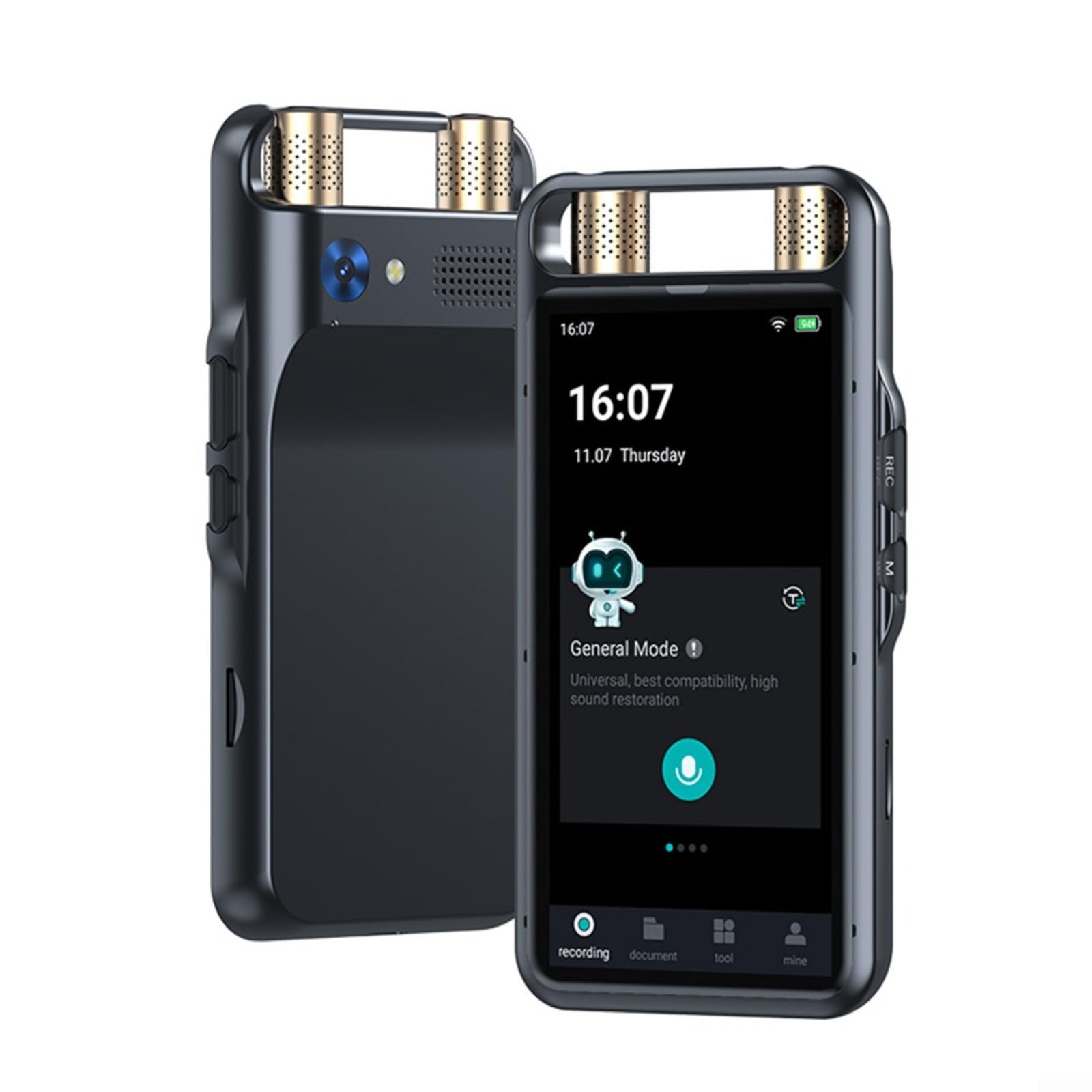
Image: The URPIZY AI Voice Recorder, highlighting its long-distance recording capability up to 15 meters, supported by 2 directional and 6 omnidirectional array microphones, and intelligent noise reduction algorithms.
설정
1. 초기 충전
Before first use, fully charge the device using the provided USB cable and a compatible power adapter. A full charge provides approximately 8 hours of continuous recording or 14 days of standby time.
2. 전원 켜기 / 끄기
- 전원을 켜려면: 기기 측면에 있는 전원 버튼을 화면이 켜질 때까지 길게 누르세요.
- 전원을 끄려면: Press and hold the Power button until a power-off prompt appears on the screen. Select 'Power Off' to shut down the device.
3. 초기 설정 및 언어 선택
Upon first power-on, the device will guide you through an initial setup process. This includes selecting your preferred language from the available options. The device supports multiple languages for its interface and transcription features.
4. Wi-Fi 연결
To utilize online features such as real-time online transcription, cloud storage, and online translation, connect the device to a Wi-Fi network:
- 이동하다 설정 > 와이파이.
- 원하는 네트워크를 선택하고 메시지가 표시되면 비밀번호를 입력하세요.
5. Account Setup for Cloud Services
For secure data storage and sharing, set up your dedicated private cloud account. This typically requires an email address and password for dual authentication, ensuring bank-grade data protection.
작동 지침
1. 오디오 녹음
The device offers four distinct recording modes to suit various situations:
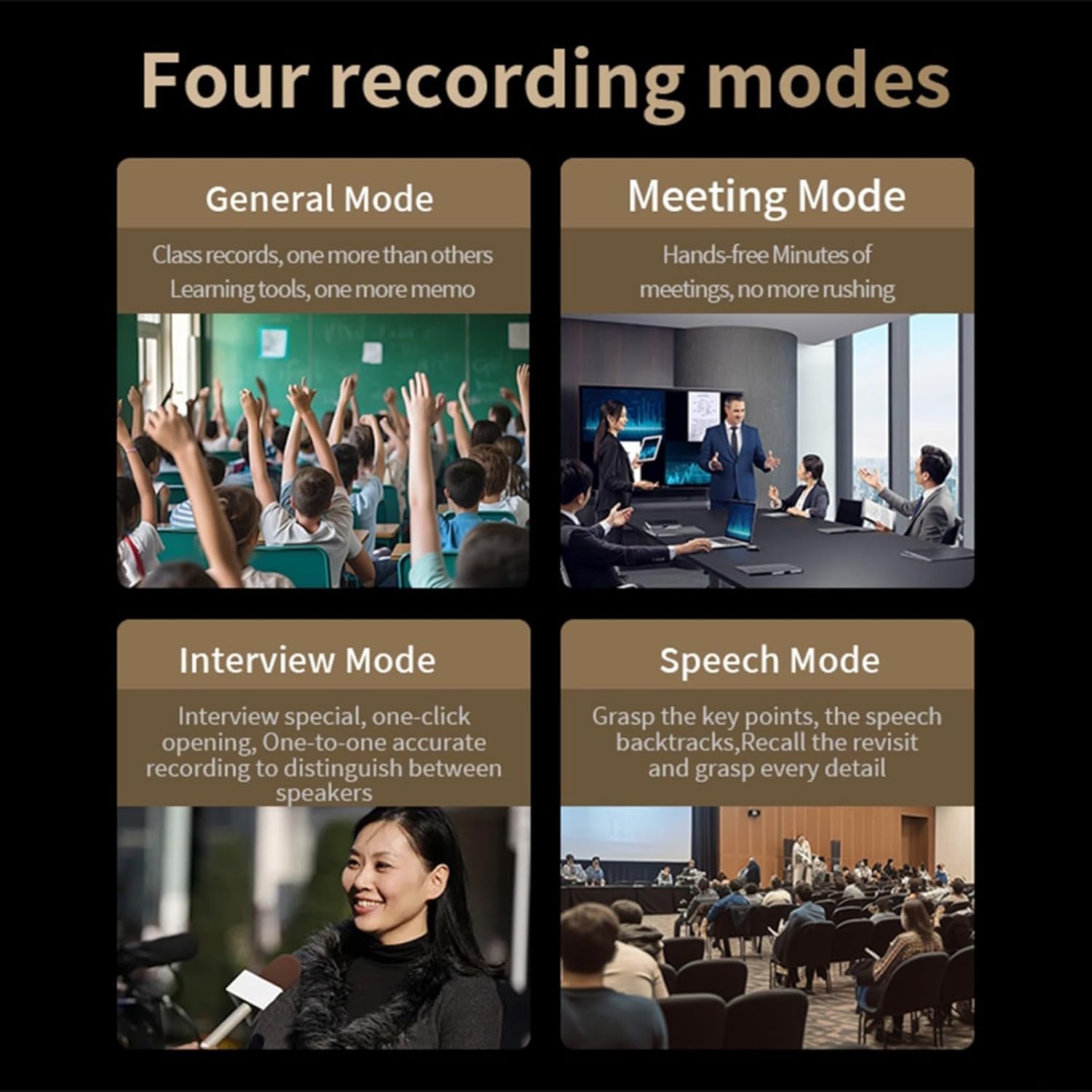
Image: Visual representation of the four recording modes: General Mode for class records and memos, Meeting Mode for hands-free meeting minutes, Interview Mode for distinguishing speakers, and Speech Mode for grasping key points and details.
- 일반 모드: Ideal for personal notes, lectures, or general audio capture.
- 회의 모드: Optimized for group discussions, ensuring clear capture of multiple speakers.
- 인터view 방법: Designed to accurately distinguish between different speakers during one-on-one interviews.
- 음성 모드: Focuses on capturing and emphasizing spoken content, useful for presentations or speeches.
To start a recording, select your desired mode from the main interface and press the 'Record' button. Press it again to stop the recording.
2. Real-time Transcription
The device can transcribe audio in real-time, supporting 16 languages both offline and online.

Image: The Intelligent Transcription feature in action, demonstrating its ability to automatically distinguish between speakers in a conversation, displaying their dialogue separately.
After a recording is complete, you can upload the audio file to obtain transcription results. The system intelligently distinguishes between speakers, providing a clear and organized transcript.
3. AI Summaries
Leverage AI to generate concise summaries of your transcribed audio files. This feature extracts important information, making it easier to review long discussions.

Image: The Smart Summaries function, illustrating how it converts recording files into text and uses an AI model to generate summaries and intelligent edits, highlighting keywords, time, place, and focus points.
To use, navigate to your transcribed file and select the 'Summarize' option. You can then share and upload these summaries to your cloud disk for further editing or collaboration.
4. Multilingual Translation
The device supports 134 online and 15 offline languages for translation, with AI translation covering 130 languages with high accuracy.

Image: The Multilingual Simultaneous Interpretation feature, demonstrating real-time translation between English and Chinese, highlighting the support for 15 offline and 134 online languages.
Access the translation feature from the main menu. Select your source and target languages to begin real-time or post-recording translation.
5. 사진 번역
The integrated 8 MP rear camera allows for optical character recognition (OCR) and translation of text from images. It supports 71 online and 12 offline languages.

Image: The Photo Translation capability, illustrating the use of the 8-megapixel rear camera to recognize text from images and translate it, supporting 12 offline and 71 online languages.
Open the camera application, capture an image of the text you wish to translate, and the device will process and display the translation.
6. 소음 제거
The device automatically employs DSP+PCM noise cancellation technology to filter out up to 90% of ambient noise, ensuring clear audio recordings even in noisy environments. This feature is active during all recording modes.
7. File 관리 및 공유
녹음 된 오디오 files and their transcriptions/summaries can be managed directly on the device or through your connected cloud storage. You can classify files, rename them, and securely share them with team members for collaboration.
유지
1. 청소
기기의 외관과 기능을 유지하기 위해:
- 부드럽고 마른 보풀 없는 천으로 화면과 본체를 닦으세요.
- 연마성 세척제, 용제 또는 에어로졸 스프레이는 사용하지 마십시오.
- 마이크 그릴에 먼지와 이물질이 들어가지 않도록 하십시오.
2. 소프트웨어 업데이트
Periodically check for software updates to ensure optimal performance and access to the latest features. Connect the device to Wi-Fi and navigate to 설정 > 시스템 업데이트 사용 가능한 업데이트를 확인하고 설치합니다.
3. 배터리 관리
배터리 수명을 연장하려면:
- 장치를 극한의 온도에 노출시키지 마십시오.
- 배터리가 자주 완전히 방전되지 않도록 하세요.
- 장기간 기기를 보관할 경우, 보관하기 전에 약 50%까지 충전하세요.
문제 해결
장치 전원이 켜지지 않음
- Ensure the device is sufficiently charged. Connect it to a power source and try again after a few minutes.
- 최소 10~15초 동안 전원 버튼을 길게 눌러 강제 재시작을 실행하세요.
Poor Recording Quality
- Ensure the microphone grilles are not obstructed.
- Check the recording environment for excessive background noise. While the device has noise cancellation, extreme noise can still affect quality.
- Verify that the correct recording mode is selected for your environment (e.g., Meeting Mode for group discussions).
Transcription/Translation Issues
- Ensure a stable Wi-Fi connection for online transcription and translation features.
- 올바른 소스 언어와 대상 언어가 선택되었는지 확인하십시오.
- Speak clearly and at a moderate pace for optimal recognition.
Connectivity Problems (Wi-Fi, PC)
- For Wi-Fi, ensure the password is correct and the network is active. Try restarting your router.
- When connecting to a PC, ensure the USB cable is securely connected and the device is in the correct USB mode (e.g., file 옮기다).
명세서
| 특징 | 사양 |
|---|---|
| 상표 | 우르피지 |
| 모델 번호 | JC69DJ95230NPS6C1IIUPUM0D771 |
| 치수 | 12 x 6 x 1cm |
| 무게 | 125g |
| 내부 메모리 | 16GB (XNUMX기가바이트) |
| 마이크 | 2 Directional, 6 Omnidirectional |
| 표시하다 | 5인치 터치스크린 |
| 후방 카메라 | 8 MP |
| 배터리 수명(녹화 시) | 최대 8시간 연속 |
| 배터리 수명(대기) | 최대 14일 |
| 프로세서 | 옥타코어 |
| 전사 언어 | 16 (Offline/Online) |
| AI 번역 언어 | 130 |
| 온라인 번역 언어 | 134 |
| 오프라인 번역 언어 | 15 |
| Photo Translation Languages (Online) | 71 |
| Photo Translation Languages (Offline) | 12 |
보증 및 지원
For warranty information, technical support, or service inquiries, please refer to the warranty card included with your product or visit the official URPIZY web사이트. 구매 증빙 자료로 구매 영수증을 보관하세요.