
소개
This manual provides detailed instructions for the installation, operation, and maintenance of your Ctronics 4K Hybrid Zoom WLAN Outdoor Security Camera, Model 930C-4K. Please read this manual thoroughly before using the product to ensure proper functionality and safety.
The Ctronics 4K Hybrid Zoom WLAN Outdoor Security Camera features a dual-lens system, 10x hybrid zoom (6x optical + 4x digital), automatic zoom tracking, human recognition, 4K full-color night vision, two-way audio, and IP66 weather resistance for reliable outdoor surveillance.

Figure 1: Ctronics 4K Hybrid Zoom WLAN Outdoor Security Camera (Model 930C-4K)
패키지 내용
패키지에 모든 품목이 들어 있는지 확인하세요.
- Ctronics 4K Hybrid Zoom WLAN Outdoor Security Camera
- 전원 어댑터
- 장착 나사 및 벽면 플러그
- 네트워크 케이블용 방수 키트
- 드릴 템플릿
- 사용자 설명서
안전 예방 조치
- Ensure the power supply matches the camera's requirements (12V).
- 카메라를 작동 범위를 넘어서는 극한의 온도나 습도에 노출시키지 마세요.
- 강한 광원에 직접 노출되면 이미지 품질에 영향을 줄 수 있으므로 피하십시오.
- 물리적 손상을 방지하기 위해 카메라를 조심스럽게 다루십시오.
- Consult a professional for installation if you are unsure about electrical wiring or mounting procedures.
설정
1. 물리적 설치
The camera supports both wall and ceiling mounting. Choose a location that provides optimal coverage and a stable Wi-Fi signal.
- 장착 위치 선택: Identify a suitable outdoor location, ensuring it is within range of your Wi-Fi network and has access to a power outlet.
- 드릴 구멍 표시: Use the provided drill template to mark the positions for drilling on the wall or ceiling.
- 드릴 구멍: 표시된 위치에 구멍을 뚫고 벽 플러그를 삽입하십시오.
- 카메라 장착: Secure the camera bracket to the wall or ceiling using the provided screws.
- 전원 연결: Connect the power adapter to the camera and plug it into a power outlet. Ensure the connection is waterproof using the provided kit if applicable.

Figure 2: Camera mounting options (wall-mounted and ceiling-mounted) demonstrating IP66 weather resistance.
2. 네트워크 연결
The camera supports stable and fast dual-band Wi-Fi (2.4GHz and 5GHz).
- 앱 다운로드 : Download the "Ctronics Pro" app from your smartphone's app store (iOS or Android).
- 계정 등록: 앱을 열고 새 계정을 등록하거나 이미 계정이 있다면 로그인하세요.
- 카메라 추가: 앱 내 안내에 따라 카메라를 추가하세요. 일반적으로 카메라의 QR 코드를 스캔하거나 카메라 ID를 직접 입력하는 방식입니다.
- Wi-Fi에 연결: Select your Wi-Fi network (2.4GHz or 5GHz) and enter the password. The camera will connect to your network.
- 초기 설정 : Complete any initial setup steps prompted by the app, such as setting a device password and time zone.

Figure 3: Ctronics Pro app interface for camera management.

Figure 4: Illustration of the camera's stable dual-band Wi-Fi connectivity (2.4GHz and 5GHz).
카메라 작동
1. 라이브 View 및 PTZ 제어
- Ctronics Pro 앱을 열고 카메라를 선택하여 실시간 영상을 확인하세요. view.
- Use the on-screen controls to pan (355°) and tilt (90°) the camera to adjust its view잉 각도.
- Utilize the 10x hybrid zoom feature (6x optical + 4x digital) to get a closer look at specific areas.

Figure 5: The camera's 10x hybrid zoom capability, showing a zoomed-in view of a child in a backyard.

Figure 6: Illustration of the dual-lens system providing both narrow (50° view, 8mm) and wide (90° view, 3.6mm) perspectives.
2. 동작 감지 및 자동 추적
- Access the camera settings in the app to configure motion detection zones and sensitivity.
- Enable human recognition to filter out false alarms caused by animals or inanimate objects.
- Activate auto-tracking zoom, which allows the camera to automatically follow detected human movement and zoom in for clearer details.
- Set up preset points for quick navigation to frequently monitored areas.
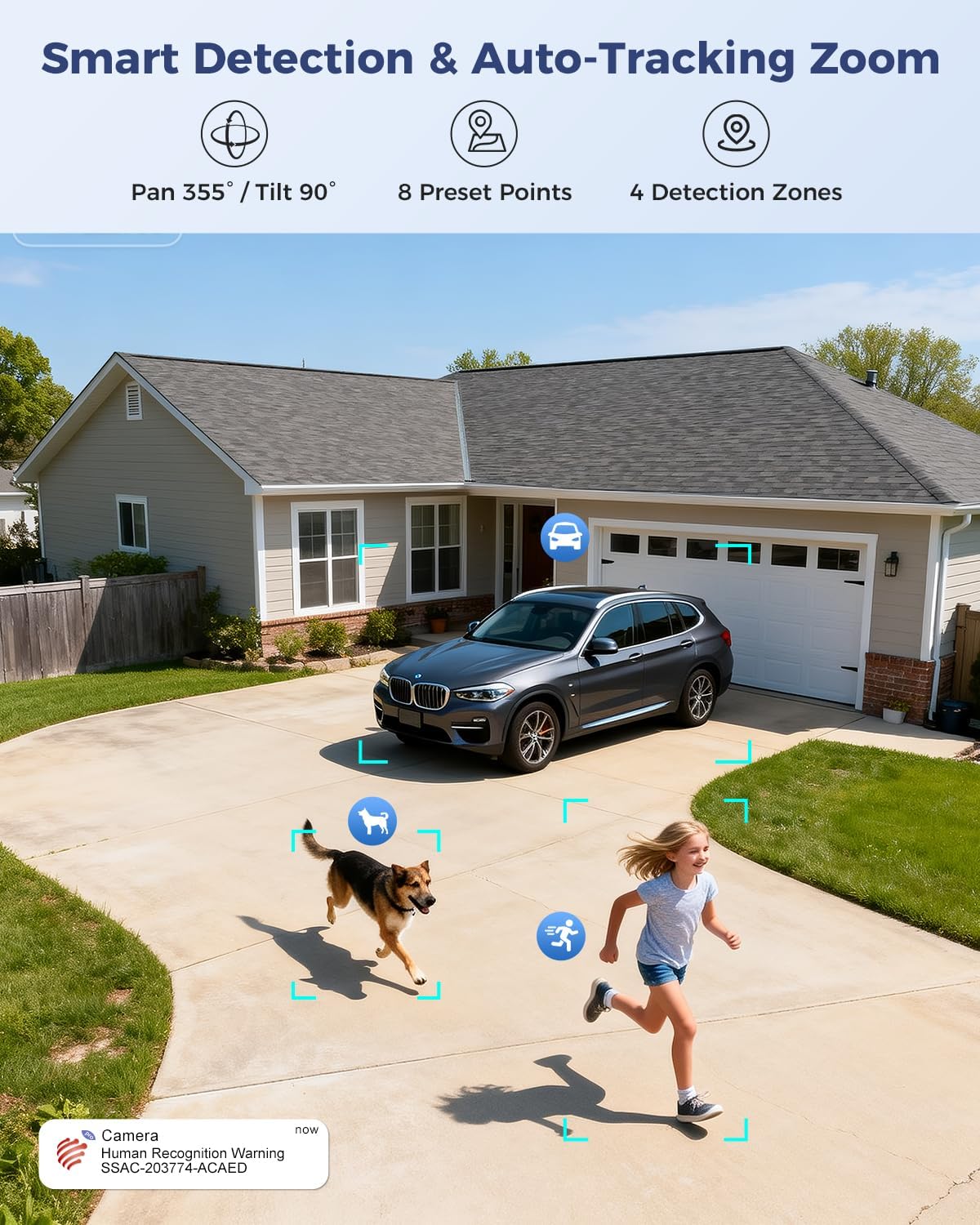
Figure 7: Visual representation of smart detection features including pan/tilt, preset points, detection zones, and human recognition with auto-tracking.
3. 야간 투시경
The camera features a starlight lens for 4K full-color night vision, providing clear images even in low-light conditions.
- The camera automatically switches to night vision mode when ambient light is insufficient.
- The starlight lens (F/1.6 aperture) enhances low-light performance, offering a night vision range of up to 30 meters.

Figure 8: Comparison of starlight lens night vision (top) providing full-color clarity versus a normal lens (bottom) in low light conditions.
4. 양방향 오디오
Use the two-way audio feature to communicate with visitors or deter intruders.
- 라이브에서 view마이크 아이콘을 탭하면 카메라 스피커를 통해 말할 수 있습니다.
- 카메라에 내장된 마이크를 통해 카메라 주변의 소리를 들을 수 있습니다.
5. 녹음 및 저장
The camera offers multiple storage options for recorded footage:
- MicroSD 카드: 로컬 저장소로 최대 256GB microSD 카드(별매)를 지원합니다.
- 클라우드 스토리지: Optional 30-day cloud storage service (subscription may be required).
- NVR: Supports Network Video Recorder (NVR) for 24/7 continuous recording.
- FTP: FTP를 지원하여 녹화 파일을 FTP 서버에 업로드할 수 있습니다.

그림 9: 이상view of the camera's four storage options: MicroSD card (up to 256GB), 30-day Cloud, NVR (7/24 Recording), and FTP support.
6. 장치 호환성
Access and manage your camera from various devices and platforms:
- 모바일 앱: Ctronics Pro (iOS, Android)
- PC 클라이언트: HiP2P Client (Windows, Mac OS)
- Web 브라우저: 접근 방법 web browser for live view 및 설정.

Figure 10: The camera's broad device compatibility, showing access from smartphones, tablets, laptops, and desktop computers.
유지
- 청소: 깨끗한 화질을 유지하려면 부드럽고 마른 천으로 카메라 렌즈를 정기적으로 닦으세요. 독한 화학 약품을 사용하지 마세요.
- 펌웨어 업데이트: Check the Ctronics Pro app periodically for available firmware updates. Keeping the firmware updated ensures optimal performance and security.
- 전원 공급 장치: 전원 어댑터와 케이블이 손상되지 않았는지 확인하세요.
문제 해결
| 문제 | 가능한 원인 | 해결책 |
|---|---|---|
| 카메라 오프라인 | No power; Wi-Fi signal weak or disconnected; incorrect Wi-Fi password. | Check power connection; move camera closer to router or use a Wi-Fi extender; re-enter Wi-Fi password in app. |
| 화질이 나쁘다 | 렌즈 오염; 조명 부족; 네트워크 대역폭 문제. | Clean the lens; ensure adequate lighting for optimal night vision; check network speed. |
| 동작 감지가 작동하지 않음 | Detection sensitivity too low; detection zones not configured; human recognition disabled. | Adjust sensitivity in app; configure detection zones; enable human recognition. |
| 양방향 오디오 문제 | 앱에서 마이크/스피커가 음소거됨; 네트워크 지연. | Ensure audio is enabled in app; check network connection. |
명세서
| 특징 | 세부 사항 |
|---|---|
| 모델 번호 | 930C-4K |
| 비디오 해상도 | 4K (3840 pixels) |
| 줌 | 10배 하이브리드 줌 (광학 6배 + 디지털 4배) |
| 팬/틸트 범위 | 팬 355 °, 틸트 90 ° |
| 렌즈 유형 | Dual Lens (Narrow 50°/8mm, Wide 90°/3.6mm) |
| 나이트 비전 | 4K Full-Color Starlight Night Vision (F/1.6), up to 30 meters |
| 오디오 | 양방향 오디오 |
| 연결성 | Dual-Band Wi-Fi (2.4GHz, 5GHz), Wired Ethernet |
| 저장 옵션 | MicroSD (up to 256GB), Cloud, NVR, FTP |
| 내후성 | IP66 |
| 전원 공급 장치 | 12 Volt, 12 Watt |
| 치수(길이 x 너비 x 높이) | 25 x 13 x 20cm |
| 재료 | 금속 |
| 장착 유형 | Wall- and Ceiling-mount |
| 호환 장치 | 데스크탑, 노트북, 스마트폰, 태블릿 |
보증 및 지원
보증 정보
This product typically comes with a standard manufacturer's warranty. For specific warranty terms and conditions, please refer to the documentation included with your purchase or contact Ctronics customer support. Amazon's return policy for this product is 30 days for refund/replacement.
고객 지원
If you encounter any issues or have questions regarding your Ctronics camera, please contact Ctronics customer support through their official website or the contact information provided in the product packaging. You can also refer to the FAQ section within the Ctronics Pro app for common solutions.