
1. 서론
Thank you for choosing the DEPSTECH DS650-DL Dual-Lens Articulating Industrial Endoscope. This device is designed for detailed visual inspection in hard-to-reach areas, featuring a dual-lens system with 210° bidirectional rotation, a 4.5-inch IPS monitor, and 1080P high-definition imaging. It is an essential tool for home maintenance, vehicle inspection, and machinery checks.
Please read this manual thoroughly before use to ensure proper operation and to maximize the product's lifespan.
2. 안전 정보
- Do not use the endoscope in environments with flammable or explosive gases.
- The probe is IP67 waterproof, but the main unit is not. Avoid exposing the main unit to water or excessive moisture.
- 기기를 분해하거나 개조하지 마십시오. 보증이 무효화되고 손상이 발생할 수 있습니다.
- 기기를 어린이의 손이 닿지 않는 곳에 보관하세요.
- LED 조명에 눈이 직접 노출되지 않도록 하십시오.
- The device features overheat protection. If the temperature exceeds 70°C, a warning will display. If it exceeds 80°C, the device will automatically shut down to prevent damage. Allow the device to cool down before resuming operation.
3. 패키지 내용
패키지를 열 때 모든 품목이 들어 있고 상태가 양호한지 확인하세요.
- DEPSTECH DS650-DL Endoscope Unit
- 보관 케이스
- 사용자 설명서
- Type-C 충전 케이블
- 32GB 메모리 카드 (사전 설치 또는 별도 구매)

Image: Contents of the DEPSTECH DS650-DL package.
4. 설정
4.1 장치 충전
Before first use, fully charge the endoscope unit. Connect the provided Type-C charging cable to the charging port on the device and to a suitable USB power adapter (not included).
4.2 메모리 카드 삽입
If the 32GB memory card is not pre-installed, locate the TF card slot on the side of the monitor unit. Insert the memory card with the contacts facing down until it clicks into place.
4.3 전원 켜기/끄기
Press and hold the power button (usually located near the monitor) for a few seconds to turn the device on or off. The IPS monitor will display the startup screen.
5. 운영
5.1 제어 방식 이해

이미지: 이상view of the endoscope controls and ports.
- 확인/확인 버튼: 메뉴에서 선택한 내용을 확인합니다.
- Up/Zoom In Button: Navigates up in menus or zooms in on the image.
- Down/Zoom Out Button: Navigates down in menus or zooms out on the image.
- 180° Rotation Button: Rotates the real-time image on the screen by 180 degrees.
- Lens Switch Button: Toggles between front camera, side camera, and dual-view 방법.
- 사진/비디오 버튼: 짧게 누르면 사진이 촬영되고, 길게 누르면 동영상 녹화가 시작/정지됩니다.
- Power Button/LED Adjustment: Short press to adjust LED brightness (3 levels), long press to power on/off.
- Articulating Angle Dial: Controls the 210° bidirectional rotation of the probe tip.
- TF 카드 슬롯 : 메모리 카드를 삽입합니다.
- C 형 포트 : 충전 및 데이터 전송용입니다.
- 재설정 버튼: 기기를 초기화합니다(핀을 사용하여 누르세요).
5.2 Using the Dual-Lens and Articulation
The DS650-DL features both a front camera and a side camera, allowing for a wider inspection range. The probe tip can be articulated up to 210° in two directions for comprehensive view주고받음.
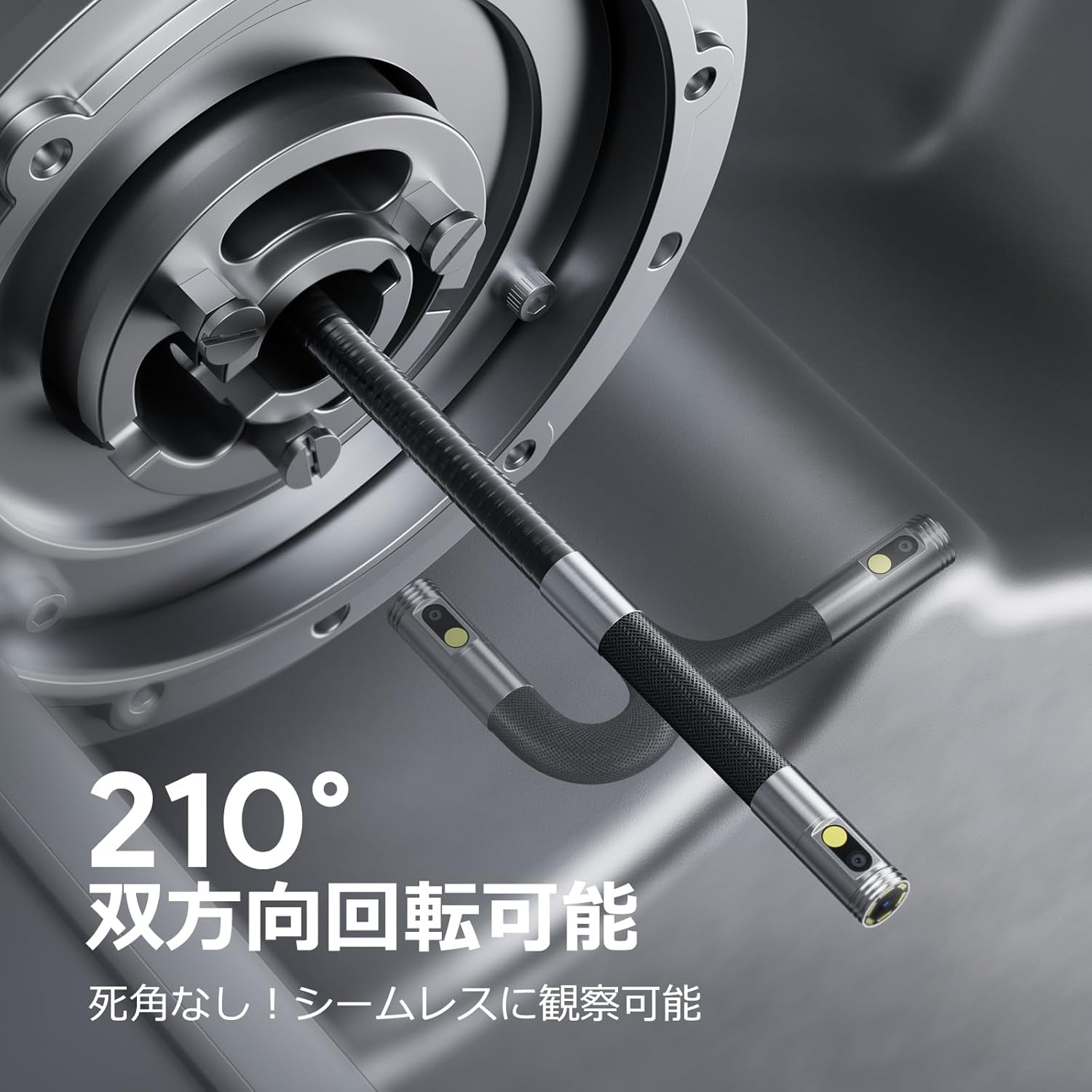
Image: Endoscope probe demonstrating 210° bidirectional articulation.
- 사용하세요 렌즈 전환 버튼 to cycle between the front camera, side camera, or a split-screen dual-view 방법.
- 회전하다 Articulating Angle Dial to precisely adjust the direction of the probe tip. This allows you to navigate around obstacles and view areas from multiple angles without repositioning the entire cable.
5.3 이미지 및 비디오 캡처
The device supports capturing both still images and video recordings directly to the inserted 32GB memory card.

Image: Monitor display showing photo and video capture features.
- 사진을 찍으려면: 짧게 누르세요 사진/동영상 버튼.
- 비디오를 녹화하려면: 길게 누르세요 사진/동영상 버튼 녹화를 시작하려면 길게 누르세요. 다시 길게 누르면 녹화가 중지됩니다.
- 캡처됨 files are saved to the 32GB memory card. You can store approximately 10,000 images or 50 videos.
5.4 LED 밝기 조정
The probe is equipped with high-brightness LED lights to illuminate dark inspection areas. Short press the Power Button/LED Adjustment button to cycle through 3 levels of LED brightness.

Image: IP67 waterproof probe with adjustable LED illumination.
5.5 데이터 전송
You can transfer captured images and videos to a computer via the Type-C cable or by directly accessing the memory card.

Image: High-speed data transfer from endoscope to PC.
6. 유지관리
- 프로브 청소: After use, especially in dirty or wet environments, gently wipe the probe with a soft, damp cloth. Ensure no debris remains on the camera lenses.
- 모니터 청소: Use a soft, dry cloth to clean the IPS monitor. Avoid abrasive cleaners or solvents.
- 저장: Store the endoscope in its provided storage case in a cool, dry place, away from direct sunlight and extreme temperatures. This prevents damage from improper storage and moisture.
- 배터리 관리 : 배터리 수명을 연장하려면 기기를 자주 완전히 방전하지 마세요. 장시간 사용하지 않더라도 정기적으로 충전하세요.
7. 문제 해결
| 문제 | 가능한 원인 | 해결책 |
|---|---|---|
| 장치의 전원이 켜지지 않습니다. | 배터리가 부족합니다. 기기가 고장났습니다. | 기기를 완전히 충전하세요. 문제가 지속되면 지원팀에 문의하세요. |
| 화면에 이미지가 나오지 않습니다. | Cable not connected properly; camera lens obstructed. | Ensure the probe cable is securely connected. Check for obstructions on the lens. |
| 이미지가 흐릿하거나 불분명합니다. | Lens is dirty; focus distance incorrect. | Clean the camera lens. Ensure the object is within the optimal focal range (3-10cm). |
| 사진/동영상을 녹화할 수 없습니다. | 메모리 카드가 가득 찼거나 올바르게 삽입되지 않았습니다. | Check if the 32GB memory card is inserted correctly. Delete old file카드 용량이 가득 차면 교체하세요. |
| Device shuts down automatically. | 과열 보호가 활성화되었습니다. | Allow the device to cool down. Avoid using in excessively hot environments. |
8. 사양
| 특징 | 세부 사항 |
|---|---|
| 상표 | 뎁스텍 |
| 모델 번호 | DS650DJ |
| 표시하다 | 4.5-inch IPS LCD Monitor |
| 카메라 해상도 | 1080피 |
| 프로브 직경 | 8.5mm |
| 관절 각도 | 210° Bidirectional |
| 케이블 유형 | 1.5M Semi-rigid |
| 방수 등급 | IP67(프로브만 해당) |
| 조명 | 조절 가능한 LED 조명 |
| 저장 | 32GB Micro SD 카드(포함) |
| 배터리 포함 | 예 |
| 패키지 크기 | 43.1 x 21.4 x 7.4cm |
| 패키지 무게 | 1.33kg |
9. 보증 및 지원
9.1 제조업체 보증
This DEPSTECH product comes with a 24개월 제조사 보증. Your order number serves as your proof of purchase for warranty claims. Please retain it.
9.2 고객 지원
For any questions, technical assistance, or warranty inquiries, please contact our professional support team:
We aim to respond to all inquiries within 24 hours (excluding weekends and public holidays, where responses will be provided on the next business day).

Image: DEPSTECH customer support and warranty information.