
1. 서론
This manual provides instructions for the assembly, operation, and maintenance of your SSUPD Meshroom D Mini-ITX Small Form Factor (SFF) PC case. Please read this manual thoroughly before beginning installation to ensure proper setup and optimal performance.
2. 제품 특징
- 컴팩트한 ITX 디자인: 14.93L footprint, exclusively designed to accommodate Mini-ITX motherboards.
- Large GPU Support: Compatible with 3.5 slot GPUs.
- Dual Radiator Ready: Fully prepared for dual radiator custom loop configurations.
- Ultra Ventilation: Extreme fine mesh panel in 1.5mm aperture on all sides.
- 전원 공급 장치 지원: Supports SFX/SFX-L/ATX power supply.
- 냉각 팬 지원: Interior fits up to 3x 140mm cooling fans, along with multiple radiators.
3. 설정 및 설치
The SSUPD Meshroom D case is designed for tool-free and easy accessibility. Follow these steps for component installation.
3.1. 내부 접근
The side panels and top panel can be easily removed for access.

Image: The SSUPD Meshroom D case with its side panel removed, revealing the internal structure and mounting points for components.
The mesh panels are flexible for easy removal and reattachment.
Video: This video demonstrates the tool-free removal of the side panels and the flexible nature of the mesh material, highlighting the ease of access for installation.
3.2. GPU 설치
The case supports large GPUs, up to 3.5 slots.

Image: A large graphics processing unit (GPU) installed within the SSUPD Meshroom D case, demonstrating the ample space for high-performance components.
Video: This video provides a build reference, showing the installation process of a GPU and other components within the SSUPD Meshroom D case.
3.3. 냉각 시스템 설치
The Meshroom D supports various cooling configurations, including up to three 140mm fans and dual radiators for custom liquid cooling loops.
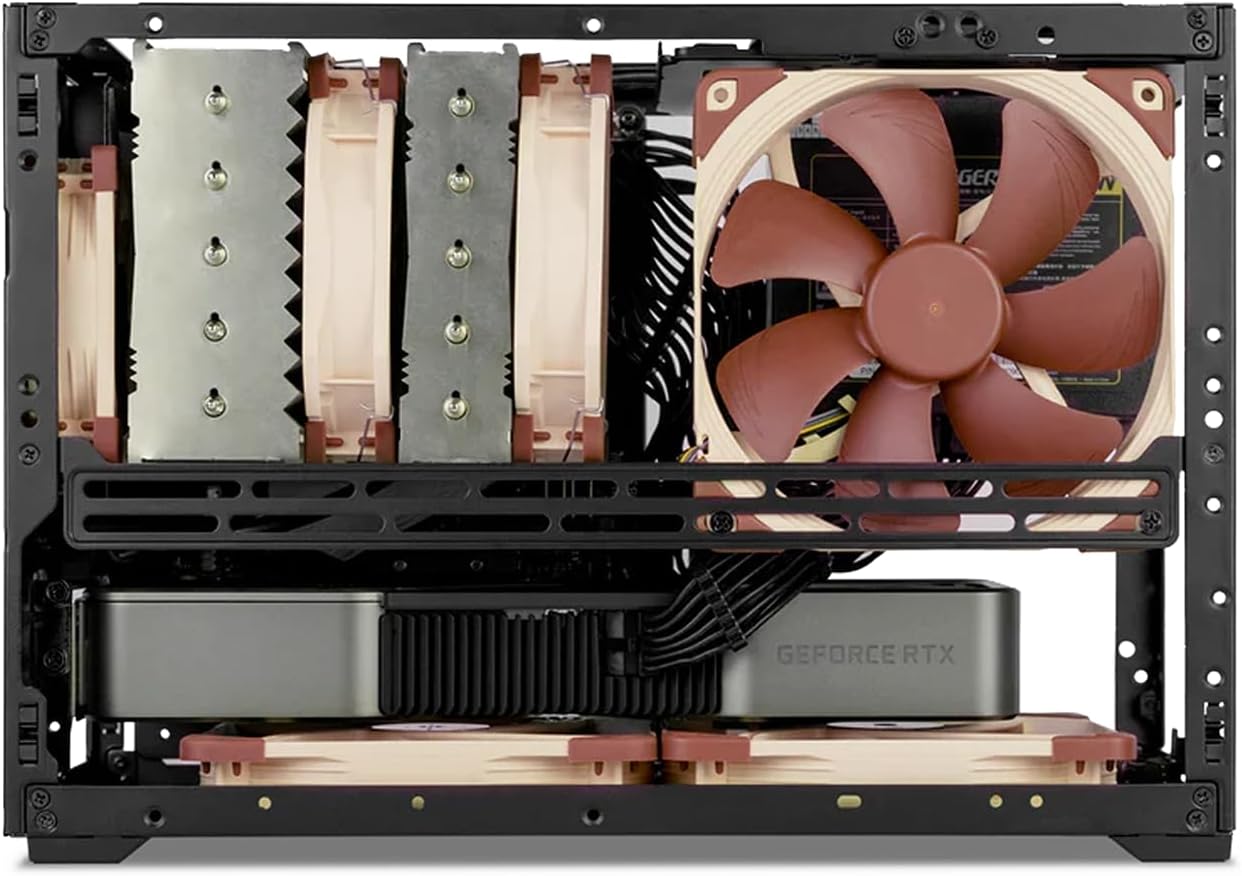
이미지: 내부 view of the SSUPD Meshroom D case, showcasing a CPU air cooler and two fans installed at the bottom for enhanced airflow.

Image: The SSUPD Meshroom D case configured with dual radiators for a custom liquid cooling setup, illustrating its advanced cooling capabilities.
4. 구성 요소 호환성
The Meshroom D offers flexible compatibility for various PC components.
4.1. 마더보드 호환성
- 미니 ITX
- Mini DTX
- Micro-ATX (requires optional expansion bracket)
4.2. Power Supply Compatibility
- 에이티엑스
- SFX-L
- 음향효과
4.3. Storage Drive Support
- Up to 3 x 3.5" HDDs
- Up to 5 x 2.5" SSDs
4.4. GPU Dimensions
Refer to the specifications table for detailed GPU length and height limitations based on motherboard type and I/O configuration.

Image: A diagram illustrating GPU compatibility for the SSUPD Meshroom D, detailing supported lengths and slot sizes for different configurations.
5. 유지관리
5.1. 청소
- Regularly clean the mesh panels to ensure optimal airflow. Use a soft brush or compressed air to remove dust.
- For deeper cleaning, panels can be removed and gently washed with water and mild soap, then thoroughly dried before reinstallation.
5.2. 구성 요소 검사
- Periodically check all internal components for secure connections and dust buildup.
- Ensure cooling fans are free from obstructions and operating correctly.
6. 문제 해결
6.1. 과열 문제
- Verify all fans are spinning and correctly oriented for airflow.
- Check for excessive dust buildup on mesh panels and component heatsinks.
- CPU 쿨러에 써멀 페이스트가 제대로 도포되었는지 확인하십시오.
6.2. Power On Failure
- Confirm all power cables are securely connected to the motherboard, GPU, and power supply.
- 전원 버튼과 메인보드의 연결 상태를 확인하십시오.
- 가능하다면 다른 시스템을 사용하여 전원 공급 장치를 테스트하십시오.
7. 사양
| 특징 | 세부 사항 |
|---|---|
| 케이스 크기(LxWxH) | 17 x 7.7 x 12.4 인치 |
| 용량 | 14.93리터 |
| 케이스 소재 | Alloy Steel, Aluminum, Plastic, Tempered Glass |
| 마더보드 호환성 | Mini ITX, Mini DTX, Micro-ATX (with optional bracket) |
| GPU Max Length (ITX MB) | 3-slot mode: 325mm length x 140mm height; 3.4-slot mode: 325mm length x 136mm height |
| GPU Max Length (MATX MB) | 3-slot mode: 325mm length x 140mm height (with expansion bracket); 4.6-slot mode: 325mm length x 136mm height (with expansion bracket) |
| CPU 쿨러 최대 높이 | 142mm (no side fan bracket), 138mm (with side fan bracket) |
| 전원 공급 유형 | ATX, SFX-L, SFX |
| Power Supply Max Length | 150mm (PSU left side), 140mm (PSU right side), 130mm (PSU top) |
| 2.5" Drive Mounts | 5 x 2.5" SSD (SFX PSU); 4 x 2.5" SSD (ATX PSU) |
| 3.5" Drive Mounts | 3 x 3.5" HDD (SFX PSU); 2 x 3.5" HDD (ATX PSU) |
| Front Interface (Variant B) | 1x USB 3.2 Gen 2 Type-C (20 Gbps), 1x USB 3.0 Type-A (5 Gbps), 1x Power button |
| 냉각 방식 | 물, 공기 |
| 품목 무게 | 6.16파운드(2.8킬로그램) |

Image: A comprehensive table detailing the specifications and compatibility of the SSUPD Meshroom D case, including dimensions, component support, and cooling options.
8. 보증 및 지원
For warranty information and technical support, please refer to the official SSUPD web해당 사이트를 방문하거나 고객 서비스에 문의하세요. 보증 청구를 위해 구매 영수증을 보관하세요.