
소개
This manual provides detailed instructions for the installation, operation, and maintenance of the SENSORWORX SWX-852-2-WH Wireless Remote Light Switch. This device is designed to provide manual control of wirelessly controlled lighting systems, acting as a companion switch to compatible SENSORWORX wireless load controllers.
The SWX-852-2-WH is a line-powered wall station that simplifies multi-way switching configurations by reducing wiring complexity and installation time. It communicates wirelessly using an encrypted 915 MHz proprietary protocol, offering reliable operation within specified ranges.
안전 정보
WARNING: Risk of Electric Shock. Improper installation can lead to serious injury or death.
- Always turn off power at the circuit breaker or fuse box before installing, servicing, or removing the device.
- 설치는 모든 국가 및 지역 전기 규정에 따라 자격을 갖춘 전기 기술자가 수행해야 합니다.
- 정격 부하를 초과하는 부하에서 이 장치를 사용하지 마십시오.
- 모든 전선 연결이 안전하고 적절하게 절연되어 있는지 확인하세요.
- 이 장치는 실내에서만 사용하도록 설계되었습니다.
패키지 내용
설치를 시작하기 전에 모든 구성 요소가 있는지 확인하세요.
- SENSORWORX SWX-852-2-WH Wall Switch Sensor
- 와이어 리드
- 장착 나사
- 와이어 너트
- 사용 설명서(본 문서)
명세서
| 특징 | 사양 |
|---|---|
| 모델 | SWX-852-2-WH |
| 작동 모드 | 온-오프 |
| 현재 평가 | 1 Amps |
| 운영 볼륨tage | 120-277V (Line Powered) |
| 연락처 유형 | 단극 단투(SPST) |
| 커넥터 유형 | 주름 |
| 스위치 유형 | Sensor (Remote) |
| 단말기 | 와이어 리드 |
| 재료 | Plastic (Housing), Silver (Contact) |
| 치수(길이 x 너비 x 높이) | 1.39 x 1.68 x 2.74 인치 |
| 장착 유형 | Surface Mount (in standard wallbox) |
| 회로 유형 | 1-way, 3-way, 4-way (with compatible controllers) |
| 작동 온도 | 화씨 32도에서 화씨 122도(섭씨 0도에서 50도) |
| 습기 | 0-95 % 비 응축 |
| 무선 프로토콜 | Encrypted 915 MHz Proprietary |
| 무선 범위 | ~80 feet line of sight, ~40 feet through obstructions |
| 인증 | UL Listed, RoHS Compliant, BAA Compliant, BABA Compliant, TAA Compliant |
| 품목 무게 | 3.88 온스 |
설정 및 설치
The SENSORWORX SWX-852-2-WH is designed for straightforward installation in a standard single-gang wallbox, requiring less than 1 inch of mounting depth.
1. 배선
- 전원 끄기: Before starting, ensure power to the circuit is OFF at the circuit breaker.
- 전선 식별: The SWX-852-2-WH is line-powered and requires connection to line (hot) and neutral wires. It does not directly switch the load.
- 전선을 연결하십시오: Use the provided wire nuts to connect the switch's wire leads to the corresponding building wiring (Line, Neutral). Consult local electrical codes for proper wiring practices.
- 스위치를 장착하세요: Carefully place the switch into the wallbox, ensuring wires are not pinched. Secure the switch to the wallbox using the provided mounting screws.
- Install wallplate: Attach a standard decorative wallplate (not included) over the switch.
- 전원 복구: 회로 차단기에서 전원을 다시 켜십시오.
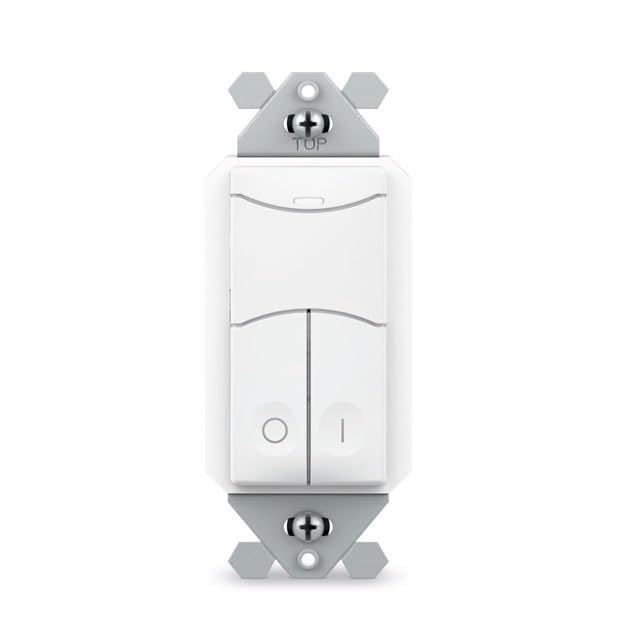
Image: SENSORWORX SWX-852-2-WH Wireless Remote Light Switch. This image shows the front view of the white wall switch, illustrating its compact design for easy installation.
2. Pairing with Wireless Controller
The SWX-852-2-WH must be paired with a compatible SENSORWORX wireless load controller (e.g., SWX-950 series power pack, SWX-851 wireless wall switch, or SWX-874-ELV dimmer) to function. The pairing process is quick and typically takes approximately 3 seconds per device.
- 전원이 켜져 있는지 확인하세요 for both the SWX-852-2-WH and the target wireless load controller.
- 페어링 모드 시작 on the wireless load controller according to its specific instructions. This usually involves pressing and holding a button on the controller.
- Activate pairing on SWX-852-2-WH: Press and hold the designated button on the SWX-852-2-WH (refer to the specific button layout on your device) until an indicator light confirms pairing mode.
- 페어링을 확인하세요: Both devices should provide visual feedback (e.g., LED flashes) to indicate successful pairing. Refer to the controller's manual for specific confirmation signals.
For multi-way switching, additional SWX-852-2-WH units can be paired to the same wireless load controller.
작동 지침
Once installed and paired, the SWX-852-2-WH operates as a remote control for the linked SENSORWORX wireless load controller.
- 켜짐/꺼짐 제어: Press the top button to turn the connected lights ON. Press the bottom button to turn the connected lights OFF.
- Dimming Control (if paired with a dimmer): If paired with a compatible SENSORWORX wireless dimmer (e.g., SWX-874-ELV), the buttons may also provide dimming functionality. Typically, holding the ON button will brighten lights, and holding the OFF button will dim lights. Refer to the dimmer's manual for specific dimming operations.
- 다중 방향 제어: In multi-way setups, any paired SWX-852-2-WH switch can control the same lighting load.
유지
The SENSORWORX SWX-852-2-WH is designed for long-term, maintenance-free operation. Follow these guidelines for optimal performance:
- 청소: 스위치 표면을 청소하려면 부드러운 천을 사용하십시오.amp 천으로 닦아주세요. 연마성 세제, 용제 또는 강한 화학 물질은 마감재를 손상시킬 수 있으므로 사용하지 마세요.
- 사용자가 수리할 수 없는 부품: 스위치 내부에는 사용자가 수리할 수 있는 부품이 없습니다. 기기를 열거나 수리하려고 시도하지 마십시오.
- 환경 조건: 손상을 방지하려면 작동 환경이 지정된 온도 및 습도 범위 내에 유지되도록 하세요.
문제 해결
If you experience issues with your SENSORWORX SWX-852-2-WH, consult the following troubleshooting guide:
| 문제 | 가능한 원인 | 해결책 |
|---|---|---|
| Switch does not respond to presses. | 스위치에 전원이 들어오지 않습니다. Not properly paired with a controller. Controller is out of range or powered off. | Verify power at the circuit breaker and wiring connections. Re-attempt the pairing process with the wireless load controller. Ensure the wireless load controller is powered on and within range (~40 feet through obstructions). |
| Lights do not turn ON/OFF or dim correctly. | 잘못된 연결입니다. Incompatible controller. 간섭. | Confirm successful pairing with the correct SENSORWORX wireless load controller. Ensure the controller is compatible with the SWX-852-2-WH and supports the desired functionality (e.g., dimming). Minimize sources of wireless interference (e.g., large metal objects, other 900 MHz devices). |
| 간헐적 작동. | 무선 신호가 약합니다. 환경적 요인. | Relocate the wireless load controller or the SWX-852-2-WH to improve signal strength. Ensure no new obstructions have been introduced. Check for extreme temperatures or humidity outside of specified operating conditions. |
If troubleshooting steps do not resolve the issue, please contact SENSORWORX customer support.
보증 및 지원
The SENSORWORX SWX-852-2-WH Wireless Remote Light Switch comes with a 5년 보증 from the date of purchase, covering defects in materials and workmanship under normal use. This warranty is valid only for products purchased from authorized SENSORWORX distributors.
For technical support, warranty claims, or further assistance, please visit the official SENSORWORX website or contact their customer service department. Please have your product model number (SWX-852-2-WH) and proof of purchase available when contacting support.
SENSORWORX products are proudly Made in the USA and comply with UL, RoHS, BAA, BABA, and TAA standards, ensuring high quality and reliability.