
소개
The Founist Vlogmate Mini is a compact and portable monitor designed to enhance your iPhone's rear camera capabilities for vlogging, selfies, and live streaming. It allows real-time mirroring of your iPhone's back camera, enabling high-quality content creation with precise framing. This device is engineered for ease of use, offering a plug-and-play experience with a wireless remote for convenient control.
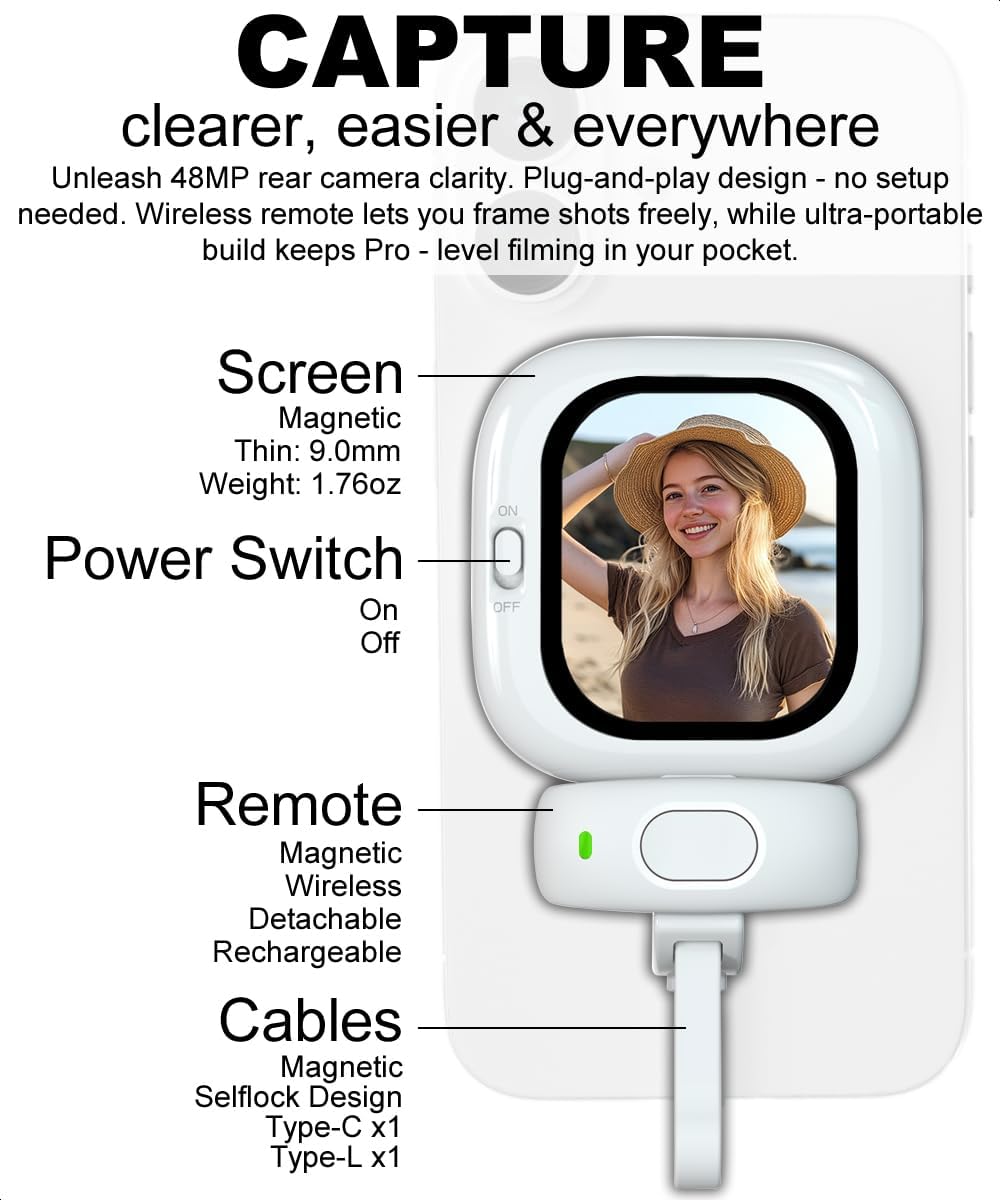
Figure 1: Founist Vlogmate Mini Selfie Monitor
포함된 액세서리
The Founist Vlogmate Mini comes with a complete accessory kit to get you started immediately:
- Founist Vlogmate Mini (with magnetic attachment) x1
- Bluetooth Wireless Remote (with magnetic attachment) x1
- Cables (with magnetic self-lock design) x2 (1x Type-C & 1x Type-L)
- Metal Rings x2
- 여행용 파우치 x1
- 사용 설명서 x1

그림 2: 패키지 내용물
설정
Setting up your Founist Vlogmate Mini is quick and straightforward:
- 모니터 부착: The Vlogmate Mini features a MagSafe magnetic attachment. Simply align it with the MagSafe area on the back of your iPhone. If your iPhone or case is not MagSafe compatible, use one of the included metal rings to enable magnetic attachment.
- 케이블 연결: Plug the appropriate cable (Type-C or Type-L, depending on your iPhone model) into the port on the Vlogmate Mini and then into your iPhone's charging port. The device is plug-and-play; no additional apps are required for basic 1080P recording.
- 전원 켜기: Turn on the Vlogmate Mini using the power switch located on the side.
- Pair the Remote (Optional): For wireless control, single-tap the Bluetooth remote. A blue light will blink, indicating it's ready to pair with your iPhone.

Figure 3: Magnetic Attachment and Setup
작동 지침
Using the iPhone Rear Camera for Selfies and Vlogging
The Vlogmate Mini allows you to utilize your iPhone's superior rear camera for selfies and vlogging, providing sharper clarity, wider angles, and advanced image stabilization.

Figure 4: Enhanced Quality with Rear Camera
1080P Plug-and-Play Recording
For instant recording, simply connect the Vlogmate Mini and use your iPhone's native camera app. It supports 1080P high-frame-rate video without requiring any additional applications. This is ideal for quick social media content, live streams, and daily vlogging.
- 호환성: iOS 6.0+ on iPhone models 5-17 (including iPhone 17/16/15/14/13/12/11/SE/XR/XS/X/8/7/6/5).

그림 5: 1080p 비디오 녹화
4K Video Recording with Blackmagic Cam App
To record 4K videos, download the Blackmagic Cam app from the App Store. This app allows for smooth 4K video capture at various frame rates supported by your iPhone.
- 다운로드: Install the Blackmagic Cam app from the App Store.
- Enable Vertical Video: In the Blackmagic Cam App settings, enable "Vertical Video" to ensure the monitor displays the correct subject content for framing.
- 호환성: iOS 17.0+ on iPhone models with A12 chip or newer (including iPhone 17/16/15/14/13/12/11/SE/XR/XS).
- Ensure your specific iPhone model supports 4K recording.

Figure 6: 4K Video Setup with Blackmagic Cam App
무선 원격 제어
The included Bluetooth wireless remote allows for hands-free control of your iPhone's camera from up to 33 feet away, perfect for solo creators.
- 사진 모드 : Single tap to take a photo. Long press and release to start and end video recording.
- 비디오 모드: Single tap to start recording. Another single tap to stop recording. Long press and release to start and end recording.
- 다른 인터페이스: Single tap to adjust volume by 1 level. Long press to continuously adjust volume (if the first tap increases volume, the next decreases it).
- 수면 모드 : The remote will auto-sleep after 3 minutes of inactivity. A single tap will wake it up.

Figure 7: Wireless Remote Functions
Mirror Mode for Intuitive Framing
The Vlogmate Mini's mirror mode provides an intuitive framing experience for rear-camera selfies, making it feel like you are looking into a mirror. While on-screen text may appear reversed, this does not affect the orientation of captured photos or videos, which are saved correctly.

Figure 8: Mirror Mode in Action
Audio Support and Connectivity
The Vlogmate Mini ensures full audio support, allowing your iPhone's built-in microphone and speakers to function seamlessly for recording and playback. For professional audio and expanded storage, you can pair your iPhone with a compatible dock to connect external microphones, SSDs, or charge your device while using the monitor.
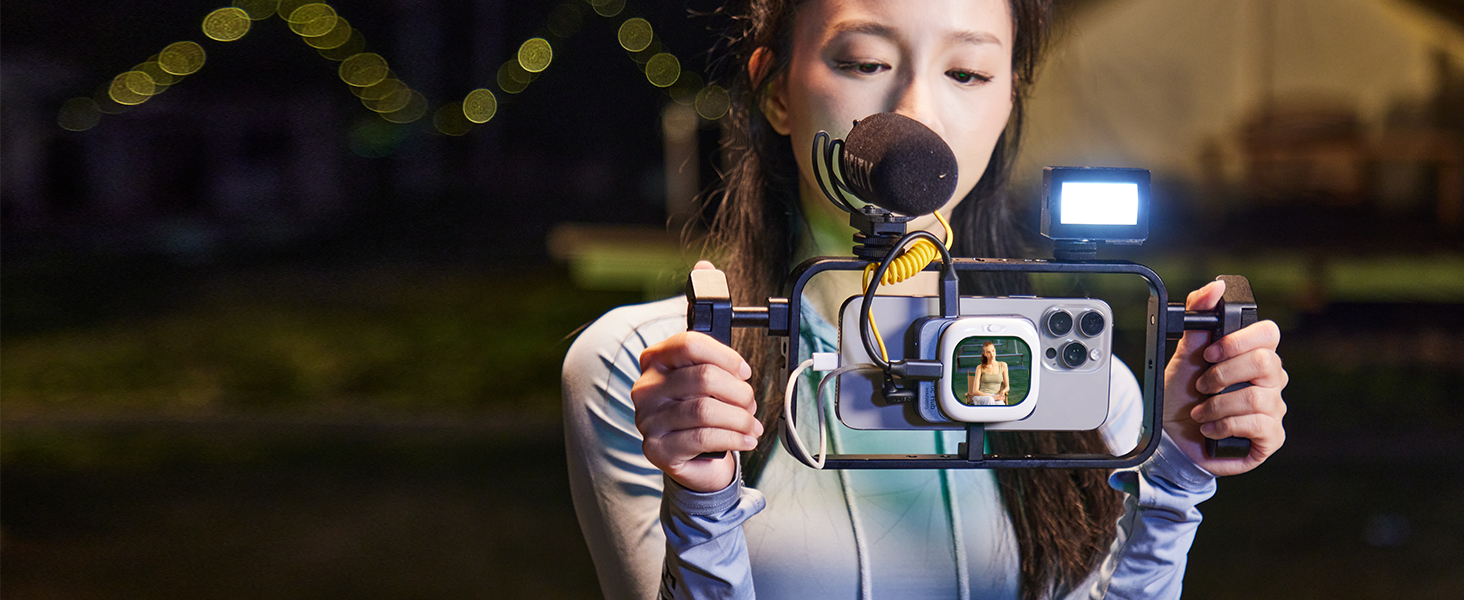
그림 9: 다용도 연결성
전원 관리
The Founist Vlogmate Mini operates without an internal battery, drawing ultra-low power (0.6W) directly from your iPhone via the wired connection. This design eliminates the need to manage separate batteries for the monitor.
For extended shooting sessions, such as all-day vlogging or live streaming, you can attach a MagSafe power bank to your iPhone. The Vlogmate Mini can then be secured to the power bank's magnetic surface, allowing your iPhone to charge while simultaneously powering the monitor, ensuring uninterrupted use.
유지
To ensure the longevity and optimal performance of your Founist Vlogmate Mini, follow these maintenance guidelines:
- 청소: Gently wipe the screen and body with a soft, dry, lint-free cloth. Avoid using harsh chemicals or abrasive materials.
- 저장: When not in use, store the Vlogmate Mini in the provided travel pouch to protect it from dust and scratches.
- 케이블 관리: Handle the connecting cables with care to prevent damage. Avoid sharp bends or excessive pulling.
- 환경 조건: 기기를 극한의 온도, 장시간 직사광선 또는 높은 습도에 노출시키지 마세요.
문제 해결
If you encounter issues with your Founist Vlogmate Mini, refer to the following common solutions:
- 모니터에 표시되지 않음: Ensure your iPhone is unlocked and the connecting cable is securely plugged into both the Vlogmate Mini and your iPhone.
- 4K Video Lag: Some iPhone models may experience lag when recording 4K video. Downloading and using the Blackmagic Cam app (available on the App Store) can resolve this, providing smoother 4K recording.
- Blackmagic Cam App Compatibility: The Blackmagic Cam app requires iOS 17.0+ and iPhone models with an A12 chip or newer (e.g., iPhone 17/16/15/14/13/12/11/SE (2nd gen+), XR, XS). Verify your iPhone meets these requirements and supports 4K recording.
- Wireless Remote Unresponsive: The remote enters an auto-sleep mode after 3 minutes of inactivity. A single tap will wake it up. Ensure it is paired correctly via Bluetooth.
- Mirror Effect on Text: The mirror mode intentionally reverses on-screen text for intuitive framing. This does not affect the final orientation of recorded photos or videos.
명세서
| 상표 | founist |
| 모델명 | Founist Vlogmate Mini |
| 호환 장치 | Cellphone (iPhone) |
| 제품 크기(D x W x H) | 0.35인치 x 2.34인치 x 0.35인치 |
| 무게 | 50그램 (1.76온스) |
| 화면 유형 | 아몰레드 |
| 화면 크기 | 2.13 인치 |
| 명도 | 700니트 |
| 대비율 | 60000시 1분 |
| 피피아이 | 320 |
| 색상 영역 | 100% NTSC |
| 새로 고침 빈도 | 60Hz |
| 촬영 모드 | 4K Video, 1080P Video |
| 비디오 캡처 해상도 | 3840 x 2160 |
| File 형식 지원 | RAW, ProRes, Dolby Vision |
| 이미지 안정화 | 진실 |
| 오디오 녹음 | 예 |
| 전력 소비 | 0.6W (powered by iPhone) |
| 방수 레벨 | 방수가 되지 않음 |

Figure 10: Display Specifications Comparison
보증 및 지원
For warranty information, technical support, or customer service inquiries, please refer to the contact details provided on the product packaging or the official founist web사이트. 보증 청구에 대비해 구매 증빙 자료로 구매 영수증을 보관하세요.


