
1. 안전 정보
Please read all instructions carefully before installation and use. Improper installation or operation may cause damage to the device or vehicle, and may void the warranty. Always prioritize safe driving practices. Do not operate the device in a way that distracts you from the road.
- 전문 설치 권장: 자동차 전기 시스템은 매우 복잡하기 때문에 전문가의 설치를 강력히 권장합니다.
- 전원 공급 장치: 기기가 음극 접지 방식의 12V DC 전원에 연결되어 있는지 확인하십시오.
- 배선: Double-check all wiring connections before powering on the unit to prevent short circuits or damage.
- 작동 온도: 장치를 극한의 온도나 직사광선에 장기간 노출시키지 마십시오.
2. 제품 오버view
The JOYING JY-TT158N4 is a 9-inch Android car stereo designed for Toyota Land Cruiser Prado 120 and Lexus GX470 models from 2004-2009. It features a high-resolution touchscreen, integrated CarPlay and Android Auto, a physical volume knob, and robust hardware for an enhanced in-car experience.

그림 2.1: 전면 view of the JOYING JY-TT158N4 car stereo.
주요 특징:
- 차량 호환성: Specifically designed for Toyota Land Cruiser Prado 120 & Lexus GX470 (2004-2009), compatible with JBL amplifier and factory steering wheel controls.
- 빠른 부팅: Quick startup, entering the user interface in approximately 2 seconds after the initial boot.
- 오디오 출력: Optical Fiber and Coaxial Digital Output for high-quality sound with external amp정수기.
- 내장형 4G 모듈: 인터넷 접속용 SIM 카드를 지원합니다(데이터 전용, 통화/문자 메시지 불가).
- GPS 네비게이션: Precise GPS with included antenna, supporting offline maps and synchronization with phone map data via CarPlay/Android Auto.
- CarPlay 및 Android Auto: Built-in support for seamless smartphone integration via USB or Bluetooth.
- 개인 설정: Customizable car boot logos, wallpapers, and button colors.
- 냉각 시스템: Dual heat sink design with automatic fan control to prevent overheating.
3. 상자 안에 무엇이 들어있나요?
패키지에는 다음과 같은 구성 요소가 포함되어 있습니다.
- 9" radio unit (x1)
- Single Din Cage (x1)
- Left & Right Bracket (x1)
- 와이파이 안테나 (1개)
- GPS 안테나 (1개)
- 4G 안테나(x2)
- External Mic (x1)
- USB 케이블(x2)
- AR 케이블 (1개)
- 스크린 리본 케이블 (1개)
- 전원 케이블(x1)
- 사용 설명서(x1)

그림 3.1: 포함된 구성 요소의 시각적 표현.
4. 설치
The JOYING JY-TT158N4 is designed for plug-and-play installation in compatible Toyota Land Cruiser Prado 120 and Lexus GX470 models (2004-2009). No cutting of factory cables is required. Ensure the vehicle's power is disconnected before beginning installation.
4.1. 차량 호환성 확인
Verify that your vehicle's dashboard matches the compatible models to ensure proper fitment.
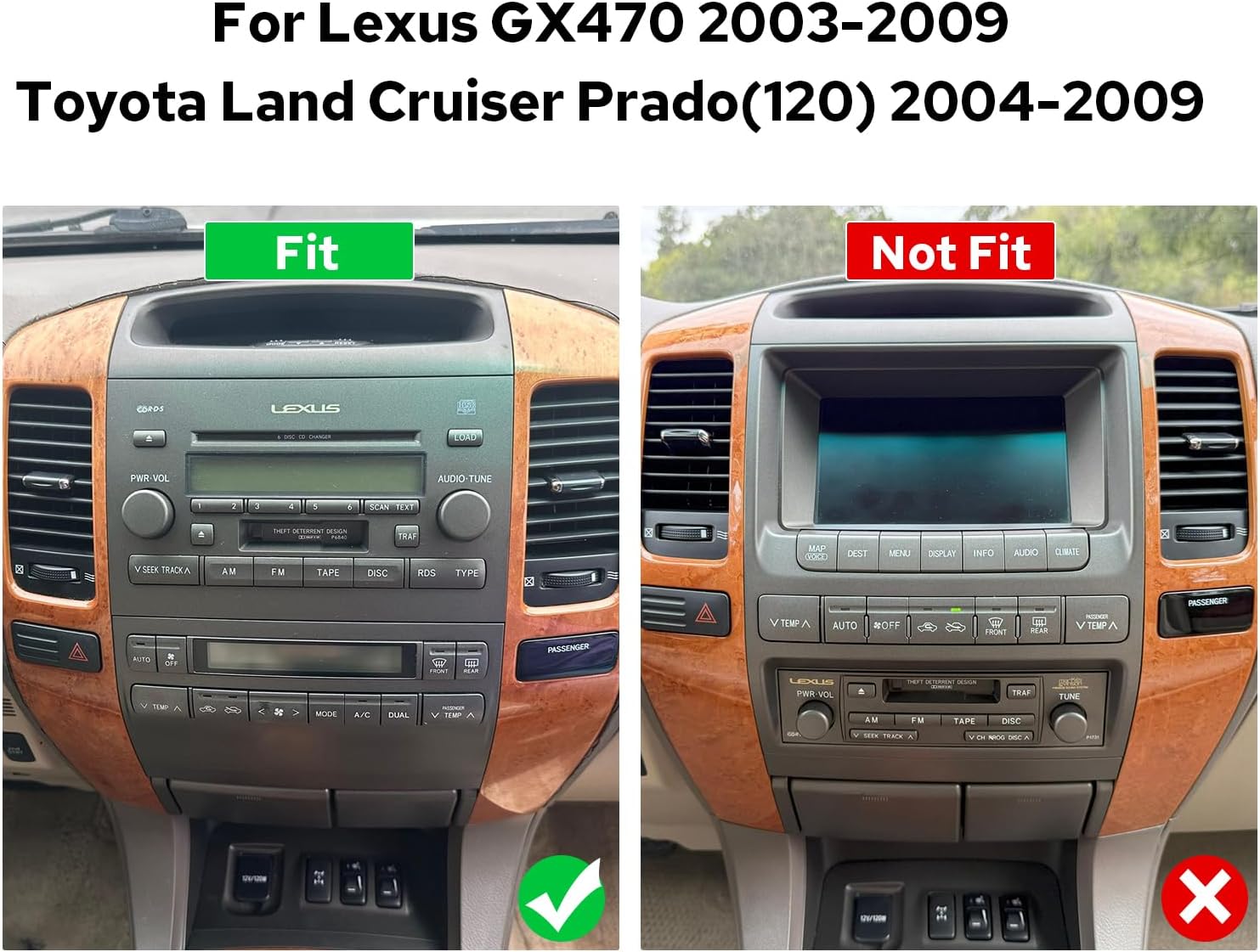
Figure 4.1: Comparison of compatible and incompatible dashboards.
4.2. 배선 연결
제공된 케이블을 카 스테레오와 차량 배선 하네스의 해당 포트에 연결하십시오. 모든 연결이 단단히 고정되었는지 확인하십시오.

그림 4.2: 후면 view of the car stereo with various ports and connections.
4.3. AR Camera Connection
For connecting AR (Augmented Reality) front and reverse cameras, follow the specific wiring instructions. This typically involves connecting the camera's power cable and video input to the head unit.
Video 4.1: Detailed guide on connecting AR (Front and Reverse) cameras to the head unit.
5. 초기 설정
5.1. 첫 번째 부팅
The first boot-up may take 30-40 seconds. Subsequent startups will be faster, typically within 2 seconds.
5.2. 블루투스 페어링
To enable hands-free calling and audio streaming, pair your smartphone via Bluetooth. Navigate to the Bluetooth settings on the car stereo and your phone, then select 'Car BTo' or a similar device name to connect.
Video 5.1: Demonstration of Bluetooth pairing and CarPlay/Android Auto connection.
5.3. CarPlay 및 Android Auto 연결
Connect your mobile phone to the car radio via USB cable or Bluetooth to use CarPlay or Android Auto. This allows access to navigation, phone calls, and music on the larger screen.

Figure 5.1: Display showing CarPlay and Android Auto interfaces.
6. 사용 설명서
6.1. 사용자 인터페이스 탐색
The system features an intuitive Android interface. Swipe left or right to access different home screens and applications. Tap icons to launch apps like Radio, Music, Video, Navigation, and Settings.

Figure 6.1: Car stereo displaying the main user interface with various application icons.
6.2. Audio and Equalizer Settings
Adjust audio settings and utilize the 48-band graphic equalizer (TDA7851 DSP chip) for optimal sound quality. Preset EQ modes are available, or you can customize your own.

Figure 6.2: Illustration of high-quality sound features and equalizer interface.
6.3. 음성 제어
Utilize voice commands to control various functions, enhancing driving intelligence and security. This allows for hands-free operation of features like radio, navigation, and calls.
Video 6.1: Demonstration of voice control features, including opening FM radio and hands-free calling.
6.4. Dual Screen Functionality
The system supports dual-screen operation, allowing two applications to run simultaneously. For examp예를 들어, 한쪽에는 내비게이션을, 다른 쪽에는 음악 재생을 배치할 수 있습니다.
Video 6.2: Shows dual screen functionality with FM radio and phone dialer running concurrently.
6.5. HDMI 출력
The unit features an HDMI output, allowing you to send uncompressed audio and video signals to external displays, such as headrest monitors, for passenger entertainment.
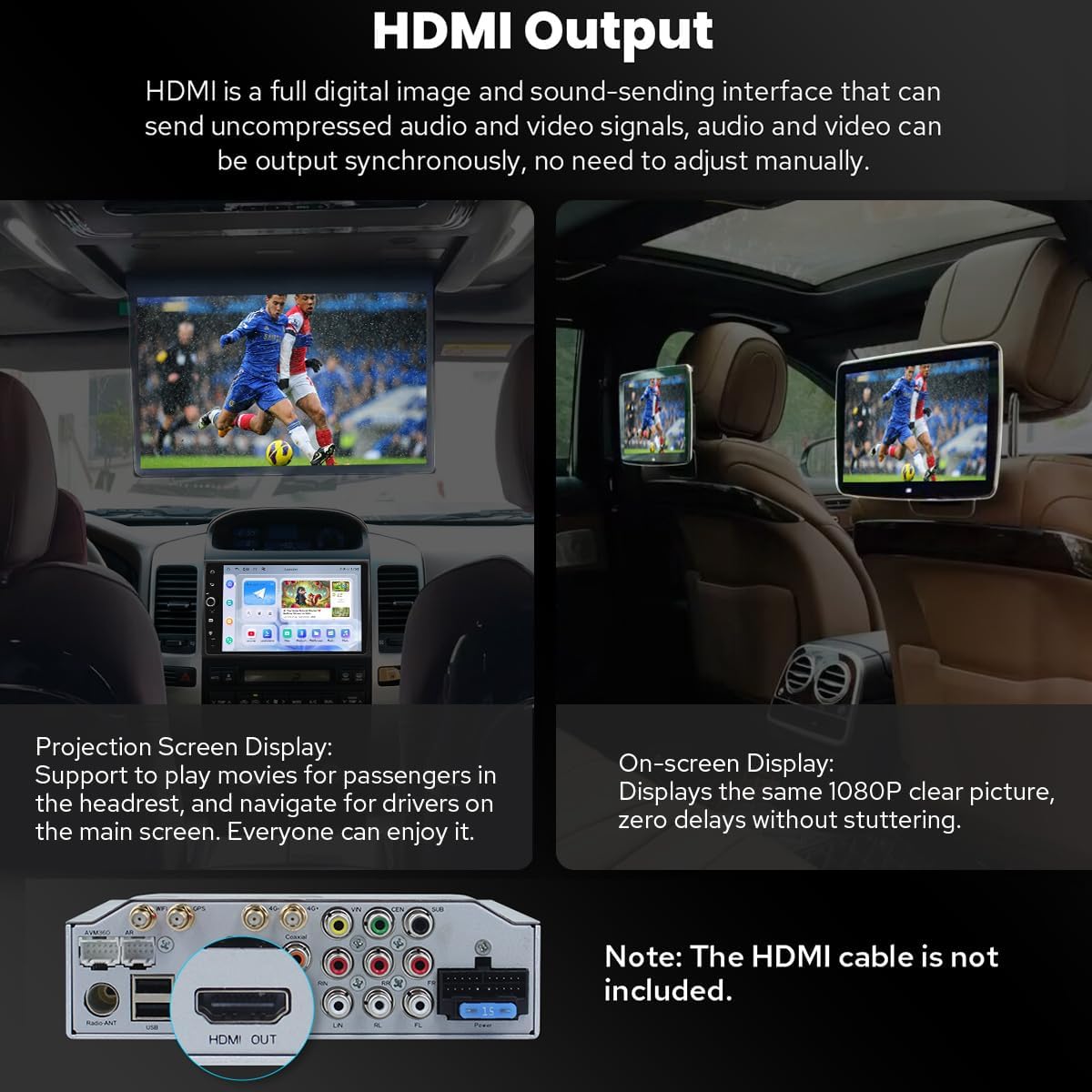
Figure 6.3: Diagram illustrating HDMI output connection to external screens.
7. 추가 기능
7.1. Personalized Settings
Customize your car stereo experience with changeable button colors, car boot logos, and a variety of wallpapers.
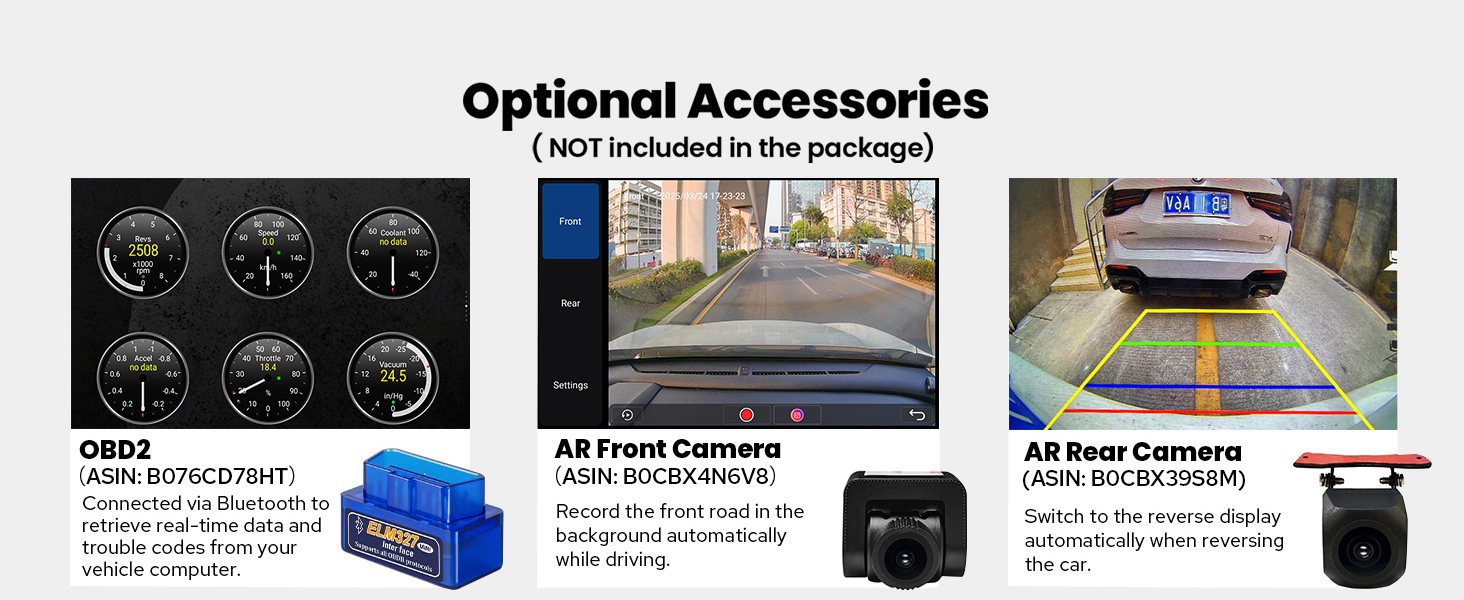
Figure 7.1: Options for customizing UI elements like button colors and wallpapers.
7.2. 연결성
The unit offers enhanced connectivity with upgraded WiFi signal via an independent antenna for stable and fast internet access, and a built-in 4G module for SIM card data.

Figure 7.2: Illustration of the independent WiFi antenna for improved signal.
7.3. 냉각 시스템
A dual heat sink design ensures superior heat dissipation and improved temperature control, enhancing performance stability. The fan automatically activates if the CPU temperature or radio volume exceeds a set warning value.

Figure 7.3: Diagram showing the dual heat sink design and fan control interface.
7.4. 옵션 액세서리
Enhance your experience with optional accessories such as OBD2 scanners, AR front cameras, and AR rear cameras (sold separately).

그림 7.4: 이상view of optional accessories for the car stereo.
8. 사양
| 특징 | 세부 사항 |
|---|---|
| 품목 모델 번호 | JY-TT158N4 |
| 디스플레이 크기 | 9 인치 |
| 운영 체제 | 기계적 인조 인간 |
| 특별 기능 | Bluetooth, Touchscreen, Built-in 4G Module, Optical Fiber and Coaxial Digital Output, Fast Boot, GPS Navigation, CarPlay, Android Auto |
| 연결 기술 | 블루투스, 이더넷, USB, Wi-Fi |
| 오디오 출력 모드 | 스테레오 재생 |
| 지도 유형 | North America (Offline maps supported) |
| 품목 무게 | 6파운드 |
| 패키지 크기 | 13 x 9 x 8 인치 |
9. 유지관리
- 청소: 부드럽고 마른 천을 사용하여 화면과 외부를 닦으세요. 연마성 세척제나 용제는 사용하지 마세요.
- 소프트웨어 업데이트: 최적의 성능과 새로운 기능에 대한 액세스를 보장하기 위해 주기적으로 소프트웨어 업데이트를 확인하세요.
- 온도: 본 제품을 극한 온도에 노출시키지 마십시오.
10. 문제 해결
- 전원 없음: 모든 전원 연결부를 확인하고 차량의 시동이 켜져 있는지 확인하십시오. 퓨즈를 점검하십시오.
- 소리 없음: Check speaker connections, volume levels, and audio settings (e.g., equalizer, balance). Ensure external amp앰프는 사용 시 전원이 켜집니다.
- 블루투스 연결 문제: 스테레오와 휴대폰 모두에서 블루투스가 켜져 있는지 확인하세요. 두 기기의 연결을 해제했다가 다시 연결해 보세요.
- CarPlay/Android Auto 연결 안 됨: Ensure your phone's operating system is up to date. Try a different USB cable. Verify USB debugging settings for Android Auto if connecting via USB.
- GPS 신호 손실: GPS 안테나가 제대로 설치되었고 깨끗한지 확인하십시오. view 하늘의.
11. 보증 및 지원
이 제품에는 다음이 포함되어 있습니다. 2년 보증. For technical support, troubleshooting assistance, or warranty claims, please contact JOYING customer service through your purchase platform or the official JOYING web대지.