
1. 서론
Thank you for choosing the DinoFire USB Type C Wireless Presentation Clicker. This device is designed to enhance your presentations with its dual Bluetooth and 2.4GHz RF connectivity, versatile USB-A and USB-C compatibility, and ergonomic design. This manual provides detailed instructions for setup, operation, and maintenance to ensure optimal performance.

Image: The DinoFire USB Type C Wireless Presentation Clicker, a sleek black device with control buttons.
2. 안전 정보
- 레이저 안전 : Do not point the laser beam directly at people or animals. Avoid direct eye exposure to the laser beam. This product uses a Class 2 laser.
- 배터리 취급: Use only specified AAA batteries. Do not mix old and new batteries, or different types of batteries. Dispose of used batteries according to local regulations.
- 저장: 기기를 극한의 온도, 직사광선, 습기에 노출되지 않도록 하세요.
- 어린이들: 어린이의 손이 닿지 않는 곳에 보관하세요.
3. 설정
3.1. 배터리 설치
- Locate the battery compartment cover on the back of the presenter.
- 덮개를 밀어 엽니다.
- AAA 배터리 2개(별도 구매)를 배터리 칸에 넣을 때, 극성(+/-)을 정확히 확인하십시오.
- 배터리 덮개를 단단히 닫으세요.

Image: The presenter showing the battery compartment and the integrated USB receiver storage.
3.2. Connecting via USB Receiver (2.4GHz RF Mode)
- Open the battery compartment cover and remove the integrated USB receiver. This receiver features both USB-A and USB-C connectors for broad compatibility.
- Plug the appropriate connector (USB-A or USB-C) of the receiver into an available USB port on your computer.
- Turn on the presenter using the ON/OFF switch located on the side.
- The computer should automatically detect and install the necessary drivers. The presenter is now ready for use in 2.4GHz RF mode.
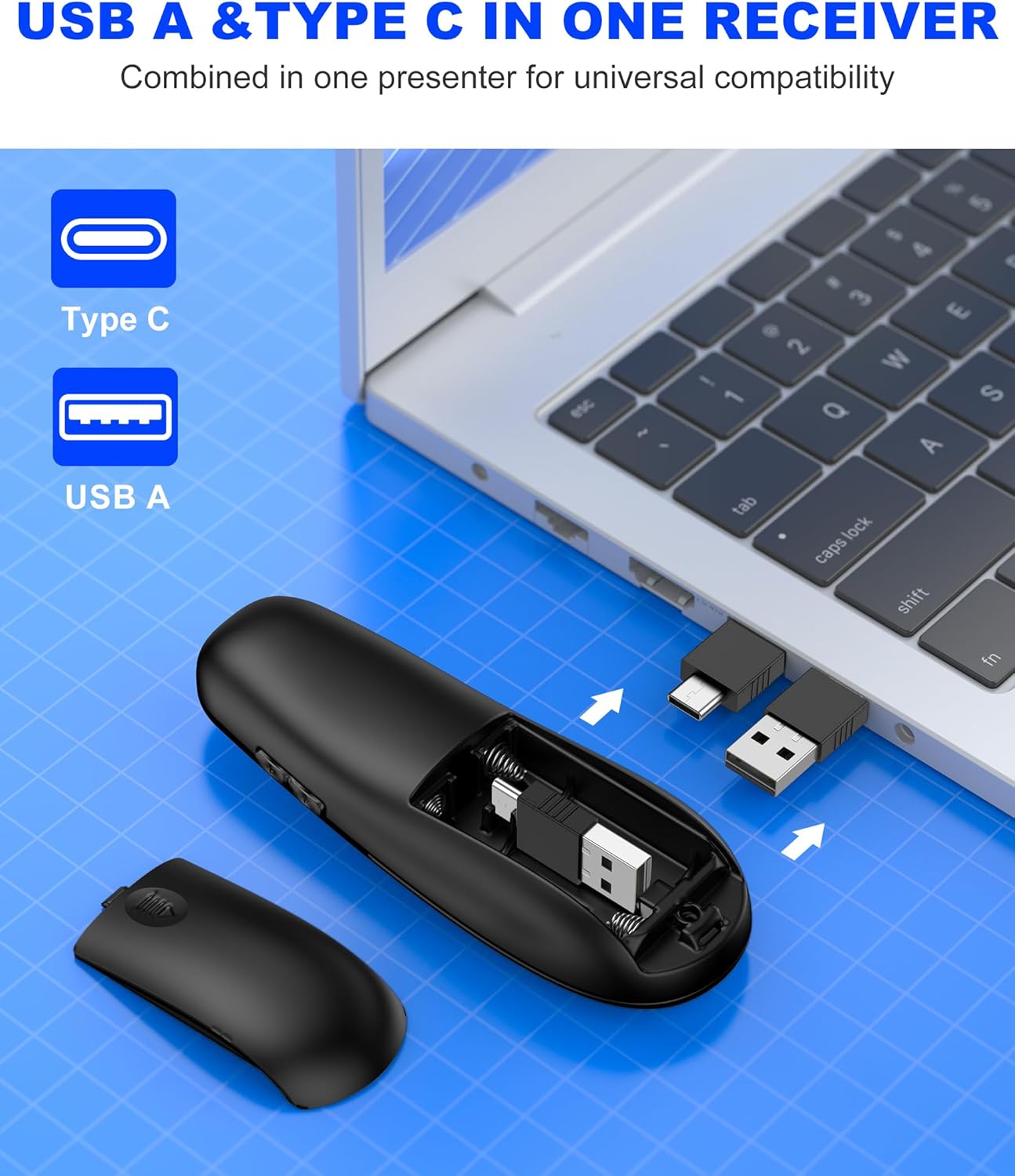
Image: Close-up of the dual USB-A and USB-C receiver, highlighting its versatile design.
3.3. Connecting via Bluetooth (BT Mode)
- Ensure the presenter is turned on.
- 를 누르고 계세요 연결하다 button (usually a small circular button near the laser pointer) for a few seconds until the indicator light flashes, indicating pairing mode.
- 컴퓨터에서 Bluetooth 설정으로 가서 새 장치를 검색하세요.
- Select "DinoFire Presenter" (or similar name) from the list of available devices to pair.
- Once paired, the indicator light on the presenter will stop flashing and remain solid. The presenter is now ready for use in Bluetooth mode.
- To switch between BT and RF modes, simply press the dedicated BT/RF switch button on the presenter.
4. 사용 설명서
The DinoFire Wireless Presentation Clicker offers a range of functions to control your presentations effectively.
- 페이지 위로/아래로: 화살표 버튼(▲ / ▼) to navigate through your presentation slides.
- 레이저 포인터: Press the dedicated laser button (often a triangle icon) to activate the bright laser light for highlighting key areas.
- 전체 화면/검은 화면: A dedicated button allows you to toggle between a full screen display and a black screen to draw audience attention.
- 볼륨 조절: Adjust the audio volume of your computer directly from the presenter.
- Hyperlink Activation: Activate hyperlinks within your presentation with a dedicated button.
- Window Switching: Seamlessly switch between open windows on your computer.
- 자동 절전 모드: The presenter automatically enters sleep mode after 30 seconds of inactivity to conserve energy. Press any button to wake it up.

Image: Diagram illustrating the various functions of the presentation clicker buttons, including page navigation, window switching, hyperlink, and volume control.
5. 특징
- BT & RF 2.4 GHz Dual Modes: Quickly switch between Bluetooth and 2.4GHz RF modes for flexible connectivity with various devices.
- Plug & Play USB A & C Connectors: Equipped with dual USB-A/USB-C connectors combined in one receiver for universal compatibility with laptops and desktop computers.
- 인체공학적 디자인: Features a curved design for a comfortable grip, allowing for extended use without discomfort.
- 긴 제어 무선 범위: Enjoy a maximum wireless control range of 164 feet (50 meters), providing freedom to move around the room during presentations.
- Bright Laser Light: The integrated laser pointer helps to effectively highlight content on your slides.

Image: Illustration showing the presenter's long control range, indicating up to 164 feet for wireless control and 628 feet for laser light.

Image: A hand holding the presenter, illustrating its comfortable, ergonomic grip.
6. 유지관리
- 청소: Use a soft, dry cloth to clean the surface of the presenter. Do not use abrasive cleaners or solvents.
- 저장: When not in use, store the USB receiver inside the presenter's battery compartment to prevent loss. Store the presenter in a cool, dry place.
- 배터리 교체: Replace batteries when the indicator light shows low power or when the device becomes unresponsive.
7. 문제 해결
| 문제 | 가능한 원인 | 해결책 |
|---|---|---|
| Presenter not responding (RF Mode) | USB receiver not properly connected or not detected. | USB 수신기가 작동하는 USB 포트에 완전히 삽입되었는지 확인하십시오. 다른 USB 포트를 사용해 보십시오. |
| Presenter not responding (Bluetooth Mode) | 페어링되지 않았거나 범위를 벗어났습니다. | Ensure Bluetooth is enabled on your computer. Re-pair the device following the Bluetooth connection steps. Move closer to the computer. |
| 레이저 포인터가 작동하지 않음 | Low battery or laser button not pressed. | Replace batteries. Ensure the laser button is pressed firmly. |
| 짧은 무선 범위 | 방해 또는 장애물. | Minimize obstacles between the presenter and the receiver. Avoid using near other wireless devices that may cause interference. |
| Presenter automatically enters sleep mode too quickly | This is normal behavior for energy saving. | Press any button to wake the presenter from sleep mode. |
8. 사양
- 상표: 다이노파이어
- 모델 이름: AAA+USB A&C+BT
- Model Number (Mfr Part Number): WP506
- 연결 기술 : Bluetooth, Radio Frequency (2.4GHz)
- Max Wireless Control Range: 164피트(50미터)
- 호환 장치: Laptops, Desktop Computers (Bluetooth-enabled)
- 수화기: Dual USB-A / USB-C
- 배터리 유형: AAA 배터리 2개 (포함되지 않음)
- 특징: Ergonomic Design, Laser Pointer, Dual Mode Connectivity
- 색상: 검은색
9. 보증 및 지원
The DinoFire USB Type C Wireless Presentation Clicker comes with a 3년 보증.
For technical support, troubleshooting assistance, or warranty claims, please contact DinoFire customer service through the retailer where the product was purchased or visit the official DinoFire web연락처 정보 사이트.
제조업체: Shenzhen Qixun Space Technology Co., Ltd.