
1. 중요 안전 지침
- 기기를 작동하기 전에 이 지침을 꼼꼼히 읽으십시오.
- 이 지침을 향후 참고용으로 보관하세요.
- 제품과 사용 설명서에 있는 모든 경고에 주의하십시오.
- 모든 지시를 따르세요.
- 이 기기를 물 근처에서 사용하지 마십시오.
- 마른 천으로만 닦으십시오.
- 환기구를 막지 마십시오. 제조업체의 지침에 따라 설치하십시오.
- 라디에이터, 난방 조절기, 스토브 또는 기타 장치(다음을 포함)와 같은 열원 근처에 설치하지 마십시오. amp열을 생성하는 발전기.
- 전원 코드가 밟히거나 끼지 않도록 보호하세요. 특히 플러그, 편의용 콘센트 및 기기에서 나오는 부분은 보호하세요.
- 제조사가 지정한 부속품/액세서리만 사용하세요.
- 번개 폭풍 시 또는 장기간 사용하지 않을 때는 기기의 플러그를 뽑아두세요.
- 모든 서비스는 자격을 갖춘 서비스 담당자에게 의뢰하십시오. 전원 코드나 플러그가 손상되었거나, 액체가 쏟아졌거나, 물체가 기기에 떨어졌거나, 기기가 비나 습기에 노출되었거나, 정상적으로 작동하지 않거나, 떨어졌을 때와 같이 기기가 어떤 식으로든 손상된 경우 서비스가 필요합니다.
2. 패키지 내용
아래 나열된 모든 품목이 패키지에 포함되어 있는지 확인하세요.
- GOBOULT X400 Soundbar
- BoomX Subwoofer
- 원격 제어
- 사용 설명서 (본 문서)
- 보증 카드
- 전원 어댑터/케이블
- 보조 케이블

이미지: 이상view of the GOBOULT X400 system components and key features.
3. 설정 가이드
3.1 배치
For optimal audio performance, place the soundbar centrally below your television. Position the BoomX subwoofer on the floor near the soundbar, ensuring it has adequate space for bass dispersion. The two satellite speakers should be placed to the left and right of your listening area for a true 5.1 surround sound experience.

Image: Recommended placement of the soundbar and subwoofer in a home environment.
3.2 서브우퍼 연결
Connect the wired BoomX subwoofer to the 'SUBWOOFER OUT' port on the soundbar using the provided cable.
3.3 전원 연결
Connect the power cable to the soundbar's power input and then plug it into a wall outlet. Ensure the power switch on the soundbar (if present) is in the 'ON' position.
3.4 오디오 입력 연결
The GOBOULT X400 offers multiple connectivity options:
- HDMI ARC : For the best audio quality and control, connect an HDMI cable from your TV's HDMI ARC port to the soundbar's HDMI ARC port. This allows your TV remote to control the soundbar's volume.
- 광학: Connect an optical cable from your TV's optical output to the soundbar's OPTICAL input.
- 보조: Use a 3.5mm auxiliary cable to connect devices with an AUX output to the soundbar's AUX input.
- USB: 오디오를 재생하려면 USB 포트에 USB 드라이브를 삽입하세요. file직접적으로.
이미지: 상세 view of the soundbar's input ports for various audio sources.
3.5 5.1 Channel Surround Sound Configuration
The X400 system includes a soundbar, a subwoofer, and two satellite speakers to deliver a 5.1 channel surround sound experience. Ensure the satellite speakers are connected to the soundbar and positioned appropriately to create an immersive audio field around the listener.

Image: Visual guide for setting up the 5.1 channel surround sound system.
4. 사용 설명서
4.1 전원 켜기/끄기
를 누르세요 힘 리모컨이나 사운드바의 버튼을 눌러 장치를 켜거나 끕니다.
4.2 입력 소스 선택
를 누르세요 입력 button on the remote control to cycle through available input sources: Bluetooth, HDMI ARC, Optical, AUX, USB. The selected input will be displayed on the soundbar's LED panel.
4.3 볼륨 조절
사용하세요 볼륨+ 그리고 권 buttons on the remote control or the soundbar to adjust the volume level.
4.4 블루투스 페어링
- Select Bluetooth input mode on the soundbar. The LED display will show "BT" and flash, indicating it's in pairing mode.
- 모바일 기기에서 블루투스를 활성화하고 사용 가능한 기기를 검색하세요.
- Select "GOBOULT X400" from the list. Once connected, the LED display will show a steady "BT".
4.5개의 EQ 모드
The GOBOULT X400 features multiple equalizer (EQ) modes to optimize your listening experience. Press the dedicated 영화, 음악, 또는 소식 buttons on the remote control to switch between modes.
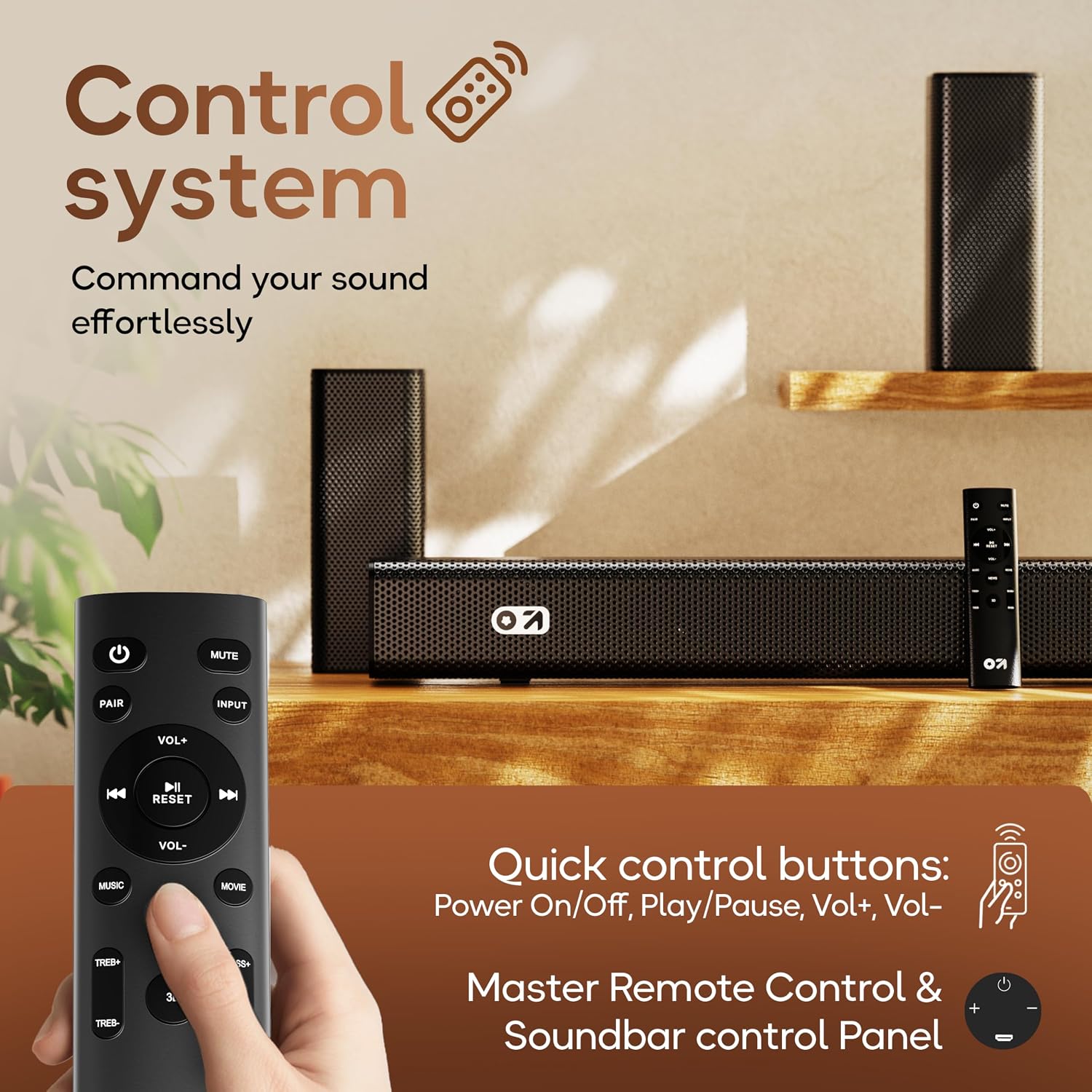
4.6 리모콘 기능

Image: Layout and functions of the GOBOULT X400 remote control.
- 힘: 사운드바를 켜거나 끕니다.
- 무음: 사운드를 음소거하거나 음소거 해제합니다.
- 입력: 오디오 입력 소스를 선택합니다.
- 볼륨+/볼-: 마스터 볼륨을 조정합니다.
- 재생/일시 중지: Controls media playback (Bluetooth/USB modes).
- 이전 다음: Skips tracks (Bluetooth/USB modes).
- EQ Modes (Movie, Music, News): 프리셋 사운드 프로를 선택합니다files.
- 쌍: 블루투스 페어링을 시작합니다.
- RESET : Resets sound settings to default.
- TREB+/TREB-: 고음 레벨을 조절합니다.
- 베이스+/베이스-: 저음 레벨을 조절합니다.
5. 유지관리
To ensure the longevity and optimal performance of your GOBOULT X400 soundbar system, follow these maintenance guidelines:
- 청소: Use a soft, dry cloth to clean the surfaces of the soundbar and subwoofer. Do not use liquid cleaners, aerosols, or abrasive materials, as they may damage the finish or internal components.
- 통풍: 사운드바와 서브우퍼의 통풍구가 막히지 않았는지 확인하세요. 적절한 공기 흐름은 과열을 방지합니다.
- 저장: 장기간 보관할 경우 전원 콘센트에서 플러그를 뽑고 직사광선과 극한의 온도를 피해 서늘하고 건조한 곳에 보관하세요.
- 물 노출: While the product is water-resistant, avoid direct exposure to water or high humidity to prevent damage.
6. 문제 해결
If you encounter issues with your GOBOULT X400, refer to the following common problems and solutions:
| 문제 | 가능한 원인 | 해결책 |
|---|---|---|
| 전원이 없습니다 | 전원 케이블이 연결되지 않았습니다. 전원 콘센트가 활성화되지 않았습니다. | 사운드바와 전원 케이블이 제대로 연결되어 있고 전원 콘센트에 꽂혀 있는지 확인하십시오. |
| 소리가 나지 않습니다 | 잘못된 입력 소스; 볼륨이 너무 낮음; 음소거 활성화됨; 케이블 연결이 잘못됨 | 올바른 입력 소스를 선택하십시오. 볼륨을 높이십시오. 음소거를 해제하십시오. 오디오 케이블 연결 상태를 확인하십시오. |
| 블루투스 페어링 실패 | 사운드바가 페어링 모드가 아닙니다. 장치가 너무 멀리 떨어져 있습니다. 간섭이 있습니다. | Ensure soundbar is in Bluetooth pairing mode. Move device closer. Clear previous pairings on your device. |
| 리모컨이 작동하지 않습니다 | 배터리 방전; 장애물; 리모컨 작동 범위 이탈 | Replace remote control batteries. Remove any obstructions between remote and soundbar. Ensure remote is within operating range. |
| 서브우퍼에서 저음이 나오지 않습니다. | Subwoofer cable loose; Bass level set too low | Check the connection of the subwoofer cable to the soundbar. Increase bass level using the remote control. |
7. 사양
Detailed technical specifications for the GOBOULT X400 Soundbar System:

이미지: 내부 view of the BoomX Dual Driver, highlighting its design for enhanced bass response.
| 특징 | 사양 |
|---|---|
| 상표 | 고볼트 |
| 모델명 | 베이스박스 X400 |
| 스피커 최대 출력 전력 | 400 와트 |
| 오디오 채널 수 | 5.1 |
| 연결 기술 | Auxiliary, Bluetooth, USB, HDMI ARC, Optical |
| 블루투스 버전 | 5.3 |
| 블루투스 범위 | 10 미터 |
| 오디오 출력 모드 | 둘러싸다 |
| 스피커 유형 | 유선 서브우퍼가 있는 사운드바 |
| 제어 방법 | 원격 |
| 제품 특징 | Bass Boost, LED Light, USB Port, Water Resistant |
| 전원 | 코드식 전기 |
| 품목 치수(D x W x H) | 8D x 9W x 7.5H 센티미터 (사운드바) |
| 품목 무게 | 7.6 킬로그램 |
8. 보증 및 지원
8.1 보증 정보
The GOBOULT X400 Soundbar System comes with a 1년 제조사 보증 from the date of purchase. This warranty covers manufacturing defects and ensures reliable operation under normal use. Please retain your purchase receipt and the warranty card for any warranty claims.
8.2 고객 지원
For technical assistance, troubleshooting, or warranty inquiries, please contact GOBOULT customer support. Refer to the contact information provided on your warranty card or visit the official GOBOULT web지원 세부 정보 사이트.