
1. 서론
This manual provides detailed instructions for the installation, operation, and maintenance of your ZSUS X79 VG2 Motherboard Bundle. This bundle includes the ZSUS X79 VG2 Motherboard, an Intel Xeon E5 2689 C2 processor, and 16GB of DDR3 1600MHz ECC RAM. Please read this manual thoroughly before proceeding with installation to ensure proper setup and optimal performance.
2. 제품 오버view
The ZSUS X79 VG2 Motherboard is designed to support LGA2011 V1/V2 series processors, offering a robust platform for demanding computing tasks. It features dual-channel DDR3 memory support, NVMe M.2 storage capabilities, and multiple expansion slots.
2.1. 주요 구성 요소
- ZSUS X79 VG2 Motherboard: Features an LGA2011 socket, H61 chipset, 4 DDR3 memory slots, 2 PCIe x16 slots, 1 PCIe x1 slot, 1 NVMe M.2 port, and 4 SATA2.0 ports.
- Intel Xeon E5 2689 C2 CPU: An 8-core, 16-thread processor with a base frequency of 2.6GHz (up to 3.6GHz turbo), 20MB L3 Cache, and LGA2011 socket compatibility.
- 16GB DDR3 1600MHz ECC RAM: High-performance Error-Correcting Code (ECC) memory, suitable for server and workstation environments, ensuring data integrity.
2.2. 마더보드 레이아웃
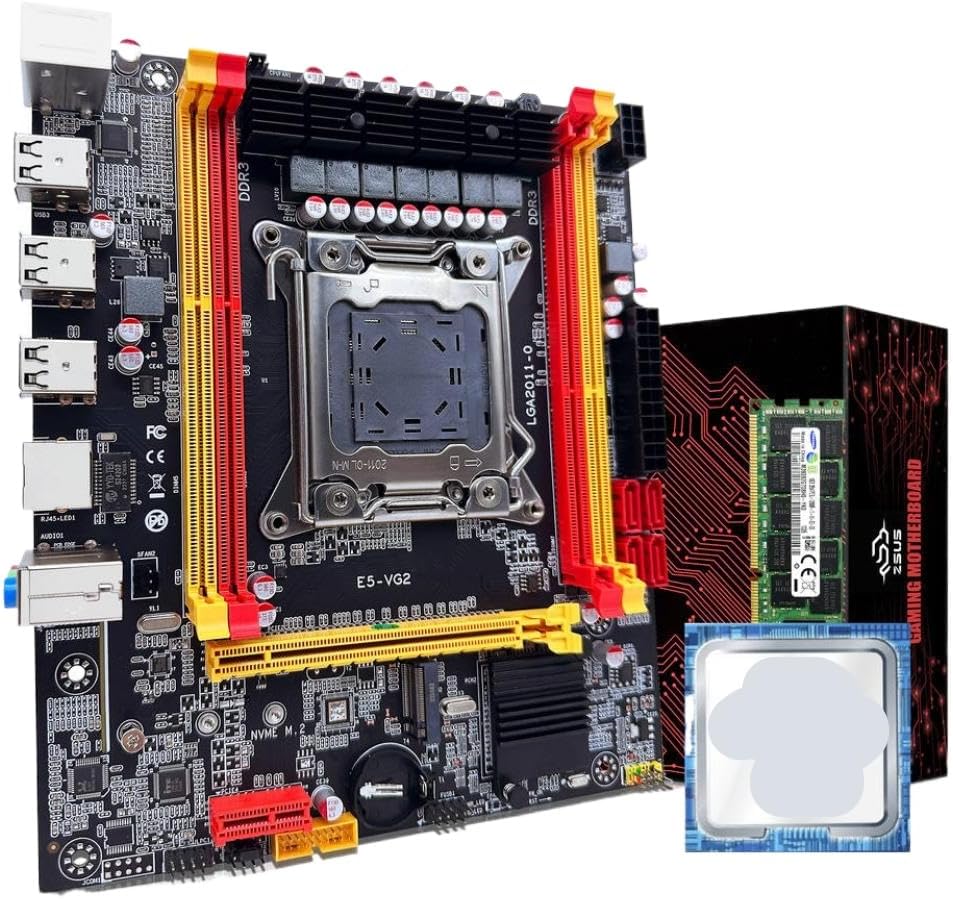
그림 1: ZSUS X79 VG2 Motherboard Bundle. This image displays the motherboard with its LGA2011 CPU socket, four DDR3 RAM slots, PCIe slots, and various connectors. The included Xeon E5 2689 C2 CPU and 16GB DDR3 ECC RAM module are also visible alongside the product packaging.
Familiarize yourself with the various components and connectors on the motherboard before installation. Key areas include the CPU socket, RAM slots, PCIe expansion slots, SATA ports, M.2 slot, and I/O panel connectors.
3. 설정 및 설치
Before beginning installation, ensure your workspace is clean, well-lit, and free of static electricity. Use an anti-static wrist strap if available. Handle components by their edges to avoid touching sensitive contacts.
3.1. CPU 설치
- 소켓 준비: Gently lift the CPU retention lever on the LGA2011 socket. Open the metal load plate.
- CPU 삽입: Carefully align the Intel Xeon E5 2689 C2 CPU with the LGA2011 socket. Ensure the triangular marker on the CPU matches the marker on the socket. Lower the CPU straight down without forcing it.
- 보안 CPU: Close the metal load plate and push the retention lever back into its locked position until it clicks.
- 열 페이스트 적용: Apply a small amount of thermal paste (not included) to the center of the CPU's integrated heat spreader (IHS).
- CPU 쿨러 설치: Mount a compatible LGA2011 CPU cooler (not included) according to its manufacturer's instructions. Ensure it makes firm contact with the CPU.
3.2. RAM 설치
- 잠금장치 열기: DDR3 메모리 슬롯 양쪽 끝에 있는 고정 클립을 엽니다.
- RAM 정렬: Align the 16GB DDR3 1600MHz ECC RAM module with a memory slot, ensuring the notch on the module matches the key in the slot. For dual-channel operation, refer to the motherboard's silkscreen for recommended slot pairing (typically alternating slots).
- RAM을 삽입하세요: Press down firmly on both ends of the RAM module until the retention clips snap into place.
- 확인하다: Ensure both clips are fully closed and the RAM module is securely seated.
3.3. NVMe M.2 SSD Installation (Optional)
- M.2 슬롯 찾기: Identify the NVMe M.2 slot on the motherboard.
- 스탠드오프 나사를 제거하세요: Unscrew the small standoff screw from the M.2 slot.
- M.2 SSD를 삽입하세요: Insert your NVMe M.2 SSD (not included) into the slot at a 30-degree angle, ensuring the gold contacts are fully seated.
- 보안 SSD: SSD를 살살 눌러 내린 후 스탠드오프 나사로 고정하십시오.
3.4. SATA Device Installation (Optional)
- 데이터 케이블을 연결하세요: Connect one end of a SATA data cable (not included) to a SATA2.0 port on the motherboard and the other end to your SATA hard drive or SSD (not included).
- 전원 케이블 연결: Connect a SATA power cable from your power supply (not included) to the SATA device.
3.5. 전원 공급 장치 연결
- 24핀 ATX 전원: 파워서플라이의 24핀 ATX 메인 전원 커넥터를 마더보드의 해당 포트에 연결하십시오.
- 8핀 EPS/CPU 전원: Connect the 8-pin EPS (CPU) power connector from your power supply to the 1x8PIN port near the CPU socket.
3.6. 전면 패널 및 주변 장치 연결
- 전면 패널 커넥터: Connect the power switch, reset switch, HDD LED, and power LED cables from your PC case to the front panel header on the motherboard. Refer to the motherboard's silkscreen for correct pin assignments.
- USB 헤더: Connect front panel USB 2.0 cables to the USB 2.0 headers on the motherboard.
- 오디오 헤더: 전면 패널 오디오 케이블을 오디오 헤더에 연결하십시오.
- 확장 카드: Install any PCIe expansion cards (e.g., graphics card, network card) into the available PCIe x16 or PCIe x1 slots.
4. 사용 설명서
After completing all hardware installations, you can proceed with powering on your system.
- 초기 전원 켜기: Ensure all cables are securely connected. Connect your monitor, keyboard, and mouse. Turn on the power supply switch, then press the power button on your PC case.
- BIOS/UEFI 설정: During startup, repeatedly press the designated key (commonly 델, F2, 또는 F10) to enter the BIOS/UEFI setup utility. Here you can configure boot order, system time, and other hardware settings.
- 운영 체제 설치: 운영체제 설치 미디어(USB 드라이브 또는 DVD)를 삽입하고 화면의 안내에 따라 원하는 운영체제를 설치하십시오.
- 드라이버 설치: After OS installation, install all necessary drivers for the motherboard chipset, network, audio, and any other installed components. Drivers are typically available on the manufacturer's web대지.
5. 유지관리
정기적인 유지보수는 시스템의 수명 연장과 안정적인 작동을 보장하는 데 도움이 됩니다.
- 먼지 제거: Periodically clean dust from inside your PC case, especially from CPU coolers, case fans, and heatsinks, using compressed air. Ensure the system is powered off and unplugged before cleaning.
- BIOS/펌웨어 업데이트: 제조사 확인해보세요 website for updated BIOS/firmware versions. Follow their instructions carefully when performing updates.
- 드라이버 업데이트 : Keep your system drivers updated to ensure compatibility and optimal performance.
- 케이블 관리 : 공기 흐름을 개선하고 간섭을 방지하기 위해 내부 케이블이 깔끔하게 배선되어 있는지 확인하세요.
6. 문제 해결
문제가 발생하면 다음의 일반적인 문제 해결 단계를 참조하세요.
- 전원 없음:
- Check if the power supply is switched on and properly connected to the motherboard (24-pin and 8-pin connectors).
- 전면 패널 전원 스위치 케이블이 마더보드 헤더에 올바르게 연결되어 있는지 확인하세요.
- 디스플레이 없음:
- Verify that the monitor is connected to the graphics card (if installed) or the motherboard's integrated graphics port (if applicable and CPU supports it).
- RAM 모듈을 다시 장착하십시오. RAM이 잘못 장착되면 화면이 나오지 않는 경우가 많습니다.
- Ensure the graphics card is properly seated in its PCIe slot and has adequate power connections.
- 시스템 불안정/충돌:
- CPU와 GPU 온도를 확인하세요. 과열은 시스템 불안정을 초래할 수 있습니다.
- Ensure RAM modules are compatible and correctly installed.
- 메모리 진단 도구를 실행하여 RAM 오류를 확인하세요.
- 모든 전원 연결이 안전한지 확인하세요.
- 운영 체제가 부팅되지 않음:
- Check BIOS/UEFI settings for correct boot order.
- Ensure the storage drive (SSD/HDD) containing the OS is properly connected and detected.
- If using an NVMe M.2 drive, ensure it is correctly installed and recognized in BIOS.
7. 사양
| 요소 | 사양 |
|---|---|
| 마더보드 모델 | ZSUS X79-VG2 |
| CPU 소켓 | LGA2011 V1/V2 series processor |
| 칩셋 | H61 시리즈 |
| CPU 포함 | Intel Xeon E5 2689 C2 (8 Cores / 16 Threads) |
| CPU 기본 주파수 | 2.6GHz (터보 부스트 시 최대 3.6GHz) |
| CPU L3 Cache | 20MB |
| 메모리 유형 | DDR3 ECC REG(서버 메모리) |
| 메모리 주파수 | 1600MHz (Supports 1066/1333/1600/1866MHz) |
| 메모리 용량 | 1 x 16GB (Max 128GB across 4 slots) |
| 메모리 슬롯 | 4 x DDR3(듀얼 채널) |
| 오디오 인터페이스 | 1 (마이크 입력, 라인 출력, 라인 입력) |
| 이더넷 | Realtek 기가비트 이더넷 |
| USB Interfaces (Rear) | 6개의 USB 2.0 |
| USB 헤더(내부) | 1 (supports 2 x USB 2.0 ports) |
| PCIe 슬롯 | PCIe x2 16개, PCIe x1 1개 |
| SATA 포트 | SATA4 2.0 개 |
| M.2 포트 | 1 x NVMe M.2 |
| 전원 인터페이스 | 1 x 8-pin EPS, 1 x 24-pin ATX |
| 치수 | 217mm x 187mm |
8. 보증 및 지원
For warranty information and technical support, please refer to the documentation provided with your purchase or contact the manufacturer, TJKTSLVA, directly. Keep your proof of purchase for warranty claims.
Manufacturer: TJKTSLVA