
소개
The Anderic RR850LM Universal Gate and Garage Door Opener Conversion Add-on Kit is designed to enhance your gate and garage door control system with seamless compatibility and powerful functionality. This versatile kit is suitable for various applications including gated communities, industrial facilities, commercial buildings, and home garage doors and gates. It features a 3-channel design, allowing control of up to three gates or commercial door operators. Each channel supports multiple remote controls and keypads for convenient access management.
상자 안에 무엇이 들어있나요?
- (1) RR850LM Receiver (with antenna and hook-and-loop tape)
- (1) 전원 공급 장치
- (1) RR893LM 3-button Remote Control with preinstalled battery
명세서
| 특징 | 세부 사항 |
|---|---|
| 상표 | 안 데릭 |
| 특징 | 만능인 |
| 색상 | 회색 |
| 지원되는 최대 장치 수 | 3 |
| 호환 장치 | 차고 문 |
| 연결 기술 | 고주파 |
| 버튼 수량 | 3 |
| 컨트롤러 유형 | 버튼 제어 |
| 최대 범위 | 160 피트 |
| 배터리 유형 | 알칼리성 |
| 스마트 홈 호환성 | Not Smart Home Compatible |
| 모델명 | 850LM, 893LM |
| 모델 번호 | RR850LM |
설정
The Anderic RR850LM kit offers easy installation and programming, typically completed within 5 minutes. Follow these general steps for setup:
- Select Location for Receiver: Choose a suitable location for the receiver that allows access to its terminals and space for the antenna. Ensure the antenna does not touch metal surfaces. Do not bend or fold the antenna.
- Secure the Receiver: Fasten the receiver securely using the provided hook-and-loop fasteners. Screws are not provided if you prefer that mounting method.
- 전원 연결: After the receiver is installed, connect power. You can use an 85LM plug-in or 95LM wired-in transformer, or power provided from your operator (9-30 V AC, 9-34 Vdc). Refer to the detailed wiring diagrams in the included manual for specific power ratings and connections.
- Wiring to Operator: Connect the receiver to your gate or garage door operator. The receiver can command the operator to close the door or gate by constant pressure. This feature is only available with a wireless control panel (Model 885LM). To enable this, press and hold the push bar until the gate or garage door moves to the closed position.

Figure 1: Anderic RR850LM Universal Receiver unit showing AC/DC power input and three channels (CH.1, CH.2, CH.3) with Normally Open (N.O.), Common (COM), and Normally Closed (N.C.) terminals. The receiver unit features clearly labeled terminals for AC/DC power input and three distinct channels for connecting to gate or garage door operators. Each channel provides Normally Open (N.O.), Common (COM), and Normally Closed (N.C.) connections.
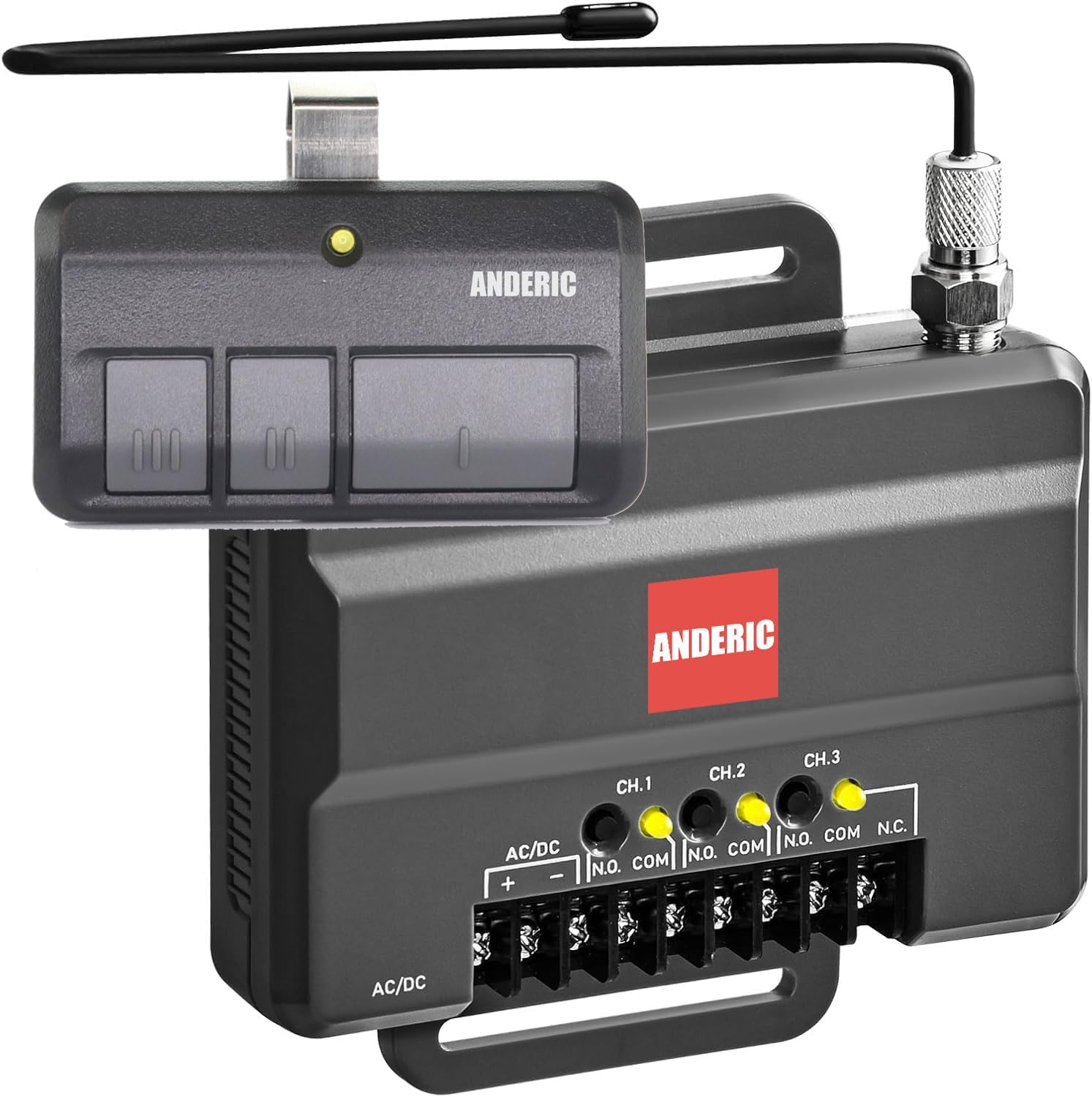
Figure 2: Anderic RR850LM Universal Receiver kit including the receiver unit and a 3-button remote control. The complete kit includes the compact receiver unit and a pre-programmed 3-button remote control, ready for immediate use after installation.
운영
The RR850LM receiver can be used as a single or three-channel receiver to control up to 3 gates or commercial door operators. It is compatible with a wide range of remote models and keypads.
Remote Control and Keypad Capacity:
- 채널 1 : Supports up to 50 remote controls and 2 keypads.
- 채널 2 & 3: Each supports up to 20 remote controls and 2 keypads.
When a channel reaches full capacity for remote controls, its LED will blink 3 times. When full capacity for keypads is reached, all LEDs will blink 4 times. Any newly programmed accessory will replace the first programmed accessory in that channel.
메모: The receiver allows programming a button on a remote control to one channel at a time. If a button is already programmed to Channel 1 and then programmed to Channel 3, the button will be erased from Channel 1 and will only work on Channel 3.
확장된 무선 범위:
The system provides an extended wireless range of up to 160 feet, ensuring convenient operation from your vehicle or other desired locations.
유지
To ensure optimal performance and longevity of your Anderic RR850LM Universal Receiver Kit, regular maintenance is recommended:
- 수신 장치를 깨끗하게 유지하고 먼지와 이물질이 없도록 하십시오.
- 모든 배선 연결부를 주기적으로 점검하여 안전하고 손상되지 않았는지 확인하십시오.
- Replace the batteries in your remote controls as needed to maintain reliable operation.
- Ensure the antenna remains unobstructed and in good condition for optimal signal reception.
문제 해결
If you encounter issues with your Anderic RR850LM kit, consider the following:
- 원격 응답 없음: Check the remote control's battery. If the battery is good, attempt to re-program the remote to the receiver following the instructions in the manual.
- 제한된 범위: Ensure the receiver's antenna is properly positioned and not touching any metal surfaces. Obstructions between the remote and receiver can also reduce range.
- 호환성 문제: The RR850LM is designed for wide compatibility, including LiftMaster 850LM systems and most garage door and gate opener brands. However, very old systems might not be fully compatible. Refer to the manual for a list of compatible remote models (e.g., 811LM, 893LM, 890MAX) and keypads (e.g., 877LM, 877MAX).
- Programming Conflicts: Remember that programming a remote button to a new channel will erase its programming from a previous channel.
For more detailed troubleshooting steps, please consult the full instruction manual included with your product.
보증 및 지원
The Anderic RR850LM Universal Gate and Garage Door Opener Receiver Kit comes with a manufacturer's warranty. For specific warranty details, registration, or technical support, please refer to the documentation included in your product packaging or visit the official Anderic website. Contact information for customer service is typically provided within the manual for any assistance you may require.