
1. 서론
The ProtoArc XK01 is a portable, full-size foldable Bluetooth keyboard designed for seamless productivity across multiple devices. Its compact design, comfortable typing experience, and long-lasting battery make it ideal for on-the-go use. This manual provides essential information for setting up, operating, and maintaining your keyboard.
2. 제품 특징
2.1 휴대성 및 디자인
The XK01 features a triple-fold design, making it as compact as an iPad mini when folded. Weighing only 291g, it's easy to carry in a bag or laptop case, perfect for use in cafes, libraries, offices, or during travel. The high-quality hinges are designed to withstand over 100,000 open/close cycles, ensuring excellent durability. Strong magnets securely hold the keyboard closed, preventing accidental opening in your bag.
Unfolded dimensions: 38.58 × 11.89 × 1.22 cm
Folded dimensions: 21.49 × 11.89 × 1.98 cm

Image: Keyboard dimensions and folded size comparison.

Image: Keyboard easily fits into a bag for portability.
2.2 타이핑 경험
Experience a comfortable and responsive typing feel similar to a laptop. The keyboard utilizes a pantograph key structure with a 19mm key pitch and a shallow 1.2mm key stroke, designed to prevent mistyping and ensure smooth input.

Image: User typing on the ProtoArc XK01 keyboard.

이미지: 상세 view of the pantograph key structure and key pitch.
2.3 Standard Japanese Layout with Shortcut Keys
The XK01 features a standard Japanese JIS 105-key layout, allowing for a familiar typing experience. It includes specialized keys for Japanese input such as the inverted L-shaped large Enter key, 'Half/Full-width' key, 'Convert' and 'Non-convert' keys, a right Ctrl key, and a large independent Delete key, enhancing typing efficiency. Additionally, 14 convenient shortcut keys are integrated for quick access to functions like app switching, home screen display, volume adjustment, and multimedia controls. The integrated numeric keypad further enhances efficiency for data entry.
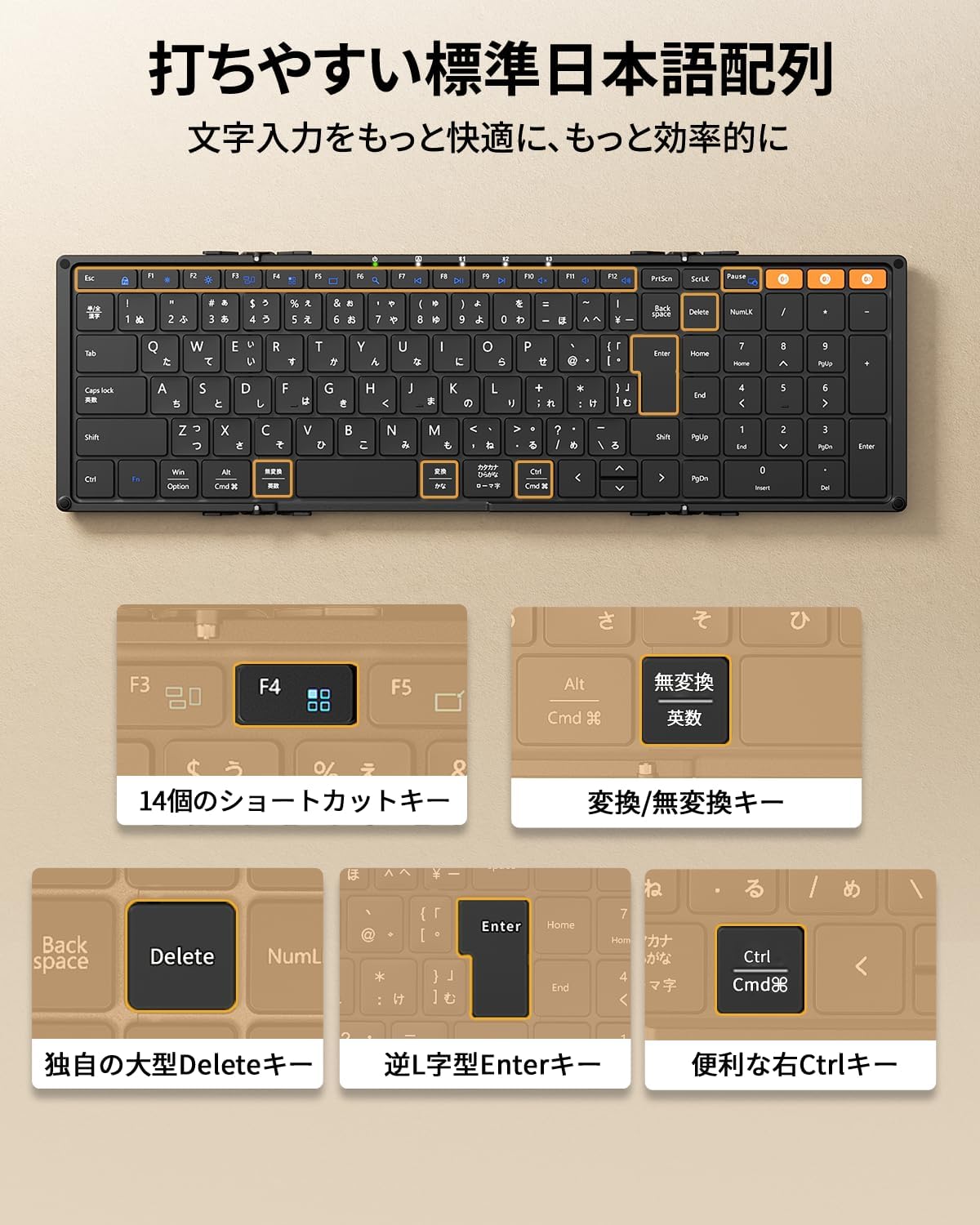
Image: Japanese key layout and dedicated function keys.

이미지: 이상view of the 14 shortcut keys.
2.4 다중 장치 연결
Connect up to three devices simultaneously via Bluetooth. The keyboard supports a wide range of operating systems including iPadOS, iOS, Android, Mac, and Windows. Easily switch between connected devices with a single button, making it convenient for users who work with multiple PCs, tablets, and smartphones.

Image: Keyboard connected to multiple devices simultaneously.
2.5 Long Battery Life & Energy Saving
Equipped with a 210mAh large-capacity battery, a single full charge provides approximately 1-2 weeks of continuous use or up to 150 days of standby time. The keyboard features energy-saving designs such as automatic sleep after 60 minutes of inactivity and automatic power ON/OFF when folded/unfolded, minimizing unnecessary power consumption. Type-C rapid charging is supported.

Image: Type-C charging port and battery information.
3. 설정 지침
3.1 Unfolding and Power On
Gently unfold the keyboard until it lies flat. The keyboard will automatically power on due to its magnetic design. Five convenient LED lights on the top of the keyboard allow for quick checking of battery level and connection status.
3.2 블루투스 페어링
- Ensure the keyboard is sufficiently charged. Connect the provided Type-C cable to charge if necessary.
- Turn on Bluetooth on your device (smartphone, tablet, PC).
- 를 누르세요 Fn Bluetooth 채널 키 중 하나와 함께 키(FN + BT1, BT2, 또는 BT3) to select a pairing channel. The corresponding LED indicator will flash.
- On your device, search for 'ProtoArc XK01' in the Bluetooth settings and select it to pair.
- Once paired, the LED indicator will stop flashing and remain solid for a few seconds.
- 연결된 기기 간에 전환하려면 버튼을 누르기만 하면 됩니다. Fn 키와 해당 블루투스 채널 키(Fn + BT1/BT2/BT3).
3.3 OS Compatibility Note
For iOS/iPadOS devices running versions older than iOS 16 / iPadOS 16, the keyboard may be recognized as an English layout keyboard, leading to incorrect input. Please update your device's operating system to iPadOS 16 or later for optimal Japanese input functionality. Refer to your device's settings to change the keyboard layout to Japanese.
4. 사용 설명서
4.1 전원 관리
- 자동 전원 켜기/끄기: The keyboard automatically powers on when unfolded and powers off when folded due to its magnetic design.
- 자동 절전: The keyboard will enter automatic sleep mode after 60 minutes of inactivity to conserve battery. Press any key to wake it up.
4.2 단축키
Utilize the 14 shortcut keys for quick access to various functions. Press the Fn 원하는 기능 키와 함께 키를 조합합니다.
- Fn+F1: 밝기 낮추기
- Fn+F2: 밝기 업
- Fn+F3: 창 스위치
- Fn+F4: 앱 전환
- Fn+F5: 데스크탑 표시
- Fn+F6: 검색
- Fn+F7: 이전 트랙
- Fn+F8: 재생/일시정지
- Fn+F9: 다음 트랙
- Fn+F10: 무음
- Fn+F11: 볼륨 낮추기
- Fn+F12: 볼륨을 높이다
4.3 Fn Lock
To toggle Fn Lock (to use F1-F12 keys directly without pressing Fn), press the Fn 키와 에스케이프 키를 동시에 누르세요.
5. 충전
Connect the provided Type-C charging cable to the keyboard's Type-C port and a power source (e.g., USB wall adapter, computer USB port). The charging indicator LED will light up. A full charge takes approximately 2 hours. The keyboard can be used while charging.
6. 문제 해결
6.1 Keys not responding or incorrect characters
This often indicates that your device recognizes the keyboard as an English layout instead of Japanese. Please change the keyboard layout to Japanese in your device's settings. For example, on an iPad, navigate to Settings > General > Keyboard > Hardware Keyboard and select the Japanese layout.
6.2 연결 문제
Ensure Bluetooth is enabled on your device and the keyboard is sufficiently charged. Try re-pairing the keyboard by following the Bluetooth pairing instructions in Section 3.2.
6.3 Keyboard not turning on
Ensure the keyboard is fully unfolded. If it still doesn't turn on, charge it using the Type-C cable. The battery might be depleted.

Image: Common troubleshooting tips.
7. 사양
| 상표 | 프로토아크 |
| 모델 | 엑스케이01 |
| 연결 기술 | 블루투스 |
| 키보드 설명 | 팬터그래프 |
| 추천 용도 | Business, Student, Education, Everyday Use |
| 특별 기능 | Hotkeys & Media Keys, Portable, Rechargeable, Foldable, Lightweight |
| 색상 | 검은색 |
| 제품 치수(펼친 상태) | 38.6cm (L) x 11.9cm (W) x 1.2cm (H) |
| 포함된 구성 요소 | 사용 설명서, 충전 케이블 |
| 배터리 수 | 1 |
| 호환 장치 | iPadOS 16+, Win 8/10+, Mac OS X 10.10+, Android 4.3+, Smartphones, Tablets, Desktops, Laptops |
| 전원 | 배터리 구동 |
| 스위치 유형 | 촉각적 |
| 키보드 레이아웃 | QWERTY (Japanese JIS) |
| 키의 개수 | 109 |
| 품목 무게 | 291그램 |
8. 보증 및 지원
This product comes with an 18-month manufacturer's warranty from the date of purchase. In case of any defects or damage, please contact our customer support. We offer free exchanges or full refunds.
For further assistance, please refer to the contact information provided in the full user manual (PDF version available on the product page) or on the ProtoArc brand store page.

Image: Customer support contact details.
9. 제품 비디오
9.1개 제품 이상view
비디오: 간략하게 살펴보기view of the ProtoArc XK01 foldable keyboard, demonstrating its folding mechanism and compact size.