
1. 제품 오버view
The LongPlus 4K PoE Security Camera System, Model LP8MC84B2, provides advanced surveillance capabilities for both home and business environments. This system includes 4K (8MP) cameras, a Network Video Recorder (NVR) with a pre-installed 2TB Hard Disk Drive (HDD), and utilizes H.265+ video compression for efficient storage. Key features include 24/7 recording, spotlight color night vision, and clear video streaming. The Power over Ethernet (PoE) design simplifies installation by providing both power and data through a single Ethernet cable.

Image: LongPlus 4K PoE Security Camera System with NVR and four bullet cameras.
2. 상자 안에 무엇이 들어있나요?
아래 나열된 모든 품목이 패키지에 포함되어 있는지 확인하세요.
- 1 x 8CH NVR with 48/1.875V Adaptor
- 4 x 4K PoE 카메라
- 1 x USB 마우스
- 1x1M Cat5 케이블
- 1 x 1M HDMI 케이블
- 4 x 18M Cat5 케이블
- 2 x Extra Connectors
- 4 x 나사 및 기타 액세서리 팩
- 1 x 빠른 시작 가이드
3. 설정 지침
Follow these steps to set up your LongPlus 4K PoE Security Camera System:
- NVR을 모니터에 연결합니다: Use the provided HDMI or VGA cable to connect the NVR to a compatible monitor.
- Power On the NVR: Connect the NVR to a power source using the provided power adapter and turn on the NVR power switch.
- 네트워크에 연결: Connect an Ethernet cable from the NVR's LAN port to your router's LAN port for internet access.
- 카메라 연결: Connect each PoE camera to any available PoE camera port on the NVR using the provided Ethernet cables. The cameras will receive both power and data through these cables.
- USB 마우스 연결: 시스템 탐색을 위해 USB 마우스를 NVR의 USB 포트에 연결하십시오.
- 초기 구성: Follow the on-screen prompts on your monitor to complete the initial setup, including setting a password and configuring network settings.
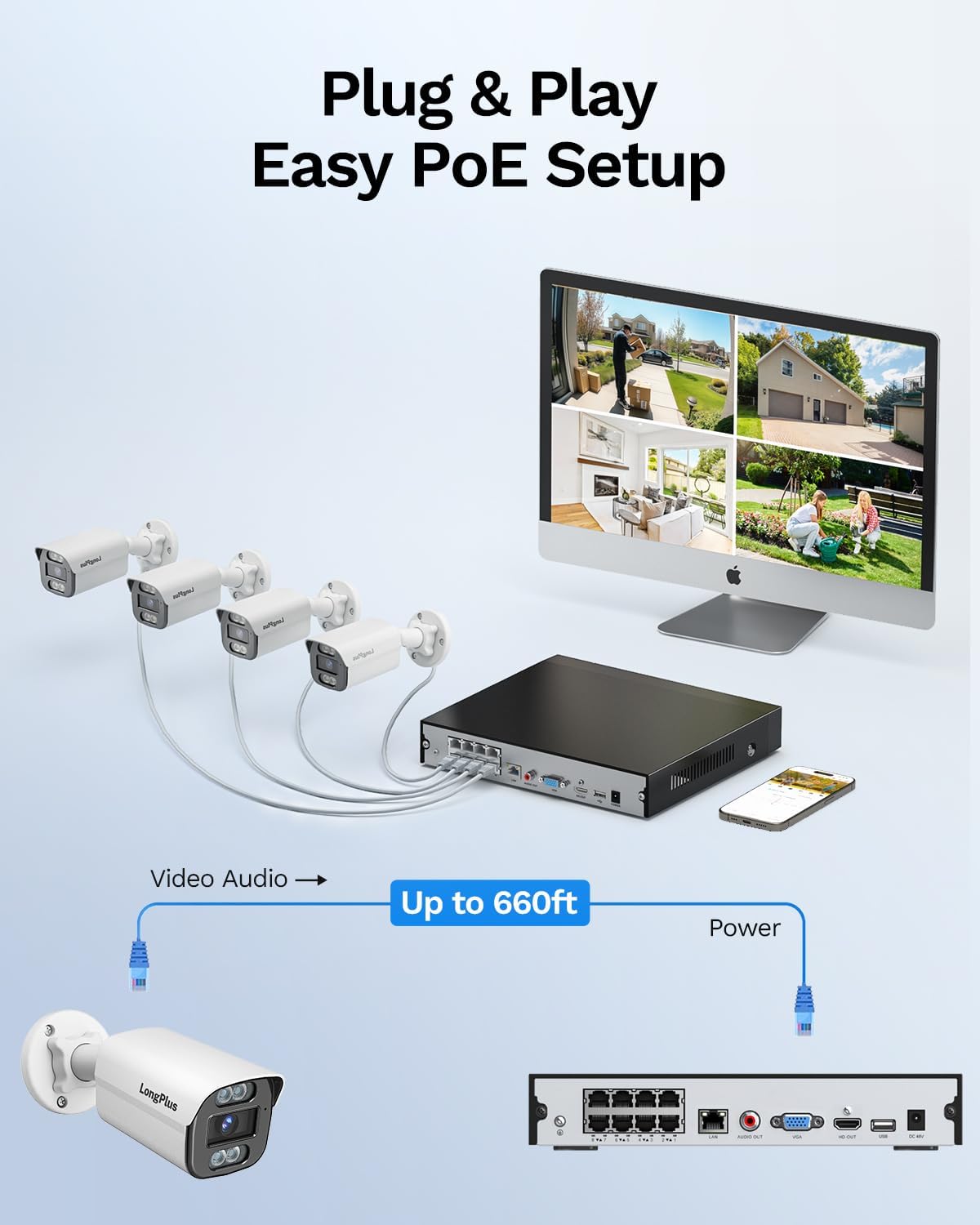
Image: Simplified PoE setup showing NVR, cameras, and monitor connections.
Video: LongPlus 8MP 16CH NVR Security System Unboxing & Setup Guide. This video demonstrates the unboxing process and step-by-step setup of the NVR and cameras.
4. 사용 설명서
4.1. 4K UHD and Wide View 각도
The system captures video in crystal-clear 4K (3840x2160) resolution, providing enhanced detail and clarity. The cameras feature a 132° wide view angle, offering broader coverage and minimizing blind spots in your surveillance area.

Image: Demonstration of 4K UHD video quality, highlighting clear details day and night.

Image: Comparison illustrating the 132° wide view angle of LongPlus cameras.
4.2. AI Motion Detection and Activity Zones
The smart PoE cameras utilize AI object detection to accurately identify humans and vehicles, reducing false alarms. You can define specific activity zones within the camera's field of view to focus detection on critical areas and ignore motion in irrelevant regions. Privacy masks can also be set to exclude certain areas from recording.

Image: Smart AI detection identifying persons and vehicles, triggering alerts.
4.3. Triple Night Vision Modes
The system offers three night vision modes to suit various lighting conditions:
- IR 나이트 비전 : Standard black and white infrared vision.
- 컬러 나이트 비전: 풀컬러 음식 이미지를 제공합니다tage in low-light conditions, allowing for better identification of details up to 100ft/30m.
- 스마트 나이트 비전: Automatically switches between IR and color modes based on detected activity.
4.4. Audio and Strobe Light Alarm / Two-way Audio
When motion is detected, the cameras can automatically trigger an audio alarm and red & blue strobe lights to deter intruders. The built-in two-way audio feature allows for real-time communication through the camera, enabling you to speak to visitors or warn off unwanted individuals.

Image: Two-way audio functionality with integrated strobe light alarm.
4.5. Flexible Storage and Playback
The NVR includes a 2TB HDD for 24/7 continuous recording, expandable up to 10TB. H.265+ compression technology significantly reduces file sizes, saving storage space without compromising video quality. Bank-level encrypted cloud storage is also available as an option. The Longvision APP/Client allows for easy playback of recorded footage, with events highlighted on the timeline for quick review.

Image: Interface demonstrating 24/7 recording and smart playback features.

Image: Explanation of H.265+ compression for efficient storage.
4.6. 원격 접속 및 공유
실시간 foo에 액세스tage and recorded videos remotely via the Longvision app, compatible with iOS, Mac, Windows, and Android devices. The system supports up to 32 users, allowing you to share access with family members or colleagues.

Image: Remote access to live camera feeds via the Longvision app.
Video: LongPlus 4Channel PoE Security Camera System Overview. This video showcases the system's features including PoE setup, app monitoring, 4K UHD, night vision, motion detection, and alarm functions.
5. 유지관리
To ensure optimal performance and longevity of your security system, regular maintenance is recommended:
- 카메라 렌즈 청소: 부드러운 천으로 카메라 렌즈를 주기적으로 청소하세요.amp 이미지 선명도에 영향을 줄 수 있는 먼지와 얼룩을 제거하는 천입니다.
- 연결 확인: Ensure all cable connections (power, Ethernet, video) are secure and free from damage.
- 펌웨어 업데이트: Regularly check for and install firmware updates for the NVR and cameras to benefit from new features and security enhancements.
- Review 녹음 : 주기적으로 다시view 기록된 footage to ensure the system is capturing events as expected.
- NVR 배치: 과열을 방지하기 위해 NVR을 통풍이 잘 되는 곳에 설치하십시오.
6. 문제 해결
If you encounter issues with your LongPlus security system, consider the following common troubleshooting steps:
- 영상이 표시되지 않음:
- Verify all power and video cables are securely connected.
- 모니터의 입력 소스가 올바른지(HDMI/VGA) 확인하십시오.
- NVR을 재시작하세요.
- 동작 감지가 작동하지 않음:
- Check motion detection settings in the NVR interface or app.
- Ensure activity zones are correctly configured and not excluding desired areas.
- 감도 설정을 조정합니다.
- 원격 액세스 문제:
- Confirm the NVR is connected to the internet.
- Check network settings on the NVR and your router.
- Ensure the Longvision app is updated to the latest version.
- 이미지 품질이 좋지 않음:
- 카메라 렌즈를 청소하세요.
- 카메라 시야에 장애물이 있는지 확인하십시오. view.
- 최적의 야간 시야 성능을 위해 충분한 조명을 확보하세요.
7. 사양
| 특징 | 세부 사항 |
|---|---|
| 상표 | 롱플러스 |
| 연결 기술 | 열광한 |
| 비디오 캡처 해상도 | 3840x2160, 4K |
| 특별 기능 | High Efficiency Video Coding, Red & Blue Flashing Lights, Easy to Install, Waterproof, Vehicle Detection, Adjustable, Motion Sensor, Siren Alarm/Flexible Storage (Local Storage/Cloud Storage), Smart Playback, Vehicle/Person/Animal Detection |
| 채널 수 | 8 |
| 메모리 저장 용량 | 2 TB (expandable up to 10TB) |
| 색상 | 하얀색 |
| 전원 | 코드식 전기 |
| 품목 치수 L x W x H | 13.29 x 10.23 x 9.4 인치 |
| 운영 체제 호환성 | 안드로이드, 맥 OS, 윈도우, iOS |
| 추천 용도 | Indoor, Outdoor, Surveillance |
| 호환 장치 | Cameras, Laptops, Personal Computers, Smartphones |
| 기타 카메라 기능 | 전면, 후면 |
| 저조도 기술 | 나이트 비전 |
| 나이트 비전 범위 | 100 피트 |
| 프레임 속도 | 30 |
| 녹화 모드 | 모션 트리거 녹화(기본값); 예약녹화, 연중무휴 녹화 |
| 총 USB 포트 | 2 |
| 하드웨어 인터페이스 | 이더넷, HDMI, USB, VGA |
| 렌즈 유형 | 와이드 앵글 |
| 비디오 입력 | VGA, USB, Ethernet, HDMI |
| View잉 각도 | 132도 |
| 제조업체 | LongPlus Direct |
| 품목 무게 | 13.26파운드 |
| 첫 번째 이용 가능 날짜 | 12년 2025월 XNUMX일 |
8. 보증 및 지원
LongPlus provides a 2년 보증 for this product, ensuring coverage against manufacturing defects. Additionally, lifetime technical support is available to assist with any inquiries or operational issues you may encounter. For support, please contact LongPlus customer service.