
1. 서론
Thank you for choosing the Xega Solar Security Camera. This device is designed to provide reliable outdoor surveillance with the convenience of solar power and wireless connectivity. Featuring 2K resolution, Pan-Tilt-Zoom (PTZ) functionality, color night vision, and smart motion detection, it offers comprehensive monitoring for your property. This manual will guide you through the installation, operation, and maintenance of your camera system.

Image: The Xega Solar WiFi Camera mounted on a house, illustrating its wireless connectivity.
2. 상자 안에 무엇이 들어있나요?
모든 품목이 들어 있는지 확인하려면 패키지 내용물을 확인하세요.
- WiFi Camera (4 units)
- 태양광 패널 (4개)
- Solar Panel Bracket (4 units)
- 3-meter Connection Cable (4 units)
- 사용자 설명서
- 나사 및 벽면 플러그
3. 제품 오버view 및 기능
The Xega Solar Security Camera is equipped with advanced features for reliable outdoor surveillance:
- Solar-Powered & Easy Installation: Operates entirely on solar energy with a built-in 5200mAh rechargeable battery. No electrical wiring required, allowing flexible installation. The 3.5W angle-adjustable solar panel maximizes sunlight exposure.
- 2K Image & PTZ Technology: Delivers 2K HD clarity with a high-performance image sensor. Features 355° horizontal and 90° vertical rotation for wide area coverage.
- 컬러 나이트 비전: Provides vibrant full-color night vision up to 25 meters (82ft) in darkness.
- 스마트 감지 및 즉시 알림: Built-in PIR sensor with adjustable sensitivity supports human detection and customizable detection zones to minimize false alarms. Triggers bright floodlights and audible alarms upon detection. Real-time alerts are pushed to your phone via the Ubox app.
- 양방향 대화: Built-in microphone and speaker enable real-time two-way communication.
- 선택적 저장 공간: Supports local storage via TF card (up to 128GB, not included) and cloud storage (30-day trial available).
- IP66 방수: Designed to withstand various weather conditions, ensuring year-round security.
시각적 특징view

Image: The camera and solar panel setup, emphasizing continuous solar power for 365 days.
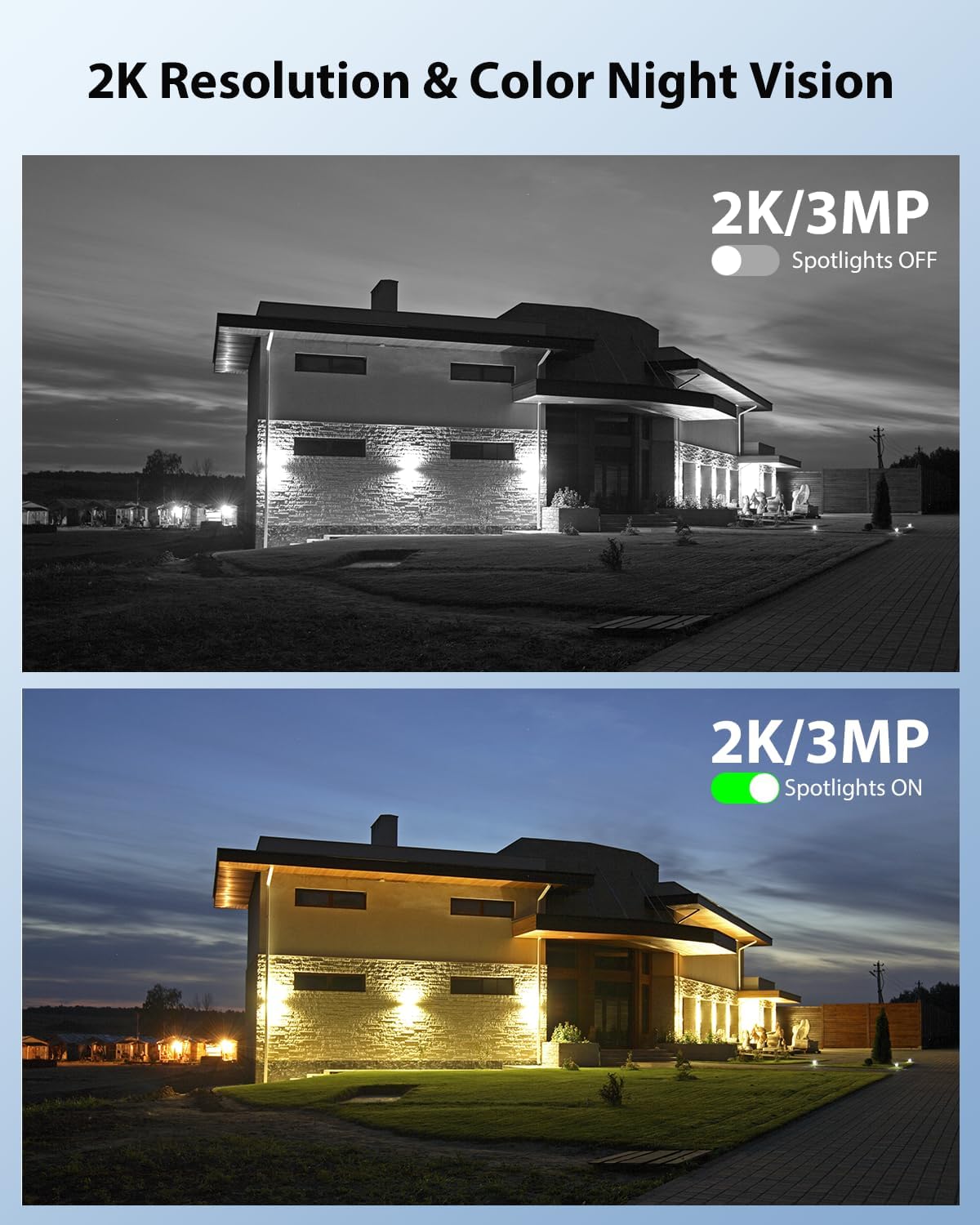
Image: Demonstrates 2K resolution and the difference between infrared and color night vision with spotlights.

Image: Illustrates the panoramic view and PTZ (Pan-Tilt-Zoom) capabilities controlled via a smartphone app.
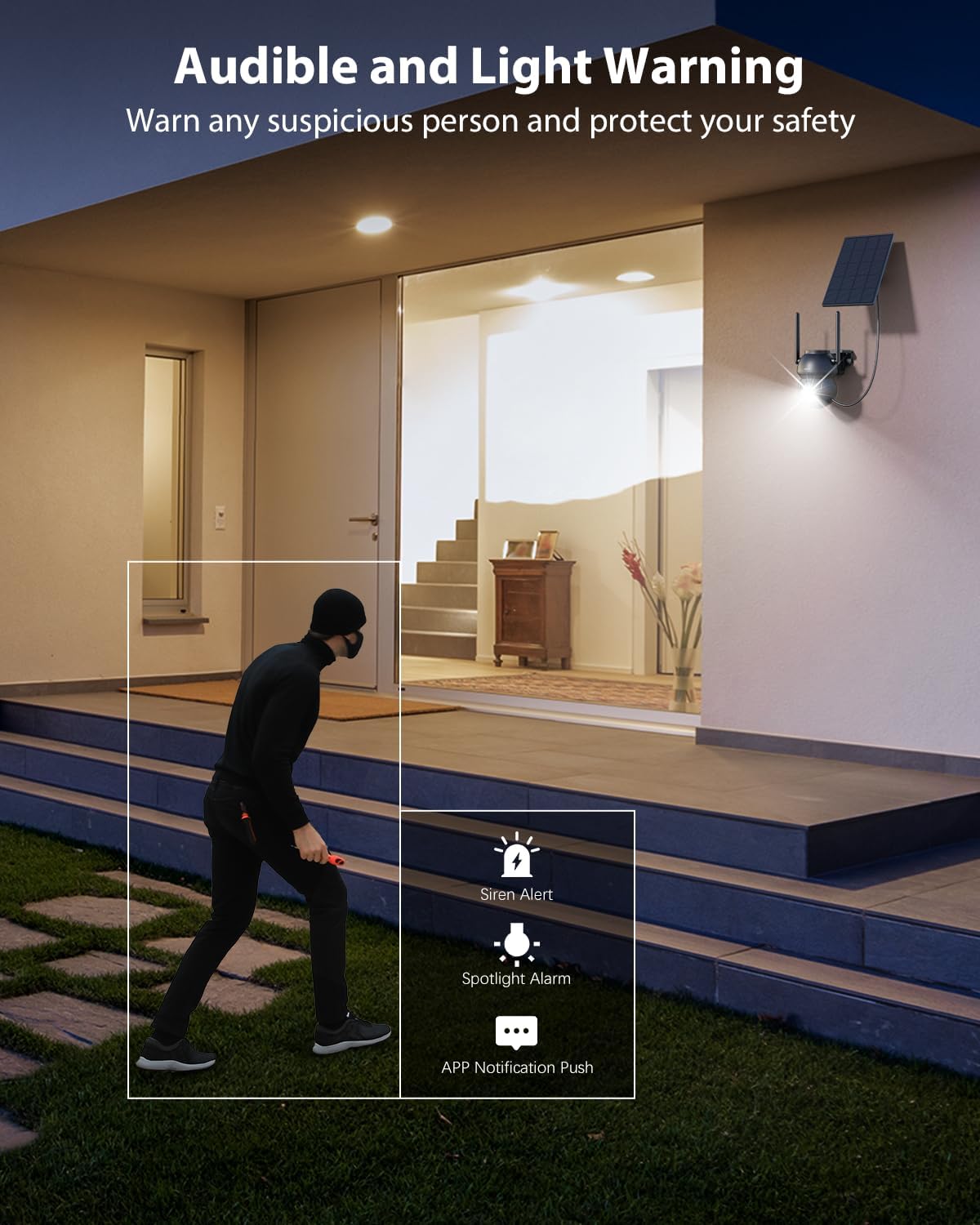
Image: Shows the camera's audible and light warning system deterring a suspicious person.

이미지: 카메라를 통해 소통할 수 있는 양방향 오디오 기능을 보여줍니다.

Image: Shows how to customize detection areas to focus monitoring on important zones and reduce false alarms.

Image: Highlights the IP66 weather-resistant design, showing the camera's durability in various weather conditions.
제품 비디오
비디오: 오버view of the Xega Solar WiFi Camera Outdoor Wireless, demonstrating its key features and ease of installation.
4. 설정 가이드
4.1 배터리 충전
Before initial use, fully charge the camera's built-in 5200mAh battery using the provided USB cable. Although solar-powered, a full initial charge ensures optimal performance from the start.
4.2 앱 설치 및 계정 생성
- 다운로드 유박스 스마트폰 앱스토어(iOS 또는 Android)에서 앱을 다운로드하세요.
- 앱을 열고 화면의 지시에 따라 새 계정을 만들거나 이미 계정이 있는 경우 로그인하세요.
4.3 Camera Pairing with Wi-Fi
- 스마트폰이 다음에 연결되어 있는지 확인하세요. 2.4GHz Wi-Fi 네트워크이 카메라는 5GHz Wi-Fi를 지원하지 않습니다.
- In the Ubox app, tap the "Add Device" or "+" icon.
- Power on the camera. It will enter pairing mode, indicated by a specific LED light pattern (refer to the camera's LED indicator guide in the app for details).
- Follow the app's instructions to connect the camera to your Wi-Fi network. This usually involves scanning a QR code displayed on your phone with the camera lens.
- Once connected, the camera will confirm successful pairing, and you can name your device.
4.4 카메라 및 태양광 패널 장착
The camera and solar panel are designed for wall mount installation.
- 위치를 선택하세요: Select an outdoor location with good Wi-Fi signal strength and ample sunlight exposure for the solar panel. The camera should be mounted at a height that provides optimal viewing angles and detection range.
- 카메라 장착: Use the provided screws and wall plugs to securely attach the camera bracket to a wall or suitable surface. Ensure the camera has a clear line of sight to the area you wish to monitor.
- 태양 전지판 장착: Attach the solar panel bracket to a location where it receives direct sunlight for most of the day. Adjust the angle of the solar panel to maximize sunlight exposure.
- 태양광 패널 연결: Use the 3-meter connection cable to link the solar panel to the camera.
5. 사용 설명서
5.1 라이브 View 및 PTZ 제어
- Open the Ubox app and select your camera to access the live view.
- Use the on-screen joystick or swipe gestures to control the camera's 355° pan and 90° tilt movements.
- Pinch to zoom in or out (digital zoom).
5.2 양방향 오디오
- 라이브에서 view마이크 아이콘을 탭하면 카메라 스피커를 통해 말할 수 있습니다.
- 카메라 주변의 소리를 들으려면 스피커 아이콘을 탭하세요.
5.3 동작 감지 및 알림
- Navigate to the camera settings in the Ubox app.
- Adjust PIR sensor sensitivity to optimize detection and minimize false alarms.
- Set up custom detection zones to monitor specific areas of interest.
- Enable or disable floodlight and siren alarms for motion events.
- Ensure push notifications are enabled in your phone settings and the Ubox app to receive instant alerts.
5.4 야간 투시 모드
The camera offers different night vision modes:
- 적외선 나이트 비전: 저조도 환경에서도 선명한 흑백 이미지를 제공합니다.
- 컬러 나이트 비전: Activates built-in spotlights to provide full-color images at night when motion is detected. This can be configured in the app settings.
5.5 저장 옵션
- TF 카드 저장: Insert a TF (microSD) card (up to 128GB, not included) into the camera's designated slot for local recording.
- 클라우드 스토리지: Subscribe to the optional cloud storage service via the Ubox app for secure, remote storage of your recordings. A 30-day trial may be available.
- 기록된 foo에 액세스tage and playback options through the Ubox app.
6. 유지관리
- 태양광 패널 청소: 태양광 패널 표면을 부드러운 천으로 정기적으로 닦아주세요.amp 충전 효율을 저하시킬 수 있는 먼지, 오물 또는 이물질을 제거하는 데 사용하십시오.
- 카메라 렌즈 청소: Gently clean the camera lens with a microfiber cloth to ensure clear image quality. Avoid abrasive materials.
- 펌웨어 업데이트: Check the Ubox app periodically for firmware updates. Keeping your camera's firmware updated ensures optimal performance and access to new features.
- 배터리 상태: While solar-powered, extreme weather or prolonged periods of low sunlight may affect battery levels. Ensure the solar panel is optimally positioned.
- 내후성: The IP66 rating ensures protection against dust and strong jets of water. No special weather-proofing maintenance is typically required beyond ensuring secure mounting.
7. 문제 해결
- 카메라가 Wi-Fi에 연결되지 않음:
- Wi-Fi 네트워크가 2.4GHz인지 확인하세요.
- 카메라 설치 위치에서 Wi-Fi 신호 강도를 확인하세요.
- 라우터와 카메라를 다시 시작하세요.
- 앱에서 Wi-Fi 비밀번호를 올바르게 입력했는지 확인하세요.
- 이미지 품질이 좋지 않음:
- 카메라 렌즈를 청소하세요.
- 특히 컬러 야간 투시경의 경우, 적절한 조명을 확보하십시오.
- 인터넷 연결 속도를 확인하세요.
- 허위 모션 경고:
- Adjust PIR sensor sensitivity in the app.
- Define or refine custom detection zones to exclude irrelevant areas (e.g., public roads, swaying trees).
- 배터리가 충전되지 않음:
- 태양광 패널이 매일 몇 시간 동안 직사광선을 받을 수 있도록 하십시오.
- 태양광 패널 표면을 청소합니다.
- 태양광 패널과 카메라를 연결하는 케이블을 확인하십시오.
- 양방향 오디오 문제:
- Ensure your phone's volume is up and the microphone is enabled for the Ubox app.
- Check the camera's speaker and microphone settings in the app.
8. 사양
| 특징 | 사양 |
|---|---|
| 모델명 | XG-22-WIFI-P4 |
| 실내/실외 사용 | 집 밖의 |
| 전원 | Solar and Battery Powered (5200mAh Lithium Ion batteries included) |
| 연결 기술 | 2.4GHz 와이파이 |
| 비디오 캡처 해상도 | 2K(1296p) |
| PTZ (Pan/Tilt) | 355° 수평, 90° 수직 |
| 나이트 비전 범위 | 25 미터 (82 피트) |
| 저조도 기술 | 컬러 나이트 비전 |
| 동작 감지 | PIR Sensor, Human Detection, Customizable Alarm Areas |
| 양방향 오디오 | 예 |
| 저장 옵션 | TF Card (Max. 128GB), Cloud Storage |
| 국제 보호 등급 | IP66 |
| 장착 유형 | 벽걸이형 |
| 재료 | 아크릴로니트릴 부타디엔 스티렌(ABS) |
| 제품 치수 | 5 x 5 x 5 인치 |
| 품목 무게 | 6.43파운드(4팩 기준) |
9. 보증 및 지원
9.1 보증 정보
Xega products typically come with a manufacturer's warranty. Please refer to the product packaging or the official Xega web자세한 보증 조건은 해당 웹사이트를 참조하십시오. 구매 영수증을 보관하여 구매 증빙 자료로 활용하십시오.
9.2 고객 지원
For technical assistance, troubleshooting, or any product-related inquiries, please contact Xega customer support. You can usually find contact information on the Xega official website or through the Ubox app.

Image: Xega offers 24/7 online customer support for assistance.