
BOTSLAB G980H Pro
BOTSLAB G980H Pro 4K 블랙박스 사용 설명서
Model: G980H Pro | Brand: BOTSLAB
1. 서론
Thank you for choosing the BOTSLAB G980H Pro 4K Dash Cam. This manual provides detailed instructions on how to install, operate, and maintain your dash camera system, including the hardwire kit and CPL filter. Please read this manual thoroughly before use to ensure proper functionality and safety.
2. 패키지 내용
아래 나열된 모든 품목이 패키지에 포함되어 있는지 확인하세요.
- BOTSLAB 4K+2K Dual Dash Cam (Front and Rear Units)
- Botslab Circular Polarizing Lens (CPL) Filter
- Hardwire Kit (Type C)
- 사용자 설명서
- Other standard accessories (e.g., mounting adhesive, cable clips)
3. 제품 오버view
The BOTSLAB G980H Pro is a high-performance dash camera system designed to capture crystal-clear footage of your journeys. It features a true 4K front camera and a 2K rear camera with 360° rotation capability, providing comprehensive coverage both outside and inside your vehicle.
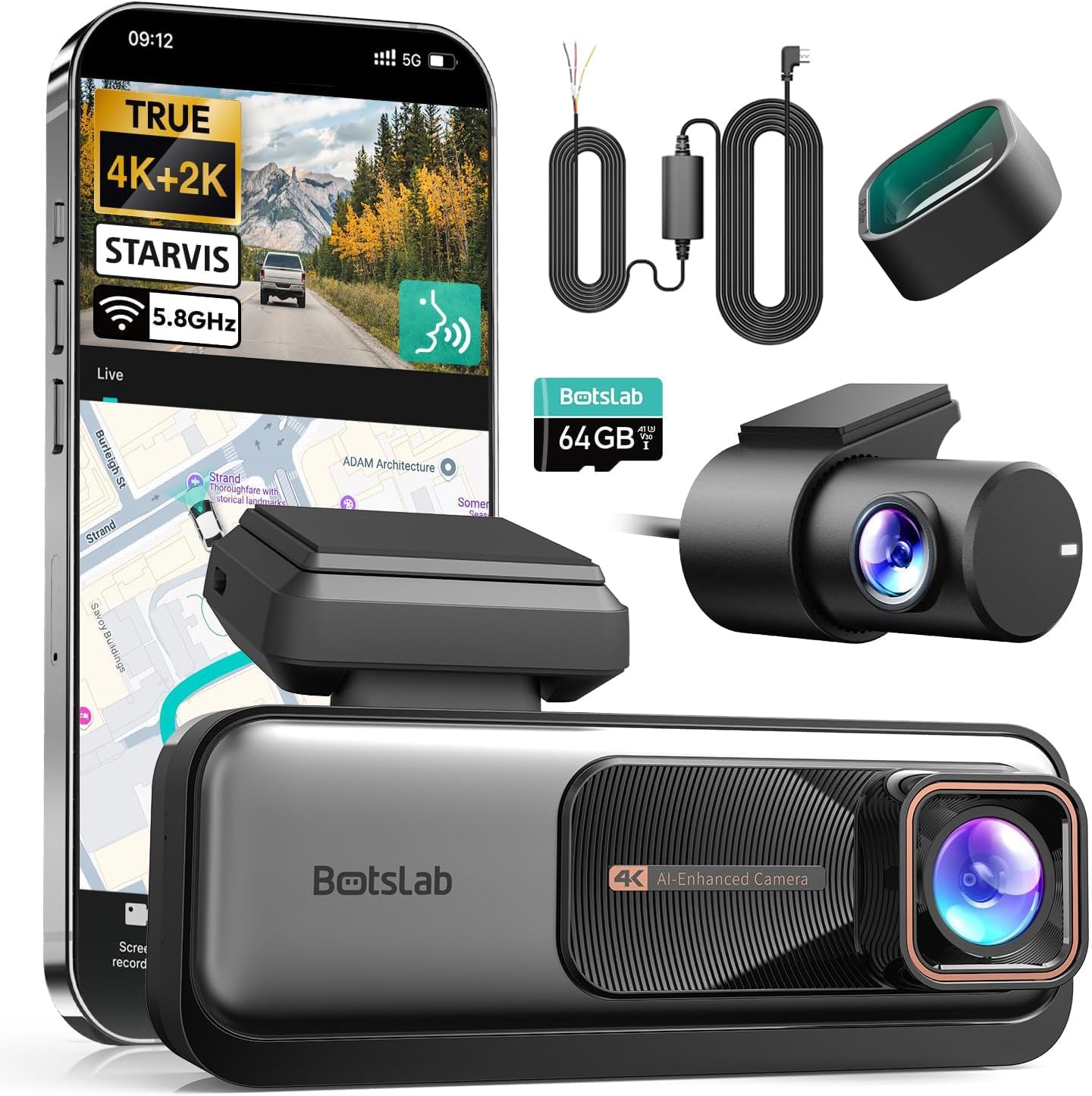
이미지: 이상view of the BOTSLAB G980H Pro Dash Cam and its included components.

Image: The G980H Pro Dash Cam shown with a smartphone displaying the live view and map interface.
4. 설정 및 설치
Proper installation is crucial for optimal performance. This section guides you through the process of installing the dash cam and the hardwire kit.
4.1 하드와이어 키트 설치
The hardwire kit enables 24/7 parking mode functionality by providing continuous power to the dash cam even when the vehicle is off. It connects directly to your car's fuse box.
이미지: 상세 view of the Hardwire Kit, highlighting the Type-C connector, power conversion box, and the ACC (yellow), VCC+ (red), and GND- (black) wires.
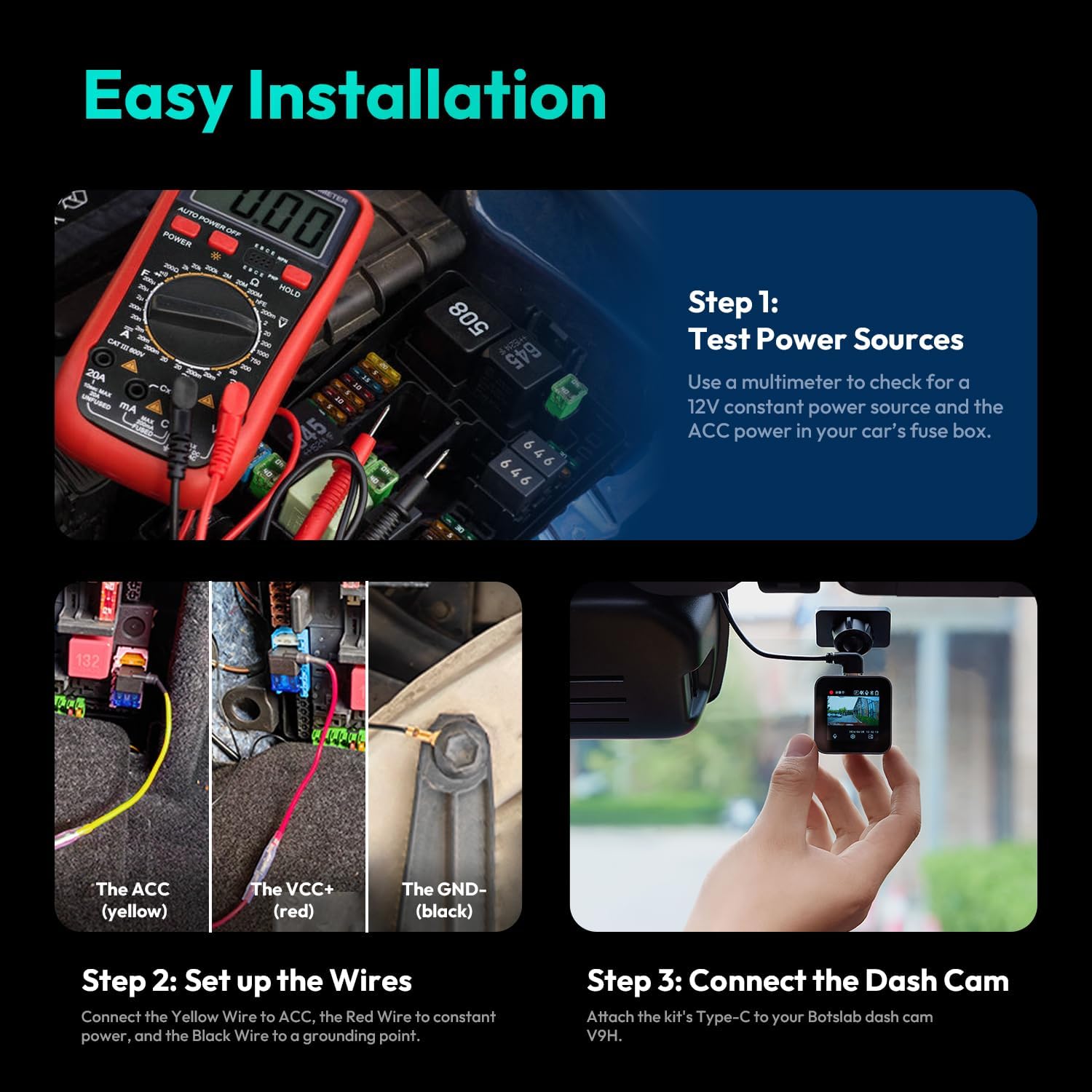
- Step 1: Test Power Sources. Use a multimeter to identify a 12V constant power source (for VCC+) and an ACC (Accessory) power source in your car's fuse box. The ACC power should only be active when the ignition is on.
- Step 2: Set Up the Wires. Connect the yellow wire (ACC) from the hardwire kit to the identified ACC fuse slot. Connect the red wire (VCC+) to the constant power fuse slot. Securely connect the black wire (GND-) to a grounding point on the vehicle's chassis, typically a metal bolt or screw.
- Step 3: Connect the Dash Cam. Attach the Type-C connector of the hardwire kit to the corresponding port on your BOTSLAB G980H Pro Dash Cam.

Image: Visual guide for the easy installation process of the hardwire kit, showing multimeter use, wire connections, and dash cam attachment.
4.2 대시캠 장착
전면 블랙박스는 앞 유리, 가급적 뒷 유리 뒤쪽에 장착하세요.view mirror, to ensure it does not obstruct your view. Mount the rear camera on the rear window. Ensure both cameras have a clear view 도로의.
4.3 CPL 필터 설치
The CPL filter helps reduce glare and reflections from the windshield and road, improving video clarity. Gently attach the CPL filter to the front lens of the dash cam. Rotate the filter while observing the live view on the dash cam or app to find the optimal position for glare reduction.
5. 사용 설명서
This section details the key features and how to operate your G980H Pro Dash Cam.
5.1 Recording Quality and Camera Rotation
The front camera records in true 4K resolution, while the rear camera records in 2K resolution, providing exceptional detail. The rear camera can rotate 360° to monitor either the rear view or the vehicle's interior, making it versatile for various recording needs, including rideshare monitoring.

Image: Comparison of 4K front and 2K rear camera footage, demonstrating clarity for license plate recognition.
5.2 첨단 운전자 보조 시스템(ADAS)
The G980H Pro features an ADAS powered by AI NPU and BOTSLAB's AI algorithm, providing real-time safety alerts:
- 보행자 충돌 경고: Alerts you to pedestrians in your path.
- Vehicle Movement Alert: 앞차가 움직이기 시작하면 알려줍니다.
- 차선 이탈 경고: 차선을 이탈하면 경고음이 울립니다.
- Driver Fatigue Warning: Prompts you to take a break if signs of fatigue are detected.

Image: Illustrations of various ADAS alerts, including front vehicle start, pedestrian proximity, too close warning, and lane departure.
5.3 음성 제어
Operate your dash cam hands-free using voice commands. Supported commands include:
- "Turn on screen" / "Turn off screen"
- "사진을 찍으세요"
- "전면 카메라 표시" / "후면 카메라 표시"
- "비디오 시작"
5.4 24시간 주차 모드
When connected via the hardwire kit, the dash cam automatically enters parking mode after your car is turned off. It continues to monitor your vehicle for impacts or motion, providing protection against theft, vandalism, and hit-and-runs.
5.5 5.8GHz WiFi & GPS Integration
The built-in 5.8GHz WiFi allows for fast and reliable connection to the companion mobile app for real-time viewing, video playback, and settings adjustment. The integrated GPS module tracks your driving route and speed, which can be reviewed using the dedicated DV playback software on your computer.
6. 유지관리
블랙박스의 수명 연장과 최적의 성능을 보장하려면 다음 유지 관리 지침을 따르십시오.
- 렌즈 청소: Regularly wipe the camera lenses with a soft, lint-free cloth to ensure clear recordings.
- SD 카드 관리 : Format the microSD card periodically (e.g., once a month) to prevent data corruption and ensure smooth recording. Use a high-quality, high-endurance microSD card.
- 펌웨어 업데이트: Check the BOTSLAB official web성능을 개선하고 새로운 기능을 추가하기 위한 사용 가능한 펌웨어 업데이트가 있는지 사이트나 앱에서 확인하세요.
- 온도: 대시캠을 장시간 극한의 온도에 노출시키지 마세요.
7. 문제 해결
If you encounter any issues with your dash cam, refer to the following common problems and solutions:
| 문제 | 가능한 해결책 |
|---|---|
| 대시캠 전원이 켜지지 않습니다. | Check power connections. Ensure the hardwire kit is correctly installed and receiving power from the fuse box. |
| 녹음이 중지되거나 정지됩니다. | Format the microSD card. Ensure you are using a high-speed (Class 10 or U3) and high-endurance microSD card. Replace the card if it's old or damaged. |
| Poor video quality / Glare. | Clean the lenses. Adjust the CPL filter by rotating it to minimize glare. Ensure the windshield is clean. |
| ADAS alerts are inaccurate. | Ensure the dash cam is mounted correctly and has a clear, unobstructed view of the road. Calibrate ADAS settings via the mobile app if available. |
| Wi-Fi 연결 문제. | Ensure the dash cam's Wi-Fi is enabled. Restart both the dash cam and your mobile device. Try reconnecting through the app. |
8. 사양
Key technical specifications of the BOTSLAB G980H Pro Dash Cam:
- 전면 카메라 해상도: 진정한 4K
- 후면 카메라 해상도: 2K
- 후면 카메라 회전: 360°
- 연결성: 5.8GHz WiFi, Built-in GPS
- 고급 기능: ADAS (Pedestrian Collision, Vehicle Movement, Lane Departure, Driver Fatigue Alerts), Voice Control, 24/7 Parking Mode
- 포함된 액세서리: Hardwire Kit, CPL Filter
- ASIN: B0F7RNZPB4
- 첫 번째 이용 가능: 7년 2025월 XNUMX일
9. 보증 및 지원
Your BOTSLAB G980H Pro Dash Cam is covered by a standard return policy. For specific warranty details and technical support, please refer to the documentation provided with your purchase or contact the seller directly.
반품 정책: 본 제품은 판매자의 반품 정책에 따라 구매일로부터 30일 이내에 환불 또는 교환이 가능합니다.
판매자 정보: For support and inquiries, please contact Botslab Security, the seller of this product.
Ask a question about this manual
Ask about setup, troubleshooting, compatibility, parts, safety, or missing instructions. Manuals+ will review the question and use this page’s manual context to help answer it.