
소개
This manual provides detailed instructions for the assembly, operation, and maintenance of your FLEXISPOT One-Piece Standing Desk with Rattan Drawers. Please read this manual thoroughly before installation and use to ensure proper function and safety. Keep this manual for future reference.

Image: The FLEXISPOT One-Piece Standing Desk in black with rattan drawers, featuring a monitor shelf and an integrated control panel.
중요한 안전 정보
부상이나 제품 손상을 방지하기 위해 다음 안전 지침을 준수하십시오.
- 항상 조립 지침을 주의 깊게 따르세요.
- 어린이와 애완동물을 집회 장소에 가까이 두지 마십시오.
- Use appropriate tools and safety gear during assembly.
- 책상을 작동하기 전에 모든 연결이 안전하게 되어 있는지 확인하십시오.
- 책상에 과부하를 주지 마십시오. 최대 하중은 70kg(110lbs)입니다.
- 높이를 조정하는 동안에는 움직이는 부품에 손이나 물건이 닿지 않도록 주의하세요.
패키지 내용
Verify that all components are present before beginning assembly. The desk ships in two separate packages.
- Desktop with integrated monitor shelf and rattan drawers
- Desk frame and legs
- 제어판
- 전원 어댑터 및 케이블
- 조립 하드웨어(나사, 볼트, 도구)
- 사용자 설명서

Image: A diagram illustrating the dimensions of the desk components and indicating that the product ships in two separate packages.
조립 설명서
Assembly typically takes approximately one hour. Refer to the separate detailed assembly guide included in your package for step-by-step instructions and diagrams. Ensure all fasteners are correctly identified and used in their designated locations.
- 모든 구성품을 풀어서 패키지 내용물 목록과 비교해보세요.
- Attach the desk legs to the desktop frame using the provided hardware.
- Connect the control panel and motor cables as instructed.
- Secure any cable management components.
- Place the desk in its desired location.
설정
After assembly, connect the desk to a power source.
- Plug the power adapter into the desk's control box.
- 전원 코드를 표준 전기 콘센트에 꽂으세요.
- The desk is now ready for initial use.
작동 지침
높이 조정
The desk features an electric motor system for smooth height transitions.
- 를 누르세요 위쪽 화살표 책상을 올리는 버튼.
- 를 누르세요 아래쪽 화살표 책상 높이를 낮추는 버튼.
- The desk can adjust between 28.9 inches (minimum) and 46.5 inches (maximum).
- The motor operates quietly, typically below 50dB.

Image: The desk shown at its minimum (28.9") and maximum (46.5") adjustable heights.
메모리 사전 설정
최대 3개의 선호하는 높이 설정을 저장하여 빠르게 조절할 수 있습니다.
- 원하는 높이로 책상을 조정하세요.
- 를 누르세요 M 버튼을 누른 다음 번호가 매겨진 사전 설정 버튼 중 하나를 누르십시오(1, 2, 또는 3) 현재 높이를 저장하려면 3초 이내에 입력해야 합니다.
- 저장된 높이를 불러오려면 해당 번호의 프리셋 버튼을 누르기만 하면 됩니다.

이미지: 클로즈업 view of the desk's control panel, highlighting the up/down arrows and memory preset buttons.
모니터 선반
The integrated monitor shelf is designed to elevate screens to an ergonomic eye level.
- Place your monitor(s) on the shelf to reduce neck and back strain.
- This helps maintain proper posture during extended work sessions.

Image: Visual comparison of poor posture versus ergonomic sitting and standing postures facilitated by the adjustable desk.
Rattan Drawers
The desk includes both sliding-door desktop compartments and an under-desk drawer for organized storage.
- Use the desktop compartments (47.2"x8.7"x5.5") for easy access to frequently used items.
- The under-desk drawer (23.6"x11.8"x3.9") provides discreet storage for documents or books.
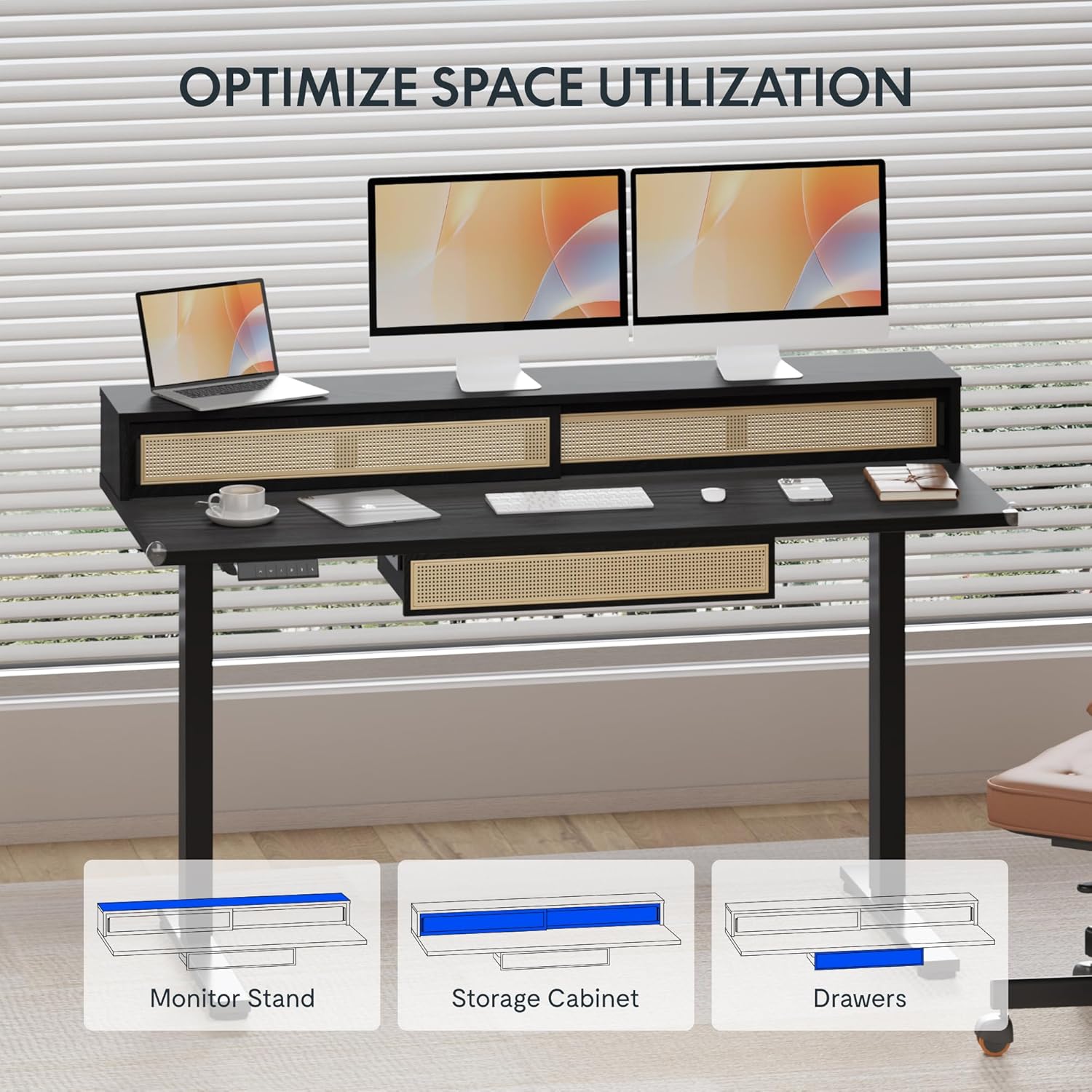
Image: An illustration demonstrating the various storage options, including the monitor stand, storage cabinet, and drawers, for optimal space utilization.
유지
정기적인 유지 관리는 책상의 수명과 최적의 성능을 보장합니다.
- 청소: 부드러운 천으로 책상 표면을 닦으세요.amp 옷감. 마감재를 손상시킬 수 있는 연마성 세제나 가혹한 화학 물질을 피하십시오.
- 점검: 모든 나사와 볼트가 단단히 조여져 있는지 정기적으로 점검하세요. 필요하면 다시 조이세요.
- 케이블 관리 : 케이블이 깔끔하게 정리되어 책상의 움직임을 방해하지 않도록 하십시오.
문제 해결
책상에 문제가 발생하면 다음의 일반적인 해결책을 참조하세요.
| 문제 | 가능한 원인 | 해결책 |
|---|---|---|
| 책상이 움직이지 않고 제어에 반응하지 않습니다. | Power connection issue, cable disconnected, motor error. | Check power cord connection to outlet and desk. Ensure all motor cables are securely connected. Unplug and replug the power for 10 seconds to reset. |
| 책상이 고르지 않게 움직이거나 이상한 소리가 납니다. | 불균형한 하중, 느슨한 연결, 장애물. | Ensure weight is evenly distributed. Check for any obstructions under the desk. Verify all assembly screws are tight. |
| 메모리 프리셋 기능이 작동하지 않습니다. | 사전 설정이 올바르게 저장되지 않았습니다. | Re-save the desired height settings by pressing 'M' then the preset number within 3 seconds. |
명세서
| 특징 | 세부 사항 |
|---|---|
| 상표 | 플렉스팟 |
| 제품 크기(D x W x H) | 23.6"D x 47.2"W x 29"H (at lowest point) |
| 색상 | 검은색 |
| 기본 소재 | 합금강 |
| 상단 재료 유형 | 목재 |
| 최소 높이 | 28.9 인치 |
| 최대 높이 | 46.5 인치 |
| 서랍 수 | 1 (under-desk) |
| Enclosed Shelves | 2 (sliding-door desktop compartments) |
| 특징 | Corded electric height adjustment, Memory Presets |
| 필요한 조립 | 예 |
보증 및 지원
FLEXISPOT provides comprehensive warranty coverage for your standing desk:
- 프레임 및 모터: 5년 보장.
- 전자제품: 2년 보장.
This warranty ensures lasting security for your workspace investment. For customer support, technical assistance, or warranty claims, please refer to the contact information provided in your product packaging or visit the official FLEXISPOT web대지.