
어택 샤크 X82 프로 HE
ATTACK SHARK X82 PRO HE 게이밍 키보드 사용 설명서
Wireless Rapid Trigger RGB Mechanical Gaming Keyboard
1. 제품 오버view
The ATTACK SHARK X82 PRO HE is a high-performance 75% layout mechanical gaming keyboard designed for competitive gaming and efficient daily use. It features Hall Effect magnetic switches, rapid trigger technology, adjustable actuation points, and versatile tri-mode connectivity (wired, 2.4GHz wireless, and Bluetooth). With an 8000Hz polling rate and a 5000mAh battery, it delivers ultra-low latency and extended usage.
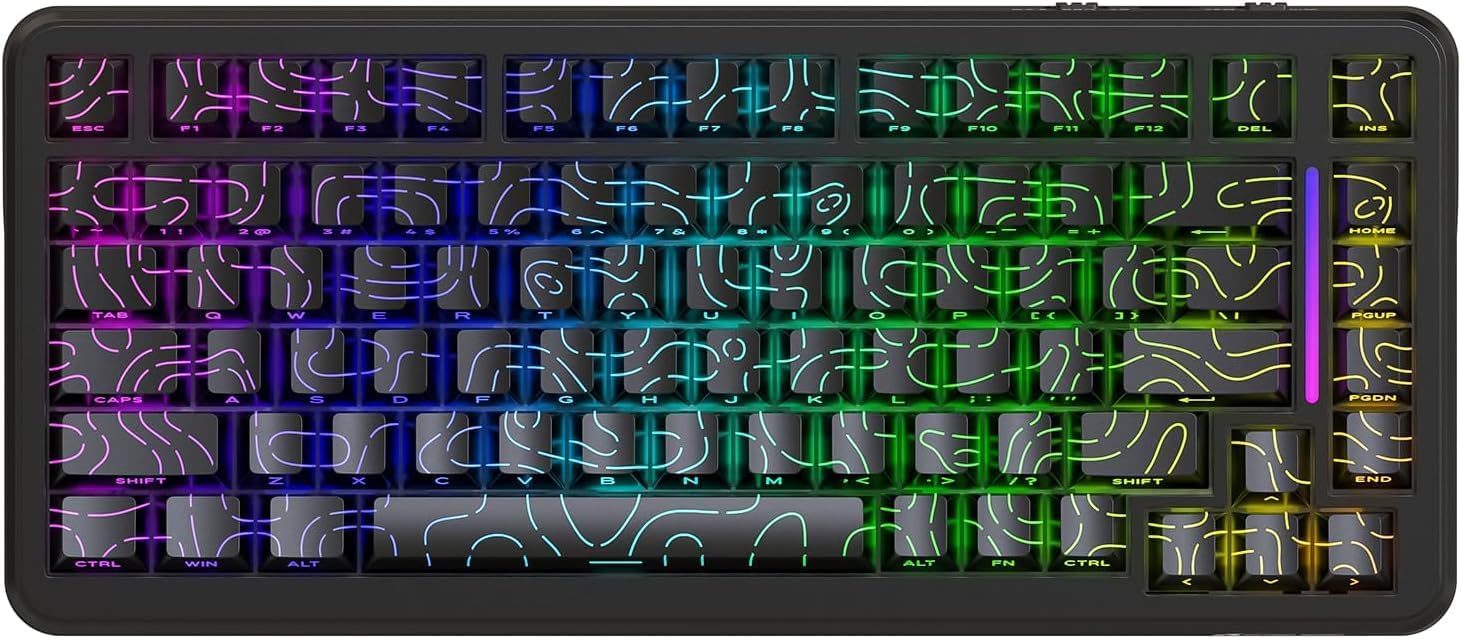
그림 1: 전면 view of the ATTACK SHARK X82 PRO HE Gaming Keyboard, showcasinRGB 조명과 컴팩트한 75% 레이아웃이 특징입니다.

Figure 2: Visual summary of key features including 75% TKL layout, magnetic switches, web driver, tri-mode connectivity, long battery life, full RGB, 8000Hz polling rate, and low latency.
2. 설정 및 연결
The X82 PRO HE keyboard offers three versatile connection methods:
2.1. 유선 연결(USB-C)
Connect the provided USB-C cable from the keyboard to an available USB port on your computer. The keyboard will be automatically recognized and ready for use. This mode supports the full 8000Hz polling rate.
2.2. 2.4GHz 무선 연결
- 키보드 상단 수납 공간에 보관되어 있는 2.4GHz USB 수신기를 찾으십시오.
- USB 수신기를 컴퓨터의 사용 가능한 USB 포트에 연결합니다.
- Switch the keyboard to 2.4GHz wireless mode. Refer to the keyboard's physical switch or key combination for mode selection (e.g., FN + R).
- 키보드는 수신기와 자동으로 페어링되어야 합니다.
2.3. 블루투스 5.0 연결
- Switch the keyboard to Bluetooth mode. Refer to the keyboard's physical switch or key combination for mode selection (e.g., FN + Q/W/E for different Bluetooth profile에스).
- 사용하시는 기기(컴퓨터, 휴대폰, 태블릿)에서 블루투스를 활성화하고 새 기기를 검색하세요.
- 사용 가능한 장치 목록에서 "ATTACK SHARK X82 PRO HE"를 선택하여 페어링하십시오.
- 화면의 지시에 따라 페어링 과정을 완료하세요.

Figure 3: Illustration of the three connectivity modes: USB-C wired, 2.4GHz wireless, and Bluetooth, with corresponding key combinations for switching.
2.4. 초기 충전
Before first use, it is recommended to fully charge the keyboard using the provided USB-C cable. The 5000mAh battery provides extended usage time.
3. 작동 모드 및 기능
3.1. 폴링 속도 및 지연 시간
The X82 PRO HE supports an 8000Hz polling rate in wired mode, ensuring ultra-low latency of 0.1ms and a 128K scanning rate. This provides immediate response to keystrokes, crucial for competitive gaming. In 2.4GHz wireless mode, the polling rate is 1000Hz.

Figure 4: Visual representation of the 8000Hz polling rate in wired mode and 1000Hz in wireless mode, highlighting the ultra-low latency.
3.2. Hall Effect Magnetic Switches
Equipped with self-developed Hall Effect magnetic switches, the keyboard offers 0.01mm actuation precision. These switches are hot-swappable, allowing for easy replacement with other N-pole downward magnetic switches.
3.3. 빠른 방아쇠 작동 및 조절 가능한 작동 속도
Rapid Trigger (RT) technology allows keys to register actuation and reset based on movement distance rather than a fixed point, enabling faster repeated inputs. The adjustable actuation point feature allows users to customize the key travel distance required for a keystroke to register, from 0.1mm to 3.4mm, providing personalized responsiveness.

Figure 5: Diagram illustrating the difference between a regular switch and a rapid trigger switch, emphasizing improved accuracy and zero dead zone for gaming.

그림 6: 상세 view of the magnetic switch and its specifications, including actuation range and operation force, highlighting the adjustable actuation point.
3.4. RGB 조명 제어
The keyboard features south-facing RGB lighting with over 20 dynamic backlight effects and side-bar effects, offering 16.8 million colors. Use the following key combinations to control the lighting:
- FN + \|: 조명 모드 전환
- 에프엔 + 에이: Switch light bar color
- FN + ↑: 백라이트 밝기 +
- FN + ↓: Backlight brightness -
- FN + ←: Backlight speed -
- FN + →: Backlight speed +
- FN + 엔터: Switch light color
- FN + 캡스: Switch light bar mode

Figure 7: Visual guide to the full RGB light effects and the key combinations for controlling various lighting parameters.
3.5. WIN and Mac Compatibility
The keyboard supports one-key switching between Windows and Mac operating systems, enhancing versatility for different user environments.
4. 사용자 정의 및 소프트웨어
The ATTACK SHARK X82 PRO HE keyboard offers extensive customization options through its web-based software. This allows users to fine-tune various settings to match their preferences and optimize performance for different applications.
4.1. 액세스 Web 운전사
To access the customization software, navigate to qmk.top 당신의 web browser. This network-driven platform provides a comprehensive interface for managing your keyboard settings.
4.2. 사용자 지정 기능
- 급속 트리거(RT) 설정: Adjust the sensitivity and behavior of the rapid trigger function for individual keys.
- SOCD(동시에 반대되는 주요 방향): Configure how simultaneous opposing inputs are handled, useful for fighting games.
- 고급 기능: Utilize features like DKS (Dynamic Keystroke), MT (Macro Toggle), and TGL (Toggle) for complex key behaviors.
- Key Remapping and Macros: Freely remap any key and create custom macros for automated sequences of commands.
- Deadzones: Define deadzones for key actuation to prevent accidental inputs.
- 조명 사용자 정의: Personalize RGB lighting effects, colors, and patterns beyond the onboard controls.
- 찬성files: Create and save unlimited profiles for different games, work applications, or user preferences, allowing quick switching between configurations.

Figure 8: Interface of the web-based driver, showing options for rapid trigger settings, key personalization, and RGB lighting control.
5. 유지관리
Proper maintenance ensures the longevity and optimal performance of your ATTACK SHARK X82 PRO HE keyboard.
5.1. 청소
- 일반 청소: 부드럽고 털이 없는 천을 살짝 사용하세요.amp키캡과 키보드 프레임을 물이나 순한 세척액으로 닦아주세요. 과도한 습기는 피하십시오.
- 먼지 제거: 압축 공기를 사용하여 키캡과 스위치 사이의 먼지와 이물질을 제거합니다.
- 키캡 청소: For deeper cleaning, keycaps can be carefully removed. Use a keycap puller to avoid damage. Clean keycaps with mild soap and water, then ensure they are completely dry before reattaching.
5.2. 핫스왑 가능 스위치
The X82 PRO HE features hot-swappable Hall Effect magnetic switches. This allows for easy replacement or customization of switches without soldering. Use a switch puller to carefully remove switches. Ensure replacement switches are compatible N-pole downward magnetic switches.

Figure 9: Close-up of the Doubleshot PBT keycaps, highlighting their contour design and OEM profile, which are durable and easy to clean.
6. 문제 해결
If you encounter issues with your ATTACK SHARK X82 PRO HE keyboard, refer to the following common solutions:
| 문제 | 가능한 원인 | 해결책 |
|---|---|---|
| 키보드가 응답하지 않음(유선) | 케이블 연결이 느슨하거나 USB 포트에 결함이 있습니다. | USB-C 케이블이 제대로 연결되어 있는지 확인하세요. 다른 USB 포트나 케이블을 사용해 보세요. |
| 2.4GHz 무선 연결 안됨 | Receiver not plugged in, keyboard in wrong mode, low battery. | Ensure receiver is plugged in. Switch keyboard to 2.4GHz mode (FN + R). Charge the keyboard. |
| 블루투스가 페어링되지 않습니다 | 키보드가 페어링 모드가 아니거나, 기기 블루투스가 꺼져 있거나, 간섭이 발생하고 있습니다. | Switch keyboard to Bluetooth mode (FN + Q/W/E). Ensure device Bluetooth is on. Try re-pairing. |
| RGB 조명이 작동하지 않거나 잘못되었습니다. | Incorrect lighting mode, software settings override. | 조명 모드를 순환하려면 다음을 사용하세요. FN + \|. Check lighting settings in the web 운전사(qmk.top). |
| 키가 등록되지 않거나 두 번 입력됨 | Switch issue, software calibration needed. | Ensure switches are properly seated. Calibrate actuation points and deadzones using the web 운전사. |
| Keyboard feels unstable (uneven feet) | Manufacturing variance. | If the issue persists and affects usability, contact customer support. |
For advanced troubleshooting or issues not listed here, please refer to the official ATTACK SHARK support resources or the web-based customization software.
7. 사양
| 특징 | 세부 사항 |
|---|---|
| 모델 | 어택 샤크 X82 프로 HE |
| 공들여 나열한 것 | 75%(83키) |
| 스위치 유형 | Hall Effect Magnetic Switches (Hot-swappable) |
| 연결성 | USB-C 유선, 2.4GHz 무선, 블루투스 5.0 |
| 폴링 속도 | 8000Hz(유선), 1000Hz(2.4GHz 무선) |
| 숨어 있음 | 0.1ms (유선) |
| 작동 정밀도 | 0.01mm |
| 작동 범위 | 0.1mm - 3.4mm (조절 가능) |
| 배터리 용량 | 5000mAh |
| 키캡 | Doubleshot PBT (Contour Design) |
| 백라이트 | Full RGB (South-facing, 20+ effects, 16.8M colors) |
| N키 롤오버 | 전체 N키 롤오버 |
| 건설 | Top Mounted, Aluminum Alloy Positioning Plate, Dual-layer PORON foam |
| 소프트웨어 | Web-based Driver (qmk.top) |
| 운영 체제 호환성 | 윈도우, 맥OS |
| 품목 무게 | 1.16kg |
| 패키지 크기 | 36.79 x 19.3 x 5.3cm |
8. 보증 및 지원
For warranty information, technical support, or service inquiries, please contact ATTACK SHARK customer support through their official web제품 구매처 또는 판매처에 문의하십시오. 보증 청구를 위해 구매 증빙을 보관하십시오.
공식적인 Web대지: ATTACK SHARK 스토어 (아마존)
Ask a question about this manual
Ask about setup, troubleshooting, compatibility, parts, safety, or missing instructions. Manuals+ will review the question and use this page’s manual context to help answer it.