
소개
Thank you for choosing the INFINMIND K618 Wireless Bluetooth TouchPad Keyboard. This manual provides essential information for the proper setup, operation, and maintenance of your new device. Please read it thoroughly before use to ensure optimal performance and longevity.

Image: The INFINMIND K618 Wireless TouchPad Keyboard, showcasin세련된 디자인과 무선 기능을 갖추고 있습니다.

Image: The INFINMIND K618 keyboard being used in various scenarios including home, office, travel, and meetings, highlighting its portability and versatility.
패키지 내용
- INFINMIND K618 Wireless Bluetooth TouchPad Keyboard
- 2.4G USB 수신기
- 사용자 설명서
- (Batteries not included, requires 2x AAA batteries)
제품 끝view
Familiarize yourself with the key components of your INFINMIND K618 keyboard.

이미지: 위에서 아래로 view of the INFINMIND K618 keyboard, highlighting the integrated touchpad and the included 2.4G USB receiver.
- 키보드 배열: 기능 키가 포함된 표준 QWERTY 키보드 레이아웃입니다.
- 통합 터치패드: Located on the right side for navigation.
- Connection Mode Indicators: Lights for 2.4G, Bluetooth 1 (BT1), and Bluetooth 2 (BT2).
- 전원 스위치: On/Off switch (usually on the back or side).
- 배터리 칸: For AAA batteries (on the back).
- USB 수신기 보관: Compartment for the 2.4G USB receiver (on the back).
설정
1. 전원 켜기 / 끄기
- Insert 2x AAA batteries into the battery compartment on the back of the keyboard, ensuring correct polarity.
- Slide the power switch to the "ON" position. The keyboard will power on.
- 전원을 끄려면 전원 스위치를 "OFF" 위치로 밀어주세요.
2. 2.4G 무선 연결
- Locate the 2.4G USB receiver in the battery compartment or a dedicated slot on the keyboard.
- Plug the USB receiver into an available USB port on your computer, laptop, or smart TV.
- 를 누르세요 2.4G connection button on the keyboard (often labeled with a USB icon or 'A'). The indicator light for 2.4G will illuminate.
- The device should automatically recognize the keyboard. No additional drivers are typically required.
3. 블루투스 연결 (BT1 및 BT2)
The K618 supports two independent Bluetooth connections, allowing you to switch between two Bluetooth-enabled devices.

Image: Diagram illustrating the multi-device connection capability of the INFINMIND K618 keyboard, showing connections to a laptop, monitor (via 2.4G), and tablet (via Bluetooth).
- 기기에서 블루투스를 활성화하세요. Ensure Bluetooth is turned on for your laptop, tablet, smartphone, or smart TV.
- 블루투스 채널을 선택하세요: 다음 중 하나를 길게 누릅니다. BT1 or BT2 connection button on the keyboard for 3-5 seconds until the corresponding indicator light starts blinking rapidly. This indicates pairing mode.
- 장치와 페어링: On your device, search for Bluetooth devices. You should see "INFINMIND K618" or a similar name appear in the list. Select it to pair.
- 연결 확인: Once paired, the indicator light on the keyboard will stop blinking and remain solid for a few seconds, then turn off to save power. Your keyboard is now connected.
- 다른 기기를 연결하려면 두 번째 블루투스 채널(BT2)에 대해서도 이 단계를 반복하십시오.
작동 지침
1. 다중 장치 전환
연결된 장치 간에 전환하려면:
- 를 누르세요 2.4G button to switch to the device connected via the USB receiver.
- 를 누르세요 BT1 button to switch to the device connected via Bluetooth channel 1.
- 를 누르세요 BT2 button to switch to the device connected via Bluetooth channel 2.

Image: Visual representation of the INFINMIND K618 keyboard's ability to switch between three devices (2.4G, BT1, BT2) with a single click.
2. 터치패드 제스처
통합 터치패드는 향상된 탐색을 위해 멀티 터치 제스처를 지원합니다.
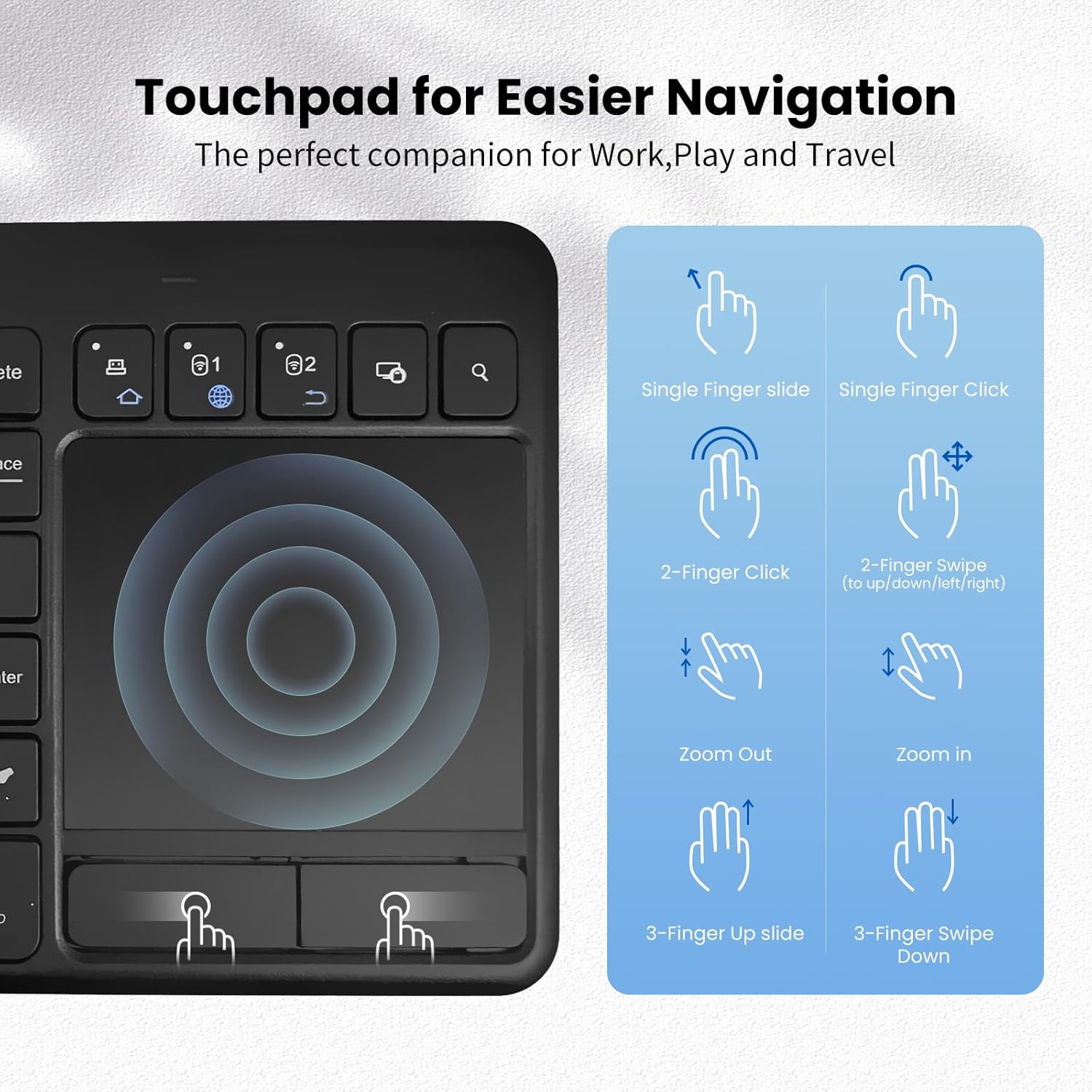
Image: A guide illustrating various touchpad gestures supported by the INFINMIND K618, including single-finger slide/click, two-finger click/swipe, zoom in/out, and three-finger slide/swipe.
- 한 손가락 슬라이드: 커서를 이동합니다.
- Single Finger Click: 왼쪽 클릭.
- 두 손가락으로 클릭: 마우스 오른쪽 버튼으로 클릭.
- Two-Finger Swipe (Up/Down/Left/Right): Scroll content or navigate.
- 꼬집기(안쪽/바깥쪽): Zoom in or out (if supported by the operating system/application).
- Three-Finger Slide Up: (Specific OS function, e.g., Task View (윈도우에서).
- Three-Finger Slide Down: (Specific OS function, e.g., Show Desktop on Windows).
Note: Specific gesture functionality may vary depending on the operating system and application.
3. 기능 키
The keyboard includes dedicated function keys (F1-F12) and multimedia shortcuts. Use the Fn key in combination with other keys to access secondary functions, if applicable.
호환성
The INFINMIND K618 keyboard is designed for broad compatibility across various operating systems and devices.

Image: Chart detailing the wide compatibility of the INFINMIND K618 keyboard with various devices (smartphones, laptops, tablets, PCs, Smart TVs) and operating systems (Mac OS, Windows 7/8/10, iOS, Android).
- 운영 체제: Windows (7/8/10/11), Android, Chrome OS, iOS, Mac OS.
- 호환 장치: Laptops, Desktop PCs, Tablets (iPad, Android tablets), Smartphones (iPhone, Android phones), Smart TVs.
Note: Full functionality, especially for advanced touchpad gestures, may depend on the specific operating system version and device support.
유지
- 청소: 부드럽고 마른 천으로 키보드 표면을 닦으세요. 잘 지워지지 않는 얼룩은 약간 거친 천으로 닦아내세요.amp 순한 비누를 묻힌 천을 사용하여 액체가 기기 내부로 들어가지 않도록 하세요.
- 배터리 교체: Replace AAA batteries when the low battery indicator (if present) illuminates or when performance degrades.
- 저장: When not in use for extended periods, turn off the keyboard and remove the batteries to prevent leakage. Store in a cool, dry place.
- 극단을 피하세요: 키보드를 극한 온도, 직사광선 또는 과도한 습기에 노출시키지 마십시오.
문제 해결
| 문제 | 가능한 해결책 |
|---|---|
| 키보드가 응답하지 않습니다 |
|
| 터치패드가 제대로 작동하지 않습니다 |
|
| Difficulty switching between devices |
|
명세서
| 특징 | 세부 사항 |
|---|---|
| 모델 | 케이618 |
| 연결성 | 2.4G 무선, 블루투스(BT1, BT2) |
| 작동 범위 | 최대 33피트(10미터) |
| 전원 | AAA 배터리 2개 |
| 호환 OS | Windows, Android, Chrome OS, iOS, Mac OS |
| 치수 | 13.39 x 5.12 x 1.18인치(대략) |
| 무게 | 12.6 온스(대략) |
보증 및 지원
INFINMIND products are designed for reliability and performance. For warranty information and technical support, please refer to the warranty card included in your package or visit the official INFINMIND web대지.
If you encounter any issues not covered in this manual, please contact INFINMIND customer support for assistance.