
삼성 SM-F766UZKEXAA
삼성 갤럭시 Z 플립7 사용 설명서
모델: SM-F766UZKEXAA
1. 서론
The Samsung Galaxy Z Flip7 is an advanced AI smartphone designed for dynamic lifestyles. Its innovative foldable display allows for a compact form factor when closed and an expansive 6.9-inch screen when unfolded, providing a versatile user experience. This manual will guide you through the setup, operation, and maintenance of your new device.

Figure 1.1: Samsung Galaxy Z Flip7, showcasin독특한 접이식 디자인이 특징입니다.
2. 설정
2.1 상자 내용물
제품 포장에 모든 구성품이 들어 있는지 확인하세요.
- 삼성 갤럭시 Z 플립7
- USB 케이블(USB-C)
- SIM 트레이 이젝터
- 빠른 시작 가이드
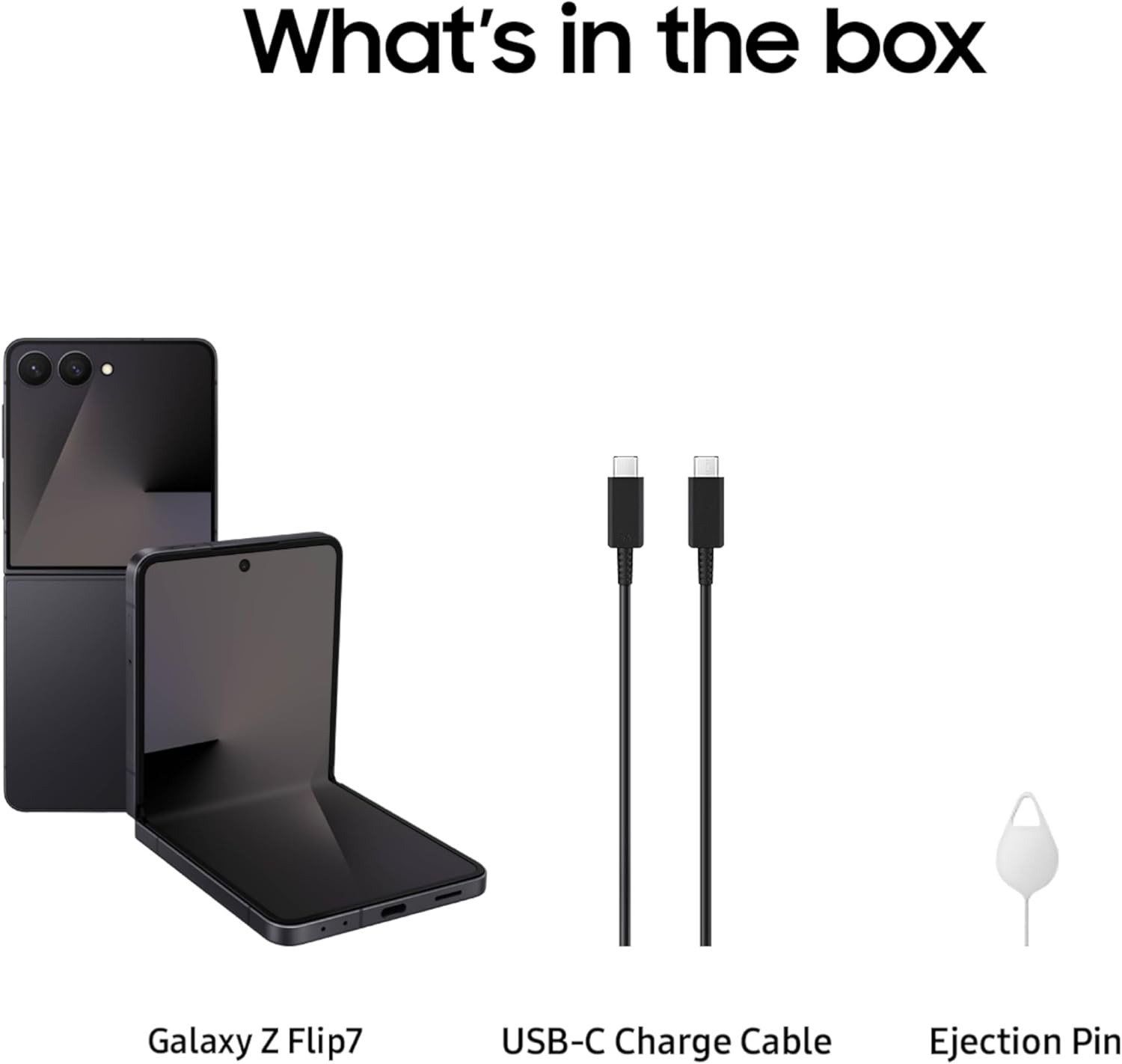
Figure 2.1: Included items in the Galaxy Z Flip7 retail package.
2.2 초기 전원 켜기
To power on your Galaxy Z Flip7 for the first time, press and hold the Side key (Power button) located on the right side of the device until the Samsung logo appears. Follow the on-screen prompts to complete the initial setup, including language selection, Wi-Fi connection, and Google account login.
2.3 SIM 카드 설치
Insert your Nano-SIM card into the device using the provided SIM tray ejector tool. Locate the SIM tray on the side of the phone, gently insert the tool into the small hole to eject the tray, place the SIM card correctly, and reinsert the tray.
2.4 Smart Switch를 통한 데이터 전송
Easily transfer data from your previous device to your new Galaxy Z Flip7 using Samsung Smart Switch. This application supports transferring contacts, messages, photos, videos, and other files from Android or iOS devices. Ensure both devices are charged and connected to Wi-Fi for a smooth transfer process.

Figure 2.2: Data transfer in progress using Samsung Smart Switch.
3. 장치 작동
3.1 접기 및 펼치기
The Galaxy Z Flip7 features a unique foldable display. Gently unfold the device to access the full 6.9-inch screen. When finished, fold the device in half for compact storage. The FlexHinge is designed for durability and smooth operation.

Figure 3.1: The Galaxy Z Flip7's versatile form factors.
3.2 FlexWindow (Cover Screen)
The redesigned edge-to-edge FlexWindow on the front of the device provides quick access to essential information and features without needing to open the phone. You can check texts, change songs, view notifications, and access smart tools like Now Brief and Google Gemini.

Figure 3.2: The new edge-to-edge cover screen in action.

Figure 3.3: Accessing 'Now Brief' on the FlexWindow for quick updates.
3.3 카메라 기능
The Galaxy Z Flip7 is equipped with a high-resolution 50MP main camera, 12MP ultra-wide, and 10MP main screen camera, designed to capture crisp and vibrant photos and videos in various lighting conditions. Utilize FlexCam for hands-free photography and video recording by partially folding the device.

Figure 3.4: Capturing photos with the FlexCam feature.

그림 3.5: 이상view of camera, display, and battery specifications.
3.4 Google Gemini and Galaxy AI
Leverage the power of Google Gemini and Galaxy AI for intelligent assistance directly from your FlexWindow. Use voice commands for quick tasks or access personalized updates through Now Brief, enhancing your daily productivity without fully opening the device.

Figure 3.6: Interacting with Google Gemini on the FlexWindow.
3.5 배터리 수명
The Galaxy Z Flip7 is equipped with a 4300 mAh battery, providing all-day power under typical usage conditions. Actual battery life may vary based on network, features used, and application usage patterns.
3.6 연결성
The device supports various connectivity options including 5G cellular technology, Bluetooth, NFC, USB, and Wi-Fi for seamless communication and data transfer.
3.7 디지털 지갑
Your Galaxy Z Flip7 includes Samsung Wallet, allowing easy access to compatible payment cards and memberships. You can also use Tap to Transfer to send funds to bank accounts of friends or family within minutes.
삼성 월렛에 대한 자세한 내용은 다음 링크를 참조하세요. http://m.site.naver.com/0fCeQ
4. 유지관리
4.1 내구성 및 보호
The Galaxy Z Flip7 is constructed with an advanced Armor Aluminum frame for enhanced durability and is rated IP48 for water and dust resistance. While robust, avoid excessive force when folding or unfolding the device.

Figure 4.1: Key durability features of the Galaxy Z Flip7.
4.2 장치 청소
To clean your Galaxy Z Flip7, gently wipe the screen and body with a soft, lint-free cloth. Avoid using harsh chemicals or abrasive materials that could damage the display or finish.
4.3 소프트웨어 업데이트
Keep your device's software up to date to ensure optimal performance and security. The Galaxy Z Flip7 runs on Android 16 with OneUI 8. You will receive notifications for available updates, which can be installed via the device settings.
5. 문제 해결
This section provides solutions to common issues you might encounter with your Galaxy Z Flip7.
5.1 장치 전원이 켜지지 않음
- 배터리가 충전되어 있는지 확인하십시오. 기기를 충전기에 연결한 후 최소 10분 동안 충전한 후 전원을 켜십시오.
- Press and hold the Side key and Volume Down button simultaneously for 7-10 seconds to force restart the device.
5.2 화면 응답 없음
- 장치를 다시 시작합니다.
- 화면이 깨끗하고 습기나 이물질이 없는지 확인하세요.
5.3 배터리 수명이 짧음
- 화면 밝기를 조정합니다.
- 백그라운드에서 실행 중인 사용하지 않는 애플리케이션을 닫습니다.
- 사용하지 않을 때는 Wi-Fi, 블루투스, GPS를 비활성화하세요.
- 사용 가능한 소프트웨어 업데이트를 확인하고 설치하세요.
6. 사양
| 특징 | 세부 사항 |
|---|---|
| 모델명 | 갤럭시 Z 플립7 |
| 모델 번호 | SM-F766UZKEXAA |
| 운영 체제 | 안드로이드 16, OneUI 8 |
| 디스플레이 크기 | 6.9 인치 |
| 새로 고침 빈도 | 120Hz |
| 메모리(RAM) | 12GB (XNUMX기가바이트) |
| 저장 용량 | 512GB (XNUMX기가바이트) |
| 배터리 용량 | 4300밀리amp 시간 |
| 치수(펼친 상태) | 6.56 x 2.96 x 0.26 인치 |
| 품목 무게 | 6.6온스(188그램) |
| 연결성 | 5G, 블루투스, NFC, USB, Wi-Fi |
| 색상 | 제트 블랙 |
| 제조업체 | 삼성전자 |
| 첫 번째 가능한 날짜 | 9년 2025월 XNUMX일 |
7. 보증 및 지원
7.1 제조업체 보증
The Samsung Galaxy Z Flip7 comes with a 1-year manufacturer's warranty. Please refer to the warranty card included in your product packaging for detailed terms and conditions.
7.2 고객 지원
기술 지원, 문제 해결 또는 서비스 문의 사항은 공식 Samsung 지원을 방문하세요. website or contact their customer service. Keep your model number (SM-F766UZKEXAA) and purchase information readily available.
삼성 스토어를 방문하세요: 삼성 공식 스토어
관련 문서 - SM-F766UZKEXAA
 |
삼성 갤럭시 Z 폴드3 5G 빠른 시작 가이드 및 이용 약관 삼성 갤럭시 Z 폴드3 5G에 대한 포괄적인 가이드로, 설정, 기기 기능, 지원 리소스, 최적의 안전한 사용을 위한 필수 약관 등을 다룹니다. |
 |
삼성 갤럭시 Z 플립7 FE 사용 설명서 (SM-F766B, SM-F761B) 삼성 갤럭시 Z 플립7 FE(모델 SM-F766B 및 SM-F761B)의 종합적인 사용 설명서를 살펴보세요. 기기의 설정, 기능, 설정 및 문제 해결 팁을 확인하세요. |
 |
삼성 갤럭시 트레이드인 Campaign 이용 약관 삼성 갤럭시 트레이드인 C 공식 이용 약관amp에스토니아, 라트비아, 리투아니아의 aign. c에 대해 알아보세요amp조정 날짜, 적격 제품, 참여 규칙 및 트레이드인 절차. |
 |
Samsung Galaxy Fold7 ir Flip7에 대한 보안 보증: Taisyklės ir sąlygos Samsung Galaxy Fold7 및 Flip7에 대한 보증이 완료되면 모든 제품에 대한 가격이 달라질 수 있습니다. Aprašomos taisyklės, sąlygos, Organizatorius, trukmė, teritorija, dalyviai ir paslaugų teikimo tvarka. |
 |
삼성 갤럭시 트레이드인 프로그램 이용 약관 라트비아, 리투아니아, 에스토니아에서 판매되는 다양한 삼성 기기에 대한 자격, 참여 및 판매 절차를 설명하는 삼성 갤럭시 트레이드인 프로그램의 공식 약관입니다. |
 |
삼성 갤럭시 Z 폴드 사용자 가이드 - 설정, 기능 및 사용법 삼성 갤럭시 Z 폴드 모델(SM-F9560, SM-F9460, SM-F9360)에 대한 종합 사용자 가이드입니다. 접이식 스마트폰의 설정, 기능, 사용법에 대해 알아보세요. |
Ask a question about this manual
Ask about setup, troubleshooting, compatibility, parts, safety, or missing instructions. Manuals+ will review the question and use this page’s manual context to help answer it.