
1. 서론
This manual provides detailed instructions for the installation, operation, and maintenance of your JOYING Double Din Car Stereo. This advanced head unit features a 10.1-inch Android 13 system with 8GB RAM and 128GB storage, offering a comprehensive in-car entertainment and navigation experience. Key functionalities include CarPlay, Android Auto, Mirror Link, AM/FM radio, and Bluetooth connectivity.
Please read this manual thoroughly before using the product to ensure proper operation and to maximize your enjoyment of its features. Keep this manual for future reference.
2. 패키지 내용
아래 나열된 모든 품목이 패키지에 포함되어 있는지 확인하세요. 품목이 누락되었거나 손상된 경우 고객 지원팀에 문의하세요.
- 10.1" Radio Unit (1)
- Double Din Cage (1)
- Left & Right Bracket (1 set)
- Reinforced Shims (1 set)
- 설치 매뉴얼(1)
- WiFi Antenna (1)
- GPS 안테나 (1)
- 4G Antenna (2)
- 외부 마이크(1)
- USB 케이블 (2)
- AR Cable (1)
- Screen Ribbon Cable (1)
- ISO Cable (1)
- 사용자 설명서 (1)

그림 2.1: Rear panel connections and included accessories for the JOYING Double Din Car Stereo. This image displays the various ports on the back of the head unit, including USB, HDMI, optical, coaxial, and antenna inputs, alongside a clear layout of all components provided in the box, such as mounting brackets, cables, and antennas.
3. 제품 특징
3.1. Manual Rotation Display

그림 3.1: The 10.1-inch display of the JOYING car stereo can be manually rotated 90 degrees, allowing for both landscape and portrait viewing modes to suit user preference or application requirements.
The display can be manually rotated 90 degrees to switch between landscape and portrait orientations, providing flexibility for navigation, media consumption, and other applications.
3.2. High-Quality Audio Output

그림 3.2: This image highlights the advanced audio capabilities of the head unit, featuring a TDA7851 DSP chip, a 48-band graphic equalizer for precise sound tuning, and a powerful 4x50W maximum output. It also shows support for external amplifiers via fiber optical and SPDIF coaxial digital outputs, along with 4 audio outputs, 1 SUB output, and a center channel output.
Equipped with a TDA7851 DSP chip and a 48-band graphic equalizer, this unit delivers high-fidelity audio. It provides 4x50W maximum output power and supports external amplifiers via Optical Fiber and Coaxial Digital Output for superior sound quality.
3.3. Split-Screen Multitasking

그림 3.3: The split-screen multitasking feature allows users to run two applications simultaneously, such as watching a video on YouTube while navigating with a map application. The image provides a step-by-step guide on how to activate split-screen mode using the recent apps icon.
The split-screen function allows you to run two applications simultaneously, such as navigation and media playback, enhancing convenience and usability.
3.4. HDMI 출력
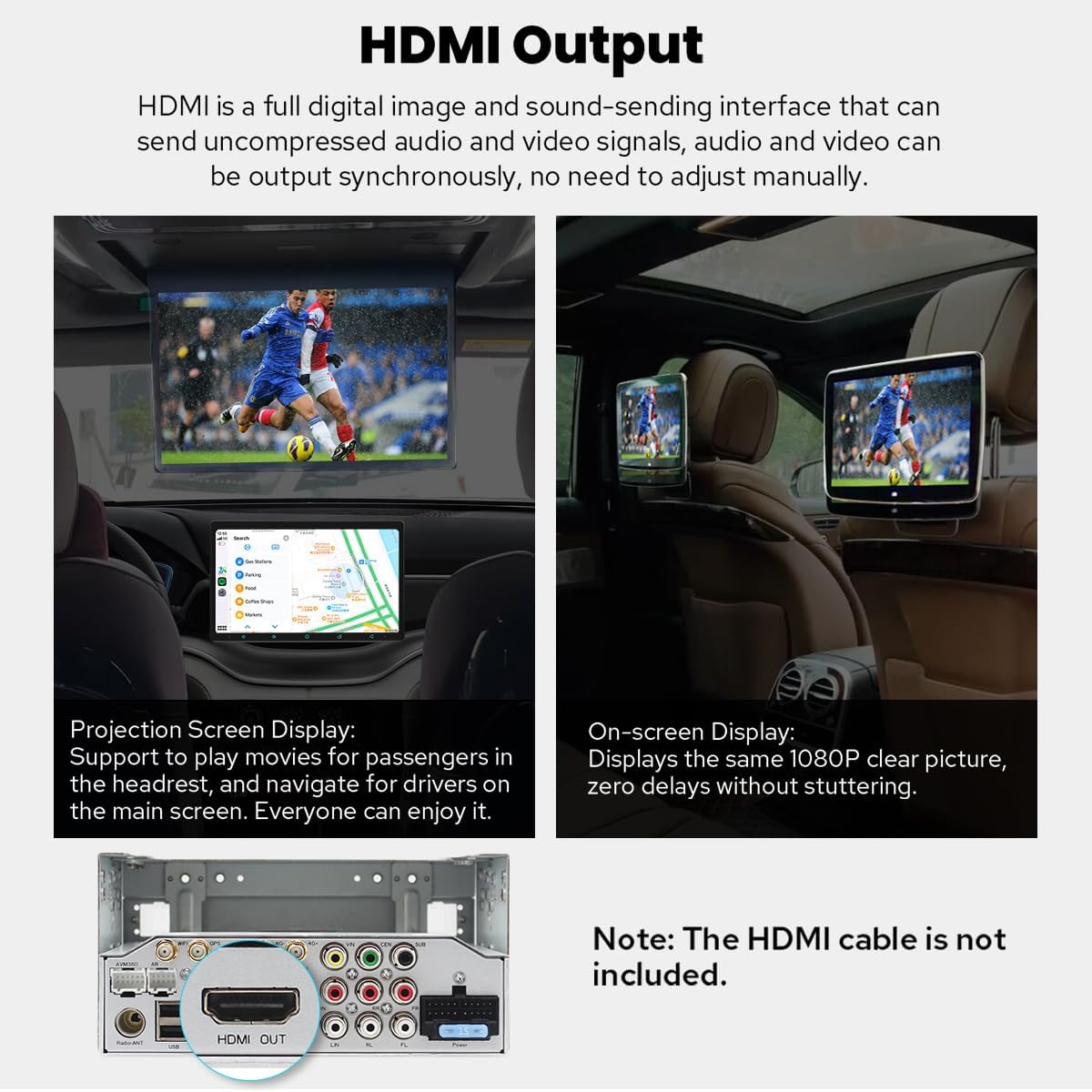
그림 3.4: The HDMI output port enables the main screen content to be projected onto external displays, such as headrest monitors, providing entertainment for rear-seat passengers. The output delivers a 1080P clear picture without stuttering. Note: HDMI cable is not included.
The HDMI output allows for uncompressed audio and video signals to be sent to external displays, such as rear-seat monitors, providing synchronized content for passengers. The HDMI cable is not included.
3.5. Built-in CarPlay & Android Auto

그림 3.5: This image displays the seamless integration of Apple CarPlay and Android Auto, allowing users to connect their smartphones via USB or Bluetooth to access navigation, make calls, and play music directly on the car stereo's larger screen.
Connect your mobile phone via USB cable or Bluetooth to utilize CarPlay and Android Auto, sharing your phone's apps for navigation, calls, and music on the larger screen.
3.6. Enhanced Cooling System

그림 3.6: The upgraded cooling system features a dual heat sink design and an active cooling fan to ensure superior heat dissipation, improved temperature control, and enhanced performance stability. The system can automatically activate the fan when CPU temperature or radio volume exceeds a set warning value.
The unit features a dual heat sink design and an active cooling fan for superior heat dissipation, improved temperature control, and enhanced performance stability. The fan automatically activates if the CPU temperature or radio's volume exceeds a set warning value.
3.7. Upgraded WiFi Signal

그림 3.7: An independent WiFi antenna is included to ensure stable signal quality and provide fast, smooth internet access. The image shows the antenna and its connection port on the rear of the head unit, supporting 802.11a/b/g/n/AC standards across 2.4GHz/5GHz spectral bands.
An independent WiFi antenna ensures stable signal quality and provides fast, smooth internet access, supporting 802.11a/b/g/n/AC standards across 2.4GHz/5GHz bands.
3.8. Other Notable Features
- 빠른 부팅: Starts up in 2 seconds after the first boot (initial boot takes 30-40 seconds).
- 내장형 4G 모듈: Insert a SIM card for internet access (does not support phone calls or SMS).
- GPS 네비게이션: Precise positioning with included GPS antenna, supports offline maps and synchronization with phone map data via CarPlay/Android Auto.
- AM/FM 라디오: Standard radio functionality.
- 핸즈프리 통화: Bluetooth connectivity for safe calling.
- 화면 속 화면(PiP): Allows a small video window to overlay other applications.
- USB 포트 3개: Multiple connectivity options for external devices.
- 마이크로 SD 카드 슬롯: 추가 저장 공간.
- 개인 설정: Customizable car boot logo, wallpapers, changeable button colors, and adjustable screen brightness.
4. 설정 및 설치
Installation of the JOYING Double Din Car Stereo requires technical knowledge and may involve modifying your vehicle's dashboard. It is highly recommended to have the unit installed by a professional car audio technician.
4.1. 설치 전 고려 사항
- 차량 호환성: Ensure your vehicle has a double din slot (178 x 102mm inner size).
- 배선 하네스 : You may need a special ISO harness, amplifier adapter, or CANbus decoder depending on your car's make and model.
- Factory Components: This unit does not support factory car GPS antenna, back-up rear camera, Bluetooth, USB, or microphone.
- 부속품: Only JOYING accessories are supported. DVR, OBDII scanner, reverse camera, TPMS, and steering wheel controller are not included and must be ordered separately if desired.
4.2. Basic Installation Steps (Refer to the included Installation Manual for detailed instructions)
- 배터리 분리: 전기 작업을 시작하기 전에 항상 차량 배터리의 음극 단자를 분리하십시오.
- 기존 헤드 유닛 제거: Carefully remove your existing car stereo and dashboard trim.
- 배선 연결: Connect the ISO cable, GPS antenna, WiFi antenna, 4G antennas, and external microphone to the corresponding ports on the JOYING unit. Ensure all connections are secure.
- 설치: Install the double din cage and brackets. Secure the JOYING unit into the dashboard opening.
- 테스트 기능: Before fully reassembling the dashboard, reconnect the battery and test the unit's basic functions (power, audio, touch screen, radio).
- 최종 조립: Once confirmed working, reassemble the dashboard trim.
5. 사용 설명서
5.1. 전원 켜기/끄기 및 기본 제어
- 전원 켜기: The unit will automatically power on when the car ignition is turned on. The first boot takes 30-40 seconds; subsequent boots are typically within 2 seconds.
- 전원 끄기 : The unit will power off with the car ignition. A long press on the power button (if available) may put it into standby or fully shut down.
- 볼륨 조절: 화면상의 컨트롤 또는 스티어링 휠 컨트롤(연결 및 설정된 경우)을 사용하여 볼륨을 조절하십시오.
5.2. 항해
The unit comes with pre-installed navigation capabilities. You can use online maps (e.g., Google Maps) with an internet connection (via WiFi or 4G SIM) or download offline maps for use without internet. CarPlay and Android Auto also allow you to synchronize your phone's navigation apps.
5.3. CarPlay 및 Android Auto
To use CarPlay or Android Auto, connect your compatible smartphone via a USB cable to one of the unit's USB ports or wirelessly via Bluetooth (for supported devices). Follow the on-screen prompts to establish the connection. This allows access to phone features like navigation, music, and messaging directly from the head unit.
5.4. 오디오 설정
Access the audio settings menu to customize your sound experience. The 48-band graphic equalizer allows for precise frequency adjustments. The built-in DSP (Digital Signal Processor) provides advanced sound optimization options. If an external amplifier is connected via optical or coaxial output, ensure the settings are configured correctly for optimal sound.
5.5. 분할 화면 기능
To activate split-screen multitasking:
- 최근 사용한 앱 아이콘(일반적으로 사각형 또는 세로선 세 개)을 탭하세요.
- Find the app you want to run in split-screen, then tap the split-screen icon (often two rectangles) next to its title.
- Select the second app from the recent apps list to fill the other half of the screen.
5.6. Connectivity (4G & WiFi)
- 4세대: Insert a compatible SIM card into the designated slot for mobile data access. Note that this module is for data only and does not support voice calls or SMS.
- 와이파이: Connect to available WiFi networks via the settings menu. The independent WiFi antenna ensures a stable connection for online services.
5.7. 개인화
Navigate to the settings menu to customize various aspects of the unit:
- 차량 트렁크 로고: Select a custom logo to display when the unit starts up.
- 배경화면: Choose from pre-installed wallpapers or upload your own.
- 버튼 색상: Adjust the color of the physical or on-screen buttons.
- 화면 밝기: Manually adjust the display brightness for optimal view조건.
6. 유지관리
To ensure the longevity and optimal performance of your JOYING Car Stereo, follow these maintenance guidelines:
- 화면 청소: 부드럽고 보풀이 없는 천을 사용하여 화면을 부드럽게 닦으세요. 잘 지워지지 않는 얼룩은 가볍게 닦아주세요.amp천에 물이나 화면에 안전한 세척제를 묻혀 닦아주세요. 강한 화학 물질이나 연마재는 사용하지 마세요.
- 소프트웨어 업데이트: Periodically check for software updates from the JOYING official website or through the unit's system settings. Keeping the software updated ensures the best performance and access to new features.
- 환경 조건: 본 제품을 극한의 온도, 장시간 직사광선 또는 과도한 습기에 노출시키지 마십시오.
- 연결 확인: Occasionally check all cable connections at the rear of the unit to ensure they are secure and free from corrosion.
7. 문제 해결
If you encounter issues with your JOYING Car Stereo, refer to the following common problems and solutions:
| 문제 | 가능한 원인 | 해결책 |
|---|---|---|
| 장치의 전원이 켜지지 않음 | 전원 연결이 느슨하거나, 퓨즈가 끊어지거나, 차량 배터리에 문제가 있습니다. | 전원 케이블과 연결 상태를 확인하세요. 차량 퓨즈를 점검하세요. 자동차 배터리가 충전되어 있는지 확인하세요. |
| 사운드 출력이 없습니다 | Volume too low, mute activated, speaker wires disconnected, incorrect audio settings. | Increase volume. Check if mute is active. Verify speaker wire connections. Adjust audio output settings. |
| GPS 신호가 손실되었거나 부정확함 | GPS 안테나가 제대로 연결되지 않았거나 막혀 있거나, 기기가 위성 수신 상태가 좋지 않은 지역에 있습니다. | GPS 안테나가 단단히 연결되어 있고 시야가 확보되었는지 확인하십시오. view 하늘의. 열린 공간으로 이동하세요. |
| 블루투스가 연결되지 않습니다 | 기기 또는 휴대폰의 블루투스가 꺼져 있거나, 기기가 페어링 모드가 아니거나, 간섭이 발생했을 수 있습니다. | 두 기기 모두 블루투스가 켜져 있는지 확인하세요. 휴대폰을 페어링 모드로 전환하세요. 이전에 페어링된 기기를 삭제하고 다시 시도하세요. |
| 터치 스크린이 반응하지 않습니다 | Software glitch, screen calibration issue, physical damage. | Restart the unit. Perform a factory reset (data will be lost). If issue persists, contact support. |
| CarPlay/Android Auto가 실행되지 않습니다 | Incorrect USB cable, phone not compatible, software issue. | Use a high-quality USB data cable. Ensure your phone's OS is updated. Check phone settings for CarPlay/Android Auto permissions. |
If the problem persists after attempting these solutions, please contact JOYING customer support for further assistance.
8. 사양
Detailed technical specifications for the JOYING Double Din Car Stereo (Model: JY-UTS10N8-MR):
| 특징 | 세부 사항 |
|---|---|
| 모델 번호 | JY-UTS10N8-MR |
| 운영 체제 | 안드로이드 13 |
| 디스플레이 크기 | 10.1 Inches (Manual Rotation) |
| 숫양 | 8GB |
| 내부 저장소 | 128GB |
| 오디오 출력 모드 | 스테레오 재생 |
| 서라운드 사운드 채널 구성 | 5.1 |
| 최대 출력 전력 | 4 x 50W |
| DSP 칩 | 티다7851 |
| 평형 장치 | 48밴드 그래픽 이퀄라이저 |
| 연결 기술 | 블루투스, 이더넷, HDMI, USB, Wi-Fi, 4G |
| WiFi 표준 | 802.11a/b/g/n/AC(2.4GHz/5GHz) |
| 4G Module Support | FDD-LTE: B2/B4/B5/B7/B12/B13/B14/B17/B25/B26/B38/B66/B71; TDD-LTE: B41 |
| 커넥터 유형 | Coaxial, Optical, USB, HDMI |
| 총 HDMI 포트 | 1(출력) |
| USB 포트 | 3 |
| 호환 장치 | Amp앰프, 카메라, 스마트폰, 스피커 |
| 비디오 인코딩 지원 | H264/H265/MP4/AVI/MKV/FLV |
| 품목 무게 | 2.65파운드 |
| 제품 치수 | 5.91 x 7.99 x 4.72 인치 |
9. 옵션 액세서리
Enhance your JOYING Car Stereo experience with these optional accessories (not included in the package):

그림 9.1: This image displays various optional accessories that can be purchased separately to expand the functionality of the JOYING car stereo. These include an OBD2 scanner for vehicle diagnostics, an AR Front Camera for recording the road, and an AR Rear Camera for assistance with reversing.
- OBD2 스캐너: 블루투스를 통해 연결하여 차량 컴퓨터에서 실시간 데이터와 오류 코드를 가져옵니다.
- AR 전면 카메라: 주행 중 전방 도로 상황을 자동으로 기록합니다.
- AR 후면 카메라: 차량을 후진할 때 자동으로 후진 표시등으로 전환됩니다.
10. 보증 정보
The JOYING Double Din Car Stereo (Model: JY-UTS10N8-MR) comes with a 2년 보증 from the date of purchase. This warranty covers manufacturing defects and malfunctions under normal use. It does not cover damage caused by improper installation, misuse, accidents, unauthorized repairs, or normal wear and tear.
Please retain your proof of purchase for warranty claims. For detailed warranty terms and conditions, refer to the warranty card included in your package or contact JOYING customer support.
11. 지원
For technical assistance, troubleshooting, or warranty inquiries, please contact JOYING customer support through the following channels:
- 온라인 지원: Visit the official JOYING web자주 묻는 질문(FAQ), 지원 문서 및 문의 양식을 위한 사이트입니다.
- 이메일 지원: 제품 포장이나 공식 문서를 참조하세요. web고객 지원 이메일 주소 사이트.
- 아마존 스토어: 또한 방문할 수 있습니다 JOYING Store on Amazon 제품 정보 및 판매자 연락 방법은 다음과 같습니다.
When contacting support, please have your product model number (JY-UTS10N8-MR) and proof of purchase readily available.