
1. 서론
This manual provides detailed instructions for the installation, operation, and maintenance of your Joying 11.6 Inch Double Din Car Stereo. This advanced head unit features Android 13, Apple CarPlay, Android Auto, a powerful 8GB RAM + 128GB ROM configuration, and a range of connectivity options including Bluetooth, Wi-Fi, and 4G. Please read this manual thoroughly before using the device to ensure proper functionality and safety.
2. 제품 오버view 및 구성 요소
The Joying 11.6 Inch Double Din Car Stereo is designed to enhance your in-car entertainment and navigation experience. It features a large IPS screen with 1920x1080 resolution, a Qualcomm Snapdragon 6125 Octa Core 2.0GHz processor, and a robust audio system.
2.1 패키지 내용
포장을 풀 때 아래 나열된 모든 품목이 들어 있고 상태가 양호한지 확인하세요.
- 11.6" Radio Unit (x1)
- Double Din Cage (x1)
- Left & Right Bracket (x1 pair)
- Reinforced Shims (x1 set)
- Plastic Trim Out (x1)
- 설치 설명서(x1)
- 와이파이 안테나 (1개)
- GPS 안테나 (1개)
- 4G 안테나(x2)
- External Mic (x1)
- USB 케이블(x2)
- AR 케이블 (1개)
- 스크린 리본 케이블 (1개)
- ISO 케이블 (1개)
- 사용 설명서(x1)
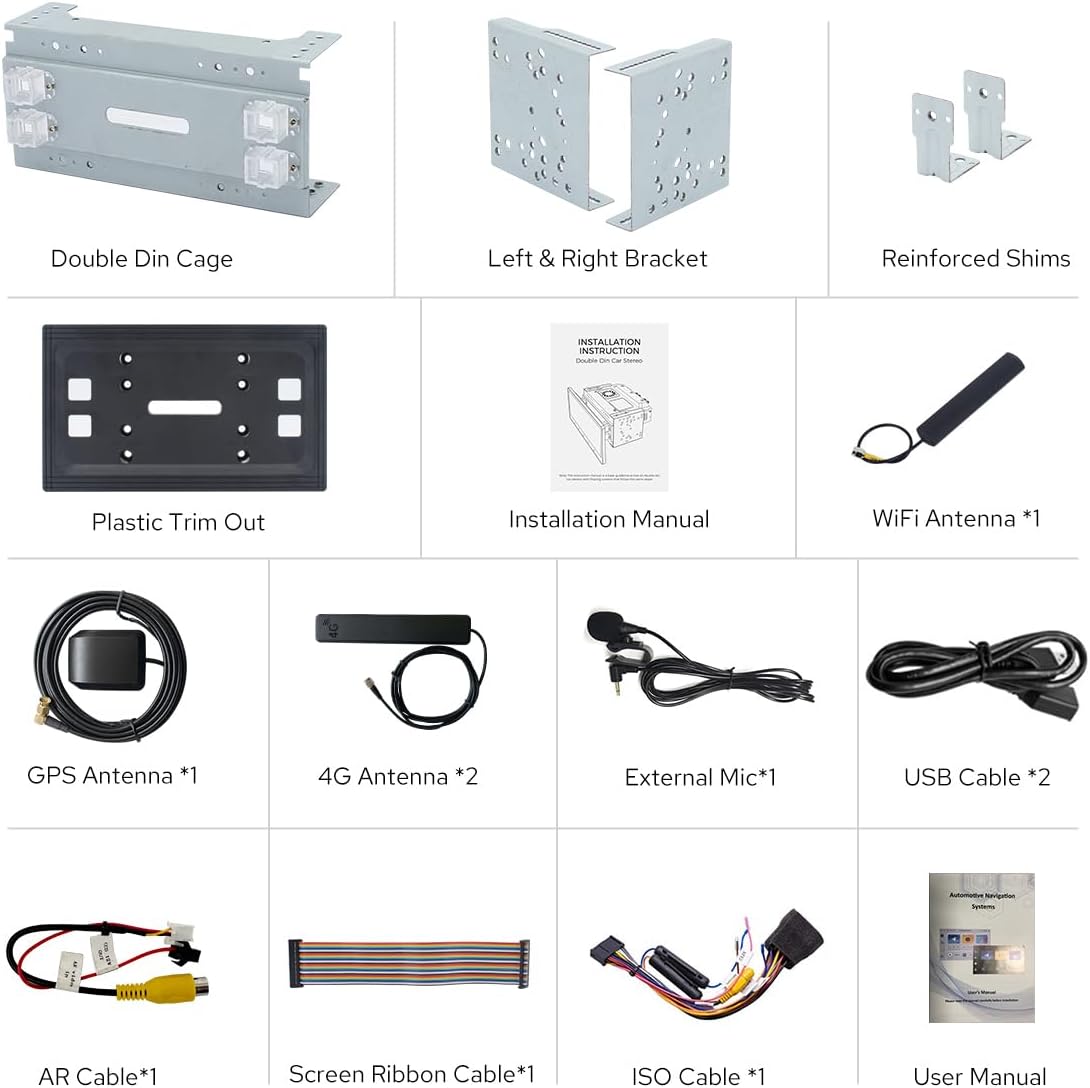
Figure 2.1: Dimensions of the head unit and a visual representation of all included package contents.
3. 설정 및 설치
Proper installation is crucial for the optimal performance of your car stereo. It is recommended that installation be performed by a qualified professional.
3.1 일반 설치 정보
- For installation, you may require an installation frame kit with an inner size of 178 x 102mm, a special ISO harness, an amplifier adapter, or a CANbus decoder, depending on your vehicle's specific requirements.
- This unit does not support factory car GPS antennas, factory backup rear cameras, factory Bluetooth, factory USB ports, or factory microphones. Only JOYING accessories are supported for these functions.
- Refer to the dedicated Installation Manual included in the package for detailed wiring diagrams and step-by-step instructions.
3.2 Installation Structure and Cooling
The unit features an upgraded installation structure and cooling system for enhanced durability and performance.

Figure 3.1: The fixing position of the left and right brackets can be extended or telescoped to achieve the best fixing position according to your car's center console, adapting to a wider range of vehicles. Note: If your car is a Hyundai or Kia brand, please contact JOYING for a different bracket.

Figure 3.2: The unit features a dual heat sink design for superior heat dissipation, improved temperature control, and enhanced performance stability. You can set a warning value for volume or CPU temperature; when the CPU temperature or radio's volume rises and exceeds the warning value, the fan will be turned on automatically for cooling to avoid overheating.
3.3 안테나 연결
Ensure all antennas are securely connected for optimal signal reception.
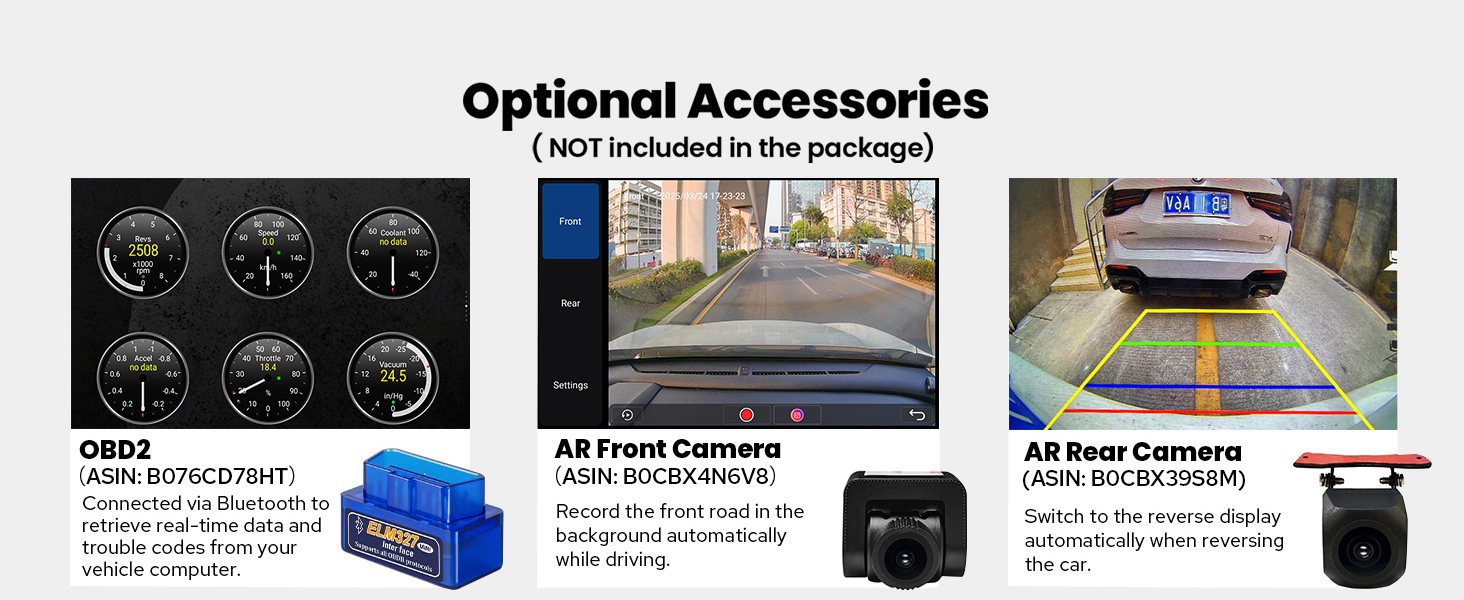
Figure 3.3: The independent WiFi antenna ensures stable signal quality and provides fast and smooth internet access. It supports 802.11a/b/g/n/AC standards with 2.4GHz/5GHz spectral bands.
4. 사용 설명서
This section details the various functions and features of your Joying car stereo.
4.1 Initial Startup and User Interface
The unit features a fast boot time. Once the car key is turned, it will start up and enter the user interface in approximately 2 seconds. The first boot-up may take 30-40 seconds.

Figure 4.1: The main user interface of the Joying 11.6 Inch Double Din Car Stereo, displaying navigation, media, and various application shortcuts.

Figure 4.2: The unit runs on Android 13 and offers both Left-Hand Drive (LHD) and Right-Hand Drive (RHD) user interface options for user convenience.
4.2 오디오 기능
Experience high-quality sound with advanced audio processing capabilities.
- 광섬유 및 동축 디지털 출력: If your external amplifier has Optical Fiber or Coaxial Digital Input, this unit provides a direct digital output for ultimate sound quality.
- DSP Chip and Equalizer: Equipped with a TDA7851 DSP Chip and a 48-Band Graphic Equalizer for precise sound customization.
- 최대 출력 전력: Delivers 4x50W maximum output power.
- 애프터마켓 Amplifier Support: Features 4*Audio Outputs and 1*SUB Output for connecting aftermarket amp정수기.

그림 4.3: 이상view of the audio features, highlighting the TDA7851 DSP Chip, 48-Band Graphic Equalizer, 4x50W Max Output Power, and support for aftermarket amplifiers via Fiber Optical, SPDIF Coaxial, and Center Channel Outputs.
4.3 연결성 및 내비게이션
Stay connected and navigate with ease using the integrated features.
- 내장형 4G 모듈: Insert a SIM card for internet access. Supported types include FDD-LTE: B2/B4/B5/B7/B12/B13/B14/B17/B25/B26/B38/B66/B71 and TDD-LTE: B41. Note: This module does not support phone calls or SMS.
- GPS 네비게이션: Equipped with precise GPS engines and an included GPS antenna for accurate and real-time navigation. Supports offline maps where data can be downloaded and saved. You can also synchronize mobile phone map data via Apple CarPlay or Android Auto.
- Apple CarPlay 및 Android Auto: Connect your mobile phone via USB cable or Bluetooth to access phone apps on the larger screen, facilitating navigation, calls, and music playback.

Figure 4.4: The unit supports both Apple CarPlay and Android Auto, allowing seamless integration with your smartphone for navigation, communication, and entertainment.
4.4 디스플레이 기능
Utilize the advanced display capabilities for enhanced user experience.
- 화면 분할 멀티태스킹: Run two applications simultaneously on the screen. Tap the recent apps icon, find the app you want to run in split-screen, click its icon to bring up the split-screen button, and tap it. The first app will display on the left side, then choose the second app from recent apps.
- HDMI 출력: A full digital image and sound-sending interface that can send uncompressed audio and video signals. Supports projection screen display for passengers in the headrest and on-screen display with 1080P clear picture and zero delays. Note: The HDMI cable is not included.

Figure 4.5: The split-screen multitasking feature allows simultaneous use of two applications, such as navigation and video playback.
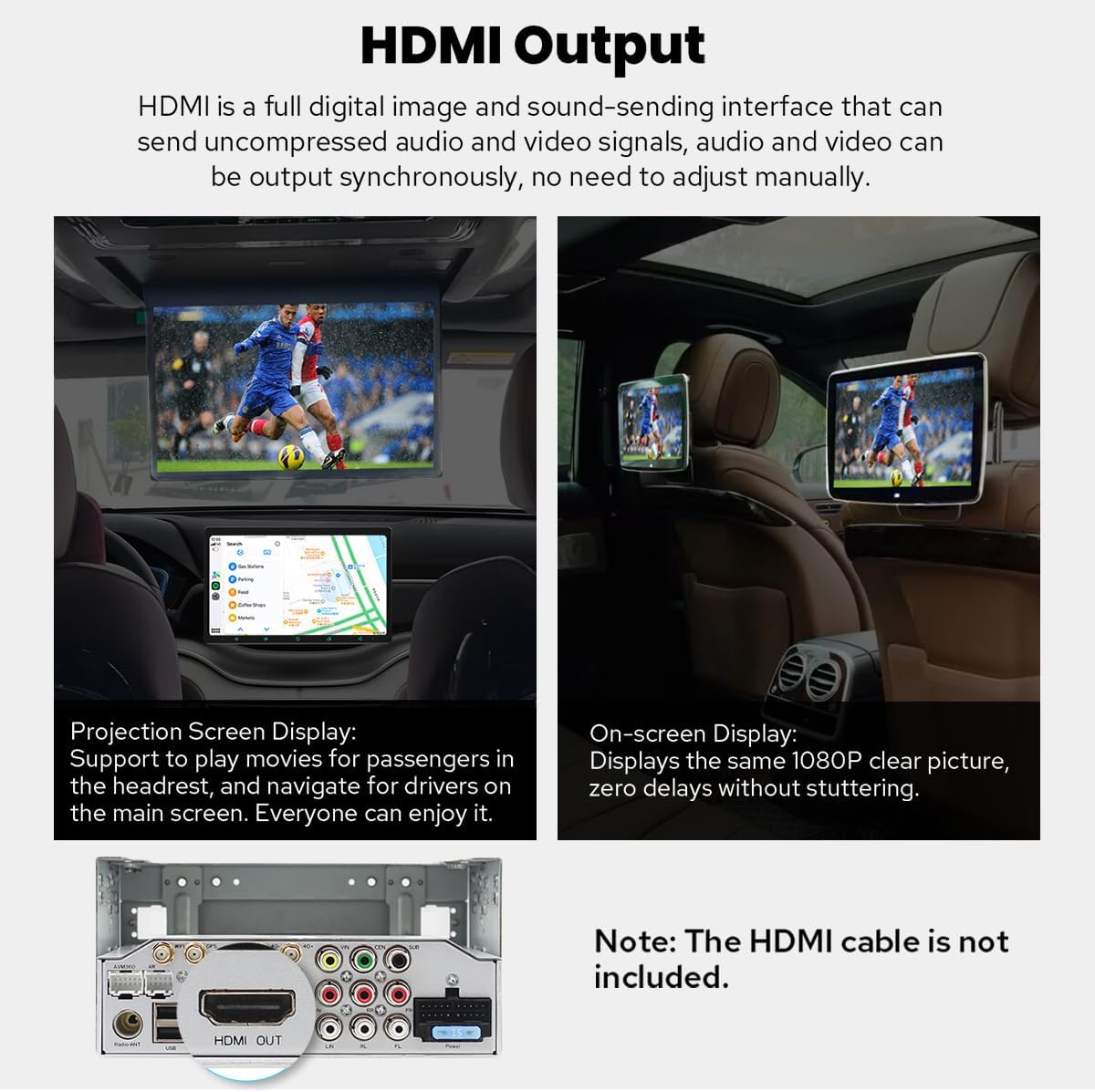
Figure 4.6: The HDMI output allows for external display connections, providing entertainment for rear passengers or mirroring the main screen.
4.5 Personalization and Other Features
Customize your stereo and utilize additional functionalities.
- 개인 설정: Customize the car boot logo, choose from various wallpapers, change button colors, and adjust screen brightness.
- 스티어링 휠 제어(SWC): Supports steering wheel controls for easy song switching, radio channel changes, and volume adjustment, contributing to a safer driving experience. Note: Cars with a CAN system may require an extra CANbus cable.
- 기타 특징: Includes Fast Boot, GPS Navigation, AM/FM Radio, Hands-free Call, Picture-in-Picture, 3 USB Ports, Micro SD Card Slot, and 4G SIM Card Slot.

Figure 4.7: Personalization options allow users to tailor the stereo's appearance and settings to their preferences.

Figure 4.8: Steering wheel control integration provides convenient and safe operation of the stereo while driving.

Figure 4.9: A summary of additional features available on the Joying car stereo.
5. 유지관리
To ensure the longevity and optimal performance of your Joying car stereo, follow these general maintenance guidelines:
- 화면 청소: 부드럽고 보풀이 없는 천을 사용하여 화면을 부드럽게 닦으세요. 잘 지워지지 않는 얼룩은 가볍게 닦아주세요.amp천에 물이나 화면 세척액을 묻혀 닦아주세요. 강한 화학 물질이나 연마재는 사용하지 마세요.
- 일반 청소: 본체와 주변 공간에 먼지와 이물질이 쌓이지 않도록 하십시오. 통풍구와 포트는 부드러운 브러시나 압축 공기를 사용하여 청소하십시오.
- 온도 조절: Avoid exposing the unit to extreme temperatures. The built-in cooling system helps manage internal temperatures, but prolonged exposure to direct sunlight or extreme cold can affect performance.
- 소프트웨어 업데이트: Periodically check the official JOYING website or contact support for available software updates to ensure your unit has the latest features and bug fixes.
6. 문제 해결
이 섹션에서는 일반적으로 발생할 수 있는 문제를 다루고 해결책을 제공합니다.
- Slow Initial Boot-up: The first boot-up after installation or a full power cycle may take approximately 30-40 seconds. Subsequent startups (from standby) will be much faster, typically around 2 seconds. This is normal operation.
- No GPS Signal / Poor Reception: Ensure the GPS antenna is properly installed and has a clear line of sight to the sky. Verify that the antenna cable is not damaged or kinked. Remember, the unit does not support factory car GPS antennas.
- Bluetooth/USB/Microphone Not Working: This unit does not support factory car Bluetooth, USB, or microphone systems. Ensure you are using the included external microphone and USB cables, and that they are properly connected.
- 후방 카메라가 표시되지 않음: The unit does not support factory backup rear cameras. Ensure you are using a compatible aftermarket camera and that it is correctly wired to the unit's video input.
- 스티어링 휠 컨트롤이 작동하지 않습니다: Verify that the SWC wires are correctly connected. If your car has a CAN system, an additional CANbus cable may be required for SWC functionality.
- 장치 과열: The unit has a dual heat sink design and a fan. If you notice excessive heat, ensure proper ventilation around the unit. Check the fan settings in the system menu; the fan can be set to automatically turn on if CPU temperature or volume exceeds a set warning value.
7. 사양
Detailed technical specifications for the Joying 11.6 Inch Double Din Car Stereo.
| 특징 | 사양 |
|---|---|
| 제품 치수 | 5.91 x 7.99 x 4.72 인치 |
| 품목 무게 | 2.65파운드 |
| 모델 번호 | JY-UTD11N8 |
| 보이는 화면 대각선 | 12인치 / 30cm |
| 연결 기술 | 블루투스, 이더넷, HDMI, USB, Wi-Fi |
| 컨트롤러 유형 | 기계적 인조 인간 |
| 특별 기능 | Android Auto, Apple CarPlay, DSP, Equalizer, RDS |
| 호환 장치 | Amplifier, Camera, Speaker |
| 총 HDMI 포트 | 1 |
| 커넥터 유형 | 동축, 광학 |
| 오디오 출력 모드 | 스테레오 재생 |
| 서라운드 사운드 채널 구성 | 5.1 |
| 비디오 인코딩 지원 | H264/H265/MP4/AVI/MKV/FLV |
8. 옵션 액세서리
Enhance the functionality of your Joying car stereo with these optional accessories (not included in the standard package):
- OBD2 Scanner (ASIN: B076CD78HT): 블루투스를 통해 연결하여 차량 컴퓨터에서 실시간 데이터와 오류 코드를 가져옵니다.
- AR Front Camera (ASIN: B0CBX4N6V8): Records the front road in the background automatically while driving.
- AR Rear Camera (ASIN: B0CBX39S8M): 차량을 후진할 때 자동으로 후진 표시등으로 전환됩니다.

Figure 8.1: Optional accessories that can be purchased separately to expand the capabilities of your car stereo.
9. 보증 및 지원
For information regarding product warranty, please refer to the warranty card included with your purchase or visit the official JOYING web사이트. 보증 약관은 다를 수 있습니다.
For technical support, troubleshooting assistance, or inquiries about compatible accessories, please contact JOYING customer service through their official channels. Keep your purchase receipt and product model number (JY-UTD11N8) ready when contacting support.