
소개
Welcome to the user manual for your new OnePlus 13s smartphone. This guide provides essential information on setting up, operating, maintaining, and troubleshooting your device. The OnePlus 13s combines powerful performance with advanced AI features and a compact design.
- 엘리트 성능: Powered by the Snapdragon 8 Elite processor, the OnePlus 13s delivers high performance for demanding tasks, supported by a Cryo-Velocity cooling system.
- Smarter Everyday: Experience OxygenOS 15 with integrated OnePlus AI features like AI Plus Mind, Intelligent Search, and Google Gemini for enhanced productivity and organization.
- 배터리 수명 연장: Equipped with a 5850mAh battery and 80W SUPERVOOC Fast Charge, ensuring long-lasting power and quick recharging.
- 컴팩트한 디자인: Features a 16.05cm (6.32-inch) ProXDR display in an ergonomic form factor, offering a comfortable viewing and handling experience.
- 고급 카메라 시스템: Capture clear images with a 32MP autofocus front camera and dual 50MP rear cameras, including features like Clear Burst.
- 향상된 연결성: Includes an independent G1 Wi-Fi chipset, 5.5G support, and a 360-degree antenna system for reliable network connections.
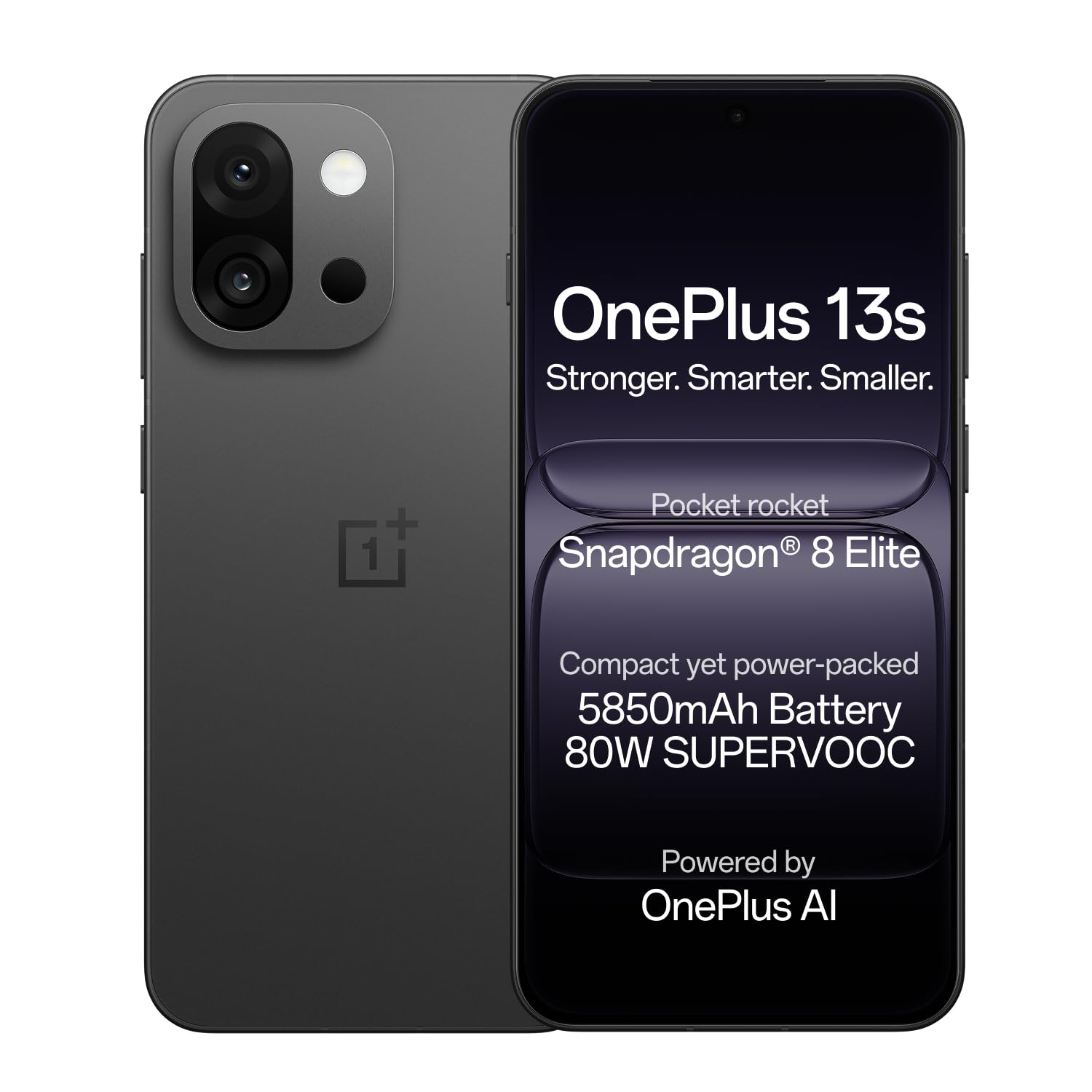
Image: OnePlus 13s smartphone in Black Velvet.
설치 가이드
1. 언박싱 및 초기 검사
Carefully unbox your OnePlus 13s. Verify that all components are present and undamaged.
상자 내용물:
- OnePlus 13s Smartphone
- 전원 어댑터
- USB 케이블
- SIM 트레이 이젝터
- 전화 케이스
- 스크린 보호 필름(사전 적용 또는 상자 내)
2. SIM 카드 삽입
- 기기 측면에서 SIM 카드 트레이를 찾으세요.
- SIM 트레이 꺼내기 도구를 트레이 옆에 있는 작은 구멍에 넣고 트레이가 튀어나올 때까지 살짝 누르세요.
- Place your Nano SIM card(s) into the tray with the gold contacts facing down. The OnePlus 13s supports Dual SIM.
- SIM 트레이가 딸깍 소리가 나면서 제자리에 고정될 때까지 조심스럽게 휴대폰에 다시 삽입하십시오.

이미지: 측면 view of the OnePlus 13s, indicating the SIM tray location.
3. 초기 전원 켜기 및 설정
- Press and hold the Power button (usually on the right side) until the OnePlus logo appears.
- 화면의 지시에 따라 언어를 선택하고, Wi-Fi에 연결하고, Google 계정을 설정하세요.
- Configure security features such as fingerprint recognition and a screen lock (PIN, pattern, or password).
4. 장치 충전
Before first use, it is recommended to fully charge your OnePlus 13s. Use the provided 80W SUPERVOOC Power Adapter and USB Cable for optimal charging speed.
- Connect the USB cable to the power adapter and then to the USB Type-C port on your phone.
- 전원 어댑터를 벽면 콘센트에 꽂으세요.
- The device will indicate charging status on the screen. A full charge takes approximately 63 minutes.

이미지: 내부 view of the OnePlus 13s highlighting the 5850mAh battery and SUPERVOOC charging.
작동 지침
1. 기본 탐색
- 터치스크린: Interact with the device using taps, swipes, pinches, and long presses on the 120Hz ProXDR AMOLED display.
- 지문 인식: Unlock your device quickly and securely using the in-display fingerprint sensor.
- 전원 버튼: Press to lock/unlock the screen. Press and hold to power off or restart the device.
- 볼륨 버튼: 미디어 볼륨, 통화 볼륨, 알림 볼륨을 조절하세요.
2. OxygenOS 15 and AI Features
Your OnePlus 13s runs on OxygenOS 15, which includes several AI-powered enhancements:
- AI Plus Mind: Organize schedules, events, and information efficiently.
- 지능형 검색: Power your search using natural, conversational prompts.
- AI 음성 기록기: Record, translate, and summarize VoIP and video calls across applications.
- 구글 제미니: Utilize Google's personal AI assistant for various tasks, including writing, planning, and learning.

Image: OxygenOS 15 interface demonstrating the AI Plus Mind feature.

Image: OxygenOS 15 interface demonstrating the AI Search feature.
3. 카메라 사용
The OnePlus 13s features a versatile camera system for capturing photos and videos.
- 후방 카메라: Dual 50MP sensors for high-resolution photos and 20x digital zoom.
- 전면 카메라: 32MP with autofocus for clear selfies and video calls.
- Clear Burst: Utilize this feature to capture fast-moving subjects without missing key moments.
- AI 흐림 제거: Automatically unblur photos of people or pets.
- AI 디테일 향상: Enhance sharp details, even when zooming in on images.

이미지: 상세 view of the OnePlus 13s camera module, showing 50MP AF Wide, 50MP AF Telephoto, and 32MP AF Front cameras.

Image: Demonstration of the AI Unblur feature, showing a blurred and unblurred photo of a cat.
4. 연결성
The OnePlus 13s supports various connectivity options:
- 셀룰러: 5G network support for fast mobile data.
- 와이파이: Independent G1 Wi-Fi chipset for enhanced wireless performance.
- 블루투스: 무선 액세서리를 연결합니다.
- NFC : 비접촉식 결제와 빠른 페어링을 위해.
- USB 타입-C: 충전 및 데이터 전송용입니다.

이미지: 내부 view of the OnePlus 13s, emphasizing the independent Wi-Fi chipset for next-gen connectivity.
유지
1. 배터리 관리
- To prolong battery lifespan, avoid extreme temperatures.
- 반드시 OnePlus 정품 80W SUPERVOOC 충전기와 케이블만 사용하십시오.
- 배터리를 자주 완전히 방전시키지 마세요.
2. 소프트웨어 업데이트
Regularly check for and install software updates to ensure optimal performance, security, and access to new features. Updates are delivered via OxygenOS 15.
- 이동하다 설정 > 기기 정보 > 산소OS.
- 수도꼭지 업데이트 확인 화면의 지시를 따르세요.
3. 기기 청소
- 부드럽고 보푸라기가 없는 천을 사용하여 화면과 본체를 닦으세요.
- 가혹한 화학물질이나 연마재는 피하세요.
- The device is water resistant; however, avoid intentional submersion.
문제 해결
If you encounter issues with your OnePlus 13s, try the following common troubleshooting steps:
- 장치가 응답하지 않음: 전원 버튼을 약 10~15초간 길게 눌러 강제로 다시 시작하세요.
- 충전 문제: 충전기와 케이블이 단단히 연결되어 있고 손상되지 않았는지 확인하세요. 다른 콘센트에 연결해 보세요.
- 앱 충돌: Clear the cache and data for the problematic app (Settings > Apps > [App Name] > Storage > Clear cache/Clear data). If the issue persists, reinstall the app.
- 네트워크 연결성: Toggle Airplane Mode on and off. Restart your device. Check your SIM card insertion. For Wi-Fi, forget the network and reconnect.
- 느린 성능: Close unnecessary background apps. Clear system cache (refer to online guides for your specific OxygenOS version). Consider a factory reset as a last resort (back up your data first).
For persistent issues, refer to the Support section for contact information.
명세서
| 특징 | 세부 사항 |
|---|---|
| 상표 | 원플러스 |
| 모델 | 13초 |
| 운영 체제 | Android 15, OxygenOS |
| CPU 모델 | 스냅드래곤 8 엘리트(4.32GHz) |
| 램 메모리 | 12GB (XNUMX기가바이트) |
| 저장 용량 | 256GB (XNUMX기가바이트) |
| 디스플레이 크기 | 6.32 인치 |
| 디스플레이 유형 | AMOLED, 120Hz ProXDR |
| 해결 | 2640×1216 Pixels (460 PPI) |
| 후방 카메라 | Dual 50 MP (Optical Sensor Resolution) |
| 전면 카메라 | 32MP (자동 초점) |
| 배터리 용량 | 5850mAh (리튬 이온) |
| 충전 중 | 80W SUPERVOOC Fast Charge (63 mins for full charge) |
| 연결성 | 5G, Wi-Fi (Independent G1 chipset), Bluetooth, NFC, USB Type C |
| 생체 인식 보안 | 지문 인식 |
| 방수성 | 방수 |
| 치수 | 15.1 x 7.2 x 0.8 센티미터 |
| 무게 | 185그램 |
| 모델 연도 | 2025 |
보증 정보
Your OnePlus 13s comes with the following warranty coverage:
- 제조업체 보증: 1 year manufacturer warranty for the device from the date of purchase.
- 액세서리 보증: 1 year manufacturer warranty for in-box accessories, including batteries, from the date of purchase.
- 평생 디스플레이 보증: OnePlus provides a lifetime display warranty for industry-wide greenline issues.
Please retain your proof of purchase for warranty claims. For detailed terms and conditions, refer to the official OnePlus web사이트를 방문하거나 고객 지원팀에 문의하세요.

Image: Information regarding the OnePlus Lifetime Display Warranty.
지원하다
For further assistance or inquiries, please contact OnePlus Customer Service:
- 고객 서비스 연락처: 1800 102 8411
- WhatsApp 지원: +91-9289606888
- 제조업체 주소: OPPO Mobiles India Private Limited, PLOT-NO.1, SECTOR ECOTECH-VII, GREATER, NOIDA, UTTAR PRADESH, India-201306
- Visit the Official OnePlus Support Web대지