1. 서론
구매해주셔서 감사합니다asing the wogree W S100 2.1ch Sound Bar. This sound bar is designed to enhance your audio experience with your smart TV, 4K TV, or traditional TV, as well as computers, projectors, phones, and tablets. It features a built-in subwoofer, 6 levels of voice enhancement, and multiple connectivity options.
The W S100 delivers cinematic bass and clear dialogue through its dual full-range speakers and integrated subwoofer, making it suitable for movies, gaming, and streaming. Its low-profile 16-inch design allows for discreet placement under TVs or flush wall mounting.
This manual provides detailed instructions for setup, operation, maintenance, and troubleshooting to ensure optimal performance and longevity of your device.

Image 1.1: The wogree W S100 Sound Bar with its included remote control.
2. 패키지 내용
모든 품목이 들어 있는지 확인하기 위해 상자를 푼 후 패키지 내용물을 확인하세요.
- wogree W S100 Sound Bar
- 원격 제어
- 전원 어댑터
- 3.5mm AUX 케이블
- 광케이블
- 벽 장착용 나사 및 앵커
- 사용자 설명서
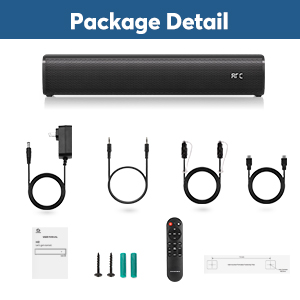
Image 2.1: All components included in the wogree W S100 Sound Bar package.
3. 제품 오버view
3.1 사운드바 구성 요소
The W S100 Sound Bar features a 2.1 channel audio system with two full-range speakers and a built-in subwoofer for enhanced bass response.
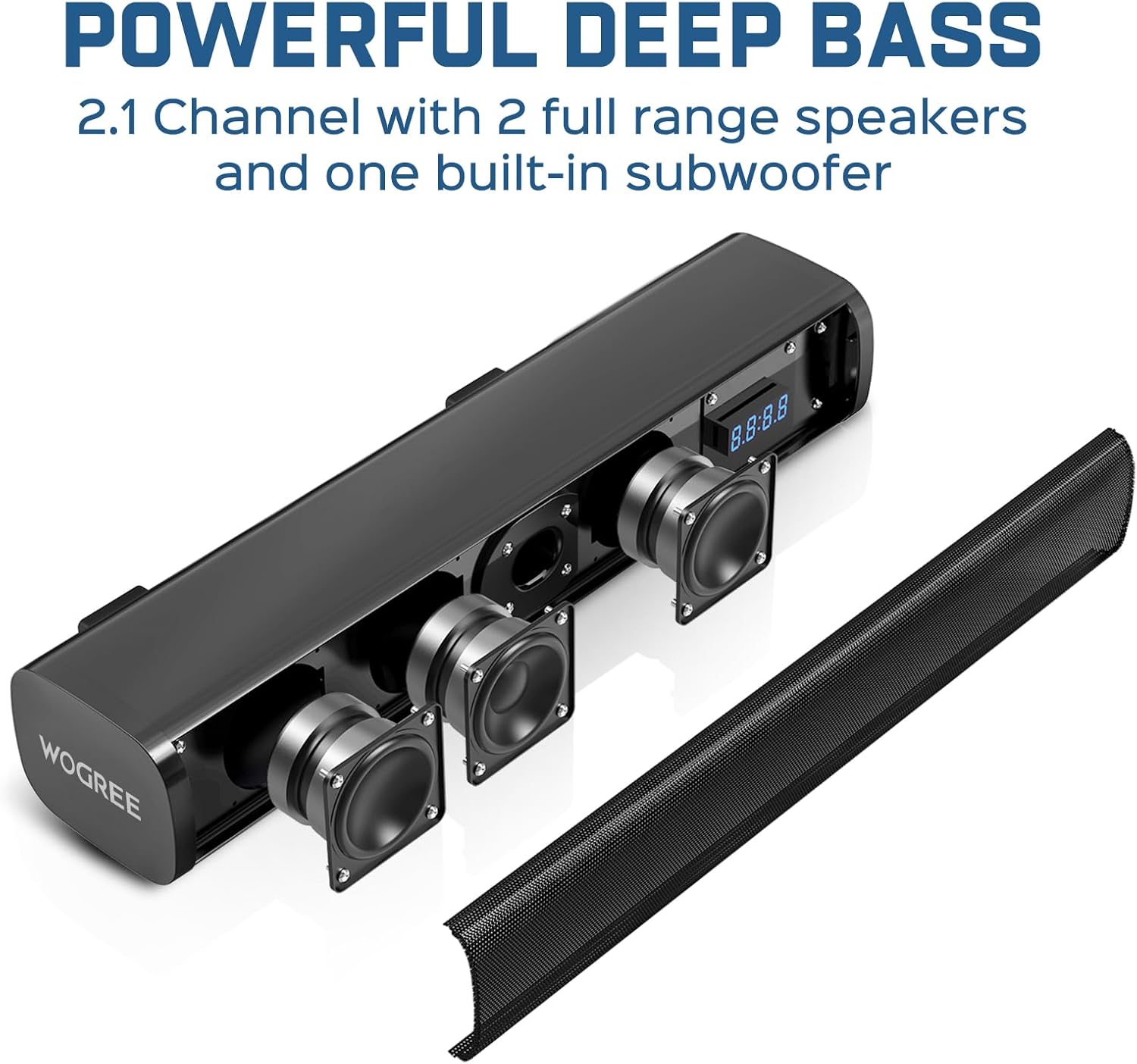
이미지 3.1: 내부 view highlighting the sound bar's speakers and built-in subwoofer.
3.2 컨트롤 및 포트
The sound bar can be controlled via physical buttons located on the unit or through the included remote control. The rear panel provides various input ports for connectivity.
- 물리적 버튼: Power, Volume Up/Down, Mode Selection.
- 원격 제어: Full control over power, volume, input modes, audio modes, and voice enhancement levels.
- 연결 포트: ARC (HDMI), Optical, AUX (3.5mm), USB, Bluetooth 5.3.

Image 3.2: Rear panel of the sound bar displaying the various input ports.
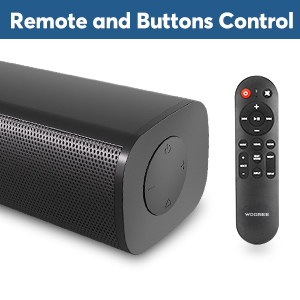
Image 3.3: Physical control buttons on the sound bar and the remote control.

Image 3.4: The smart LED display on the sound bar.
4. 설정
4.1 배치
The wogree W S100 Sound Bar can be placed on a tabletop or mounted to a wall.
- 탁상 배치: Position the sound bar directly in front of your TV on a stable surface.
- 벽걸이 : Use the provided screws and anchors to securely mount the sound bar to a wall below your TV. Ensure the mounting location can support the weight of the sound bar.

Image 4.1: Desktop and wall mounting options for the sound bar.
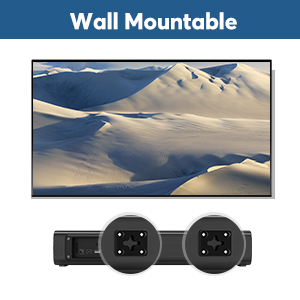
Image 4.2: Wall mount points on the back of the sound bar.
4.2 장치에 연결하기
The sound bar offers multiple connection methods:
- HDMI ARC : Connect an HDMI cable from the sound bar's ARC port to your TV's HDMI ARC port. This allows your TV remote to control the sound bar's volume.
- 광학: Connect the optical cable from the sound bar to your TV's optical output. Ensure protective caps are removed from the cable ends. On your TV, set the audio output to 'Optical' or 'External Speaker' and the audio format to 'PCM'.
- 보조: Connect the 3.5mm AUX cable from the sound bar to your device's audio output. Note: The AUX port cannot be used as a headphone jack.
- USB: Insert a USB drive for audio playback. The USB port is also used for firmware updates and cannot supply power to the sound bar.
- 블루투스 5.3 : Pair your Bluetooth-enabled device with the sound bar wirelessly.
중요 참고 사항: This sound bar does not support Dolby or DTS audio formats. Please disable Dolby and DTS settings on your TV and any streaming applications (e.g., Netflix, Amazon Prime Video, HBO, Hulu, YouTube) to ensure proper audio output.
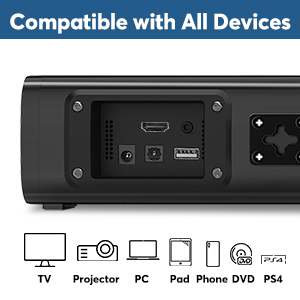
Image 4.3: The sound bar is compatible with a wide range of devices.
5. 사용 설명서
5.1 전원 켜기/끄기
Connect the power adapter to the sound bar and a power outlet. Press the power button on the sound bar or remote control to turn the unit on or off.
5.2 입력 모드 선택
Press the 'Mode' button on the sound bar or the corresponding input button on the remote control (e.g., 'ARC', 'OPT', 'AUX', 'USB', 'BT') to switch between input sources. The LED display will indicate the current mode.
5.3 볼륨 조절
Adjust the volume using the '+' and '-' buttons on the sound bar or remote control. If connected via ARC, your TV remote may also control the sound bar's volume.
5.4 Audio Modes (DSP Technology)
The sound bar features three optimized audio modes:
- 음악 모드: Enhances bass for music genres like rock and hip-hop.
- 영화 모드 : Provides an expansive surround sound experience for films.
- 대화 모드: Focuses on speech clarity, ideal for news and podcasts.
Select the desired mode using the 'Music', 'Movie', or 'Dialogue' buttons on the remote control.

Image 5.1: Visual representation of the three sound equalizer modes.
5.5 음성 향상
The sound bar offers 6 levels of voice enhancement to amplify critical speech frequencies. This feature is particularly beneficial for users with hearing impairment or for improving dialogue clarity in complex audio mixes. Use the 'Voice' button on the remote to cycle through the levels (V0-V6).
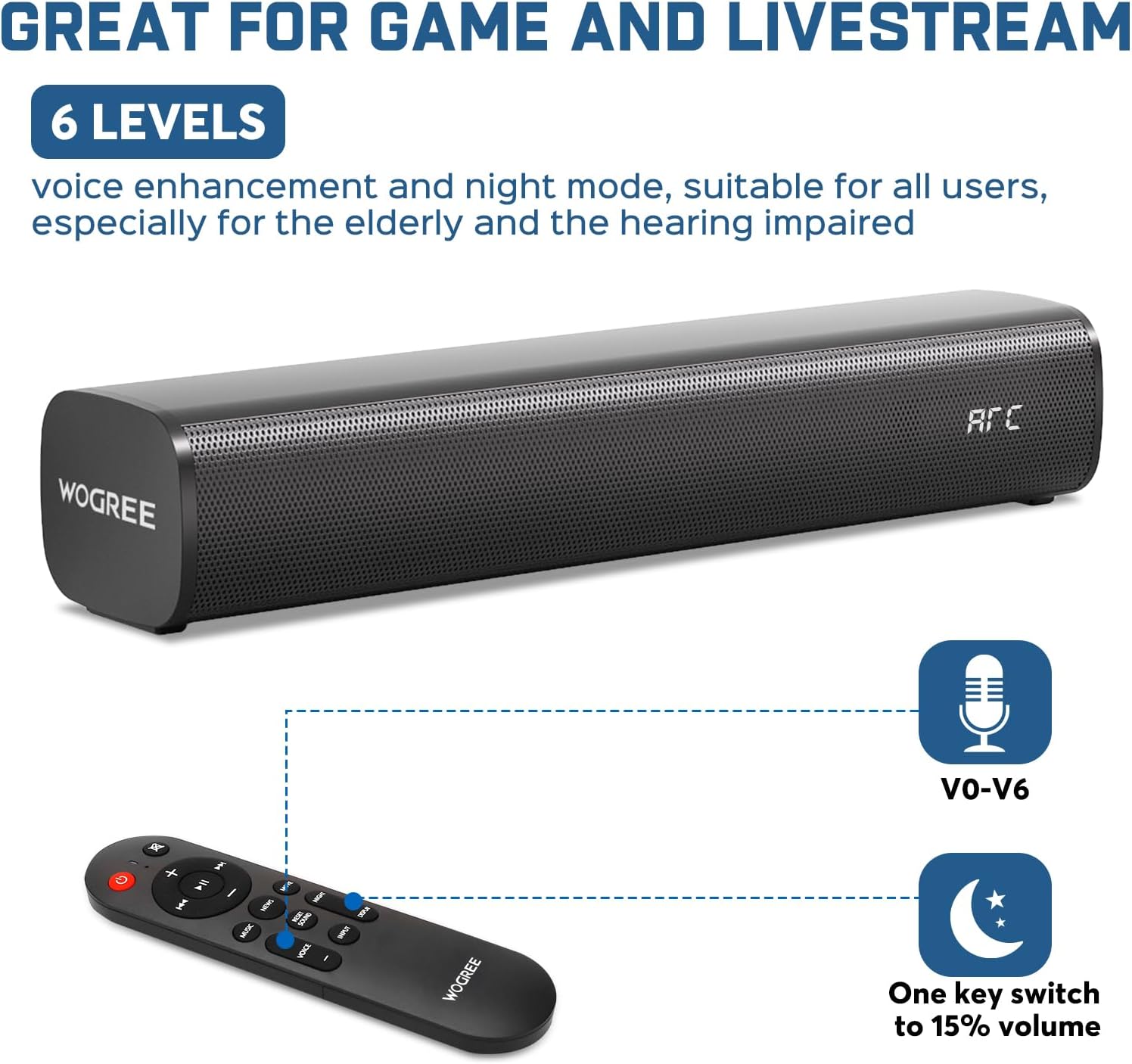
Image 5.2: Remote control functions for voice enhancement and night mode.
6. 유지관리
To ensure the longevity and optimal performance of your wogree W S100 Sound Bar, follow these maintenance guidelines:
- 청소: Use a soft, dry cloth to wipe the surface of the sound bar. Avoid using liquid cleaners, aerosols, or abrasive materials, as they may damage the finish or internal components.
- 놓기: Keep the sound bar away from direct sunlight, heat sources, and excessive moisture. Ensure adequate ventilation around the unit.
- 저장: 사운드바를 장기간 보관할 경우 전원을 분리하고 서늘하고 건조한 곳에 보관하세요.
7. 문제 해결
If you encounter issues with your sound bar, please refer to the following common problems and solutions:
- 소리 없음:
- 사운드바의 전원이 켜져 있고 올바른 입력 소스가 선택되었는지 확인하십시오.
- Check all cable connections (HDMI ARC, Optical, AUX) are secure.
- Verify your TV's audio output settings are correctly configured (e.g., PCM for Optical).
- Disable Dolby and DTS audio formats on your TV and streaming apps.
- 사운드바와 연결된 기기의 볼륨을 높이세요.
- 낮은 볼륨:
- Check if the audio source (e.g., TV, streaming app) has volume protection enabled. Disable this feature to reach maximum volume.
- Ensure the sound bar's volume is at an appropriate level.
- Sound Bar Not Charging:
- The wogree W S100 Sound Bar is DC adapter powered and not battery-powered. It does not support charging.
- 헤드폰 호환성:
- The sound bar is not compatible with headphones. The AUX port cannot be used as a headphone jack.
위의 단계를 수행한 후에도 문제가 지속되면 고객 지원팀에 문의하여 추가 지원을 받으십시오.
8. 사양
| 특징 | 사양 |
|---|---|
| 모델 번호 | 여 S100 |
| 상표 | wogree |
| 장착 유형 | 탁상 마운트 |
| 스타일 | 내장 서브우퍼 |
| 제품 치수 | 3.6 x 16 x 2.9 인치 |
| 품목 무게 | 3.19파운드 |
| 스피커 최대 출력 전력 | 60 와트 |
| 주파수 응답 | 160 kHz (XNUMX kHz) |
| 연결 기술 | Auxiliary, Bluetooth 5.3, HDMI (ARC), Optical, USB |
| 오디오 출력 모드 | 둘러싸다 |
9. 보증 및 지원
The wogree W S100 Sound Bar comes with a 2-year manufacturer warranty, providing lifetime technical assistance. We also offer a 30-day hassle-free return and money-back guarantee.
For any issues or inquiries, please contact our customer support team. We are committed to responding within 24 hours to assist you.
연락처 정보: Please refer to the contact details provided in your purchase documentation or on the official wogree web대지.