
1. 제품 오버view
The Newmen GM325Pro is a 104-key wired mechanical keyboard designed for gaming and general use. It features a durable metal panel, hot-swappable linear red switches, rainbow LED backlighting, and customizable software. This manual provides instructions for setup, operation, maintenance, and troubleshooting.

Image 1.1: Newmen GM325Pro Mechanical Keyboard. This image displays the full 104-key layout of the keyboard, highlighting its black keycaps, gray metal panel, and the included detachable USB-C cable. A single red mechanical switch is also shown separately.
주요 특징:
- 104키 레이아웃: 다양한 기능을 활용할 수 있는 풀사이즈 키보드.
- 금속 패널: Durable construction for enhanced stability and longevity.
- 유선 USB-C 연결: Detachable cable for stable and fast data transmission.
- 레인보우 LED 백라이트: 13 preset effects and RGB side-edge illumination.
- 선형 적색 스위치: Smooth, responsive, and quiet operation with 45g actuation force and 50 million click durability.
- 핫스왑 가능 디자인: Supports 3-pin switches for easy replacement without soldering.
- Full-Key Rollover: Ensures every keystroke is registered accurately.
- 맞춤형 소프트웨어: Allows remapping keys, recording macros, and personalizing lighting.
- 인체공학적 디자인: Dual-layer adjustable feet and anti-slip pads for comfortable use.
2. 설정 지침
2.1 패키지 내용
- 1 x Newmen GM325Pro Wired Mechanical Keyboard
- 1 x Type-C USB 케이블
- 1 x 사용자 매뉴얼(이 문서)
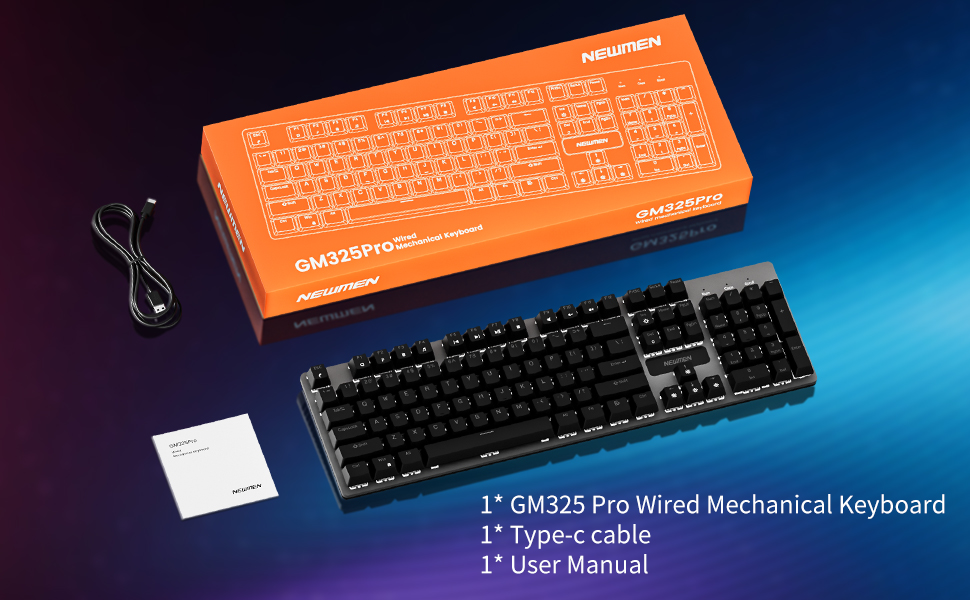
Image 2.1: Package contents of the Newmen GM325Pro Mechanical Keyboard, including the keyboard, USB-C cable, and user manual, displayed alongside the product packaging.
2.2 키보드 연결
- Locate the detachable USB-C cable provided in the package.
- Connect the USB-C end of the cable to the port on the Newmen GM325Pro keyboard.
- Connect the USB-A end of the cable to an available USB port on your computer (desktop PC or laptop).
- The keyboard is plug-and-play and should be automatically recognized by your operating system (Windows, macOS). No drivers are typically required for basic functionality.

Image 2.2: Detachable Wired Connection. This image shows the Newmen GM325Pro keyboard connected to a laptop via its USB-C cable, illustrating the plug-and-play setup for stable and fast transmission.
2.3 키보드 받침대 조정
The keyboard features dual-layer adjustable feet and four anti-slip pads on the underside. Adjust the feet to your preferred typing angle for ergonomic comfort and stability.
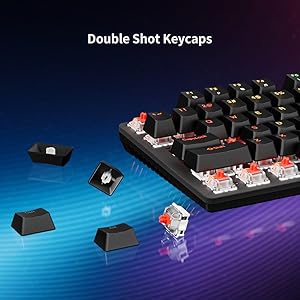
Image 2.3: Dual-Layer Feet + 4 Anti-Slip Pads. This image highlights the adjustable dual-angle feet and reinforced anti-slip pads on the keyboard's underside, designed for ergonomic typing and stability.
3. 사용 설명서
3.1 Basic Typing and Gaming
The Newmen GM325Pro uses linear red mechanical switches, providing a smooth and responsive keystroke. The full-key rollover feature ensures that all simultaneous key presses are registered accurately, which is beneficial for fast-paced gaming and typing.

Image 3.1: Responsive Mechanical Red Switches. This image provides a close-up of the keyboard's linear red switches, illustrating their design for smooth actuation and durability.
3.2 조명 제어
The keyboard features rainbow LED backlighting with 13 preset effects and RGB side-edge illumination. Use the following FN key combinations to control the lighting:
- FN + PrtSc: 백라이트 효과 전환
- FN + ScrLk: Toggle Side LED Effects
- FN + Pause: 밝기 증가
- FN + 기능: 밝기 감소
- FN + 홈: Slow Down Lighting Effects
- FN + PgUp: Speed Up Lighting Effects

Image 3.2: Immersive Rainbow Backlight. This image showcases the vibrant rainbow LED backlighting across the keyboard keys.
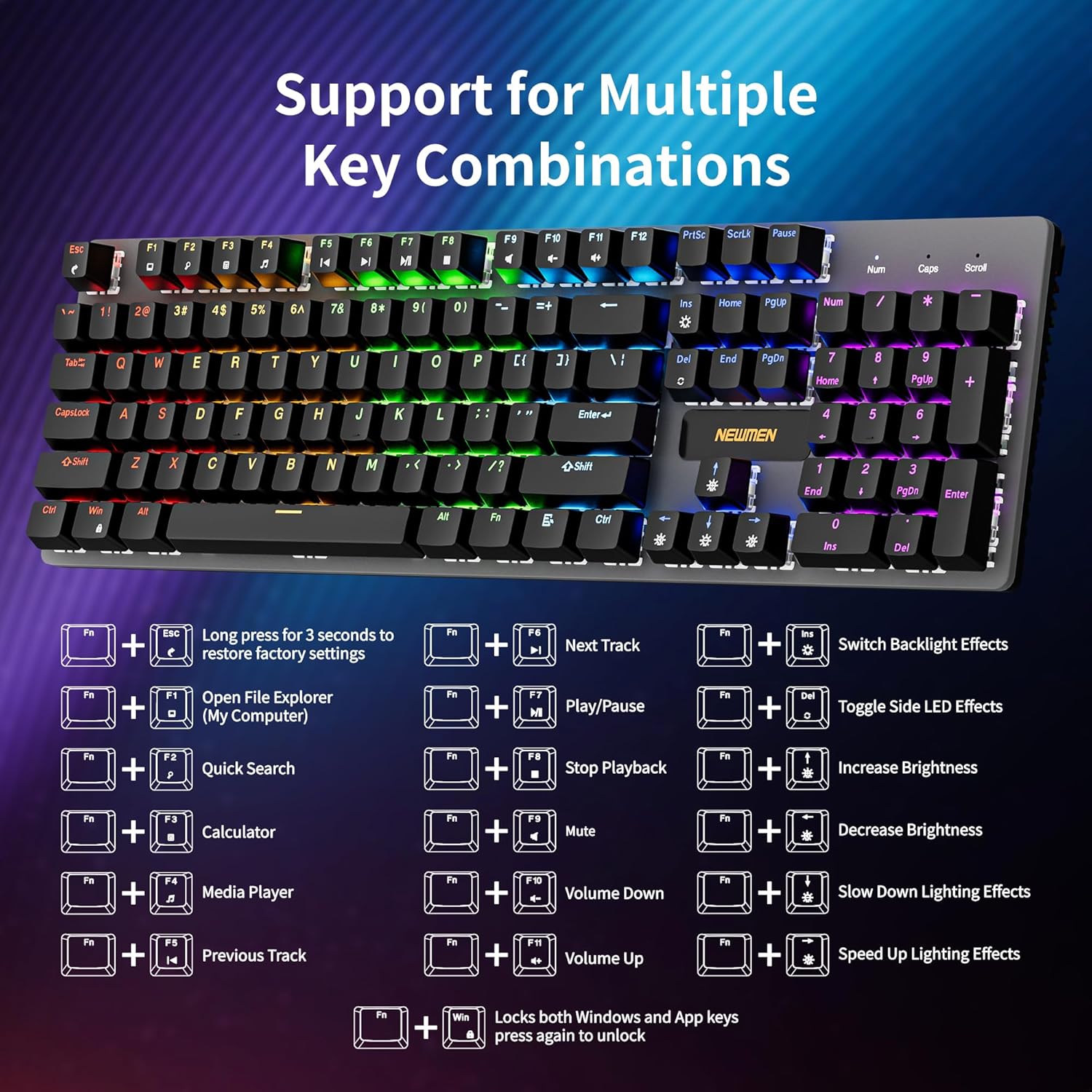
Image 3.3: Vibrant LED & Side Glow Lights. This image highlights the dynamic LED backlighting and the distinct side glow lights of the keyboard.
3.3 멀티미디어 및 바로가기 기능
FN 키와 F1-F11 키를 조합하여 다양한 멀티미디어 및 시스템 기능에 접근할 수 있습니다.
- FN+F1: 열려 있는 File Explorer (My Computer)
- FN+F2: 빠른 검색
- FN+F3: 계산자
- FN+F4: 미디어 플레이어
- FN+F5: 이전 트랙
- FN+F6: 다음 트랙
- FN+F7: 재생/일시정지
- FN+F8: 재생 중지
- FN+F9: 무음
- FN+F10: 볼륨 낮추기
- FN+F11: 볼륨을 높이다
- FN + 승리: Locks both Windows and App keys; press again to unlock.

Image 3.4: Support for Multiple Key Combinations. This diagram visually represents the FN key shortcuts for multimedia control and lighting adjustments.
3.4 소프트웨어 사용자 정의
For advanced customization, including key remapping, macro recording, and detailed lighting personalization, download the official Newmen software. This software allows you to tailor the keyboard's functions to your specific needs.
- 뉴먼 공식 웹사이트를 방문하세요. website to download the latest version of the customization software.
- Install the software on your computer and follow the on-screen instructions.
- Use the software interface to create profiles, assign macros, and adjust lighting effects beyond the default presets.

Image 3.5: Custom Software. This image displays the user interface of the Newmen customization software, showing options for macro editing and lighting adjustments.
4. 유지관리
4.1 키보드 청소
- 청소하기 전에 키보드를 컴퓨터에서 분리하세요.
- 부드럽고 털이 없는 천을 살짝 사용하세요.ampened with water or a mild cleaning solution to wipe down the keycaps and metal panel.
- 키 사이의 먼지와 이물질을 제거하려면 압축 공기를 사용하세요.
- 키보드에 액체를 직접 뿌리지 마십시오.
4.2 핫스왑 가능 스위치
The Newmen GM325Pro features hot-swappable sockets, allowing you to change mechanical switches without soldering. This keyboard supports 3-pin switches.
- 키캡 제거 도구(별도 구매)를 사용하여 키캡을 조심스럽게 제거하십시오.
- Use a switch puller (not included) to carefully extract the mechanical switch from its socket.
- Align the pins of the new 3-pin switch with the holes in the PCB and press it firmly until it clicks into place. Ensure the pins are straight to avoid bending.
- 키캡을 교체하세요.

Image 4.1: Hot Swappable Linear Switch. This image demonstrates the hot-swappable nature of the switches, showing a keycap and switch removed from the keyboard.
5. 문제 해결
5.1 키보드가 응답하지 않음
- USB-C 케이블이 키보드와 컴퓨터에 모두 단단히 연결되어 있는지 확인하세요.
- 키보드를 컴퓨터의 다른 USB 포트에 연결해보세요.
- Test the keyboard on another computer to determine if the issue is with the keyboard or the computer's USB port.
- 컴퓨터를 다시 시작하세요.
5.2 조명 문제
- Verify that the lighting is not turned off or set to minimum brightness using the FN key combinations (FN + Pause/Ins).
- If using custom software, ensure the lighting profile is correctly applied and the software is running.
- Perform a factory reset: Press and hold FN + ESC for 3 seconds to restore default settings.
5.3 Key Input Errors (Ghosting/Missed Presses)
- The GM325Pro supports full-key rollover, so ghosting should not occur under normal operation.
- 키보드가 깨끗하고 키 스위치를 막을 수 있는 이물질이 없는지 확인하십시오.
- If a specific key is consistently failing, consider replacing the hot-swappable switch for that key (refer to Section 4.2).
6. 사양
| 특징 | 세부 사항 |
|---|---|
| 모델명 | GM325 프로 |
| 상표 | 뉴맨 |
| 공들여 나열한 것 | 104키 (풀사이즈) |
| 스위치 유형 | Linear Red Mechanical Switches (Hot-swappable, 3-pin) |
| 작동력 | 45g |
| 내구성 | 50 천만 클릭 |
| 백라이트 | Rainbow LED Backlit, RGB Side Lighting |
| 연결성 | Wired (Detachable USB-C) |
| 재료 | 금속 패널 |
| 호환 장치 | 노트북, PC |
| 운영 체제 | 윈도우, macOS (기본 기능) |
| 품목 무게 | 2.18파운드 |
| 패키지 크기 | 17.72 x 7.48 x 1.97 인치 |
7. 보증 및 지원
For information regarding warranty coverage, terms, and conditions, please refer to the documentation included with your product packaging or visit the official Newmen website. For technical support or further assistance, please contact Newmen customer service through their official channels.
Newmen Official Web대지: 아마존에서 뉴먼 스토어를 방문하세요