
1. 제품 오버view
The Sunster TB10 8KW TOOLBOX Diesel Air Heater is a portable heating solution designed for various environments including vehicles, RVs, campers, tents, garages, and homes. It features an integrated toolbox design for portability, dual power supply options (12/24V DC and 110-240V AC), quiet operation, smart APP control, and all-terrain adaptive performance with altitude compensation.
This manual provides essential information for the safe and efficient setup, operation, and maintenance of your diesel air heater.

Figure 1: Sunster TB10 Diesel Heater with key features.
2. 설정 및 설치
2.1 포장 풀기 및 구성품 확인
Upon receiving your Sunster TB10 Diesel Air Heater, carefully unpack all components and verify that all accessories are present according to the packing list. Refer to the 'Product Information' section for a detailed list of included parts.

Figure 2: Included components for the Sunster TB10 Diesel Air Heater.
2.2 전원 공급 장치 연결
The heater supports dual power options: 12/24V DC and 110-240V AC. Ensure the power cord is connected directly to the car battery for DC power. Do not connect it to main cable wires, cigar lighters, or fuse boxes, as this may lead to unstable power supply or machine malfunction.
- DC 연결: Connect the red wire (positive) and black wire (negative) directly to your vehicle's battery terminals.
- AC 연결: Use the provided AC-DC power adapter to connect the heater to a standard 110-240V AC power outlet.

그림 3: 이중 전원 공급 옵션.
2.3 Exhaust and Intake Pipe Assembly
For safe operation, ensure the exhaust pipe is routed outdoors to prevent carbon monoxide buildup. The air intake and exhaust must be in different directions to avoid re-circulating exhausted air.
- 배기관: Connect the flexible metal exhaust pipe to the heater's exhaust port. Secure it tightly with the provided clamp 누출을 방지하기 위해.
- 흡기 파이프: Connect the air intake pipe to the heater's intake vent. Secure it with a clamp.
- 열 보호: Apply the heat protection sleeve to the exhaust pipe to reduce heat transfer.

Figure 4: Exhaust pipe and air filter assembly.
2.4 Hot Air Outlet Connection
Connect the hot air duct to the heater's air outlet. Fasten the joint securely with the iron loop (clamp).
2.5 Fuel Tank Filling
The integrated 6L fuel tank is located within the toolbox design. Open the fuel tank cap and carefully fill it with diesel fuel. Ensure the cap is securely closed after filling.
2.6 Control Panel Extension
The heater includes a 4-meter extension cable for the LCD control panel, allowing for indoor mounting and easier temperature monitoring and adjustment.
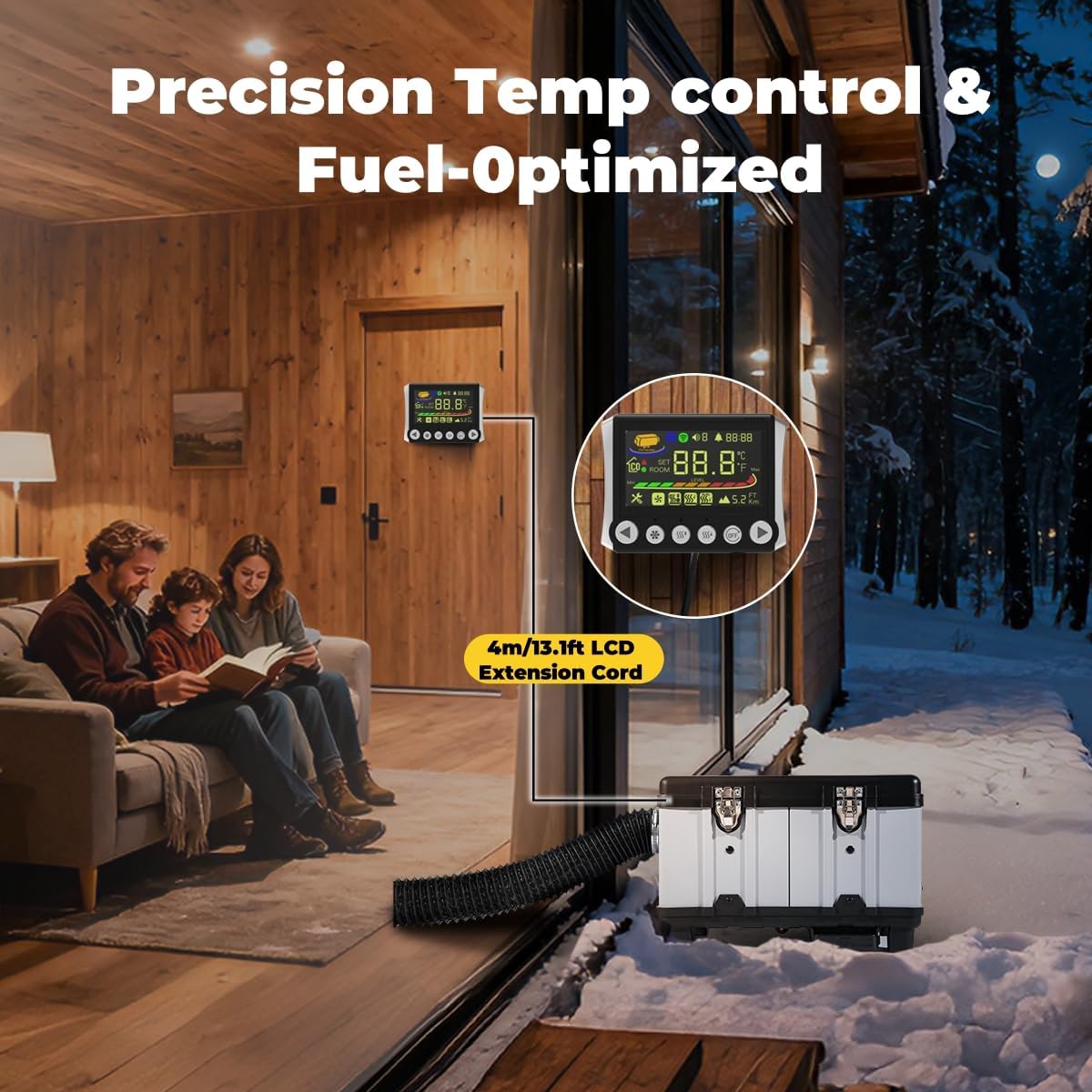
Figure 5: Extended LCD control panel for indoor climate control.
2.7 설치 비디오
Video 1: HTB1 Installation Operation. This video demonstrates the installation process for a similar Sunster diesel heater model, covering pipe connections and initial setup.
Video 2: Sunster Installation Operation. A general installation guide for Sunster diesel heaters, useful for understanding basic assembly steps.
3. 사용 설명서
3.1 제어판 및 앱 제어
The Sunster TB10 Diesel Air Heater can be controlled via its integrated LCD display, a remote control, or a Bluetooth-enabled smartphone application. The smart app offers comprehensive control over temperature, timers, power levels, altitude mode, constant temperature, and ventilation mode settings.

Figure 6: Multiple control options for the heater.

Figure 7: LCD Monitor details and functions.
3.2 Automatic Start-Stop and Ventilation
The heater features an automatic start-stop function to maintain a constant temperature and optimize energy efficiency. The ventilation function helps keep fresh air circulating and maintains suitable temperature and air quality in enclosed spaces.
3.3 Adaptive Plateau Performance
The TB10 heater automatically adjusts its combustion for optimal performance at altitudes up to 5500 meters, ensuring full heat output and fuel economy in mountainous terrain.

Figure 8: Smart APP control features.
3.4 Operating Videos
Video 3: Diesel Heater Display Video. This video demonstrates the functions and display of the diesel heater's control panel.
Video 4: A2302BH Switch operation video. This video provides detailed instructions on operating the heater's switch and various settings.
4. 유지관리
정기적인 유지보수는 디젤 공기 히터의 수명 연장과 효율적인 작동을 보장합니다. 유지보수를 수행하기 전에는 항상 전원을 차단하십시오.
- 연료 필터: Periodically check and clean or replace the fuel filter to ensure clean fuel delivery.
- 에어 필터: Inspect the air filter regularly and clean it as needed to maintain optimal airflow.
- 배기 시스템: Ensure the exhaust pipe and muffler are free from blockages and leaks. Tighten all clamps.
- 일반 청소: 히터 외부를 깨끗하게 유지하고 먼지와 이물질이 없도록 하십시오.
5. 문제 해결
If you encounter issues with your Sunster TB10 Diesel Air Heater, refer to the following common troubleshooting tips:
- 히터가 작동하지 않음: Check power connections (DC/AC), ensure sufficient fuel in the tank, and verify the control panel settings.
- 열 출력 없음: Confirm the heater is in heating mode, check for fuel blockages, and ensure the air intake and exhaust are clear.
- 과도한 연기: This may indicate incomplete combustion. Check fuel quality, air intake, and exhaust for obstructions.
- 비정상적인 소음: Inspect for loose components or obstructions in the fan or pump. The upgraded silent fuel pump should minimize ticking sounds.
- 오류 코드 : Refer to the LCD monitor's fault display section (Figure 7) for specific error code meanings and solutions.
For persistent issues, contact Sunster customer support.
6. 사양
| 특징 | 세부 사항 |
|---|---|
| 모델 | TB10 Diesel Air Heater |
| 전력 출력 | 8KW |
| 전원 공급 장치 | AC110V, DC12V, 24V |
| 연료 탱크 용량 | 6L |
| 연료 소비량 | 0.16-0.45 liters per hour |
| 난방 면적 | 20-25제곱미터 |
| Altitude Performance | Up to 5500 meters (adaptive) |
| 소음 수준 | 35 dB (air duct outlet) |
| 특별 기능 | Automatic start & stop, Dual Power Options, Toolbox Design, Upgraded Plateau motherboard, Ventilation function, Bluetooth APP control |
| 품목 무게 | 9.84kg |
| 소포 크기 | 46.5 x 37 x 31.5cm |
7. 보증 및 지원
For warranty information, product support, or technical assistance, please contact Sunster direct. Refer to your purchase documentation for specific warranty terms and contact details.
Manufacturer: Sunster
Place of Business: RenQiuShiXinSiTeQiChePeiJian Co., Ltd CN-Dajiang Village, Liangzhao Town, Renqiu City, Hebei Province, China
Contact: sunster202@163.com


