
1. 서론
구매해주셔서 감사합니다asing the Claiks Electric Height Adjustable Low Desk. This manual provides essential information for the safe and efficient assembly, operation, and maintenance of your new desk. Please read this manual thoroughly before use and keep it for future reference.
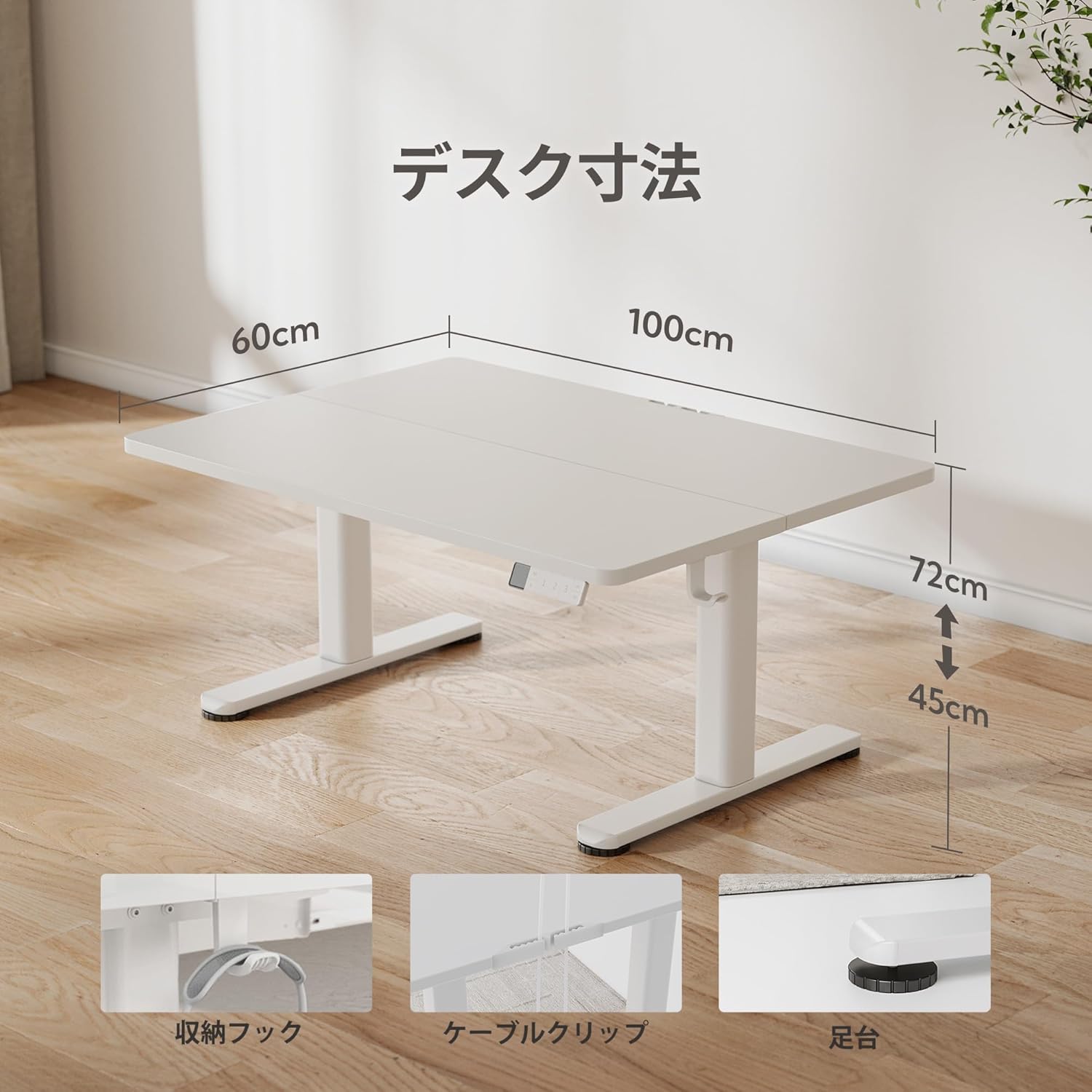
This electric low desk is designed to offer flexible working positions, accommodating various seating arrangements from floor chairs to standard office chairs, with a height adjustment range of 45cm to 72cm. Its quiet operation and memory function enhance user comfort and productivity.
2. 안전 정보
부상이나 제품 손상을 방지하기 위해 다음 안전 예방 조치를 준수하세요.
- 사용하기 전에 모든 구성 요소가 단단히 고정되어 있는지 확인하십시오.
- 높이를 조정하는 동안에는 움직이는 부품에 손이나 물건이 닿지 않도록 주의하세요.
- Do not overload the desk. The maximum recommended weight capacity is 70 kg.
- 제어판이나 전기 부품 근처에 액체를 직접 두지 마십시오.
- 어린이가 책상을 혼자 사용하도록 허용하지 마십시오.
- 청소나 유지관리 작업을 하기 전에 전원을 차단하세요.
- The desk features rounded corners for safety, reducing the risk of accidental bumps.
3. 패키지 내용
패키지에 모든 품목이 들어 있는지 확인하세요.
- 데스크 탑
- 책상 프레임 (다리 및 모터 조립체)
- 제어판
- 전원 어댑터
- 사용 설명서
- Assembly Tools (if applicable, though the product states 'No' for all assembly tools included)
- Side Hooks (2 pieces)
- 케이블 클립
4. 설치 및 조립
Assembly of the Claiks Electric Height Adjustable Low Desk is designed to be straightforward. Please follow the detailed instructions provided in the included instruction manual for step-by-step guidance.
주요 조립 특징:
- Sturdy T-shaped Legs: The reinforced steel legs provide stability and prevent wobbling.
- 케이블 관리 : Utilize the included cable clips to keep your workspace tidy.
- 조정 가능한 발 패드: Ensure stability on uneven surfaces by adjusting the foot pads.
- 사이드 후크: Attach the two included side hooks for convenient storage of headphones or bags.

5. 사용 설명서
The Claiks Electric Height Adjustable Low Desk features an intuitive control panel for easy height adjustment and memory functions.
제어판 기능:

- LED 디스플레이: 현재 책상 높이를 센티미터 단위로 표시합니다.
- 위/아래 버튼: Press and hold to manually adjust the desk height. The adjustment speed is 20mm/s.
- Memory Function (1, 2, 3): Save up to three preferred height settings. To save a height, adjust the desk to the desired height, then press the 'M' button followed by one of the number buttons (1, 2, or 3). To recall a saved height, simply press the corresponding number button.
- 타이밍 모드 : (If applicable, based on image interpretation) This feature may allow setting reminders for standing or sitting intervals. Refer to the full manual for specific instructions.
높이 조정:
The desk can be adjusted between 45cm and 72cm, allowing for comfortable use with various seating options, including floor chairs, low sofas, or standard office chairs. This flexibility helps reduce discomfort from prolonged sitting.


조용한 작동:
The desk operates quietly, with noise levels below 45dB during height adjustment. This ensures a peaceful working environment, even during late-night use.

6. 유지관리
To ensure the longevity and optimal performance of your Claiks Electric Height Adjustable Low Desk, follow these maintenance guidelines:
- 테이블탑 청소: The tabletop is made of environmentally friendly melamine resin, which is resistant to water, heat, and dirt. Wipe clean with a damp 천과 중성세제. 연마성 세제를 피하십시오.
- 프레임 세척: 금속 프레임을 마른 천이나 약간 젖은 천으로 닦으십시오.amp 옷감.
- 정기 점검: 모든 나사와 볼트가 단단히 조여져 있는지 정기적으로 점검하세요. 필요하면 다시 조이세요.
- 케이블 관리 : Ensure cables are neatly organized using the provided clips to prevent snagging or damage during height adjustments.

7. 문제 해결
If you encounter any issues with your Claiks Electric Height Adjustable Low Desk, please refer to the following common troubleshooting steps:
- 책상이 움직이지 않음: Check if the power cord is securely plugged into both the desk and the wall outlet. Ensure the power adapter is functioning correctly.
- Error message on LED display: Refer to the detailed instruction manual for specific error codes and their solutions. Often, a simple power cycle (unplugging and replugging the power) can resolve minor issues.
- 높이 조절이 고르지 않음: Ensure the desk is not overloaded beyond its 70kg capacity. Check for any obstructions under the desk or near the legs.
- Memory function not working: Re-program the memory presets by adjusting to the desired height, pressing 'M', then the desired number (1, 2, or 3).
If the problem persists after attempting these steps, please contact Claiks customer support for assistance.
8. 사양
| 특징 | 세부 사항 |
|---|---|
| 상표 | 클락스 |
| 모델 번호 | P1.01.030.002.JP |
| 데스크 타입 | Standing Desk, Height Adjustable Low Desk |
| 모양 | 직사각형 |
| 제품 크기(D x W x H) | 60 cm (Depth) x 100 cm (Width) x 45-72 cm (Height) |
| 색상 | 하얀색 |
| 스타일 | 미니멀리스트 |
| 기본 소재 | 금속 |
| 마무리 유형 | 페인트 |
| 테이블탑 두께 | 1.8cm |
| 최소 높이 | 45cm |
| 최대 높이 | 72cm |
| 높이 조절 속도 | 20mm/초 |
| 소음 수준 | 45dB 이하 |
| 최대 권장 중량 | 70kg |
| 메모리 기능 | 3 프리셋 |
| 조립 도구 포함 | 아니요 |
| 부속품 | Instruction Manual, Main Product Body |
9. 보증 및 지원
Claiks는 고품질의 제품과 탁월한 고객 서비스를 제공하기 위해 최선을 다하고 있습니다.
Manufacturer Direct Sales:
Our products are sold directly by the manufacturer, allowing us to offer high-quality items at competitive prices.
고객 지원:
If you have any questions, concerns, or encounter any defects with your product, please do not hesitate to contact our customer support. We offer support in Japanese to assist you promptly.
Please refer to your purchase documentation or the Claiks official web구체적인 보증 조건과 연락처 정보는 해당 사이트를 참조하세요.