
1. 서론
Thank you for choosing the PELONIS 40-Inch Tower Fan. This oscillating fan features an innovative washable design, providing 2000 CFM airflow at 28ft/s, 4 speeds, 2 modes, and 90° oscillation with a quiet 23dB operation. This manual provides important information for the safe and efficient use of your new tower fan. Please read it thoroughly before operation and retain it for future reference.

Figure 1: PELONIS 40-Inch Tower Fan (Model PSFZ40DR5ALG)
2. 중요 안전 지침
전기 제품을 사용할 때는 화재, 감전, 인명 피해 위험을 줄이기 위해 다음 사항을 포함한 기본 예방 조치를 항상 따라야 합니다.
- 이 팬을 사용하기 전에 모든 지침을 읽으십시오.
- 이 선풍기는 본 설명서에 명시된 대로만 사용하십시오. 제조사에서 권장하지 않는 용도로 사용할 경우 화재, 감전 또는 부상을 입을 수 있습니다.
- Do not operate the fan with a damaged cord or plug. Discard the fan or return to an authorized service facility for examination and/or repair.
- 카펫 아래로 코드를 놓지 마십시오. 코드를 러그, 러너 또는 이와 유사한 덮개로 덮지 마십시오. 코드를 교통 구역에서 멀리하고 걸려 넘어지지 않는 곳에 정리하십시오.
- 팬의 전원을 끄려면 제어 스위치를 OFF로 설정한 다음 콘센트에서 플러그를 뽑으십시오.
- 이물질이 통풍구나 배기구에 들어가지 않도록 주의하세요. 감전이나 화재가 발생할 수 있으며, 팬이 손상될 수 있습니다.
- Do not operate in areas where gasoline, paint, or flammable liquids are used or stored.
- 선풍기를 이동하거나 청소하거나 사용하지 않을 때는 항상 전원 플러그를 뽑으십시오.
- 이 팬은 가정용으로만 제작되었습니다.
3. 패키지 내용
포장을 개봉하신 후 내용물을 확인해 주십시오. 누락되거나 손상된 품목이 있을 경우 고객 지원 센터로 문의해 주십시오.
- PELONIS 40-Inch Tower Fan Unit
- Fan Base (2 parts)
- 원격 제어
- 사용 설명서 (본 문서)
4. 설치 및 조립
Follow these steps to assemble your PELONIS Tower Fan:
- 베이스 조립: 선풍기 받침대의 두 부분을 연결하세요. 딸깍 소리가 나면서 제자리에 단단히 고정되는지 확인하세요.
- Attach Base to Fan Unit: Align the assembled base with the bottom of the main fan unit. Secure the base to the fan unit using the provided nut, turning clockwise until tight. Route the power cord through the designated channel in the base for stability.
- 리모컨 배터리: Open the battery compartment on the remote control and insert the required batteries (not always included, check packaging).
- 놓기: Place the fan on a firm, level surface. Ensure there is adequate space around the fan for proper airflow and oscillation.
- 전원 연결: 전원 코드를 표준 120V AC 콘센트에 꽂으세요.

Figure 2: Effortless Setup - Twist Lock and Lift the Upper Body
Video 1: How to install Pelonis Washable Tower Fan. This video demonstrates the assembly process for the PELONIS tower fan, including attaching the base and preparing it for use.
5. 사용 설명서
Your PELONIS Tower Fan can be operated using the control panel on the top of the unit or the included remote control.
제어판 및 원격 기능:
- 전원 버튼 (⏻): 선풍기를 켜거나 끕니다.
- 속도 버튼(⇌): Cycles through 4 fan speeds (Low, Medium, High, Turbo).
- 모드 버튼(☽): Selects between 2 wind modes:
- 일반 모드: 일관된 공기 흐름을 제공합니다.
- 수면 모드 : 수면 중 조용한 작동을 위해 팬 속도를 점진적으로 낮춥니다.
- 진동 버튼(↻): Activates or deactivates the 90° oscillation feature, distributing air across a wider area.
- 타이머 버튼(⏱): Sets the auto-off timer for up to 7 hours. Press repeatedly to cycle through timer settings.

Figure 3: Remote Control and Fan Settings

그림 4: 넓은 범위 커버리지를 위한 90° 진동
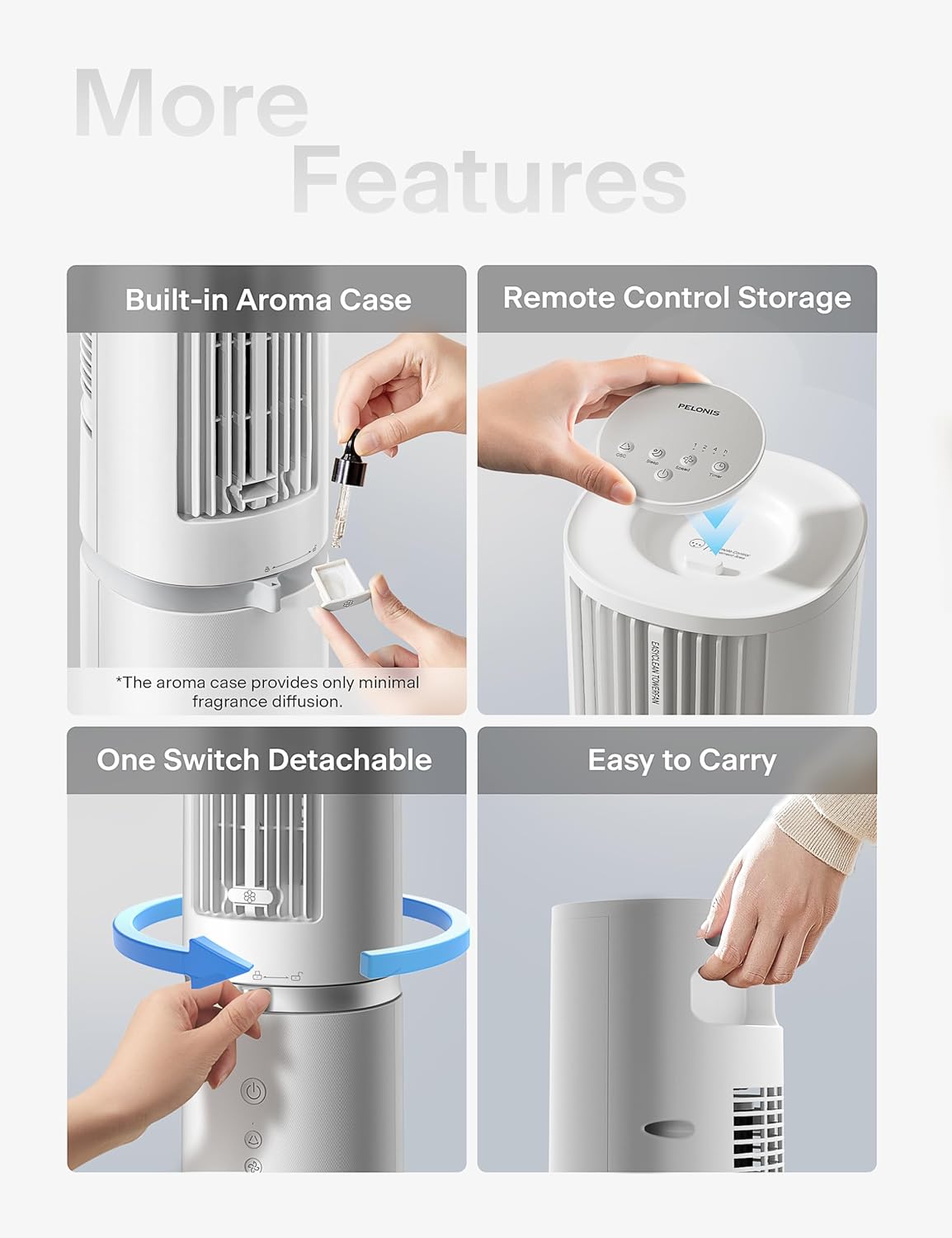
Figure 5: Additional Features including Aroma Case and Remote Storage
6. 유지관리 및 청소
The PELONIS Tower Fan features an innovative washable design for easy cleaning. Regular cleaning ensures optimal performance and extends the life of your fan.
청소 지침:
- 선풍기 플러그를 뽑으세요: 청소하기 전에는 항상 선풍기의 전원 플러그를 콘센트에서 뽑으십시오.
- Detach Upper Body: The fan's upper body is detachable for thorough cleaning. Twist the lock mechanism at the base of the upper section and lift it off the motor unit.
- 빨 수 있는 성분: The detachable upper body, including the air outlet grille and internal components, can be washed directly with water. Use mild soap and a soft cloth or sponge if necessary. Ensure no electronic components are exposed to water.
- 완전히 말리세요: Allow all washed parts to air dry completely before reassembling. Ensure no moisture remains, especially in crevices.
- Wipe Base Unit: Wipe the motor base unit with a soft, damp 옷감. 베이스 유닛을 물에 담그지 마십시오.
- 재조립: Once all parts are dry, carefully reattach the upper body to the motor unit, ensuring it locks securely into place.
Note: The aroma case (if present) can be cleaned by wiping it with a damp 천. 독한 화학 물질을 사용하지 마십시오.
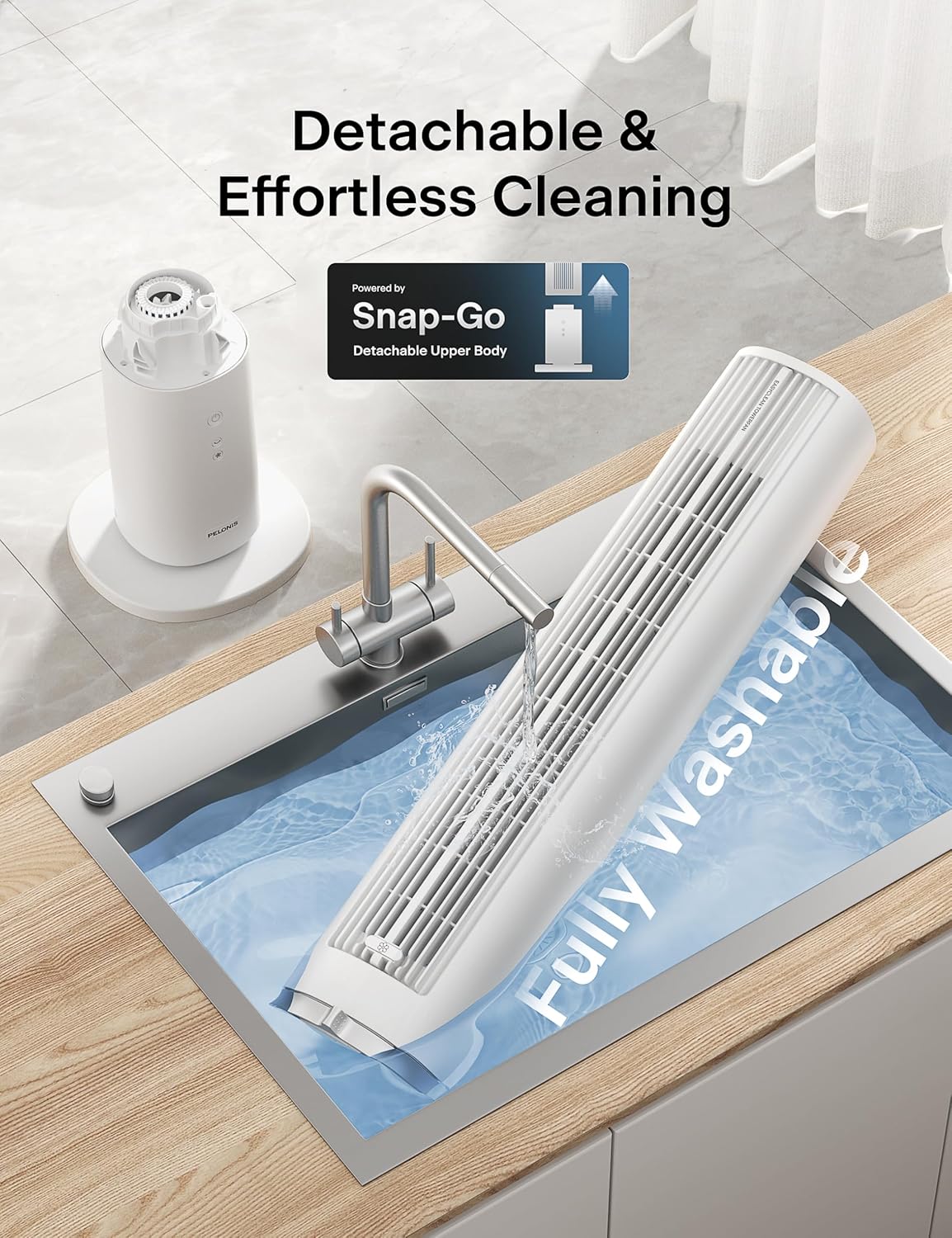
Figure 6: Detachable and Fully Washable Design

Figure 7: One-Twist Detachable Mechanism
7. 문제 해결 가이드
If your fan is not operating correctly, please refer to the following common issues and solutions:
| 문제 | 가능한 원인 | 해결책 |
|---|---|---|
| 팬이 켜지지 않습니다. | 플러그를 꽂지 않았습니다. 콘센트가 작동하지 않습니다. 전원 버튼을 누르지 않았습니다. | Ensure fan is securely plugged into a working outlet. Press the power button. |
| 공기 흐름이 약하거나 전혀 없습니다. | Fan speed too low; air intake/outlet blocked; internal components dirty. | Increase fan speed. Check for obstructions. Clean the fan as per maintenance instructions. |
| 선풍기 작동 중 소음이 심합니다. | Fan not on a level surface; internal components dirty; foreign object inside. | Place fan on a flat, stable surface. Clean the fan. If noise persists, contact support. |
| 리모컨이 작동하지 않습니다. | 배터리가 방전되었거나 잘못 삽입되었습니다. 리모컨이 수신기를 향하고 있지 않습니다. | Replace batteries. Ensure correct polarity. Point remote towards the fan's control panel. |
| 진동이 작동하지 않습니다. | 진동 기능이 활성화되지 않았습니다. | 제어판이나 리모컨의 진동 버튼을 누르세요. |
8. 제품 사양
| 특징 | 세부 사항 |
|---|---|
| 상표 | 펠로 니스 |
| 모델명 | PSFZ40DR5ALG |
| 모델 번호 | PSFZ40DR5ALG |
| 색상 | 하얀색 |
| 스타일 | Upgraded with Washable Design |
| 제품 크기(D x W x H) | 10.82인치 깊이 x 10.82인치 너비 x 40.6인치 높이 |
| 품목 무게 | 7.03 킬로그램 |
| 전원 | 교류/직류 |
| 왓tage | 45 와트 |
| 권tage | 120 볼트 |
| 속도의 수 | 4 |
| 바람 모드 | Normal, Sleep |
| 진동 | 90° |
| 소음 수준 | 23데시벨 |
| 기류 용량 | 2000 분당 입방피트(CFM) |
| 공기 속도 | 28 Feet Per Second (ft/s) |
| 시간제 노동자 | 최대 7시간 |
| 제어 방법 | 버튼 제어, 리모컨 |
| 포함된 구성 요소 | 원격 |
| 실내/실외 사용 | 실내 |
9. 보증 및 고객 지원
PELONIS products are manufactured to the highest quality standards. For specific warranty information, please refer to the warranty card included with your product or visit the official PELONIS web대지.
If you encounter any issues or have questions regarding your PELONIS 40-Inch Tower Fan, please contact our customer support team:
- 온라인 지원: 방문하세요 PELONIS Store on Amazon FAQ 및 제품 정보는 여기에서 확인하세요.
- 연락처 정보: Refer to your product packaging or the official PELONIS website for direct customer service contact details (phone, email).
Please have your model number (PSFZ40DR5ALG) and purchase date ready when contacting support.