
1. 서론
구매해주셔서 감사합니다asing the JVC XS-N1154B Bluetooth Speaker. This manual provides essential information for the safe and efficient operation of your device. Please read it thoroughly before use and retain it for future reference.
2. 안전 정보
- 스피커를 극한의 온도, 직사광선 또는 높은 습도에 노출시키지 마세요.
- 스피커를 떨어뜨리거나 강한 충격을 주지 마십시오.
- 스피커를 분해하거나 개조하지 마십시오. 보증이 무효화됩니다.
- 방수 기능이 있더라도 내부 부품 손상을 방지하기 위해 스피커를 물이나 액체로부터 멀리하십시오.
- 지정된 충전 케이블과 전원 어댑터만 사용하세요.
- 부드럽고 마른 천으로 스피커를 닦으세요. 연마성 세제나 용제를 사용하지 마세요.
3. 패키지 내용
패키지에 모든 품목이 들어 있는지 확인하세요.
- JVC XS-N1154B Bluetooth Speaker
- 충전 케이블
- 사용자 설명서
- 리모콘(포함된 경우)
4. 제품 오버view
스피커의 구성 요소와 제어 장치에 대해 알아보세요.
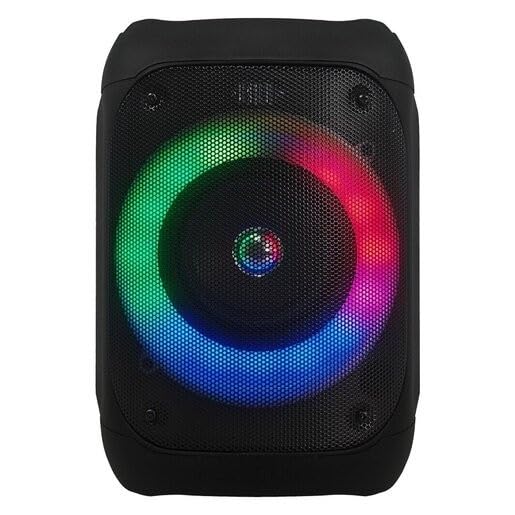
그림 1: 앞쪽 view of the JVC XS-N1154B Bluetooth Speaker, showcasing the speaker grille and integrated music-activated LED lights.
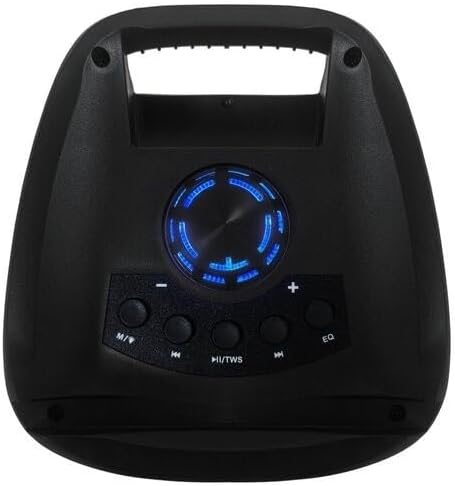
그림 2: 맨 위 view of the JVC XS-N1154B Bluetooth Speaker, displaying the control panel with various buttons and the volume knob.
제어판 기능:
- 전원 버튼: 스피커를 켜거나 끕니다.
- 모드(M) 버튼: Switches between Bluetooth, USB, SD Card, and FM Radio modes.
- Play/Pause (►||) / TWS Button: Plays or pauses audio. Long press for TWS (True Wireless Stereo) pairing.
- Previous Track (◀◀) Button: Skips to the previous track or tunes down in FM mode.
- Next Track (►►) Button: Skips to the next track or tunes up in FM mode.
- EQ 버튼: 이퀄라이저 사전 설정을 순환합니다.
- 볼륨 노브: Rotates to adjust the volume level.
5. 설정
5.1 스피커 충전
- 충전 케이블을 스피커의 충전 포트에 연결합니다.
- 케이블의 다른 쪽 끝을 적합한 USB 전원 어댑터(별도 구매) 또는 전원이 공급되는 USB 포트에 연결하십시오.
- 충전 중에는 충전 표시등(일반적으로 빨간색)이 켜집니다.
- 충전이 완료되면 표시등의 색상이 바뀔 수 있습니다(예: 꺼짐 또는 파란색/녹색). 스피커를 전원 콘센트에서 분리하십시오.
5.2 전원 켜기/끄기
- 전원을 켜려면: Press and hold the Power button until the speaker powers on and you hear an audible prompt.
- 전원을 끄려면: Press and hold the Power button again until the speaker powers off.
6. 사용 설명서
6.1 블루투스 페어링
- Ensure the speaker is powered on and in Bluetooth mode. If not, press the Mode (M) button to switch to Bluetooth mode. The speaker will indicate it is ready for pairing (e.g., a blinking LED or audible prompt).
- 모바일 기기(스마트폰, 태블릿, 노트북)에서 Bluetooth를 활성화하고 사용 가능한 기기를 검색하세요.
- Select "JVC XS-N1154B" from the list of devices.
- 페어링이 완료되면 스피커에서 소리로 확인 메시지가 표시되고 블루투스 표시등이 계속 켜집니다.
- 이제 스피커를 통해 기기의 오디오를 재생할 수 있습니다.
6.2 USB/SD 카드 재생
- 오디오를 지원하는 USB 플래시 드라이브 또는 SD 카드를 삽입하세요. files) 스피커의 해당 포트에 연결하십시오.
- The speaker will automatically switch to USB or SD card mode and begin playing audio. If not, press the Mode (M) button to select the correct input.
- Use the Previous Track (◀◀), Next Track (►►), and Play/Pause (►||) buttons to control playback.
6.3 FM 라디오 작동
- 모드(M) 버튼을 눌러 FM 라디오 모드로 전환하세요.
- To auto-scan and save available stations, press and hold the Play/Pause (►||) button. The speaker will scan and store stations automatically.
- Use the Previous Track (◀◀) and Next Track (►►) buttons to navigate between saved FM stations.
6.4가지 LED 조명 모드
The speaker features music-activated LED lights. These lights typically synchronize with the audio playback. There may be an additional button or a combination of buttons to cycle through different light modes or to turn them off. Refer to the remote control section for specific controls if available.
6.5 볼륨 조절
Rotate the Volume Knob on the top panel clockwise to increase volume and counter-clockwise to decrease volume.
6.6 원격 제어 사용
If your package includes a remote control, it provides convenient access to various functions:
- 힘: 켜기/끄기
- 방법: Switch input sources (Bluetooth, USB, SD, FM)
- 볼륨 +/- : 볼륨 조절
- 재생/일시 중지: 재생 제어
- 이전 다음: Skip tracks/stations
- EQ : Change equalizer presets
- 주도의: Control LED light modes (if applicable)
7. 유지관리
7.1 청소
Wipe the speaker's exterior with a soft, dry, lint-free cloth. Do not use liquid cleaners, sprays, or solvents, as these may damage the finish or internal components. Ensure all ports are dry before use, especially given its waterproof nature.
7.2 보관
When not in use for extended periods, store the speaker in a cool, dry place, away from direct sunlight and extreme temperatures. It is recommended to charge the battery periodically to maintain its lifespan.
8. 문제 해결
| 문제 | 가능한 원인 | 해결책 |
|---|---|---|
| 스피커의 전원이 켜지지 않습니다. | 배터리가 소진되었습니다. | 스피커를 완전히 충전하세요. |
| 소리가 나지 않습니다. | 볼륨이 너무 작거나 음소거되었습니다. 기기가 올바르게 페어링되지 않았습니다. | Increase volume. Re-pair Bluetooth device. Check audio source. |
| 블루투스 페어링에 실패했습니다. | 스피커가 페어링 모드가 아닙니다. 기기가 너무 멀리 떨어져 있습니다. 간섭이 발생하고 있습니다. | 스피커가 블루투스 페어링 모드인지 확인하십시오. 기기를 스피커 가까이 이동하십시오. 다른 블루투스 기기를 끄십시오. |
| USB/SD 카드가 재생되지 않습니다. | 잘못된 file 포맷 오류. 카드/드라이브가 올바르게 삽입되지 않았습니다. | 오디오 확인 files are in a supported format. Reinsert the USB drive/SD card. Press Mode button to select correct input. |
| FM 라디오 수신 상태가 좋지 않습니다. | 신호가 약합니다. | 스피커를 수신 상태가 좋은 곳으로 옮기세요. |
9. 사양
- 모델: XS-N1154B
- 상표: 제이비씨(JVC)
- 연결성: 블루투스, USB, SD 카드
- 라디오: 디지털 FM 라디오
- 전력 출력: 4 와트
- 오디오 출력 모드: 스테레오 재생
- 제어 방법: 원격
- 재료: 플라스틱
- 방수복: 예
- 전원: 배터리 구동
- 치수: 약 18.6D x 18.9W x 25.5H cm
- 무게: 약 1.2kg
- 호환 장치: 노트북, 스마트폰
10. 보증 및 지원
10.1 보증 정보
This JVC XS-N1154B Bluetooth Speaker comes with a 1년 보증 구매일로부터 적용됩니다. 본 보증은 정상적인 사용 조건에서 발생하는 제조상의 결함 및 불량에 적용됩니다. 단, 오용, 사고, 무단 개조 또는 정상적인 마모로 인한 손상은 보증 대상에서 제외됩니다.
10.2 고객 지원
For technical assistance, warranty claims, or further inquiries, please contact JVC customer support through their official website or the retailer where the product was purchased. Please have your product model number (XS-N1154B) and proof of purchase ready when contacting support.