
소개
This manual provides essential information for setting up, operating, maintaining, and troubleshooting your HP 250 G9 Laptop. Please read this guide thoroughly to ensure proper use and to maximize the lifespan of your device.
상자 안에 무엇이 들어있나요?
모든 품목이 포장에 들어 있는지 확인하세요.
- HP 250 G9 노트북
- 전원 어댑터
- 문서(빠른 시작 가이드, 안전 정보)
설정
1. 초기 전원 켜기
- 전원 어댑터 연결: Plug the power adapter into the laptop's AC power port and then into a wall outlet.
- 노트북을 켜세요: 노트북 덮개를 조심스럽게 엽니다.
- 전원 켜기: 노트북을 켜려면 일반적으로 키보드 부분에 있는 전원 버튼을 누르세요.
- 화면의 지침을 따르세요: The laptop will guide you through the initial Windows 11 Pro setup process, including language selection, network connection, and user account creation.
2. 주변기기 연결하기
Your HP 250 G9 Laptop offers various ports for connecting external devices:
- USB 타입-C: 데이터 전송 및 호환 장치 연결을 위해 사용됩니다.
- USB 유형 A: 마우스, 키보드, 외장 드라이브 등 USB 장치를 연결하는 데 사용됩니다.
- HDMI : 외부 디스플레이나 프로젝터에 연결합니다.
- 헤드폰/마이크 콤보 잭: 오디오 입력/출력용.
- RJ-45(이더넷): 유선 네트워크 연결용.

영상: 위에view of the HP 250 G9 Laptop's connectivity ports. This image illustrates the location and type of ports available on the laptop, including USB Type-C, HDMI, USB Type-A, headphone jack, DC-in for power, and an Ethernet port for wired network connections.
작동 지침
1. 기본 동작
- 전원 켜기/끄기: 전원 버튼을 눌러 전원을 켜세요. 종료하려면 시작 버튼을 클릭한 다음 전원을 클릭하고 "종료"를 선택하세요.
- 표시하다: The 15.6-inch Full HD anti-glare display provides clear visuals. Adjust brightness using the function keys (Fn + Fx keys, specific to model).
- 키보드 및 터치패드: Use the full-size keyboard for typing and the integrated touchpad for navigation. External mice can be connected via USB.
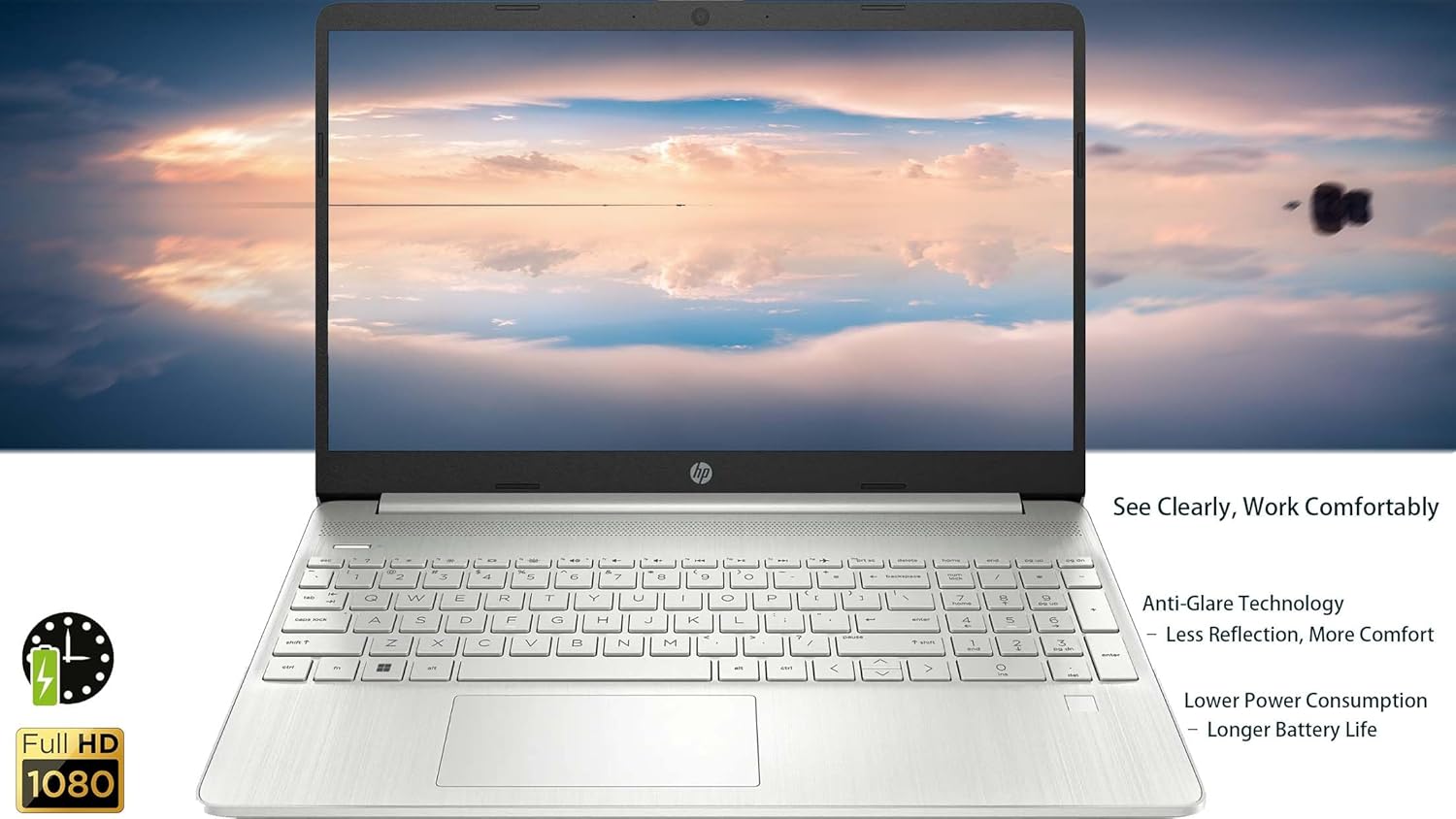
영상: The HP 250 G9 Laptop in an open position, displaying its 15.6-inch screen and full-size keyboard. This image highlights the anti-glare display and the overall design of the laptop for comfortable use.
2. 연결성
- 와이파이: Connect to wireless networks via the Realtek Wi-Fi 5 card. Access Wi-Fi settings through the Windows taskbar network icon.
- 블루투스: Pair Bluetooth devices like headphones or speakers using the integrated Bluetooth 5.0. Manage Bluetooth settings in Windows Settings > Devices.
- 이더넷: 안정적인 유선 인터넷 연결을 위해 이더넷 케이블을 RJ-45 포트에 연결하십시오.
3. Web캠 및 오디오
- Web캠: The 720p HD camera is suitable for video calls. Ensure proper lighting for best results.
- 마이크: Dual-array microphones provide clear audio input.
- 스피커: Dual stereo speakers deliver audio output. Adjust volume using function keys or Windows sound settings.
4. 배터리 관리
- The 3-cell, 41Wh Li-ion battery provides power for extended use.
- For optimal battery life, avoid extreme temperatures and fully discharge/recharge periodically.
- Monitor battery status via the Windows taskbar icon.
유지
1. 청소
- 화면: 부드럽고 보풀이 없는 천을 살짝 사용하십시오. damp물이나 화면 세척제로 닦아주세요. 화면에 직접 액체를 분사하지 마세요.
- 키보드 및 섀시: 부드러운 천으로 표면을 닦으세요. 잘 지워지지 않는 얼룩은 약간 거친 천으로 닦아내세요.amp cloth is acceptable. Avoid harsh chemicals.
- 포트: Keep ports free of dust and debris. Use compressed air if necessary, but sparingly.
2. 소프트웨어 업데이트
- 시스템 안정성과 보안을 유지하려면 정기적으로 Windows 업데이트를 확인하고 설치하세요. 설정 > Windows 업데이트로 이동하세요.
- Keep device drivers updated. HP Support Assistant can help manage driver updates.
문제 해결
일반적인 문제 및 해결책:
- 노트북 전원이 켜지지 않습니다:
- 전원 어댑터가 노트북과 작동하는 전원 콘센트에 모두 단단히 연결되어 있는지 확인하세요.
- 다른 전원 콘센트를 사용해 보세요.
- 배터리가 완전히 방전된 경우 노트북의 전원을 켜기까지 몇 분 정도 충전이 필요할 수 있습니다.
- Wi-Fi 연결 없음:
- Windows 설정에서 Wi-Fi가 활성화되어 있는지 확인하세요.
- 라우터와 모뎀을 다시 시작하세요.
- 와이파이 네트워크 범위 내에 있는지 확인하세요.
- 화면이 비어 있거나 깜박입니다.
- 기능 키를 사용하여 화면 밝기를 조절하세요.
- Connect an external monitor to check if the issue is with the laptop's display or graphics driver.
- 노트북을 다시 시작합니다.
- 느린 성능:
- 백그라운드에서 실행 중인 불필요한 애플리케이션을 닫으세요.
- Windows 업데이트를 확인하고 설치하세요.
- Run a disk cleanup and defragmentation (for HDD, SSDs do not need defragmentation).
- 악성코드나 바이러스를 검사하세요.
명세서
| 특징 | 세부 사항 |
|---|---|
| 모델 | HP 250 G9 |
| 프로세서 | 인텔 셀러론 N4500 (2코어, 최대 2.8GHz) |
| 표시하다 | 15.6-inch Full HD (1920 x 1080), Anti-glare |
| 제도법 | 통합 Intel UHD 그래픽 |
| 숫양 | 32GB DDR4 |
| 저장 | 2TB PCIe NVMe M.2 SSD |
| 운영 체제 | 윈도우 11 프로 |
| 무선 연결 | 리얼텍 Wi-Fi 5, 블루투스 5.0 |
| 포트 | 1x USB Type-C, 2x USB Type-A, 1x HDMI 1.4b, 1x Headphone/Mic Combo, 1x RJ-45, 1x AC Power |
| Web캠 | 720p HD camera with dual-array microphones |
| 오디오 | 듀얼 스테레오 스피커 |
| 배터리 | 3-cell, 41Wh Li-ion |
| 치수(길이x너비x높이) | 14.09 x 9.53 x 0.78 인치 |
| 무게 | 3.83파운드 |
| 색상 | Asteroid Silver |

영상: Physical dimensions and weight of the HP 250 G9 Laptop. This image provides a visual representation of the laptop's size, including its screen diagonal, height, depth, width, and overall weight, emphasizing its portability.
보증 및 지원
Your HP 250 G9 Laptop comes with a 1-Year Warranty from the Seller. For warranty claims or technical support, please contact the seller directly or visit the official HP support website for additional resources and driver downloads.
HP 지원 Web대지: 지원.hp.com


