
1. 서론
The KKB G110S 4G LTE Cellular Security Camera is a solar-powered, wireless outdoor surveillance solution designed for locations without Wi-Fi access. This camera offers 2K resolution, color night vision, PIR motion detection, and a 355° pan and 90° tilt (PTZ) view, ensuring comprehensive monitoring and two-way communication capabilities. It comes with a built-in SIM card and a 64GB SD card for immediate use.

Image 1.1: The KKB G110S 4G LTE Cellular Security Camera with its solar panel, designed for outdoor use.
2. 상자 안에 무엇이 들어있나요?
수령 시 패키지 내용물을 확인하여 모든 품목이 들어 있는지 확인하세요.
- KKB 4G LTE Security Camera
- 태양광 패널
- 64GB SD 카드 (사전 설치됨)
- 사용자 설명서
- Installation Accessories (screws, wall plugs, mounting bracket)
3. 주요 특징
- 4G LTE Network & No Wi-Fi: This camera operates on a 4G LTE cellular network, making it suitable for remote areas without Wi-Fi. It does not support Wi-Fi connectivity.
- Built-in SIM Card & Data Plans: The camera includes a non-replaceable SIM card compatible with Verizon, T-Mobile, and AT&T 4G networks. It comes with 300MB of prepaid data. Additional data plans are available for purchase within the mobile application.
- Solar Powered & Wireless: Equipped with a 10400 mAh battery and a 5W high-conversion rate solar panel, the camera provides continuous power, reducing the need for manual recharging.
- PIR Detection & 2K Color Night Vision: A sensitive PIR sensor accurately detects human and animal movement, sending instant notifications to your mobile app. Enjoy clear 2K image quality and colorful night vision, with infrared night vision for low-light conditions.
- 2-Way Audio & 360° View (PTZ): Engage in real-time conversations with visitors using the two-way audio feature. The camera offers a 355° pan and 90° tilt view, allowing you to remotely adjust the viewing angle for comprehensive coverage via the app.
- IP66 방수: The camera is rated IP66 waterproof, ensuring reliable operation in various weather conditions, including rain, snow, and extreme temperatures.
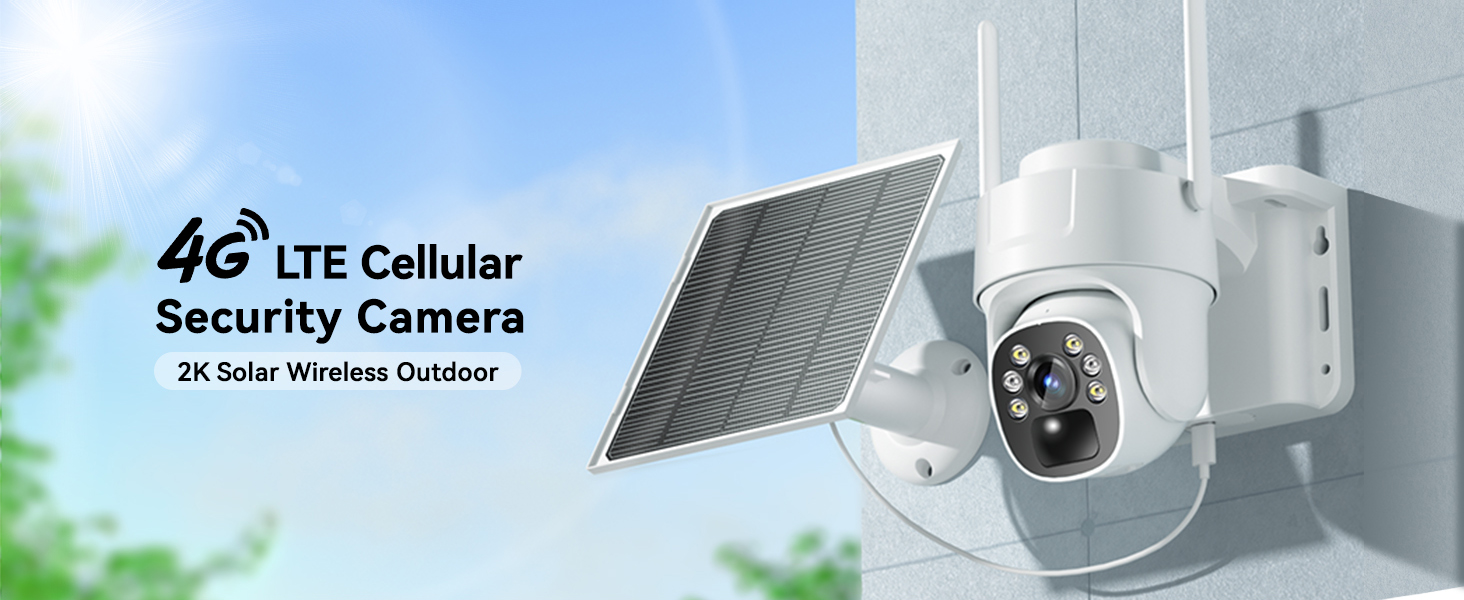
Image 3.1: The camera connects via 4G LTE, eliminating the need for Wi-Fi.

Image 3.2: The camera features a built-in SIM card for cellular connectivity and offers various data plan options.

Image 3.3: The solar panel continuously charges the camera's internal battery, ensuring uninterrupted operation.

Image 3.4: The camera provides both vivid color night vision and standard infrared night vision for optimal visibility in darkness.

Image 3.5: The two-way audio function allows for remote communication through the camera.

Image 3.6: The IP66 waterproof design ensures the camera functions reliably in all weather conditions.
4. 설정 가이드
4.1 초기 충전
Before first use, fully charge the camera's internal battery using a standard USB charger (not included) for optimal performance, especially if solar charging conditions are initially poor.
4.2 앱 다운로드 및 계정 생성
- Scan the QR code provided in the Quick Start Guide or search for the "iCam365" app in your smartphone's app store (iOS or Android).
- 앱을 다운로드하고 설치하세요.
- Open the app and follow the on-screen instructions to create a new account and log in.
4.3 Camera Activation and Pairing
- 카메라의 전원이 켜져 있는지 확인합니다.
- In the iCam365 app, tap the "+" icon to add a new device.
- Select the option for a 4G cellular camera.
- Follow the app's instructions to scan the QR code located on the camera or its packaging.
- The app will guide you through the remaining pairing steps. Once connected, you will see the live feed from your camera.
4.4 SIM Card and SD Card
The camera comes with a built-in, non-replaceable SIM card and a pre-installed 64GB Micro SD card. The SD card is used for local storage of recordings. Ensure the SD card is properly seated if you encounter storage issues.

Image 4.1: The camera includes a pre-installed 64GB Micro SD card for local video storage.
4.5 카메라 및 태양광 패널 장착
Use the provided installation accessories to securely mount the camera and solar panel. Choose a location where the solar panel receives direct sunlight for most of the day to maximize charging efficiency. The camera can be wall-mounted.

Image 4.2: The camera and solar panel are designed for easy wall mounting.
5. 사용 설명서
5.1 라이브 View 및 PTZ 제어
Open the iCam365 app to access the live video feed from your camera. Use the on-screen controls to pan (355°) and tilt (90°) the camera lens to adjust the viewing angle as needed. The app also supports digital zoom.

Image 5.1: Control the camera's pan, tilt, and zoom functions directly from the mobile app.
5.2 양방향 오디오
양방향 오디오 기능을 사용하려면 라이브 방송에서 마이크 아이콘을 탭하세요. view interface of the app. You can then speak through your phone, and your voice will be transmitted through the camera's speaker. Release the icon to listen.
5.3 동작 감지 및 알림
The camera's PIR motion sensor detects movement and sends instant push notifications to your smartphone. You can customize motion detection sensitivity and alert settings within the iCam365 app.

Image 5.2: Receive immediate alerts on your phone when motion is detected by the camera.
5.4 야간 투시 모드
The camera automatically switches between day and night vision modes. It offers both full-color night vision (when sufficient ambient light or spotlight is available) and infrared night vision for clear black-and-white images in complete darkness.
5.5 비디오 재생 및 저장
Recorded videos are stored on the pre-installed 64GB SD card. You can access and review these recordings through the iCam365 app. Cloud storage options may also be available via subscription within the app.
6. 유지관리
- 태양광 패널 청소: 태양광 패널 표면을 부드러운 천으로 정기적으로 청소하세요.amp 햇빛 흡수 및 충전 효율을 극대화하기 위한 천 소재입니다.
- 렌즈 세척: Gently wipe the camera lens with a microfiber cloth to remove dust or smudges that may affect image clarity.
- 펌웨어 업데이트: Check the iCam365 app periodically for available firmware updates to ensure your camera has the latest features and security enhancements.
- 배터리 상태: While solar-powered, extreme weather or prolonged periods of low sunlight may impact battery levels. Monitor battery status via the app and manually charge if necessary.
7. 문제 해결
7.1 Camera Not Connecting to 4G Network
- Ensure the camera is in an area with good 4G cellular coverage.
- Check the data plan status in the iCam365 app. You may need to renew or purchase a new data plan.
- 카메라 전원을 껐다가 켜서 재시작하세요.
7.2 이미지 품질이 좋지 않음
- Clean the camera lens to remove any dirt or obstructions.
- 카메라 시야에 물리적 장애물이 없는지 확인하십시오. view.
- Check the network signal strength in the app; a weak 4G signal can affect streaming quality.
7.3 배터리가 충전되지 않음
- 태양광 패널이 매일 몇 시간 동안 직사광선을 받을 수 있도록 설치되어 있는지 확인하십시오.
- 태양광 패널 표면을 청소합니다.
- Ensure the connection cable between the solar panel and the camera is secure.
7.4 Motion Detection Alerts Not Received
- Check the motion detection settings in the iCam365 app to ensure they are enabled and configured correctly.
- Verify your phone's notification settings for the iCam365 app are enabled.
- Ensure the camera has sufficient battery power and 4G data.
8. 사양
| 특징 | 세부 사항 |
|---|---|
| 모델명 | 지110에스 |
| 연결 기술 | 무선(4G LTE 셀룰러) |
| 비디오 캡처 해상도 | 2K (3 MP Photo Sensor Resolution) |
| View잉 각도 | 355° 팬, 90° 틸트 |
| 나이트 비전 | 컬러 야간 투시경, 적외선 야간 투시경 (범위 50피트) |
| 오디오 | 2-웨이 오디오 |
| 동작 감지 | PIR Sensor (Motion Only Alert Type) |
| 전원 | Solar Powered (5W), 10400 mAh Battery |
| 저장 | 64GB 마이크로 SD 카드(포함), 최대 128GB 지원 |
| 방수 레벨 | IP66 방수 |
| 호환 장치 | 스마트폰(안드로이드, iOS) |
| 설치 유형 | 벽걸이형, 독립형 |
| 품목 치수 | 7.87 x 7.87 x 5.51 인치 |
| 재료 | 아크릴로니트릴 부타디엔 스티렌(ABS) |
9. 보증 및 지원
KKB is committed to providing reliable home security solutions. For any technical assistance or inquiries, please utilize our support channels:
- 24/7 기술 지원: Access professional technical support at any time.
- Multi-channel Service: Contact support via the iCam365 app's online contact feature or through email.
Please refer to the product packaging or the official KKB web특정 보증 세부 사항 및 약관은 사이트에서 확인하세요.
10. 제품 비디오
영상 10.1: 공식 제품 소개 영상asing the KKB 4G LTE Cellular Solar Security Camera's features and applications, including its wireless operation, solar charging, and smart detection capabilities.