
소개
This manual provides detailed instructions for the installation, operation, and maintenance of your COCOCAM 24/7 AOV 4G LTE Outdoor Security Camera. This camera is designed for outdoor surveillance in areas without Wi-Fi or consistent power supply, utilizing 4G LTE connectivity and solar power. Key features include 24/7 continuous recording (Always On Video - AOV), 2K 3MP resolution, 30m night vision, AI detection for persons and vehicles, and auto-tracking capabilities.

Image: COCOCAM 24/7 AOV 4G LTE Outdoor Security Camera with solar panel.
패키지 내용
아래 나열된 모든 품목이 패키지에 포함되어 있는지 확인하세요. 품목이 누락되었거나 손상된 경우 고객 지원팀에 문의하세요.
- 1x Surveillance Camera
- 1x 사용 설명서
- 1x Camera Screw Package
- 1x 태양광 패널 브라켓
- 1x Solar Panel Screw Package
- 1x 1m Type-C Charging Cable
Video: Unboxing the COCOCAM 4G LTE Security Camera and its accessories.
설치 가이드
1. 물리적 설치
The COCOCAM 4G LTE camera is designed for wall-mount installation. Choose a location that provides optimal sunlight exposure for the solar panel and a clear view for surveillance. Ensure the mounting surface is sturdy enough to support the camera and solar panel.
- Attach the solar panel bracket to your chosen location using the provided screws.
- Mount the solar panel onto its bracket, ensuring it is positioned to receive maximum sunlight.
- Attach the camera's mounting base to the wall, ensuring it is secure.
- Connect the solar panel's charging cable to the camera's charging port.
- Secure the camera to its mounting base.
Video: Step-by-step guide on how to install the 4G camera outdoors.
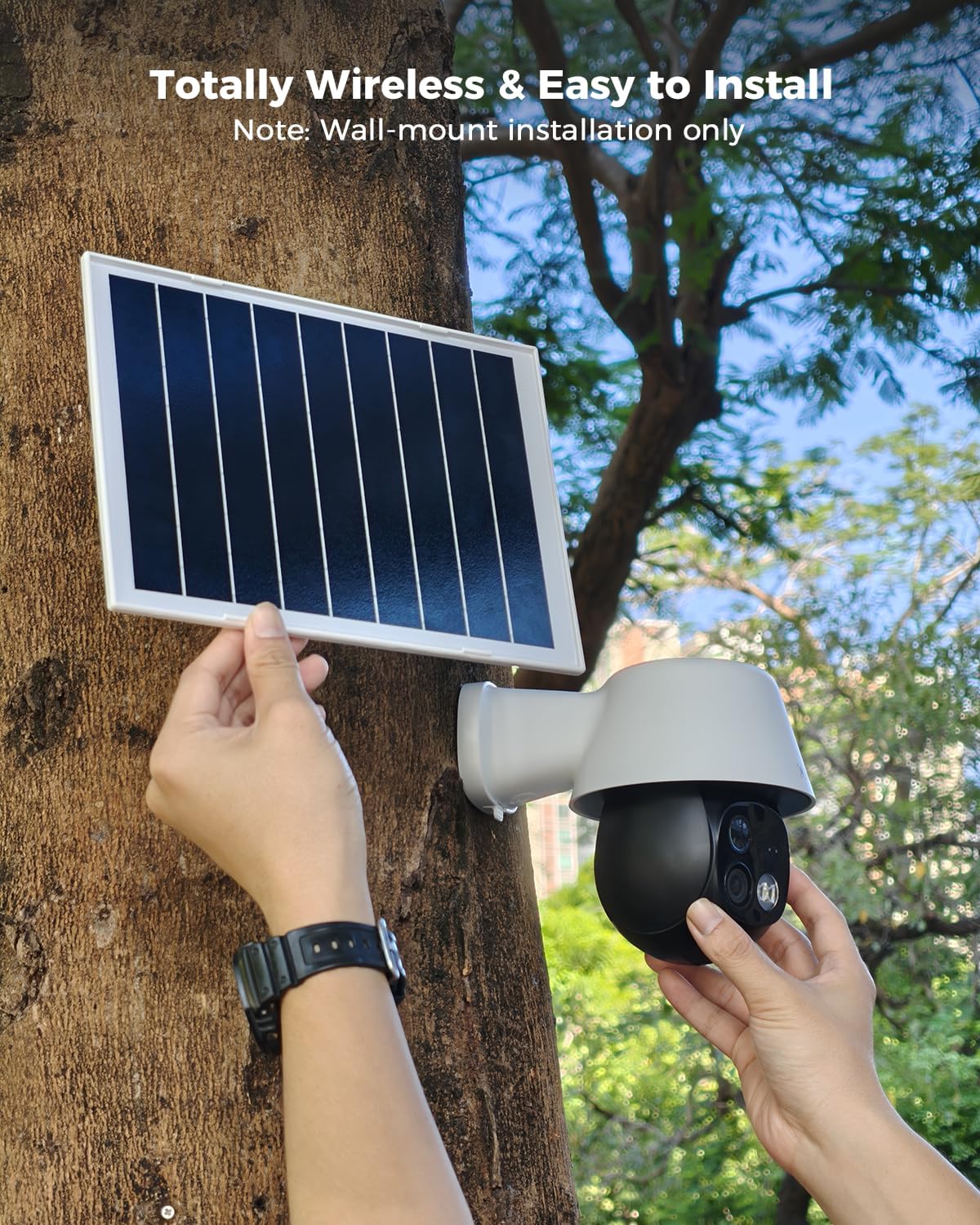
Image: Hands installing the solar panel and camera onto a tree trunk, demonstrating wall-mount installation.
2. eSIM / SIM Card Configuration
The camera features a built-in eSIM for immediate connectivity. You also have the option to insert your own Nano SIM card. The Cococam app provides three SIM selection modes:
- 자동: The camera automatically identifies and uses the SIM card with the best signal (between the built-in eSIM and your inserted SIM).
- Prioritize Built-in eSIM: The camera will primarily use the embedded eSIM.
- Prioritize Inserted SIM: The camera will primarily use your own Nano SIM card.
Note: If using your own SIM card, ensure the PIN is deactivated before insertion. The built-in eSIM includes a 7-day unlimited data trial.

Image: Diagram illustrating the camera's dual SIM support and configuration options within the app.
3. 앱 설정 및 연결
Download the "Cococam" app from your smartphone's app store. Follow the in-app instructions to add your device. This typically involves scanning a QR code on the camera to establish a connection.
Video: Demonstrates scanning the QR code to connect the camera to the mobile application.
작동 지침
1. 24/7 Continuous Recording (AOV)
The AOV (Always On Video) feature enables continuous 24/7 recording. Unlike PIR cameras that only record when triggered, the AOV camera records at 2 frames per second when no motion is detected. Upon trigger, it switches to full-frame recording (25 frames per second) to capture all critical moments without delay.

이미지: 장점을 강조하는 비교 차트tages of AOV security cameras over PIR cameras, including continuous recording and wider detection range.
Video: Explains the AOV (Always On Video) technology for continuous recording.
2. AI Detection & Auto Tracking
The camera features advanced AI for detecting persons and vehicles. Person detection is enabled by default, while vehicle detection can be activated manually in the app settings. The camera also supports auto-tracking, allowing it to follow detected subjects within its 355° pan and 90° tilt range, ensuring no blind spots.

Image: Illustrates the camera's 355° pan and 90° tilt rotation with auto-tracking, showing a child being followed across a field.

Image: Demonstrates AI intelligent recognition for persons and vehicles in an outdoor setting.
Video: Shows the camera's 30-meter AI detection capabilities.
3. 야간 투시경
The camera provides 30m color night vision and 2K 3MP resolution, ensuring clear images even in complete darkness. This extended range allows for effective surveillance over larger outdoor areas.
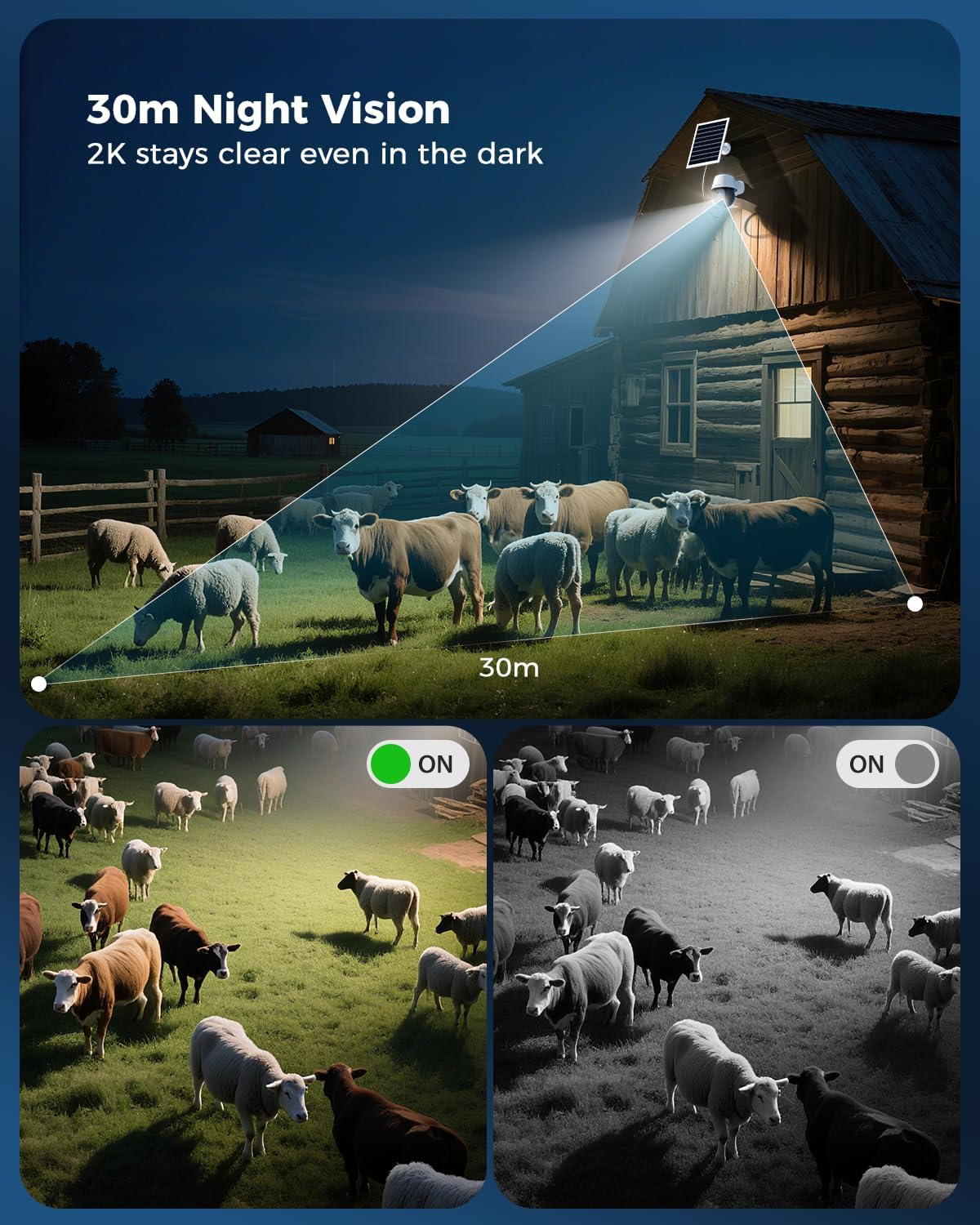
Image: Illustrates the camera's 30m night vision capability, showing a clear view of sheep in a field at night.
4. 양방향 오디오
Utilize the two-way audio feature to communicate with individuals near the camera. This can be used for giving instructions, deterring intruders, or simply interacting with visitors.

Image: A child feeding a horse near the camera, with a speech bubble indicating two-way audio communication.
5. Event Playback & Storage
녹화된 푸tage can be stored locally on a TF card (up to 128GB, not included) or via cloud storage services. The Cococam app allows for easy event playback and sharing of video clips.

Image: Illustrates event playback and storage options, showing the camera and various surveillance scenarios.
6. 소리 및 빛 경보
The camera can be configured to activate a sound and light alarm when triggered by detection. This feature is off by default and can be enabled in the app settings to deter intruders.

Image: Depicts the camera's sound and light alarm feature deterring an intruder at night.
유지
1. Battery and Solar Panel
The camera is powered by a 10000mAh rechargeable battery, continuously charged by an 8W solar panel. Ensure the solar panel is kept clean and free from obstructions (like leaves or dirt) to maximize charging efficiency. Regular cleaning will help maintain optimal performance.

Image: Highlights the camera's 8W solar panel and 10000mAh rechargeable battery, ensuring continuous operation.
2. 내후성 (IP66)
With an IP66 waterproof and dustproof rating, the camera is built to withstand various outdoor weather conditions, including rain and dust. While designed for durability, periodic inspection for any physical damage or debris accumulation is recommended.

Image: Shows the camera and solar panel enduring heavy rain, emphasizing its IP66 waterproof and dustproof rating.
문제 해결
| 문제 | 가능한 원인 | 해결책 |
|---|---|---|
| Camera not connecting to 4G network. | Weak 4G signal, incorrect SIM card settings, SIM card PIN active. | Check 4G signal strength in the installation area. Ensure SIM card PIN is deactivated. Verify SIM card selection mode in the Cococam app. |
| 배터리가 충전되지 않습니다. | Insufficient sunlight, dirty solar panel, faulty connection. | Relocate solar panel to an area with direct sunlight. Clean the solar panel surface. Check the connection cable between the solar panel and camera. |
| 동작 감지가 작동하지 않거나 오작동 경보가 발생합니다. | Incorrect detection zone settings, environmental factors (e.g., moving branches). | Adjust AI detection sensitivity and customize detection zones in the app. Ensure camera is not pointed at constantly moving objects. |
| No video playback. | No TF card inserted, TF card full, cloud storage subscription expired, network issues. | Insert a TF card or check its capacity. Verify cloud storage subscription status. Check 4G network connectivity. |
명세서
| 특징 | 세부 사항 |
|---|---|
| 모델 번호 | CC-MC 206G3-DIT-EU4G |
| 연결성 | 4G LTE (eSIM included) |
| 비디오 해상도 | 2K 3MP (2304*1296) |
| 나이트 비전 범위 | 30 meters (Color Night Vision) |
| 감지 기술 | AOV (Always On Video), AI Detection (Person, Vehicle) |
| 팬/틸트 | 355° Pan, 90° Tilt with Auto Tracking |
| 배터리 용량 | 10000mAh |
| 태양 광 패널 전력 | 8W |
| 방수 등급 | IP66 |
| 저장 옵션 | TF 카드(최대 128GB), 클라우드 저장소 |
| 작동 온도 | -20°C ~ 50°C (-4°F ~ 122°F) |
| 제어 방법 | Cococam App (Smartphone, Tablet) |
보증 및 지원
COCOCAM provides a lifetime warranty for its products. For technical assistance, troubleshooting, or any inquiries, please contact COCOCAM customer support. Our professional technical team is available 24/7 to provide quick responses and support tailored to your needs.
- 평생 보증: Ensures long-term product reliability.
- 빠른 응답: Dedicated support for timely assistance.
- 24/7 Professional Technical Support: Expert help available around the clock.

Image: A smiling customer service representative, symbolizing COCOCAM's commitment to customer support.