
1. 서론
This instruction manual provides essential information for the safe and efficient use of your ApoloSign 32-inch UHD 4K Smart Portable TV Gen2. Please read this manual thoroughly before operating the device and retain it for future reference. This portable smart TV combines a high-resolution display with smart features, offering versatile entertainment and productivity options throughout your home.

Image: The ApoloSign 32-inch Portable TV Gen2 positioned in a modern living room, showcasin세련된 디자인과 휴대성이 장점입니다.
2. 안전 정보
일반 안전 예방 조치
- 화재나 감전을 예방하려면 기기를 비나 습기에 노출시키지 마십시오.
- 적절한 환기를 유지하세요. 환기구를 막지 마세요.
- 장치와 함께 제공된 전원 어댑터만 사용하십시오.
- 불안정한 표면에 장치를 두지 마십시오.
- 기기를 직접 분해하거나 수리하지 마십시오. 모든 정비는 자격을 갖춘 기술자에게 맡기십시오.
배터리 안전
- The device contains a built-in 15000mAh lithium-ion battery. Do not expose it to excessive heat, direct sunlight, or fire.
- 처음 사용하기 전에 배터리를 완전히 충전하십시오.
- If the battery shows signs of swelling, leakage, or damage, discontinue use immediately and contact support.
- 현지 규정에 따라 배터리를 폐기하십시오.
3. 패키지 내용
패키지에 모든 품목이 들어 있는지 확인하세요.
- ApoloSign 32-inch UHD 4K Smart Portable TV Gen2 Display
- Rolling Stand Base
- Stand Pole (multiple sections)
- 전원 어댑터
- 음성 원격 제어
- 8MP Camera Module
- Assembly Screws and Tools
- 사용 설명서 (본 문서)

Image: The voice remote control, a key accessory for navigating the ApoloSign TV.

Image: The detachable 8MP camera module, designed for video calls and other interactive features.
4. 제품 오버view
The ApoloSign 32-inch UHD 4K Smart Portable TV Gen2 is a versatile device designed for flexible use across various environments. Its main components include:
- 32-inch UHD 4K Touchscreen: A large, high-resolution display with touch functionality for intuitive interaction.
- Rolling Stand: A sturdy base with smooth wheels for easy movement between rooms.
- Adjustable Screen Mount: Allows for height adjustment, left/right swivel, and tilt for optimal view세로 및 가로 방향 모두에서 각도를 조절할 수 있습니다.
- Integrated 8MP Camera: For video conferencing and other camera-enabled applications.
- 음성 원격 제어: Enables hands-free operation and navigation.
- 내장형 15000mAh 배터리: Provides up to 8 hours of portable use.
- 연결 포트: Includes HDMI, USB 2.0, USB 3.0, Bluetooth 5.3, and Wi-Fi for various connections.
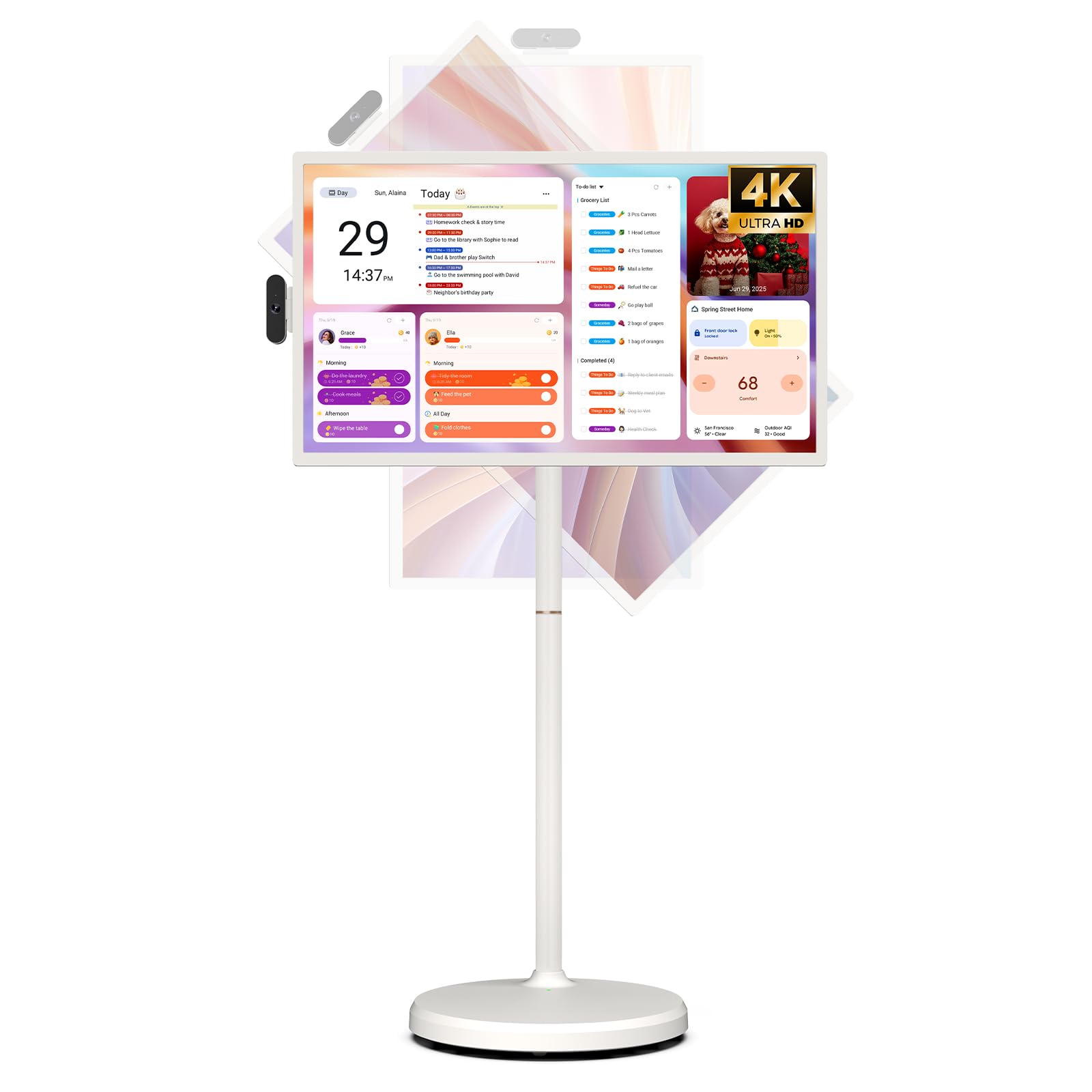
Image: The ApoloSign 32-inch UHD 4K Smart Portable TV Gen2, highlighting its large screen and mobile stand.
5. 설정
집회
- 상자에서 모든 구성품을 꺼냅니다.
- Attach the stand pole sections to the rolling base using the provided screws.
- Carefully mount the TV display onto the top of the assembled stand pole, ensuring it clicks securely into place.
- Connect the internal power cable from the stand to the display.
- Attach the 8MP camera module to the designated slot on top of the display.
초기 전원 켜기 및 네트워크 연결
- Connect the power adapter to the TV and a power outlet. The device will begin charging.
- Press the power button located on the back of the display to turn on the TV.
- 화면의 지시에 따라 언어와 지역을 선택하세요.
- 목록에서 Wi-Fi 네트워크를 선택하고 비밀번호를 입력하여 연결하세요.
- Google 계정으로 로그인하여 Google Play 스토어 및 기타 서비스를 이용하세요.
원격 제어 페어링
- Insert batteries into the voice remote control.
- On the TV screen, navigate to 설정 > 리모컨 및 액세서리 > 액세서리 추가.
- Press and hold the specified pairing buttons on the remote (refer to remote's mini-guide) until the indicator light blinks.
- Select the remote control from the list on the TV screen to complete pairing.
6. 사용 설명서
기본 탐색
- 터치스크린: Tap, swipe, and pinch to navigate menus, open apps, and interact with content.
- 음성 원격: Use the directional pad and selection buttons for menu navigation. Press the voice button to activate voice commands for searching or launching apps.
Screen Rotation and Adjustment
The screen can be rotated 90 degrees between landscape and portrait modes. It also allows for height adjustment, left/right swivel, and tilting to achieve the desired view잉 각도.

Image: Illustrations demonstrating the various ways the ApoloSign TV screen can be adjusted: height, tilt, and rotation.
Apps and Google Play Store
Running on a customized Android 15 OS and Google certified, you can download and install any app available on the Google Play Store. Access streaming services, social media, productivity tools, and games.

Image: The ApoloSign TV screen showing the Android 15 interface with icons for popular apps like Netflix, YouTube, Spotify, and TikTok.
Wireless and Wired Casting
Share content from your mobile phone, tablet, or laptop to the TV screen.
- 무선 캐스팅: Use the built-in MixCast feature or other compatible casting protocols. Ensure your device and the TV are on the same Wi-Fi network.
- Wired Casting: Connect external devices like gaming consoles or laptops via the HDMI port. The TV supports 4K HDMI output.
Video: A demonstration of how to screen mirror a mobile phone, tablet, or laptop to the ApoloSign Smart Portable TV.
Calendar Widget and Screensavers
The interactive desktop calendar widget syncs with Google Calendar, Outlook, and Google Tasks to help manage your schedule. Utilize dynamic screensavers to transform the TV into a digital clock, photo frame, or market billboard.

Image: The ApoloSign TV screen showcasing its digital calendar feature, displaying daily schedules and events.

Image: The ApoloSign TV screen demonstrating different digital screensaver options, including a photo display and a music player interface.
카메라 사용
The integrated 8MP camera is ideal for video calls and conferences. Ensure the camera is correctly installed and facing the desired direction.
7. 유지관리
청소
- 청소하기 전에 항상 장치의 플러그를 뽑으십시오.
- 부드럽고 털이 없는 천을 살짝 사용하세요.amp물이나 화면 세척제로 디스플레이를 닦으세요. 강한 화학 물질은 피하세요.
- Wipe the body of the TV and stand with a dry, soft cloth.
배터리 관리
- 최적의 배터리 수명을 위해 배터리를 자주 완전히 방전시키지 마세요.
- 장기간 사용하지 않을 때는 기기를 서늘하고 건조한 곳에 보관하세요.
- 장기간 보관할 경우 과방전을 방지하기 위해 배터리를 주기적으로 충전하십시오.
소프트웨어 업데이트
Regularly check for and install software updates to ensure optimal performance and access to the latest features. Updates can usually be found in the device's settings menu.
8. 문제 해결
- Device not powering on or shutting off abruptly:
Ensure the power adapter is securely connected and the battery is charged. If the issue persists, perform a soft reset by holding the power button for 10-15 seconds. If problems continue, contact customer support. - Remote control not responding or selective functionality:
Check the remote's batteries and replace if necessary. Ensure the remote is paired correctly (refer to Section 5). If the remote is still unresponsive, try re-pairing it. - Wi-Fi 연결 문제:
Verify that your Wi-Fi router is working correctly. Restart the TV and your router. Ensure the TV is within range of your Wi-Fi signal. - 화면 미러링이 작동하지 않습니다.
Confirm that both the TV and the source device (phone, tablet, laptop) are connected to the same Wi-Fi network. Ensure the casting feature is activated on both devices. - Poor picture or sound quality:
For streaming content, check your internet connection speed. For wired connections (HDMI), ensure cables are securely connected and undamaged. Adjust display settings (resolution, brightness) as needed.
9. 사양
| 특징 | 세부 사항 |
|---|---|
| 모델명 | SW3299T-4K |
| 화면 크기 | 32 인치 |
| 해결 | 4K UHD 2160p (3840x2160 Pixels) |
| 디스플레이 기술 | 액정표시장치 |
| 새로 고침 빈도 | 60Hz |
| 운영 체제 | 안드로이드 15 |
| 숫양 | 16GB (8+8GB) |
| 내부 저장소 | 256GB |
| 배터리 용량 | 15000mAh (up to 8 hours runtime) |
| 카메라 | 8MP |
| 연결성 | 블루투스 5.3, 와이파이 |
| 포트 | 1x HDMI, 1x USB 2.0, 1x USB 3.0 |
| 스피커 설명 | 2.1 채널 스피커 |
| 제어 방법 | Touch, Voice Remote |
| 제품 치수 | 16.14인치 깊이 x 28.87인치 너비 x 60.26인치 높이 |
10. 보증 및 지원
제조업체 보증
This ApoloSign product is covered by a 1년 제조사 보증 구매일로부터. 본 보증은 정상적인 사용 중 발생하는 재료 및 제조상의 결함에 적용됩니다. 보증 청구를 위해 구매 증빙 자료를 보관해 주십시오.
고객 지원
For technical assistance, troubleshooting, or warranty inquiries, please contact ApoloSign Official customer support. They offer 24/7 fast support to address any issues you may encounter.
자세한 내용은 다음을 방문하세요. 아마존에서 ApoloSign 스토어를 만나보세요.