
1. 서론
데이비스 인스트루먼트 밴tage Pro2 is a professional-grade radio weather station designed for reliable and precise measurement of important meteorological parameters. It provides real-time data to help users respond to changing weather conditions and make informed decisions. Engineered for use in challenging environments, this station delivers data with scientific accuracy and robust performance, suitable for both professional weather observers and serious weather enthusiasts.
This manual provides essential information for the proper setup, operation, and maintenance of your Vantage Pro2 기상 관측소.
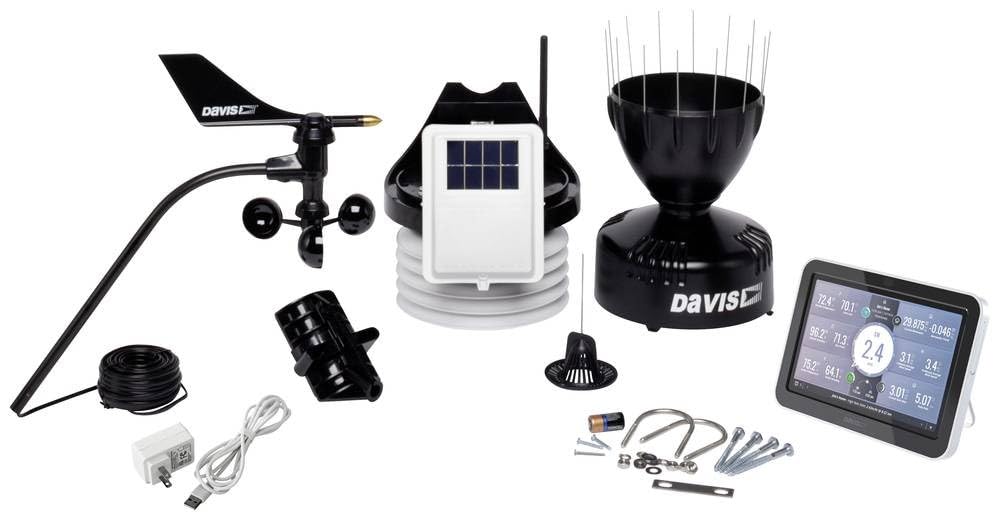
Image 1.1: Davis Instruments Vantage Pro2 Radio Weather Station with Console. This image shows the main console unit and the integrated sensor suite, which typically includes an anemometer, rain collector, and temperature/humidity sensors.
2. 안전 정보
Please read and understand all safety instructions before installing or operating your weather station. Failure to follow these instructions may result in injury or damage to the product.
- 설치: Ensure the outdoor sensor suite is installed in a secure location, away from power lines and other obstructions. Use appropriate safety gear when working at heights.
- 힘: Use only the specified power adapter for the console. Do not expose the console or sensors to extreme temperatures or moisture beyond their operating limits.
- 배터리: 배터리를 사용할 경우, 극성을 맞춰 삽입하십시오. 새 배터리와 오래된 배터리를 혼용하거나, 종류가 다른 배터리를 사용하지 마십시오. 사용한 배터리는 책임감 있게 폐기하십시오.
- 유지: Disconnect power before performing any maintenance. Avoid using abrasive cleaners on any part of the station.
3. 패키지 내용
Verify that all components are present before beginning installation. The standard package for the Davis Instruments Vantage Pro2 (Model 6252EU) typically includes:
- 봉고차tage Pro2 콘솔
- Integrated Sensor Suite (ISS) with anemometer, rain collector, temperature, and humidity sensors
- Mounting hardware for ISS
- AC power adapter for console
- 사용 설명서 (본 문서)
Note: Specific contents may vary slightly based on the purchased configuration.
4. 설정
Follow these general steps to set up your Vantage Pro2 weather station:
- 구성 요소 풀기: Carefully remove all items from the packaging and check against the package contents list.
- 배터리 설치(선택 사항): If using batteries for backup power in the console, insert them according to the polarity markings.
- 콘솔 전원 켜기: Connect the AC power adapter to the console and plug it into a power outlet. The console should power on and display initial setup screens.
- Configure Console: Follow the on-screen prompts to set basic parameters such as time, date, and measurement units.
- Assemble Integrated Sensor Suite (ISS): Attach the anemometer to the ISS mast if it's not pre-assembled. Ensure all connections are secure.
- Mount ISS: Choose an appropriate outdoor location for the ISS. It should be mounted on a pole or mast, clear of obstructions, to ensure accurate wind, rain, and temperature readings. Ensure it is securely fastened.
- Establish Wireless Communication: The console and ISS will automatically attempt to establish a wireless connection. Ensure they are within range and free from major interference sources. Refer to the console's display for signal strength.
- 데이터 검증: Once connected, the console should begin displaying live weather data from the ISS. Compare readings with local conditions to ensure accuracy.
5. 운영
당신의 밴tage Pro2 console provides access to a wide range of weather data and features. Here are general operating guidelines:
- Viewing Current Conditions: The main screen of the console typically displays current temperature, humidity, wind speed and direction, barometric pressure, and rainfall.
- 메뉴 탐색: Use the console's buttons (e.g., 'MODE', 'SET', arrow keys) to navigate through different screens and menus to view historical data, set alarms, or configure advanced settings.
- 과거 데이터: Access historical data such as daily, monthly, and yearly highs and lows for various parameters.
- 경보 : Set custom alarms for specific weather conditions (e.g., high wind, low temperature, heavy rain) to be notified when thresholds are met.
- 외부 센서: 더 밴tage Pro2 system can display values from up to 8 outdoor units simultaneously, allowing for expanded monitoring capabilities. Refer to the advanced manual for adding and configuring additional sensors.
- Data Logging (Optional): If equipped with a data logger, you can store weather data for later analysis on a computer.
6. 유지관리
정기적인 유지보수는 기상 관측소의 정확성과 수명을 보장합니다.
- 빗물 수집기: Periodically check and clean the rain collector funnel to remove leaves, debris, or insects that could obstruct the tipping bucket mechanism.
- 풍력계: Inspect the wind cups and wind vane for free movement. Remove any obstructions like spiderwebs 또는 먼지.
- 온도/습도 센서: Ensure the radiation shield is clean and free of debris to allow proper airflow around the sensors.
- 배터리 교체: Replace console batteries annually or when the low battery indicator appears. Outdoor sensor batteries (if applicable) should also be checked and replaced as recommended by the manufacturer.
- 일반 청소: Wipe down the console and exterior of the ISS with a soft, damp 옷감. 가혹한 화학 물질이나 연마재를 사용하지 마십시오.
7. 문제 해결
밴에 문제가 발생하면tage Pro2, try the following troubleshooting steps:
- 콘솔에 데이터가 없습니다:
- Check if the console is powered on and receiving power.
- Ensure the ISS is powered (check solar panel and backup battery).
- Verify that the console and ISS are within wireless range and there are no new obstructions.
- Try resetting both the console and the ISS (refer to the full manual for specific reset procedures).
- 부정확한 판독:
- 온도/습도: Ensure the radiation shield is clean and the sensor is not exposed to direct sunlight or heat sources.
- 풍속/풍향: Check for obstructions around the anemometer. Ensure it spins freely.
- 강우: Clean the rain collector funnel and check for debris in the tipping bucket.
- Console Freezes/Unresponsive: Disconnect power, remove batteries, wait 30 seconds, then reconnect power and batteries.
If problems persist, contact Davis Instruments customer support.
8. 사양
| 상표 | 데이비스 인스트루먼트 |
| 모델 번호 | 6252EU |
| 제조업체 부품 번호 | 6252EU |
| 특징 | Max. 80 Sensors |
| 제품 크기(D x W x H) | 45P x 41l x 28H 센티미터 |
| 품목 무게 | 4 킬로그램 |
| 사용환경 | 집 밖의 |
| 항목 수 | 1 |
| 배터리가 포함되어 있나요? | 아니요 |
| 스마트 홈 호환성 | 스마트 홈과 호환되지 않습니다 |
| 한국어: | 011698015276 |
| GTIN | 011698015276 |
| ASIN | B0F2Y4NKC7 |
9. 보증 및 지원
예비 부품 가용성: Spare parts for this product are available for 1 year in the EU.
For technical support, warranty claims, or to purchase replacement parts, please contact Davis Instruments customer service. You can typically find contact information on the manufacturer's official web사이트 또는 공인 딜러를 통해 구매하세요.
온라인 리소스: Visit the official Davis Instruments website for additional resources, FAQs, software updates, and detailed product documentation.
10. 비디오 자료
현재 판매자가 제공하는 공식 제품 영상은 내장할 수 없습니다.